1. Introduktion
This manual provides comprehensive instructions for the assembly, operation, and maintenance of your FLEXISPOT One-Piece Electric Standing Desk. Please read this manual thoroughly before use to ensure proper functionality and safety.
2. Sikkerhedsoplysninger
- This desk requires careful assembly using an electric drill (not included).
- Overskrid ikke den maksimale vægtgrænse på 80 kg.
- Be cautious when handling the desk as it ships in two separate packages.
- Ensure all cables are properly managed to prevent entanglement during height adjustments.
- Hold børn og kæledyr væk fra skrivebordet under drift.
3. Pakkens indhold
Your FLEXISPOT Electric Standing Desk is shipped in two packages. Please verify all components are present before beginning assembly.
- One-Piece Desktop (48x30 inches)
- Electric Lifting Frame (Legs and Crossbar)
- Control Panel with LED Display and Memory Presets
- Strømadapter og kabler
- Høretelefonkrog
- Assembly Hardware and Tools (excluding electric drill)
4. Opsætning og montering
Assembly typically takes approximately 30-60 minutes. An electric drill is recommended for faster and more secure assembly.
- Udpak komponenter: Carefully remove all parts from both packages and lay them out on a soft, clean surface to prevent scratches.
- Saml rammen: Attach the lifting columns to the crossbar according to the provided diagrams. Ensure all screws are tightened securely.
- Vedhæft skrivebord: Position the one-piece desktop onto the assembled frame. Align the pre-drilled holes and secure the desktop using the provided screws. An electric drill will expedite this step.
- Installer kontrolpanel: Monter kontrolpanelet på undersiden af skrivebordet på det angivne sted.
- Tilslut elektronik: Connect the motor cables, control panel cable, and power adapter to the control box. Ensure all connections are firm.
- Kabelstyring: Utilize the integrated cable management basket and included cable ties to organize all wires neatly. This prevents cables from snagging during height adjustments and maintains a clean aesthetic.
- Fastgør hovedtelefonkrog: Secure the headphone hook to the desired location on the desk edge.
Once assembled, plug the desk into a power outlet. The desk is now ready for initial calibration and use.
5. Betjeningsvejledning
The FLEXISPOT Electric Standing Desk features an intuitive control panel for easy height adjustment and memory functions.

Figure 1: Smart Control Panel with LED Display and Memory Presets.
5.1. Højdejustering
- Løft skrivebordet: Tryk og hold på Pil op button (▲) to raise the desktop.
- Nederste skrivebord: Tryk og hold på Pil ned button (▼) to lower the desktop.
- The LED display will show the current height in inches.
5.2. Hukommelsesforudindstillinger
The desk features four programmable memory buttons to save your preferred sitting and standing heights.
- Juster skrivebordet til den ønskede højde ved hjælp af Op/Ned-knapperne.
- Tryk på M button (or 'i' button on some models) to activate memory setting mode.
- Tryk straks på en af de nummererede knapper (1, 2, 3 eller 4) for at gemme den aktuelle højde til den forudindstillede værdi.
- For at genkalde en gemt højde skal du blot trykke på den tilsvarende nummererede knap. Bordet flytter automatisk til den gemte position.
5.3. USB-opladningsporte
The control panel includes integrated USB-A and USB-C charging ports for convenient device charging.
- Locate the USB-A and USB-C ports on the side of the control panel.
- Connect your compatible devices to charge them directly from the desk.
6. Produktfunktioner
6.1. One-Piece Solid Desktop
The desk features a seamless, one-piece desktop design, providing a smooth and continuous work surface without unsightly seams or cracks. This design enhances both aesthetics and durability.
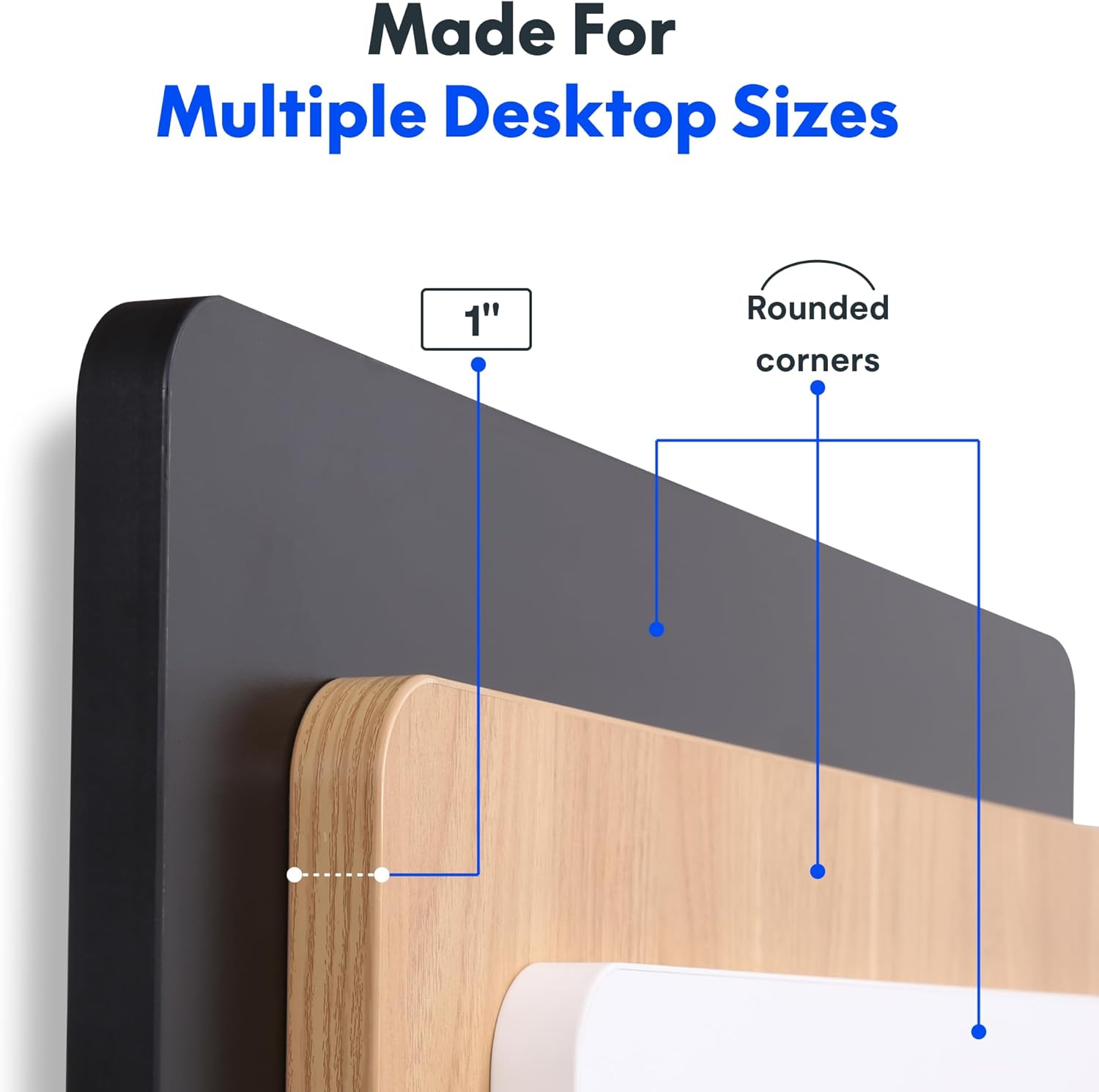
Figure 2: Detail of the 1-inch thick, one-piece desktop with rounded corners.
6.2. 1-Inch Thick Board for Stability
Constructed with a robust 1-inch thick desktop, this desk minimizes wobble and enhances overall firmness, providing a stable platform for all your work activities.

Figure 3: Desktop dimensions and thickness.
6.3. Smooth & Quiet Height Adjustment
The electric lifting system allows for effortless transitions between sitting and standing positions. The motor operates quietly, ensuring your work environment remains undisturbed.

Figure 4: Illustration of the desk's quiet operation, typically below 50 dB.
6.4. Strong Support for Everyday Use
Engineered for durability, the desk supports up to 176 lbs (80 kg), accommodating dual monitors, laptops, and various accessories with ease.
6.5. Integreret hovedtelefonkrog
A convenient headphone hook is included, allowing you to keep your headphones or other items organized and within reach, contributing to a clutter-free workspace.

Figur 5: Krog til hovedtelefoner til praktisk opbevaring.
7. Vedligeholdelse
- Rensning: Tør skrivebordet og rammen af med en blød kludamp klud. Undgå skrappe kemikalier eller slibende rengøringsmidler, der kan beskadige overfladen.
- Kabeltjek: Periodically inspect all cables for wear or damage. Ensure they are securely connected and properly managed.
- Skruefasthed: Occasionally check and tighten any loose screws on the frame or desktop connections.
8. Fejlfinding
- Skrivebordet bevæger sig ikke: Check if the power cord is securely plugged into both the desk and the wall outlet. Ensure no objects are obstructing the lifting mechanism.
- Usædvanlige lyde (f.eks. kliklyde): Verify that the desk's weight limit is not exceeded. Inspect all frame connections for tightness. If the issue persists, contact customer support.
- Height Display Error: Unplug the desk from the power outlet for 10 seconds, then plug it back in. This may reset the control panel.
9. Specifikationer
| Feature | Detalje |
|---|---|
| Mærke | FLEXISPOT |
| Model | 48x30 |
| Produktdimensioner | 30" D x 48" B x 29" H |
| Farve | Black Top + Black Frame |
| Stil | Moderne |
| Grundmateriale | Legeret stål |
| Top materialetype | Konstrueret træ |
| Finish Type | Pulverlakeret |
| Speciel funktion | 1-inch Thick Standing Desk, 48x30" One-Piece Desktop, Headphone Hook |
| Maksimal vægtanbefaling | 176 pund (80 kg) |
| Minimum højde | 28 tommer |
| Maksimal højde | 45.7 tommer |
| Bordpladetykkelse | 1 tommer |
| Påkrævet samling | Ja |
| UPC | 840460459167 |
10. Garanti og support
FLEXISPOT offers a limited warranty for this product:
- Frame and Motors: 5 års begrænset garanti.
- Electronics and Control Panel: 2 års begrænset garanti.
For technical support, warranty claims, or any inquiries, please visit the official FLEXISPOT webhjemmeside eller kontakt deres kundeservice direkte.
11. Officielle produktvideoer
FLEXISPOT Brand Store
This video from the official FlexiSpot brand store showcases various products, including the electric standing desk, highlighting its features such as smooth height adjustment, integrated storage, and design versatility. It provides a visual overview of the desk's functionality and aesthetic appeal within different work environments.
Flexispot's Factory | INSIDE LOOK!
This video offers an inside look into FlexiSpot's manufacturing facility, demonstrating the precision and automated processes involved in producing their products. It highlights the quality control and technological innovation behind the electric standing desk components, from raw materials to final assembly.


