1. Produktet er slutview
The DOOGEE Tab A9 is a 10.1-inch Android 15 tablet designed for versatile use, from productivity to entertainment. It features a quad-core processor, ample memory, and a high-capacity battery, complemented by a suite of accessories for enhanced functionality.
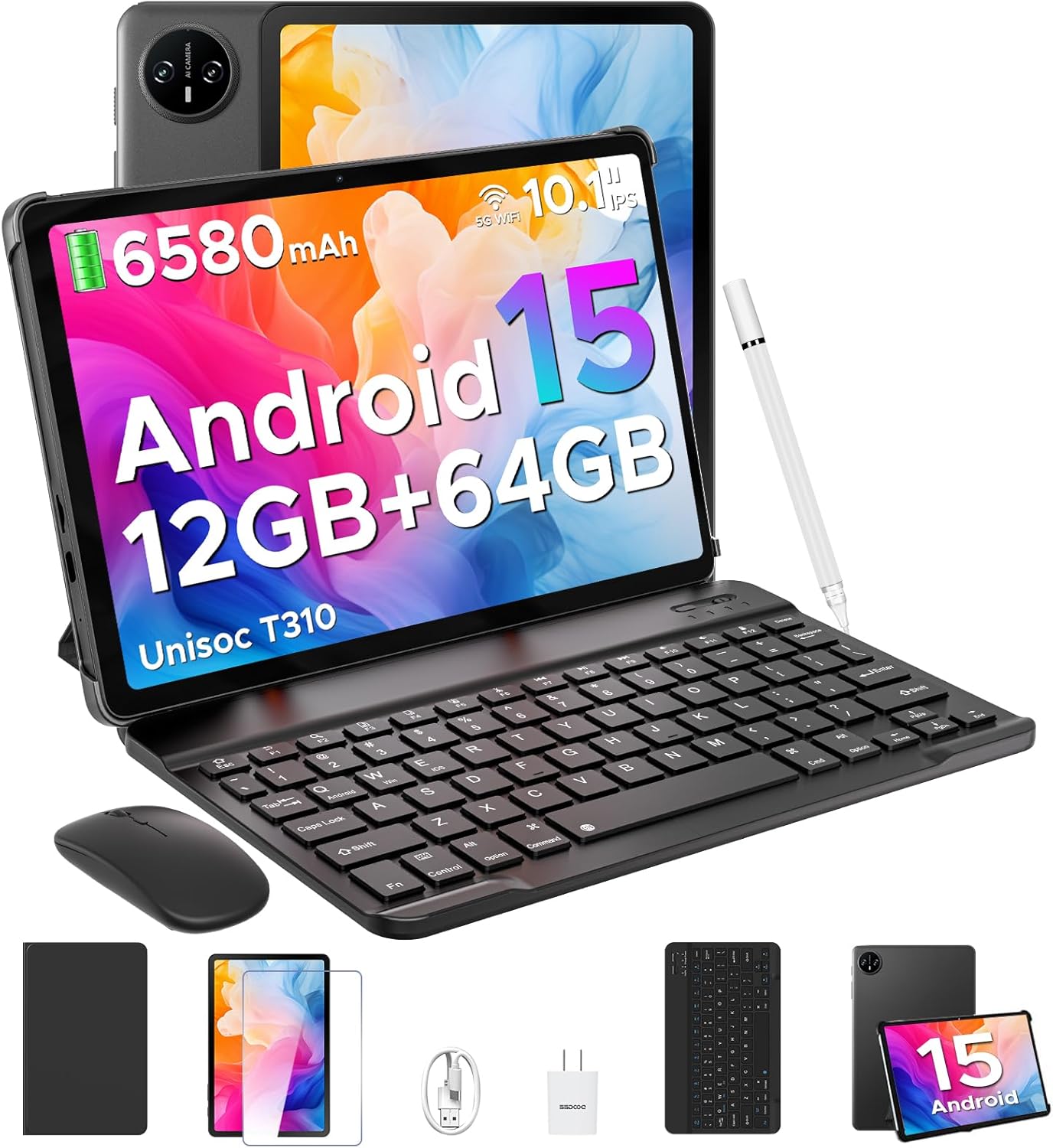
Image 1.1: DOOGEE Tab A9 tablet with its complete accessory kit.
Nøglefunktioner:
- Operativsystem: Android 15 for enhanced performance and privacy.
- Processor: Unisoc T310 Quad-Core, 2.0GHz.
- Hukommelse og opbevaring: 12GB RAM (3GB physical + 9GB virtual) and 64GB internal storage, expandable up to 2TB via microSD.
- Vise: 10.1-inch IPS HD (1280x800) touchscreen.
- Batteri: 6580mAh til længerevarende brug.
- Kameraer: 8MP bagkamera og 5MP frontkamera.
- Forbindelse: 2.4G/5G Dual-band WiFi, Bluetooth 5.0.
- Sikkerhed: Ansigtslås.
- Lyd: Dual speakers and 3.5mm headphone jack.
2. Hvad er inkluderet
Your DOOGEE Tab A9 package includes the following items:

Image 2.1: Contents of the DOOGEE Tab A9 package.
- DOOGEE Tab A9 Tablet
- Bluetooth tastatur
- Bluetooth Mouse
- Stylus pen
- Skærmbeskytter
- Beskyttende etui
- Oplader
- USB Type-C-kabel
- Brugermanual
3. Opsætning
3.1 Indledende opladning
Before first use, fully charge your tablet using the provided charger and USB Type-C cable. Connect the cable to the tablet's charging port and the charger to a power outlet. The battery indicator on the screen will show charging status.
3.2 Tænd/sluk
- For at tænde: Press and hold the Power button (located on the side of the tablet) until the DOOGEE logo appears.
- For at slukke: Tryk og hold tænd/sluk-knappen nede, og vælg derefter "Sluk" fra de muligheder, der vises på skærmen.
- For at genstarte: Tryk og hold tænd/sluk-knappen nede, og vælg derefter "Genstart" fra valgmulighederne.
3.3 Connecting Accessories (Keyboard & Mouse)
The included keyboard and mouse connect via Bluetooth:
- Ensure the keyboard/mouse is charged and powered on.
- Gå til din tablet på Indstillinger > Forbundne enheder > Bluetooth.
- Turn on Bluetooth and scan for available devices.
- Select the keyboard or mouse from the list and follow any on-screen pairing instructions.
3.4 Indsættelse af et MicroSD-kort
To expand storage, insert a microSD card (up to 2TB, sold separately):
- Find SIM-/microSD-kortbakken på siden af tabletten.
- Brug det medfølgende SIM-kortudløserværktøj til at åbne bakken.
- Placer microSD-kortet i den dertil beregnede plads på bakken.
- Sæt forsigtigt bakken tilbage i tabletten.
4. Betjeningsvejledning
4.1 Android 15-system
Your DOOGEE Tab A9 runs on Android 15, offering improved app launch speeds, system smoothness, and enhanced privacy controls. Explore the intuitive interface and customize settings to your preference.
Video 4.1: Overståetview of the DOOGEE Tab A9 tablet's features, including its display, speakers, and connectivity.

Image 4.1: The Android 15 system logo, highlighting its intelligent, seamless, and secure features.
4.2 Skærmindstillinger
The 10.1-inch IPS HD display offers clear visuals. You can adjust display settings for comfort:
- Eye Care Mode: Reduces blue light to minimize eye strain. Activate it in Settings > Display > Eye Care Mode.
- Mørk tilstand: Changes the system theme to a darker palette, ideal for low-light environments. Activate it in Settings > Display > Dark Mode.

Image 4.2: Visual representation of the tablet's 10.1-inch IPS HD display and its key specifications.
4.3 Kamerabrug
Capture photos and videos with the tablet's cameras:
- Bagkamera (8 MP): Suitable for general photography.
- Frontkamera (5 MP): Ideal for video calls and selfies.
Open the Camera app from the home screen or app drawer to start. Tap the shutter button to take a photo or switch to video mode to record.

Billede 4.3: Eks.amples of photos taken with the 8MP main camera.

Image 4.4: The 5MP front camera is suitable for clear video calls.
4.4 Lydfunktioner
The tablet is equipped with dual speakers for clear audio output and a 3.5mm audio jack for private listening with headphones.

Image 4.5: Illustration of the tablet's dual speaker system for enhanced audio.
4.5 Forbindelse
- Wi-Fi: Supports 2.4G and 5G dual-band Wi-Fi for stable and fast internet access. Connect via Indstillinger > Netværk og internet > Wi-Fi.
- Bluetooth 5.0: For connecting wireless peripherals like headphones, speakers, and the included keyboard and mouse. Manage connections in Indstillinger > Forbundne enheder > Bluetooth.

Image 4.6: Features of the tablet's WiFi 5 connectivity.
4.6 Ansigtslås
For convenient and secure access, set up Face Unlock:
- Gå til Settings > Security & privacy > Face unlock.
- Følg instruktionerne på skærmen for at registrere dit ansigt.
- Ensure you are in a well-lit area during registration for optimal performance.

Image 4.7: The tablet's facial recognition unlock feature in action.
4.7 Multitasking with Split-Screen
Utilize the split-screen feature to run two apps simultaneously:
- Åbn den første applikation.
- Stryg op fra bunden af skærmen og hold nede for at få adgang til de seneste apps.
- Tap the app icon at the top of the first app's card and select "Split screen".
- Vælg den anden app fra dine seneste apps eller appskuffen for at udfylde den anden halvdel af skærmen.

Image 4.8: Demonstrating efficient split-screen multitasking on the tablet.
4.8 Ydeevne og lagring
The Unisoc T310 Quad-Core processor and 12GB RAM (3GB physical + 9GB virtual) ensure smooth operation for daily tasks and multitasking. The 64GB internal storage provides space for essential apps and files, with expandable storage up to 2TB via microSD card.
Video 4.2: Highlights of the DOOGEE Tab A9's processor, RAM, and storage capabilities.

Image 4.9: Visual representation of the Unisoc T310 Quad-Core processor.

Image 4.10: Illustrates the tablet's memory and storage capacity, including expandable memory.
4.9 Batterilevetid
The 6580mAh battery, combined with smart battery management, provides all-day usage. Actual battery life may vary based on usage patterns and settings.

Image 4.11: Details on the 6580mAh battery capacity and estimated usage times.
5. Vedligeholdelse
- Softwareopdateringer: Søg regelmæssigt efter og installer systemopdateringer for at sikre optimal ydeevne og sikkerhed. Gå til Indstillinger > System > Systemopdatering.
- Rensning: Brug en blød, fnugfri klud til at rengøre skærmen og tablettens kabinet. Undgå slibende materialer eller barske kemikalier.
- Batteripleje: To prolong battery life, avoid extreme temperatures and do not let the battery fully discharge frequently.
- Lagerstyring: Ryd periodisk unødvendigt files and apps to maintain system speed.
6. Fejlfinding
Se tabellen nedenfor for almindelige problemer og løsninger på disse:
| Spørgsmål | Mulig løsning |
|---|---|
| Tabletten tænder ikke | Ensure the battery is charged. Connect the charger and try again. If unresponsive, press and hold the Power button for 10-15 seconds to force a restart. |
| Problemer med Wi-Fi-forbindelse | Restart the tablet and your Wi-Fi router. Check Wi-Fi settings to ensure the correct network is selected and the password is entered correctly. |
| Bluetooth-enhed parrer ikke | Ensure the Bluetooth device is in pairing mode and within range. Restart both the tablet and the Bluetooth device. Check tablet's Bluetooth settings. |
| Langsom ydeevne | Luk ubrugte applikationer. Ryd cache og midlertidige files. Consider uninstalling rarely used apps. Perform a system update if available. |
| Skærmen reagerer ikke | Restart the tablet. If the issue persists, ensure the screen is clean and free of debris. |
7. Specifikationer
| Feature | Detalje |
|---|---|
| Modelnavn | Fane A9 |
| Operativsystem | Android 15 |
| Processor | Unisoc T310 Quad-Core, 2 GHz |
| VÆDDER | 12 GB (3 GB fysisk + 9 GB virtuel) |
| Intern opbevaring | 64 GB |
| Udvidelig opbevaring | Op til 2 TB via MicroSD-kort |
| Skærmstørrelse | 10.1 tommer |
| Skærmopløsning | 1280 x 800 pixels (IPS HD) |
| Bagkamera | 8 MP |
| Forreste kamera | 5 MP |
| Batterikapacitet | 6580 mAh |
| Trådløs type | 802.11ac, 802.11b, 802.11g, 802.11n (2.4G/5G WiFi) |
| Bluetooth | Bluetooth 5.0 |
| Dimensioner (LxBxH) | 9.54 x 6.33 x 0.38 tommer |
| Varens vægt | 1.12 pund |
8. Garanti og support
Your DOOGEE Tab A9 tablet comes with a 2 års garanti og livslang teknisk support. For any questions, issues, or support needs, please contact DOOGEE customer service. Refer to the warranty card included in your package for specific terms and conditions.


