1. Introduktion
Thank you for choosing the GOBOULT Astra Neo Bluetooth In-Ear Earbuds. This manual provides essential information for setting up, operating, and maintaining your earbuds to ensure optimal performance and longevity. Please read this manual thoroughly before use.
2. Sikkerhedsoplysninger
- Udsæt ikke ørepropperne eller opladningsetuiet for ekstreme temperaturer, fugtighed eller væsker.
- Undgå at tabe, udsætte stød for eller skille enheden ad.
- Brug kun det medfølgende opladningskabel eller et certificeret Type-C-kabel til opladning.
- Lyt ved moderat lydstyrke for at undgå høreskader.
- Opbevares utilgængeligt for børn og kæledyr.
3. Pakkens indhold
Bekræft at alle varer er til stede i din pakke:
- GOBOULT Astra Neo Earbuds (Left and Right)
- Opladningsetui
- Type-C opladerkabel
- Ørepuder (forskellige størrelser)
- Brugermanual
- Garantikort
4. Produktet er slutview
The GOBOULT Astra Neo earbuds feature a sleek design with touch controls and a compact charging case. The case includes breathing LED lights for status indication.

Image: GOBOULT Astra Neo Earbuds and Charging Case. The image displays the black earbuds removed from their charging case, which features a glowing blue LED strip.

Image: GOBOULT Astra Neo Comfort Grip Case and Earbuds. This image highlights the textured surface of the charging case and earbuds, along with the breathing case lights.
5. Opsætning
5.1 Opladning af øretelefoner og etuiet
Oplad ørepropperne og opladningsetuiet helt inden første brug.
- Placer ørepropperne i opladningsetuiet. Sørg for, at de er korrekt isat.
- Tilslut Type-C-opladerkablet til opladningsporten på etuiet og til en strømkilde.
- The LED indicator on the case will illuminate during charging and turn off or change color when fully charged.
A 10-minute charge provides approximately 100 minutes of playtime.

Image: GOBOULT Astra Neo Fast Charging Feature. This image illustrates the 70-hour playtime and the fast charging capability: 10 minutes of charge equals 100 minutes of playtime.
5.2 Pairing with a Device (Bluetooth 5.4)
The Astra Neo uses Bluetooth 5.4 with Blink & Pair technology for quick and stable connections.
- Åbn opladningsetuiet. Ørepropperne går automatisk i parringstilstand.
- Aktiver Bluetooth på din enhed (smartphone, tablet, bærbar computer).
- Søg efter available Bluetooth devices and select "GOBOULT Astra Neo" from the list.
- Når forbindelsen er oprettet, vil en stemmemeddelelse bekræfte den gennemførte parring.

Image: GOBOULT Astra Neo Bluetooth 5.4 Pairing. This image shows a smartphone screen displaying a successful Bluetooth 5.4 connection to 'Astra Neo', emphasizing power efficiency and stable connection.
6. Betjeningsvejledning
6.1 Tryk på kontrolelementer
The Astra Neo earbuds feature intuitive touch controls on each earbud:
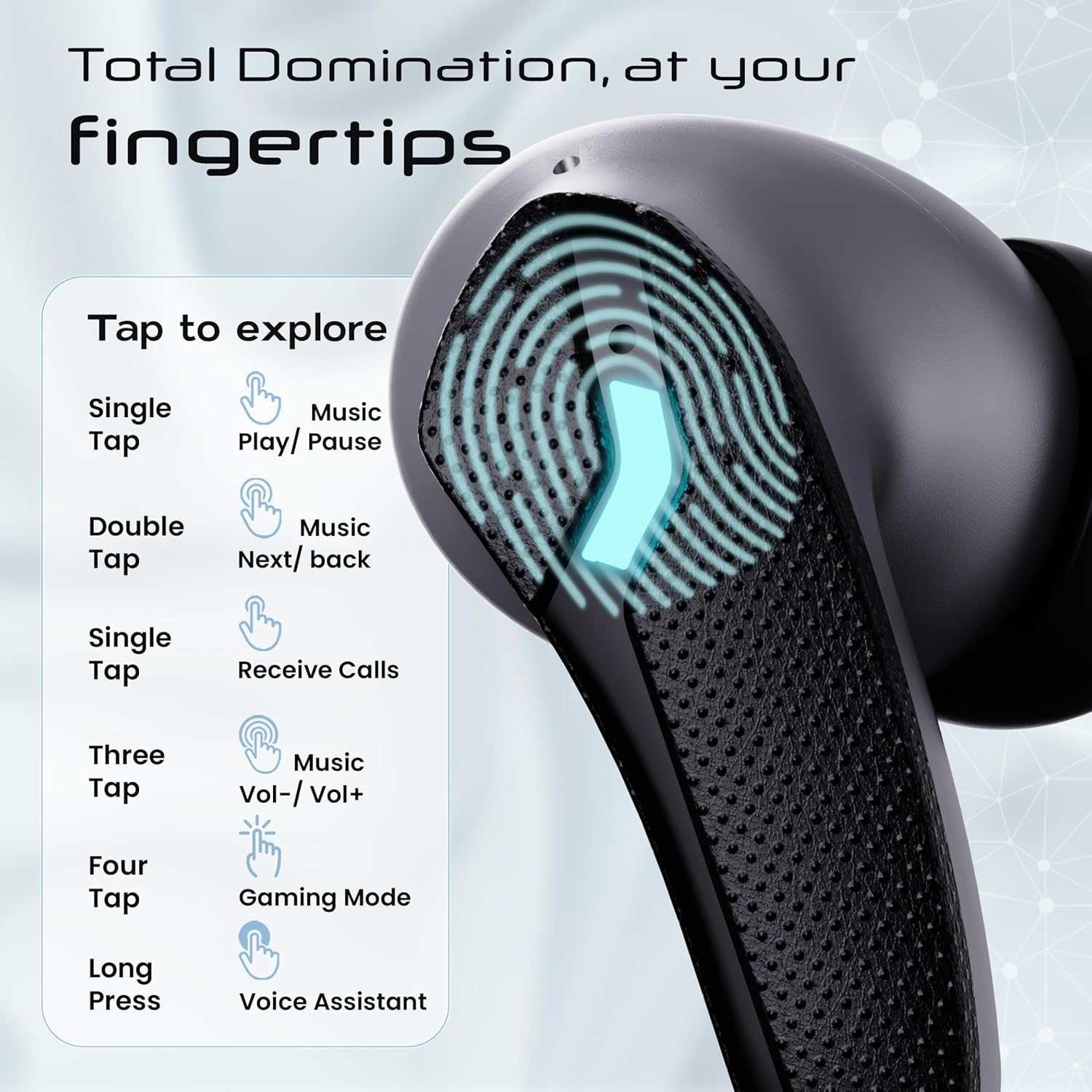
Image: GOBOULT Astra Neo Touch Controls Guide. This graphic details the various touch gestures for controlling music, calls, gaming mode, and voice assistant.
- Enkelt tryk: Play/Pause music, Receive Calls.
- Dobbeltklik: Music Next/Back (specific earbud for each function).
- Three Tap: Music Volume Up/Down (specific earbud for each function).
- Four Tap: Activate Gaming Mode.
- Langt tryk: Activate Voice Assistant (Google Assistant/Siri).
6.2 Gaming Mode (40ms Low Latency)
Activate Gaming Mode for a synchronized audio experience during gameplay, reducing audio delay to 40ms.
- To activate: Four tap on either earbud.
- To deactivate: Four tap again on either earbud.

Image: GOBOULT Astra Neo Gaming Mode with 40ms Low Latency. This image depicts a user playing a mobile game with the earbuds, highlighting the ultra-low latency feature for an immersive gaming experience.
6.3 ZEN Quad Mic ENC for Calls
The ZEN Quad Mic Environmental Noise Cancellation (ENC) system ensures clear voice calls by filtering out background noise.

Image: GOBOULT Astra Neo ZEN Quad Mic ENC Technology. This image illustrates the internal components and the function of the 4 microphones for clear in-game communication and crystal-clear calling with Acoustic Echo Cancellation (AEC).
6.4 EQ-tilstande
The Astra Neo earbuds support 4 EQ modes for customized audio experiences. Refer to the product packaging or official GOBOULT website for specific instructions on how to switch between these modes, as this functionality is typically managed via a companion app or specific touch gestures not detailed here.
7. Vedligeholdelse
7.1 Rengøring
- Tør forsigtigt ørepropperne og opladningsetuiet af med en blød, tør og fnugfri klud.
- Brug ikke skrappe kemikalier, rengøringsopløsningsmidler eller stærke rengøringsmidler.
- Rengør opladningskontakterne på både ørepropperne og etuiet regelmæssigt for at sikre korrekt opladning.
7.2 Vandtæthed (IPX5)
The Astra Neo earbuds are IPX5 water-resistant, meaning they are protected against sweat, rain, and splashes. They are not designed for submersion in water.
- Dyp ikke ørepropperne med vilje i vand.
- If exposed to sweat or rain, wipe them dry before placing them back in the charging case.

Image: GOBOULT Astra Neo IPX5 Water Resistance and Voice Assistant. This image highlights the earbuds' sweatproof, rainproof, and splashproof capabilities, along with compatibility with Google Assistant and Hey Siri.
7.3 Opbevaring
Når ørepropperne ikke er i brug, skal de opbevares i deres opladningsetui for at beskytte dem og holde dem opladede.
8. Fejlfinding
- Ørepropper parrer ikke: Ensure both earbuds are in the charging case, then open the lid to re-enter pairing mode. Check your device's Bluetooth settings and try reconnecting.
- Kun én øreprop virker: Place both earbuds back in the case, close the lid, wait a few seconds, then open it again. This often re-syncs them.
- Ingen lyd: Kontrollér lydstyrken på både din enhed og ørepropperne. Sørg for, at ørepropperne er korrekt tilsluttet din enhed.
- Opladningsproblemer: Clean the charging contacts on the earbuds and inside the case. Ensure the charging cable is securely connected and the power source is active.
- Dårlig opkaldskvalitet: Sørg for, at mikrofonerne ikke er blokeret. Prøv at flytte dig til et mere stille miljø.
9. Specifikationer
Key technical specifications for the GOBOULT Astra Neo Earbuds:
| Feature | Specifikation |
|---|---|
| Modelnavn | Astra Neo |
| Bluetooth version | 5.4 |
| Spilletid | Op til 70 timer (med opladningsetui) |
| Hurtig opladning | 10 minutters opladning = 100 minutters spilletid |
| Lav latens | 40ms (spiltilstand) |
| Driver størrelse | 13mm BoomX Drivers |
| Mikrofon | ZEN Quad Mic ENC |
| Vandmodstand | IPX5 |
| Kontrolmetode | Røre |
| Forbindelsesteknologi | Bluetooth, Trådløs |
| Hovedtelefonstik | Type-C hurtigopladningsstik |
| Varens vægt | 47 gram |
| Produktdimensioner | 6.2 x 5.3 x 3.2 cm |
| Batteritype | Lithium polymer |
| Bluetooth rækkevidde | 10 meter |
| Impedans | 32 Ohm |

Image: GOBOULT Astra Neo 13mm BoomX Drivers. This image highlights the 13mm BoomX drivers, emphasizing crystal clear sound and support for MSBC, SBC, and AAC codecs.
10. Garanti og support
The GOBOULT Astra Neo Earbuds come with a 1 års producentgaranti from the date of purchase. This warranty covers manufacturing defects. For warranty claims or technical support, please refer to the contact information provided on your warranty card or visit the official GOBOULT webwebsted.


