1. Introduktion
The ALIGATOR AZA930B is a mobile phone designed with ease of use in mind, particularly for seniors. It features a large keypad, a clear 2.8-inch color display, and essential safety functions such as an SOS button and SOS locator. This manual provides detailed instructions on how to set up, operate, maintain, and troubleshoot your device to ensure optimal performance and safety.
2. Sikkerhedsoplysninger
Læs venligst dette afsnit omhyggeligt, inden du bruger din telefon, for at sikre sikker og korrekt betjening.
- Batterisikkerhed: Use only ALIGATOR approved batteries and chargers. Do not short-circuit, puncture, or expose the battery to extreme temperatures. Dispose of batteries properly.
- Opladning: The phone does not include a charger. Use a compatible USB-C charger (recommended model ALIGATOR CHA0047) with a power output of 2.5-3W. Avoid charging in damp forhold.
- Høreværn: Undgå langvarig lytning ved høj lydstyrke for at forhindre høreskader.
- Kørselssikkerhed: Always prioritize driving safety. Use hands-free accessories and obey all local laws and regulations regarding mobile phone use while driving.
- Medicinsk udstyr: Maintain a safe distance between the phone and medical devices such as pacemakers. Consult your physician and the medical device manufacturer for specific guidelines.
- Vandtæthed: Denne telefon er ikke vandafvisende. Undgå kontakt med væsker.
3. Pakkens indhold
Bekræft, at alle varer er til stede i din produktpakke:
- ALIGATOR AZA930B Mobile Phone
- Opladningsdock
- Brugervejledning (dette dokument)
- Bemærk: Oplader medfølger ikke og skal købes separat.
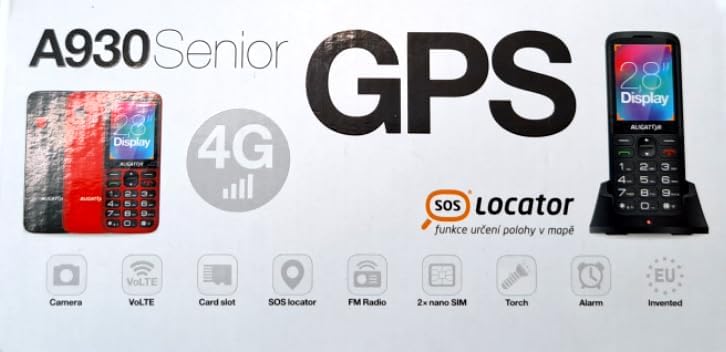
Figure 3.1: Product packaging illustrating the phone, charging dock, and various features such as 4G connectivity, GPS, SOS Locator, camera, VoLTE, card slot, FM radio, torch, and alarm. The box also indicates the 2.8-inch display.
4. Opsætning
4.1. Indsættelse af SIM-kort
The ALIGATOR AZA930B supports Dual SIM (2 x Nano SIM) functionality. To insert SIM cards:
- Sluk telefonen.
- Fjern bagdækslet og batteriet.
- Locate the SIM card slots. Insert your Nano SIM cards into the designated slots, ensuring the gold contacts face down and the cut corner aligns correctly.
- Udskift batteriet og bagdækslet.
4.2. Indsættelse af et Micro SD-kort
The phone supports a Micro SD memory card up to 256 GB for additional storage.
- Follow steps 1 and 2 from "4.1. Inserting SIM Cards".
- Locate the Micro SD card slot. Insert the Micro SD card with the gold contacts facing down until it clicks into place.
- Udskift batteriet og bagdækslet.
4.3. Første opladning
Before first use, fully charge the phone's 1700 mAh Li-ion battery.
- Connect the USB-C cable (not included) to the phone's USB-C port or place the phone in the charging dock.
- Connect the other end of the cable to a compatible charger (e.g., ALIGATOR CHA0047, 2.5-3W) or a powered USB port.
- The charging indicator will illuminate. A full charge may take several hours.

Figure 4.1: The ALIGATOR AZA930B phone placed in its dedicated charging dock. The phone's screen shows the current time and network signal indicators.

Figure 4.2: Detail from the product box, explicitly showing an icon indicating that a charger is not included and specifying a recommended charger power of 2.5-3W.
5. Betjeningsvejledning
5.1. Tænd/sluk
- For at tænde: Tryk på tænd/sluk-knappen/afslut opkald (rød knap), og hold den nede, indtil skærmen lyser.
- For at slukke: Tryk på tænd/sluk-knappen/afslut opkald, og hold den nede, indtil sluk-mulighederne vises, og vælg derefter "Sluk".
5.2. Grundlæggende opkaldsfunktioner
- Foretag et opkald: Enter the phone number using the large keypad and press the Call button (green button).
- Besvare et opkald: When the phone rings, press the Call button (green button).
- Afslutning af et opkald: Tryk på tænd/sluk-knappen/afslut-knappen (rød knap).
- Håndfri: During a call, activate hands-free mode via the on-screen option or a dedicated button if available.
5.3. SOS Button and SOS Locator
The SOS button is a critical safety feature, allowing quick contact in emergencies.
- SOS knap: Located on the back of the phone (often red). Press and hold this button to activate the emergency sequence.
- SOS Presets: You can set up to 5 preset emergency contacts. When the SOS button is pressed, the phone will automatically call these numbers in sequence and send an emergency SMS.
- SOS Locator: This function sends the phone's location via SMS to the emergency contacts after the SOS button is pressed. The recipient can then view the location on a map via a web link provided in the SMS. This feature utilizes both GSM and GPS for location accuracy.

Figur 5.1: Bagside view of the ALIGATOR AZA930B, showing the prominent red SOS button and the speaker grille for clear audio.

Figur 5.2: Vinklet bagside view of the ALIGATOR AZA930B, demonstrating the activated flashlight feature.
5.4. "Zachranka" Rescue Application
The "Zachranka" application is a mobile emergency call application pre-installed on the device.
- It provides quick contact with emergency medical services or mountain rescue.
- The application is valid in Austria, Hungary, the Czech Republic, and in the territories of the Slovak mountains.
- For more information, refer to the "Zachranka" app's official resources.

Figur 5.3: Forside og bagside views of the ALIGATOR AZA930B, accompanied by the "Zachranka" rescue application logo, indicating its integration with the device.
5.5. Andre funktioner
- Telefonbog: Gem op til 500 kontakter.
- Beskeder: Send and receive SMS messages (memory for 100 SMS). Supports sending photos via MMS.
- Multimedier:
- FM-radio: Lyt til FM-radiostationer.
- Medieafspiller: Afspil lyd og video files stored on the phone or Micro SD card.
- Stemmeoptager: Record voice memos.
- Lommelygte: Activate the built-in flashlight for illumination.
- Værktøjer: Includes Alarm, Calculator, and SIM toolkit support.
- Bluetooth: Opret forbindelse til Bluetooth-headset eller andre enheder.
- Vibrationsalarm: Set the phone to vibrate for incoming calls or notifications.
- Melodier: Choose from 10+1 pre-installed melodies.
- Automatic Time Adjustment: The phone can automatically adjust its time.

Figur 5.4: Forside view of the ALIGATOR AZA930B, highlighting its user-friendly large keypad and vibrant color display.
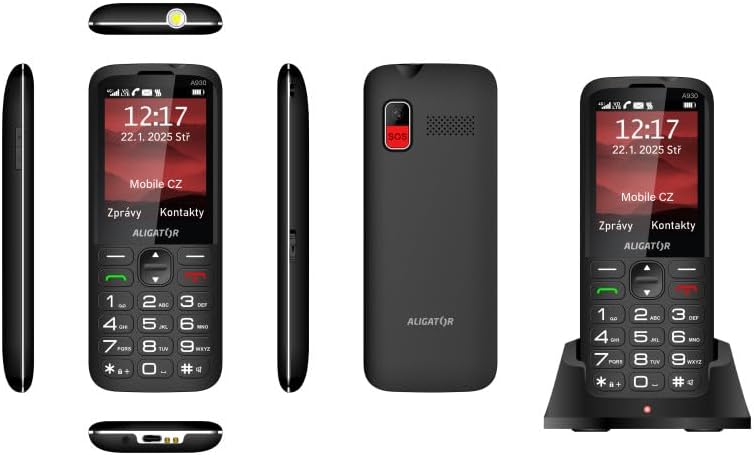
Figur 5.5: Omfattende views of the ALIGATOR AZA930B, illustrating its design from the top, sides, front, back, and when seated in its charging dock.
6. Vedligeholdelse
- Rensning: Brug en blød, tør klud til at rengøre telefonens overflade. Undgå at bruge skrappe kemikalier eller slibende materialer.
- Batteripleje: For at forlænge batteriets levetid bør du undgå at aflade batteriet helt ofte. Opbevar telefonen et køligt og tørt sted, hvis den ikke bruges i længere perioder.
- Opbevaring: Hold telefonen væk fra ekstreme temperaturer, direkte sollys og støvede omgivelser.
7. Fejlfinding
| Problem | Mulig årsag | Løsning |
|---|---|---|
| Telefonen tænder ikke. | Batteriet er afladet eller ikke isat korrekt. | Oplad batteriet. Sørg for, at batteriet er korrekt isat. |
| Intet netværkssignal. | SIM card not inserted correctly or out of network coverage. | Reinsert SIM card. Move to an area with better network coverage. |
| Kan ikke foretage eller modtage opkald. | No credit, SIM card issue, or network problem. | Check your account balance. Verify SIM card insertion. Contact your network provider. |
| SOS-knappen virker ikke. | SOS-numre er ikke konfigureret eller forkerte. | Ensure SOS numbers are correctly configured in settings. Check network signal. |
| Batteriet aflades hurtigt. | High usage, background apps, or aging battery. | Reduce screen brightness. Close unnecessary applications. Consider replacing the battery if it's old. |
8. Specifikationer
| Feature | Detalje |
|---|---|
| Modelnummer | AZA930B |
| Vise | 2.8-tommer TFT-farveskærm |
| SIM-kortpladser | Dual SIM (2 x Nano SIM) |
| Understøttelse af hukommelseskort | Micro SD op til 256 GB |
| Batteri | 1700 mAh Li-ion |
| Taletid | Op til 480 minutter |
| Standby tid | Op til 10 dage |
| Kamera | 1.9 MP |
| Forbindelse | 4G/LTE/VoLTE, Bluetooth |
| Opladningsport | USB-C |
| Hovedtelefonstik | 3.5 mm |
| Dimensioner | 14.3 x 5.8 x 1.36 cm |
| Vægt | 95 g |
| Operativsystem | Symbian 9.1 |
| Farve | Sort |
Bemærk: Specifikationerne kan ændres uden forudgående varsel.
9. Garanti og support
ALIGATOR products are designed and manufactured to the highest quality standards. For detailed warranty information, including terms, conditions, and duration, please refer to the warranty card included with your product or visit the official ALIGATOR webwebsted.
For technical support, service, or inquiries regarding your ALIGATOR AZA930B mobile phone, please contact ALIGATOR customer service or visit their official support channels. Keep your purchase receipt and product serial number (IMEI) handy when seeking support.
- IMEI 1: 357140835088496
- IMEI 2: 357140835088504
- Barcode/UPC: 8596426108267


