User Manual for TOOLTOP ET827 2-in-1 Portable Digital Oscilloscope Multimeter
Model: TT-ET827
1. Introduktion
The TOOLTOP ET827 is a versatile, portable 2-in-1 instrument combining the functionalities of a digital oscilloscope and a 6000-count True RMS (T-RMS) multimeter. Designed for engineers, technicians, and hobbyists, it offers precise measurements for voltage, current, resistance, frequency, diode, transistor HFE, and temperature, alongside waveform analysis capabilities. Its compact design and clear interface make it suitable for various applications, including outdoor research, production, debugging, and circuit repair.

Image: The TOOLTOP ET827 device, its retail packaging, test leads, and user manual, illustrating the complete product package.

Image: The TOOLTOP ET827 device shown with its integrated kickstand extended, providing a stable viewing angle for benchtop use.
2. Nøglefunktioner
- Dobbelt funktionalitet: Combines a 40MHz digital oscilloscope and a 6000-count T-RMS multimeter.
- Høj Sampling sats: 200MSPS real-time sampling rate for accurate waveform capture.
- Oscilloscope Modes: Features Auto, Normal, and Single trigger modes for various measurement needs.
- Multimeterfunktioner: Måler DC/AC voltage, DC/AC current, resistance, frequency, diode, transistor HFE, and temperature.
- Datalagring: Stores up to 100 sets of measurement data and 50 waveforms.
- Vise: 240x160 LCD with a 60mm x 40mm display area and black screen with white backlight.
- Overbelastningsbeskyttelse: Equipped with 500mA and 10A double fuses for enhanced safety.
- Automatisk nedlukning: Slukker automatisk efter 15 minutters inaktivitet for at spare batterilevetid.

Billede: Forside view of the ET827, emphasizing its 40MHz bandwidth and 200MSPS sampling rate, along with icons representing automatic oscilloscope, waveform adjustment, data storage, TRMS, and multimeter functions.

Billede: En detaljeret view of the ET827's front panel, illustrating various functions such as oscilloscope, multimeter, automatic oscilloscope, waveform adjustment, overload protection, data storage, and automatic shutdown, each represented by an icon.
3. Opsætning og første brug
3.1 Batteriinstallation
The ET827 requires three AA batteries (not included). To install, locate the battery compartment on the rear of the device. Open the cover, insert the batteries according to the polarity indicators (+/-), and securely close the compartment.
3.2 Tænd/sluk
To power on the device, rotate the central rotary switch from the 'OFF' position to any desired measurement function (e.g., V~, V-, OSC). To power off, rotate the switch back to the 'OFF' position. The device also features an automatic shutdown function after 15 minutes of inactivity.
3.3 Tilslutning af testledninger
Connect the red test lead to the 'VΩCx mA°C' input jack and the black test lead to the 'COM' (common) input jack for most voltage, resistance, capacitance, and temperature measurements. For current measurements (10A), connect the red lead to the '10A' input jack. Ensure connections are firm and secure.
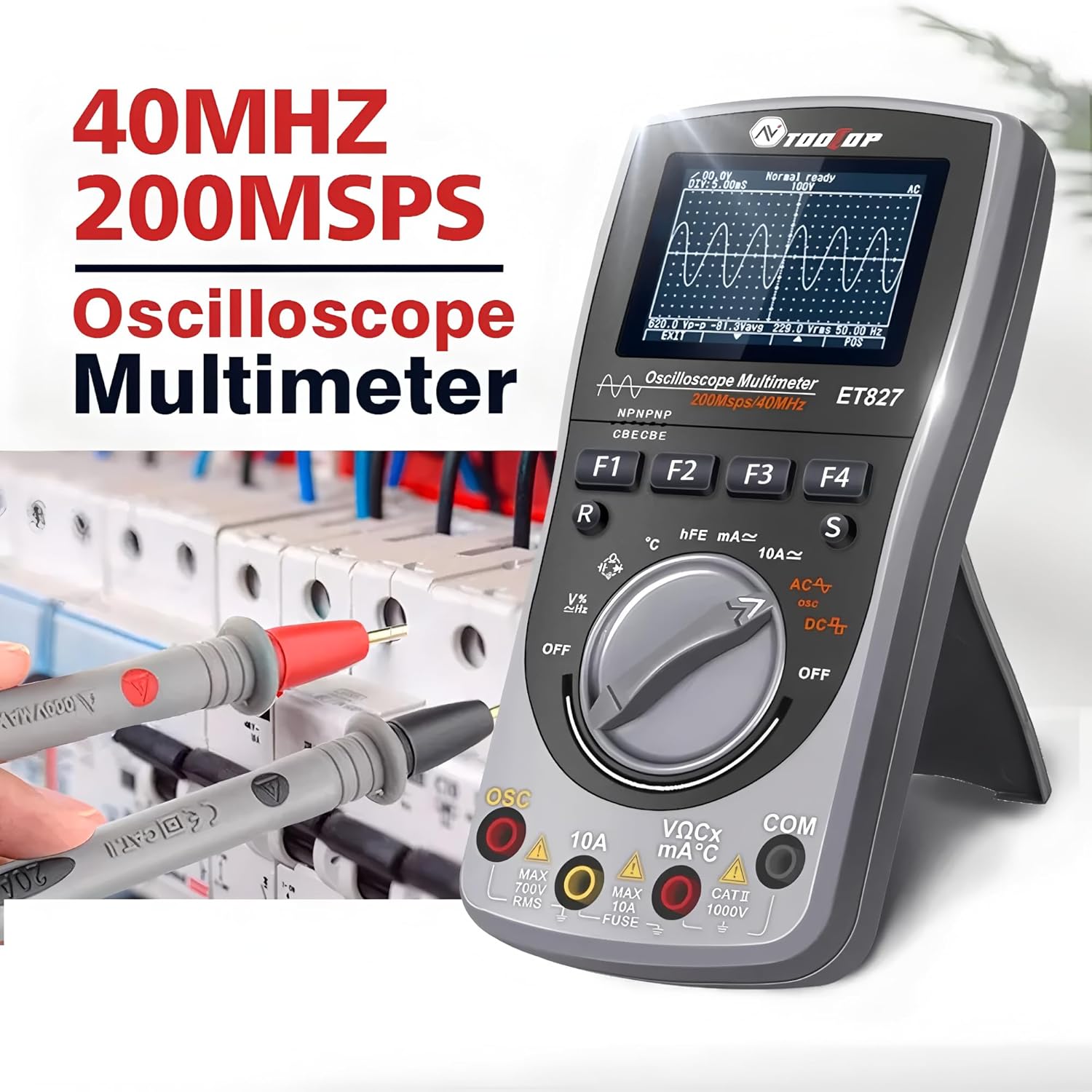
Image: The ET827 device with red and black test leads connected to its input jacks, demonstrating proper setup for measurement.
4. Betjeningsvejledning
4.1 Multimeterfunktioner
Rotate the central switch to the desired multimeter function. The ET827 supports the following measurements:
- Voltage (DC/AC): Select 'V-' for DC voltage or 'V~' for AC voltage.
- Current (DC/AC): Select 'mA~' or 'mA-' for milliampere current, or '10A~' or '10A-' for amper aktuelle.
- Modstand (Ω): Select 'Ω' to measure resistance.
- Frekvens (Hz): Integrated with voltage/current functions or a dedicated Hz setting.
- Diode test: Select the diode symbol to test diodes.
- Transistor HFE Test: Use the dedicated HFE setting for transistor gain measurement.
- Temperature Test (°C): Select '°C' for temperature measurement (requires a K-type thermocouple, not included).
- Kapacitans (F): Select 'F' to measure capacitance.

Image: The ET827 displaying a capacitance measurement of 95.70 µF, with test leads and a capacitor connected, demonstrating its capacitance measurement capability.
4.2 Oscilloskopfunktioner
Rotate the central switch to the 'OSC' position to activate the oscilloscope. The ET827 features a 40MHz bandwidth and 200MSPS real-time samplang hastighed.
- Triggertilstande: The device offers three trigger modes:
- Auto: Suitable for general users, providing one-button auto-capture and display of waveforms.
- Normal: For professional users, allowing independent adjustment of waveform parameters.
- Enkelt: Ideal for capturing low-frequency pulses or single-shot events.
- Waveform Adjustment: Use the function buttons (F1-F4) to adjust parameters such as vertical scale (V/div), horizontal time base (s/div), and trigger level.

Image: A visual guide explaining the three waveform acquisition modes (Auto, Normal, Single) available on the ET827, detailing their typical use cases and characteristics.
4.3 Data Storage and Waveform Saving
The ET827 allows users to save measurement data and waveforms for later review. Refer to the on-screen menu or dedicated buttons (if available) for saving and recalling stored data. The device can store up to 100 sets of data and 50 waveforms.
5. Vedligeholdelse
5.1 Rengøring
For at rengøre enheden skal du bruge en blød, damp cloth. Do not use abrasive cleaners, solvents, or immerse the device in water. Ensure the device is powered off before cleaning.
5.2 Udskiftning af batteri
When the low battery indicator appears on the display, replace the three AA batteries promptly to ensure accurate measurements and proper operation. Follow the battery installation steps outlined in Section 3.1.
5.3 Udskiftning af sikringer
The ET827 is protected by internal fuses (500mA and 10A) to prevent damage from overcurrent. If the device fails to measure current or shows incorrect readings for current, the respective fuse may need replacement. Fuse replacement should only be performed by qualified personnel. Refer to the device's internal diagram or contact customer support for guidance.

Image: An illustration of the ET827's overload protection feature, highlighting automatic circuit cut-off for voltage overload and the presence of 500mA and 10A double fuses for robust protection.
6. Fejlfinding
If you encounter issues with your ET827, refer to the following common problems and solutions:
- Enheden tændes ikke: Check battery installation and ensure batteries are fresh. Verify the rotary switch is set to an active function, not 'OFF'.
- Intet display eller svagt display: Replace batteries. Ensure the display area is clean.
- Unøjagtige multimeteraflæsninger: Kontrollér testledningernes forbindelser. Sørg for, at den korrekte funktion er valgt til målingen. Bekræft batteriniveauet.
- Ingen bølgeform vises i oscilloskoptilstand: Check probe connections. Ensure the input signal is within the device's measurement range. Adjust trigger settings (level, mode) and time base/vertical scale.
- Enheden lukker uventet ned: This may be due to the automatic shutdown feature. If it occurs frequently during active use, replace batteries.
For persistent issues not covered here, please contact TOOLTOP customer support.
7. Specifikationer
| Parameter | Værdi |
|---|---|
| Vise | 240*160 LCD |
| Visningsområde | 60 mm x 40 mm |
| Baggrundsbelysning | Black screen with white backlight |
| Oscilloskop båndbredde | 40 MHz |
| Realtid Sampling Rate | 200MSPS |
| Multimeter Counts | 6000 tæller |
| Indgangsimpedans | 10MΩ |
| Batteritype | AA 5th battery*3 (not included) |
| Automatisk nedlukning | 15 minutes of no operation |
| Datalagring | 100 sæt |
| Bølgeformlagring | 50 waveforms |
| Dimensioner | 83 mm X 160 mm X 32 mm |
| Vægt | 210g (uden batteri) |
| Driftsmiljø | 0 ℃ ~ +40 ℃; <75%RH |
| Opbevaringsmiljø | -10 ℃ ~ +60 ℃; <90%RH |
| Sikkerhedsoverholdelse | CE, RoHS |
8. Garanti og support
The TOOLTOP ET827 is manufactured to high-quality standards. For information regarding warranty coverage, terms, and conditions, please refer to the documentation provided with your purchase or visit the official TOOLTOP website. For technical support, troubleshooting assistance, or spare parts inquiries, please contact TOOLTOP customer service through their official channels. Please retain your proof of purchase for warranty claims.


