1. Introduktion
This manual provides essential information for the safe and effective operation of your SOOMFON SK2 Mini Projector. Please read this manual thoroughly before using the product and retain it for future reference.
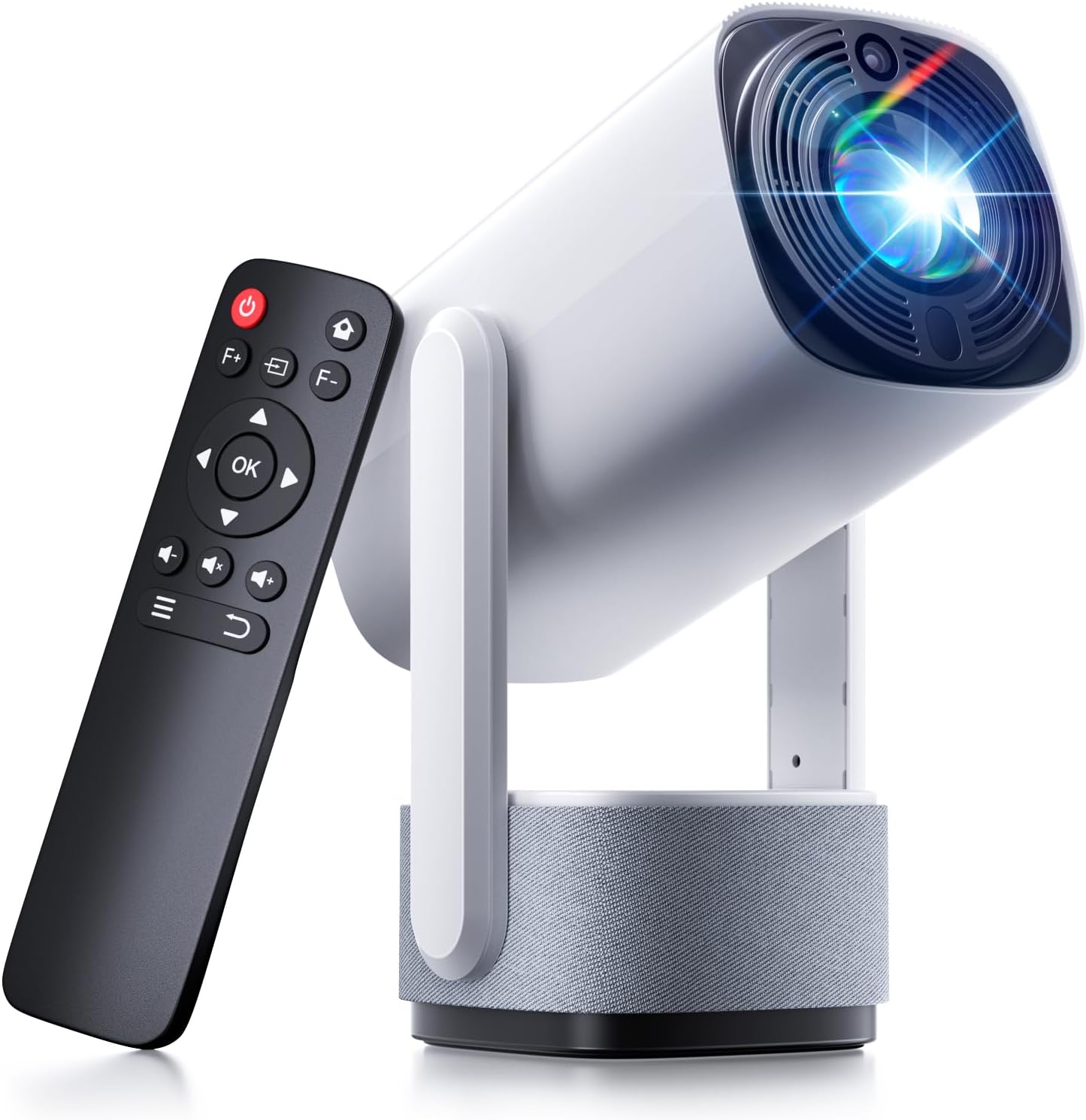
Image: The SOOMFON SK2 Mini Projector shown with its remote control.
2. Pakkens indhold
Bekræft, at alle nedenstående varer er inkluderet i din pakke:
- SOOMFON SK2 Projector
- HDMI-kabel (1.5m)
- Strømledning (1.5 m)
- Brugermanual
- Hurtig guide
- Fjernbetjening (2x AAA-batterier medfølger ikke)

Image: Contents of the SOOMFON SK2 Mini Projector package.
3. Produktet er slutview
The SOOMFON SK2 Mini Projector is designed for versatile media projection, featuring a compact form factor and multiple connectivity options.
Nøglefunktioner:
- Displayteknologi: Advanced LCD with uniform illumination.
- Opløsning: Native 720p (1280 x 720), supports 4K and 1080p input.
- Lysstyrke: 260 ANSI Lumens.
- Projektionsstørrelse: Up to 150 inches.
- Portabilitet: Compact design (7.5 x 4 x 4 inches) and lightweight (1.3 lbs).
- Rotation: 270° rotatable stand for flexible projection angles (wall-to-ceiling).
- Lyd: Integrated dual 3W high-fidelity speakers.
- Forbindelse: HDMI, USB, Audio ports, Wi-Fi, Bluetooth (two-way for input/output).
- Skærmspejling: Supports Miracast and AirPlay for wireless screen sharing.
- Billedkorrektion: Automatisk keystone-korrektion.
- Øjenbeskyttelse: Diffuse reflection imaging technology.
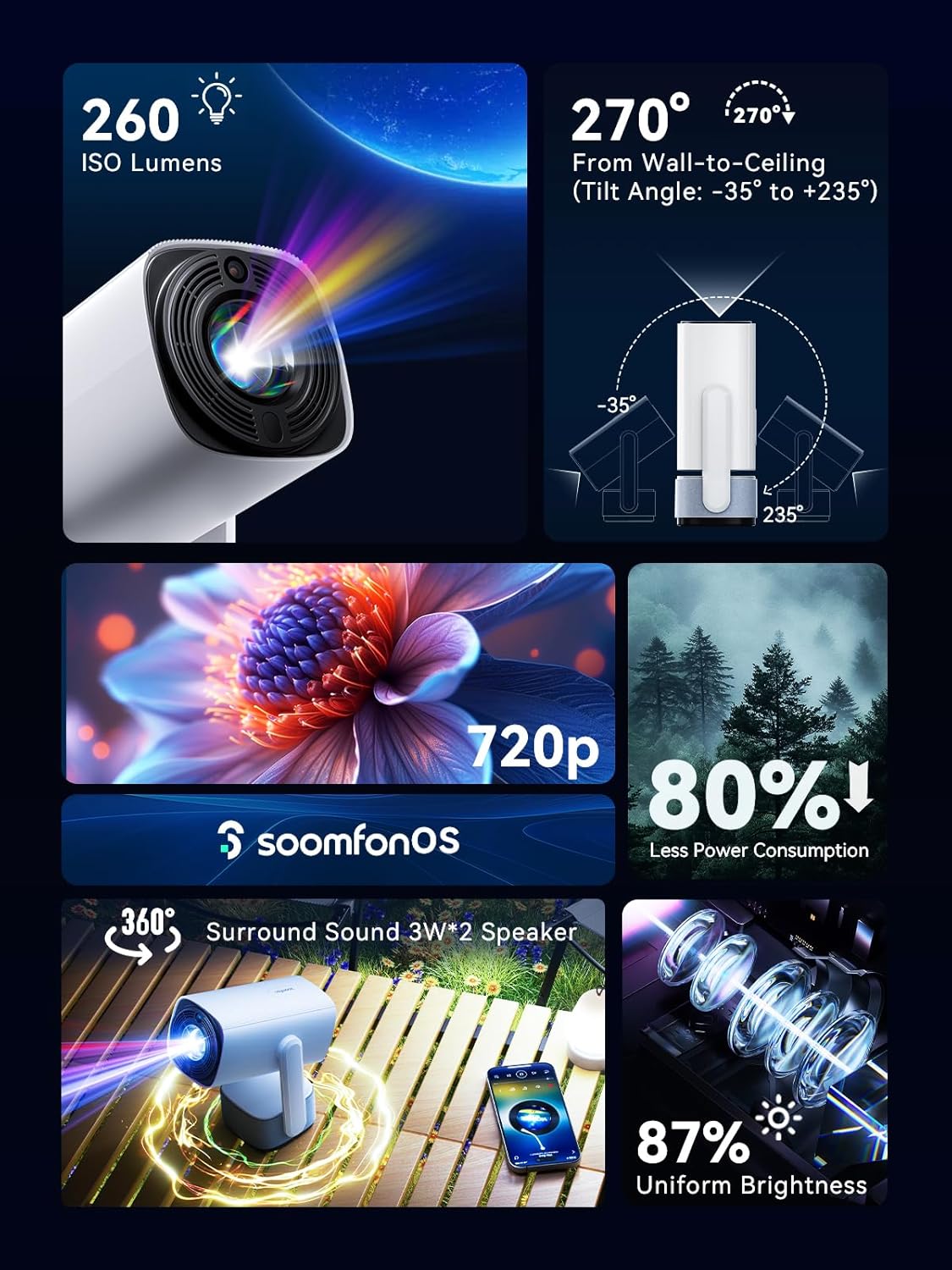
Billede: Overview of the projector's main features.
4. Opsætning
4.1 Strømtilslutning
- Connect the provided power cord to the projector's power input.
- Sæt den anden ende af netledningen i en passende stikkontakt.
4.2 Placering
Position the projector on a stable, flat surface. The 270° rotatable stand allows for flexible projection angles, including wall and ceiling projection.

Image: Projector positioned for wall-to-ceiling projection.
4.3 Indledende tænding
- Tryk på tænd/sluk-knappen på projektoren eller fjernbetjeningen for at tænde for enheden.
- The projector will boot up and display the main interface (SoomfonOS).
5. Betjeningsvejledning
5.1 Fokusjustering
Adjust the image clarity using the F+ and F- buttons on the remote control. This is a manual adjustment.
5.2 Keystone-korrektion
The projector features automatic keystone correction. It will automatically adjust the image to be rectangular even if the projector is placed at an angle. Manual adjustments may also be available in the settings menu if needed.

Image: Automatic keystone correction in action.
5.3 Forbindelse
5.3.1 HDMI-forbindelse
Connect an HDMI cable from your source device (e.g., laptop, game console, TV stick) to the HDMI port on the projector. Select the HDMI input source from the projector's menu.
5.3.2 USB-forbindelse
Insert a USB flash drive into the USB port. The projector supports FAT32 formatted drives up to 32GB. Navigate to the USB section in the SoomfonOS to access media files.
5.3.3 Wi-Fi and Screen Mirroring
Connect the projector to your Wi-Fi network via the settings menu. Once connected, you can use Miracast (for Android) or AirPlay (for iOS) to wirelessly mirror your smartphone or tablet screen to the projector.

Image: Streaming content from a phone to the projector.
5.3.4 Bluetooth-forbindelse
The projector supports two-way Bluetooth functionality:
- Bluetooth Input (Audio Mode): Connect your smartphone or other Bluetooth audio device to the projector to use it as a Bluetooth speaker. Access this mode from the homepage.
- Bluetooth udgang: Connect the projector to external Bluetooth speakers or headphones for enhanced audio. Access this in the settings menu.

Image: Two-way Bluetooth connectivity options.
5.4 SoomfonOS Navigation
The projector operates on SoomfonOS, a user-friendly interface. Use the remote control's directional buttons and OK button to navigate through menus and select options. The main screen provides access to input sources, settings, and media playback options.

Image: The SoomfonOS user interface.
6. Vedligeholdelse
6.1 Rengøring
- Linse: Brug en blød, fnugfri klud, der er specielt designet til optiske linser. Brug ikke slibende rengøringsmidler eller opløsningsmidler.
- Ydre: Tør projektorens yderside af med en blød, tør klud. Ved genstridige mærker kan du bruge en let tør klud.amp en klud kan bruges, efterfulgt af en tør klud.
- Ventilation: Sørg for, at ventilationsåbningerne er fri for støv og forhindringer for at forhindre overophedning.
6.2 Opbevaring
When not in use, store the projector in a cool, dry place away from direct sunlight and extreme temperatures. If possible, use the original packaging or a protective case to prevent dust accumulation and damage.
7. Fejlfinding
- Intet billede/dårlig billedkvalitet:
- Sørg for, at netledningen er korrekt tilsluttet, og at projektoren er tændt.
- Check the input source selection (HDMI, USB, etc.) matches your connected device.
- Adjust the focus using the F+ and F- buttons on the remote.
- Ensure the room is sufficiently dark for optimal viewing, especially for larger screen sizes.
- Ingen lyd:
- Kontroller lydstyrkeniveauet på både projektoren og kildeenheden.
- If using external speakers, ensure they are properly connected via Bluetooth or audio cable.
- For HDMI sources, verify the audio output settings on your source device.
- Cannot Stream from Netflix/Prime Video via Screen Mirroring:
- Due to HDCP (High-bandwidth Digital Content Protection) restrictions, direct screen mirroring of certain streaming services (like Netflix, Prime Video, Hulu) may not work or may only provide audio.
- Løsning: Use an external streaming device (e.g., Amazon Fire Stick, Roku, Google TV) connected to the projector's HDMI port for these services.
- Problemer med Wi-Fi-forbindelse:
- Sørg for, at Wi-Fi-adgangskoden er indtastet korrekt.
- If experiencing issues with long Wi-Fi passwords, check the SOOMFON official website for potential firmware updates.
- Ventilatorstøj:
- The projector's fan noise is noticeable during operation. This is normal for cooling the internal components.
- For a more immersive audio experience, consider connecting external Bluetooth speakers.
8. Specifikationer
| Feature | Specifikation |
|---|---|
| Mærke | SOOMFON |
| Modelnummer | SK2 |
| Varens vægt | 1.69 pund |
| Produktdimensioner | 9.65 x 4.53 x 3.74 tommer |
| Indbygget skærmopløsning | 1280 x 720p |
| Understøttet inputopløsning | Op til 4K |
| Lysstyrke | 260 ANSI Lumens |
| Forbindelsesteknologi | HDMI, USB, Audio, Wi-Fi, Bluetooth |
| Særlige funktioner | Built-In Speaker, Built-In Wi-Fi, Portable, 270° Rotatable Stand, Automatic Keystone Correction |
| Anbefalede anvendelser | Erhverv, Uddannelse, Gaming, Hjemmebiograf |
9. Garanti og support
SOOMFON is committed to providing quality products and customer satisfaction.
9.1 Teknisk support
Lifetime technical support is available for your SOOMFON SK2 Mini Projector.
9.2 Kontaktoplysninger
- E-mail: service@soomfon.com
- Live chat: Available on the official SOOMFON website, Monday-Friday, 9 AM - 5 PM (PST).


