Indledning
The MEETION K9880 is an ultra-thin, portable, and rechargeable Bluetooth keyboard designed for business travel and mobile productivity. Its ergonomic split-key layout promotes a natural typing posture, reducing strain during extended use. This manual provides detailed instructions for setting up, operating, maintaining, and troubleshooting your keyboard to ensure a seamless experience across various devices.
Produktegenskaber
- Ergonomisk delt design: Features a V-shaped 166° angle and split-key layout to minimize hand and wrist strain.
- Tilslutning til flere enheder: Supports simultaneous connection to up to 3 devices via Bluetooth channels, allowing one-click switching.
- Bred kompatibilitet: Compatible with iOS, Android, Windows, and Mac OS systems.
- Silent Scissor-Switch Keys: Provides quiet, precise, and responsive typing with a laptop-like feel.
- Forbedret stabilitet: Magnetic adsorption for secure folding and a metal support wire on the back for stable typing on uneven surfaces.
- Langtidsholdbart batteri: Equipped with a 140mAh lithium battery, offering up to 60 hours of standby time on a single charge.
- Optimized Key Layout: 6-row key layout with a dedicated number key row and shortcut keys for efficient workflow.
- Kompakt og bærbar: Ultra-slim and foldable design for easy storage and transport.

Image: The MEETION K9880 keyboard shown in both its compact folded state and its fully unfolded, ready-to-use configuration, highlighting its portability and ergonomic design.

Image: A comparison illustrating the ergonomic advantage of the MEETION K9880's 166-degree split design over traditional flat keyboards, emphasizing reduced wrist strain.
Opsætningsvejledning
1. Opladning af tastaturet
Before first use, fully charge the keyboard. Connect the provided USB Type-C cable to the keyboard's charging port and the other end to a USB power source (e.g., computer USB port, wall adapter). The power indicator light will show charging status.
- Battery Capacity: 140mAh Lithium Battery
- Opladningstid: Cirka 2 timer for en fuld opladning.
- Standbytid: Op til 60 timer.
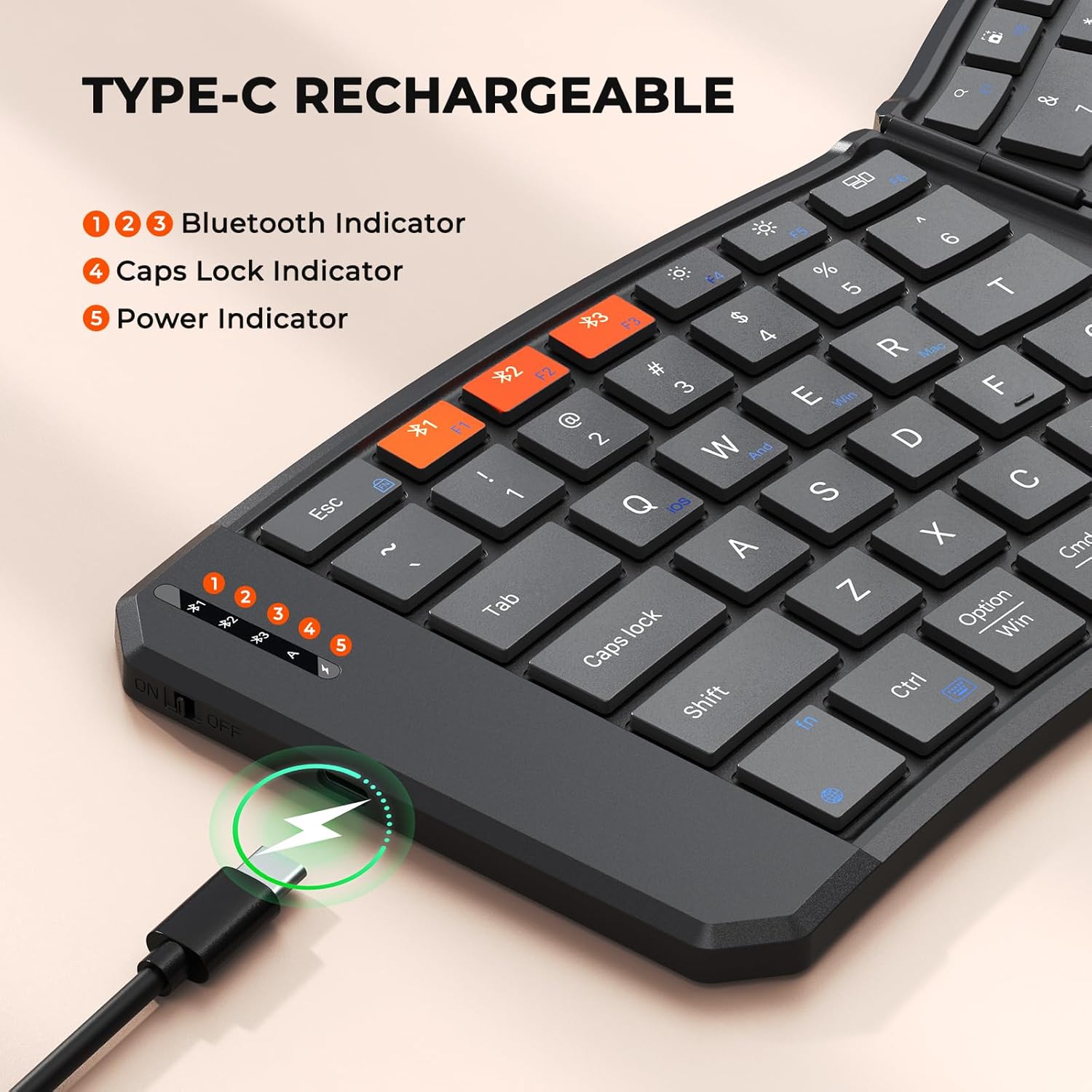
Image: The MEETION K9880 keyboard with a USB Type-C cable connected, illustrating the charging process and the location of the power indicator light.
2. Bluetooth-parring
- Locate the power switch on the side of the keyboard and slide it to the "ON" position.
- Tryk på Fn key simultaneously with one of the Bluetooth channel keys (*1, *2, eller *3) to select a channel and initiate pairing mode. The corresponding Bluetooth indicator light will begin to blink, indicating it is ready for pairing.
- On your device (smartphone, tablet, laptop), navigate to the Bluetooth settings and ensure Bluetooth is enabled.
- Søg efter available devices. You should see "Meetion-KB-BT1", "Meetion-KB-BT2", or "Meetion-KB-BT3" appear in the list, corresponding to the channel you selected.
- Select the keyboard from the list to connect. Once connected, the indicator light will stop blinking and remain solid for a few seconds before turning off.

Image: A visual guide detailing the four steps for establishing a Bluetooth connection with the MEETION K9880 keyboard, from powering on to selecting the device.
3. Systemskift
The keyboard supports multiple operating systems. Use the following key combinations to switch between system modes for optimal compatibility:
- Fn + Q: Til iOS-enheder
- Fn + W: Til Android-enheder
- Fn + E: Til Windows-enheder
- Fn + R: For Mac OS devices

Image: A diagram illustrating the specific Fn key combinations (Fn+Q, Fn+W, Fn+E, Fn+R) required to switch the MEETION K9880 keyboard between iOS, Android, Windows, and Mac operating systems.
Betjeningsvejledning
Nøglefunktioner
The K9880 keyboard features a comprehensive set of keys for enhanced productivity:
- Standardnøgler: Full QWERTY layout with a dedicated number row.
- Funktionstaster (Fn): Access various multimedia and system functions. Note that on this keyboard, the function keys (F1-F12) are the default action, and you may need to press the Fn key to access the secondary white-labeled functions (e.g., brightness, volume control).
- Emoji Shortcut Key: A dedicated key to quickly access emoji input (supports Windows, MacBook (macOS), iPad (iPadOS), and Android Samsung devices; does not support iPhone (iOS)).
- Additional Shortcut Keys: Includes keys for app switching, search, screenshot, play/pause, mute, and virtual keyboard access.

Billede: Et nærbillede view of the scissor-switch key mechanism and the dedicated emoji shortcut key on the MEETION K9880 keyboard, with a note about emoji key compatibility.
Typing Stability
The keyboard is designed for stable typing in various environments:
- Magnetisk adsorption: The folding mechanism uses magnetic adsorption to prevent accidental opening when stored.
- Metal Support Wire: A built-in metal support wire on the back of the keyboard can be deployed to securely fix the keyboard in an open state, providing stability even on uneven surfaces like your lap.

Image: A user typing on the MEETION K9880 keyboard placed on their lap, demonstrating the stability provided by the integrated metal support wire on the back.
Opretholdelse
Rensning
The keyboard's high-quality PU leather exterior is designed to be scratch-resistant and easy to clean. Use a soft, damp cloth to wipe down the surface. Avoid using harsh chemicals or abrasive materials that could damage the finish.
Batteripleje
For at forlænge batterilevetiden:
- The keyboard automatically enters sleep mode after 20 minutes of inactivity to conserve power. Press any key to wake it up.
- Turn off the keyboard using the side power switch when not in use for extended periods.
- Undgå at udsætte tastaturet for ekstreme temperaturer.
Fejlfinding
| Problem | Mulig årsag | Løsning |
|---|---|---|
| Tastaturet opretter ikke forbindelse via Bluetooth. | Low battery; Bluetooth off on keyboard or device; incorrect channel selected; interference. | Ensure keyboard is charged. Turn keyboard ON. Verify Bluetooth is enabled on your device. Select the correct Bluetooth channel (*1, *2, or *3) on the keyboard. Move closer to the device. |
| Keys are unresponsive or typing is delayed. | Low battery; connection issue; system mode mismatch. | Recharge the keyboard. Re-pair the keyboard with your device. Ensure the correct system mode (Fn+Q/W/E/R) is selected for your device. |
| Function (F1-F12) keys do not perform expected multimedia actions. | Function keys are set to default F-key behavior. | Tryk på Fn key simultaneously with the desired function key to activate its secondary multimedia action. |
| Emoji key does not work. | Inkompatibelt operativsystem. | The emoji key function supports Windows, MacBook (macOS), iPad (iPadOS), and Android Samsung devices. It does not support iPhone (iOS). |
Specifikationer
- Modelnummer: K9880
- Dimensioner (foldet): Cirka 7.72 x 6.1 x 1.14 tommer
- Dimensioner (udfoldet): Cirka 14.06 x 5.7 x 0.74 tommer
- Varens vægt: 12 ounce
- Forbindelse: Bluetooth
- Batteri: 140mAh Lithium Battery (Rechargeable via USB Type-C)
- Antal nøgler: 80
- Nøgletype: Saksekontakt
- Materiale: Plastic with PU Leather exterior
- Farve: Sort
- Kompatible enheder: Laptop, PC, Smartphone, Tablet (iOS, Android, Windows, Mac OS)

Image: A technical drawing of the MEETION K9880 keyboard displaying its unfolded and folded dimensions in inches, emphasizing its compact and portable design.
Garanti og support
For warranty information, technical support, or any product-related inquiries, please contact Meetion Direct, the manufacturer. Refer to the product packaging or the official Meetion webwebstedet for de seneste kontaktoplysninger og garantipolitik.


