1. Introduktion
Thank you for choosing the King Lucky i121 Clip-on Earbuds. These open-ear wireless headphones are designed to provide a comfortable listening experience with the added versatility of detachable decorative elements. This manual provides instructions for setup, operation, and maintenance to ensure optimal performance.

Image: The King Lucky i121 Clip-on Earbuds, showcasing their unique design with detachable butterfly-shaped decorative elements.
2. Pakkens indhold
Kontroller venligst, at alle varer er til stede i din pakke:
- Åbne ørepropper (x2)
- Opladningsetui (x1)
- Brugervejledning (x1)
- Type-C opladningskabel (x1)
- Detachable Decorative Ear Clips (x1 pair)

Image: Visual representation of the package contents, including earbuds, charging case, manual, cable, and decorative clips.
3. Produktet er slutview
The King Lucky i121 earbuds feature a lightweight, open-ear design with integrated controls and a charging case. The unique clip-on structure allows for comfortable wear without inserting into the ear canal, and includes detachable decorative elements for personalized style.

Image: A person wearing the King Lucky i121 earbuds with the butterfly decorative elements attached, demonstrating their appearance when worn.
4. Opsætning og første brug
4.1 Opladning af øretelefoner og etuiet
Oplad ørepropperne og opladningsetuiet helt inden første brug.
- Placer ørepropperne i opladningsetuiet. Sørg for, at de er korrekt isat.
- Tilslut Type-C-opladerkablet til opladningsporten på etuiet og til en USB-strømkilde.
- Indikatorlampen på etuiet viser opladningsstatus. En fuld opladning tager typisk cirka 2 timer.
- The earbuds provide up to 6 hours of playback on a single charge, with the charging case extending total playtime to approximately 50 hours.
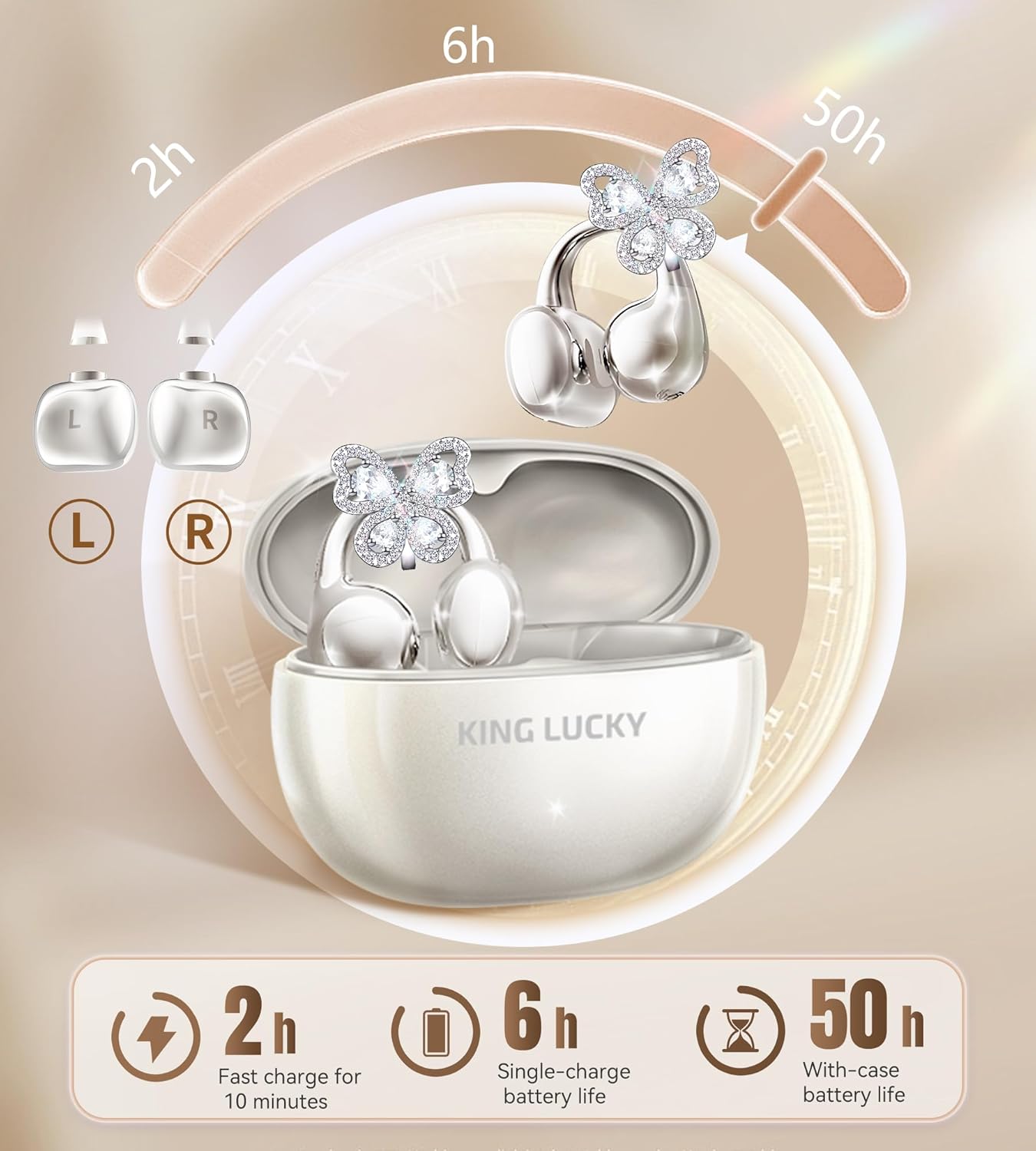
Image: Diagram illustrating the charging case, earbuds, and battery life specifications (6 hours single charge, 50 hours with case).
4.2 Bluetooth -parring
- Tænd: Åbn opladningsetuiet. Ørepropperne tændes automatisk og går i parringstilstand.
- Aktiver Bluetooth: Aktiver Bluetooth på din enhed (smartphone, tablet osv.).
- Vælg enhed: Søg efter "King Lucky i121" in the list of available Bluetooth devices and select it to connect.
- Bekræftelse: Når der er oprettet forbindelse, hører du en lydmeddelelse, og indikatorlampen på ørepropperne skifter.
Ørepropperne genopretter automatisk forbindelse til den sidst parrede enhed, når de tages ud af etuiet, hvis Bluetooth er aktiveret på enheden.
4.3 Sådan tager du ørepropperne på
The i121 earbuds are designed for an open-ear, clip-on fit. Ensure correct placement for optimal sound and comfort.
- Identificér venstre/højre: The earbuds are marked 'L' for left and 'R' for right.
- Placering: Gently place the earbud onto your ear, ensuring the clip rests securely on the outer ear cartilage. The sound outlet should be positioned near your ear canal without entering it.
- Juster for komfort: The ear clips are designed to be flexible. Adjust them slightly to find a secure and comfortable fit.

Image: Step-by-step visual guide on correctly wearing the clip-on earbuds and attaching the decorative elements.
4.4 Attaching/Detaching Decorative Ear Clips
The i121 earbuds come with detachable decorative ear clips, allowing you to customize their appearance.
- At fastgøre: Align the decorative clip with the designated slot on the earbud's clip-on structure. Gently press until it clicks into place.
- For at frakoble: Carefully pull the decorative clip away from the earbud's clip-on structure. Avoid excessive force.

Image: Visual instructions demonstrating the process of attaching and detaching the butterfly decorative elements from the earbuds.
5. Betjeningsvejledning
The King Lucky i121 earbuds feature touch controls for various functions.

Image: Diagram illustrating the touch control functions for the King Lucky i121 earbuds.
| Handling | Funktion (venstre øreprop) | Funktion (højre øreprop) |
|---|---|---|
| Tryk på x1 | Answer Call / Volume Down | Answer Call / Volume Up |
| Tryk på x2 | End Call / Play/Pause Music | End Call / Play/Pause Music |
| Tryk på x3 | Aktivér stemmeassistent (Siri, Google Assistant) | Spiltilstand |
| Long Press 2" | Reject Call / Previous Track | Reject Call / Next Track |
| Tryk på x5 | Fabriksindstilling | |
5.1 Tænd/sluk
- Tænd: Åbn opladningsetuiet, og øretelefonerne tænder automatisk.
- Sluk: Sæt ørepropperne tilbage i opladningsetuiet, og luk låget. De slukker automatisk og begynder at oplade.
6. Funktioner og teknologi
6.1 Open-Ear Design for Comfort and Awareness
The i121 earbuds utilize an open-ear, clip-on design that rests on the outer ear, avoiding insertion into the ear canal. This design provides pressure-free comfort for extended wear and allows you to remain aware of your surroundings while listening to audio.

Image: Comparison diagram highlighting the comfort and stability of the C-shaped bridge design compared to traditional clip-on, drop earring, and bone conduction designs.
6.2 High-Quality Audio with 12mm Drivers
Equipped with 12mm drivers, these earbuds deliver clear audio with deep bass and crisp highs. The directional audio transmission minimizes sound leakage, providing a more private listening experience while maintaining situational awareness.

Billede: Eksploderet view diagram of the 12mm driver, illustrating its components for immersive sound.

Image: Diagram explaining dual sound wave directional transmission, showing how sound is directed to the ear and leakage is minimized.
6.3 Clear Calls with ENC Noise-Canceling Microphones
The integrated ENC (Environmental Noise Cancellation) microphones work to reduce background noise, ensuring clear voice calls even in noisy environments.
6.4 IPX5 vandtæthed
With an IPX5 water resistance rating, the earbuds are protected against sweat and light rain, making them suitable for workouts and outdoor activities.

Image: Graphic highlighting the IPX5 water resistance feature of the earbuds, showing them protected from water splashes.
7. Vedligeholdelse
- Rensning: Brug en blød, tør klud til at rengøre ørepropperne og opladningsetuiet. Brug ikke slibende rengøringsmidler, og læg dem ikke i vand.
- Opbevaring: When not in use, store the earbuds in their charging case to protect them and maintain battery life. Store in a cool, dry place.
- Undgå ekstreme temperaturer: Do not expose the earbuds to extreme heat or cold, as this can damage the battery and internal components.
8. Fejlfinding
- Ørepropper parrer ikke:
- Sørg for, at ørepropperne er opladet.
- Sluk Bluetooth på din enhed, og tænd den igen.
- Perform a factory reset (Tap x5 on either earbud).
- Prøv at parre med en anden enhed for at udelukke enhedsspecifikke problemer.
- Kun én øreprop virker:
- Placer begge ørepropper tilbage i opladningsetuiet, luk låget, og åbn det derefter igen.
- Sørg for, at begge øretelefoner er opladet.
- Udfør en fabriksnulstilling.
- Lav lydstyrke eller dårlig lydkvalitet:
- Juster lydstyrken på både din enhed og ørepropperne.
- Ensure the earbuds are worn correctly and securely on your ears.
- Check for any obstructions on the sound outlets.
- Øretelefoner oplader ikke:
- Sørg for, at opladningskablet er korrekt tilsluttet til både etuiet og strømkilden.
- Kontroller, om opladningsporten på etuiet er ren og fri for snavs.
- Prøv et andet opladningskabel eller en anden strømadapter.
9. Specifikationer
| Feature | Detalje |
|---|---|
| Modelnummer | i121 |
| Bluetooth version | 5.4 |
| Vandmodstandsvurdering | IPX5 |
| Spilletid for enkelt ørepropper | Op til 6 timer |
| Samlet spilletid (med etui) | Op til 50 timer |
| Earbud vægt | 5.2 g (pr. øretelefon) |
| Driver størrelse | 12 mm |
| Mikrofon | ENC Noise-Canceling |
| Opladningsport | Type-C |
10. Sikkerhedsoplysninger
- Produktet må ikke skilles ad eller modificeres.
- Keep away from water and high humidity, except for the specified IPX5 resistance.
- Undgå langvarig eksponering for høje lydstyrker for at forhindre høreskader.
- Opbevares utilgængeligt for børn og kæledyr.
- Bortskaf produktet ansvarligt i henhold til lokale regler.
11. Garanti og support
King Lucky offers a 100-Day Return Guarantee for this product. For further assistance, please refer to the contact information provided in your purchase documentation or visit the official King Lucky support webwebsted.
For warranty claims or technical support, please contact King Lucky customer service with your purchase details.


