1. Introduktion
Thank you for choosing the Ewent EW3295 Backlit Wireless Keyboard. This full-size keyboard offers versatile connectivity options, including Bluetooth 5.0 and 2.4GHz wireless, allowing you to connect up to three devices simultaneously. Its slim design, silent keys, and adjustable backlight provide a comfortable and efficient typing experience. This manual provides detailed instructions for setup, operation, and maintenance to ensure optimal performance of your keyboard.

Figure 1.1: Slim and sturdy design of the EW3295 keyboard.
2. Nøglefunktioner
- Wireless Multi-Device Connection: Connect up to 3 devices simultaneously via Bluetooth 5.0 (x2) or wireless 2.4 GHz. Easily switch between devices with just one button.
- Justerbar baggrundsbelysning: The keyboard's backlight is dimmable and can be turned off completely, ideal for various lighting conditions.
- Flat & Quiet Design: Flat, silent keys ensure a comfortable and low-noise typing experience, suitable for quiet environments.
- 12 multimedietaster: Quick access to functions like volume control, email, and other operations.
- Langtidsholdbart genopladeligt batteri: Equipped with a 300mAh lithium battery and intelligent energy-saving function for extended use.
- Bred kompatibilitet: Compatible with Windows (XP, 7, 8.1, 10, 11) and Android, suitable for PCs, laptops, and tablets.
- Robust og holdbart design: Made of high-density polycarbonate, lightweight yet durable, with a compact design.
- Italian Layout: Features an Italian QWERTY keyboard layout.
3. Pakkens indhold
Kontroller venligst pakkens indhold ved udpakning:
- Ewent EW3295 Backlit Wireless Keyboard
- USB-A 2.4GHz Wireless Receiver
- USB-C til USB-A opladerkabel
- Brugervejledning (dette dokument)
4. Opsætningsvejledning
4.1 Opladning af tastaturet
The EW3295 keyboard is equipped with a built-in rechargeable 300mAh lithium battery. Before first use, it is recommended to fully charge the keyboard.
- Locate the USB Type-C charging port on the rear panel of the keyboard.
- Connect one end of the provided USB-C charging cable to the keyboard's USB-C port.
- Connect the other end of the USB-A cable to a USB power source (e.g., computer USB port, USB wall adapter).
- The charging indicator light (if present) will illuminate during charging and turn off when fully charged. A full charge takes less than 1 hour and provides over 1 month of use.

Figure 4.1: Rear panel of the keyboard with charging port and receiver compartment.
4.2 Tilslutning af tastaturet
The EW3295 keyboard supports three connection modes: 2.4GHz wireless and two Bluetooth 5.0 channels (BT1, BT2). You can connect up to three devices and switch between them.
4.2.1 2.4 GHz trådløs forbindelse
- Locate the USB-A wireless receiver, typically stored in a compartment on the rear panel of the keyboard.
- Sæt USB-A-modtageren i en ledig USB-port på din computer eller enhed.
- Tryk på Fn + 1 keys on the keyboard to switch to 2.4GHz mode. The indicator light for channel 1 will illuminate.
- Tastaturet burde automatisk oprette forbindelse til din enhed.

Figure 4.2: Ewent EW3295 keyboard and its USB wireless receiver.
4.2.2 Bluetooth-forbindelse (BT1 / BT2)
- Tryk på Fn + 2 keys to select Bluetooth channel 1 (BT1) or Fn + 3 keys to select Bluetooth channel 2 (BT2). The corresponding indicator light will flash, indicating pairing mode.
- Aktiver Bluetooth på din enhed (pc, bærbar computer, tablet) og søg efter nye enheder.
- Select "EW3295" or a similar name from the list of available Bluetooth devices.
- Follow any on-screen prompts to complete the pairing process. Once connected, the indicator light will stop flashing and remain solid.
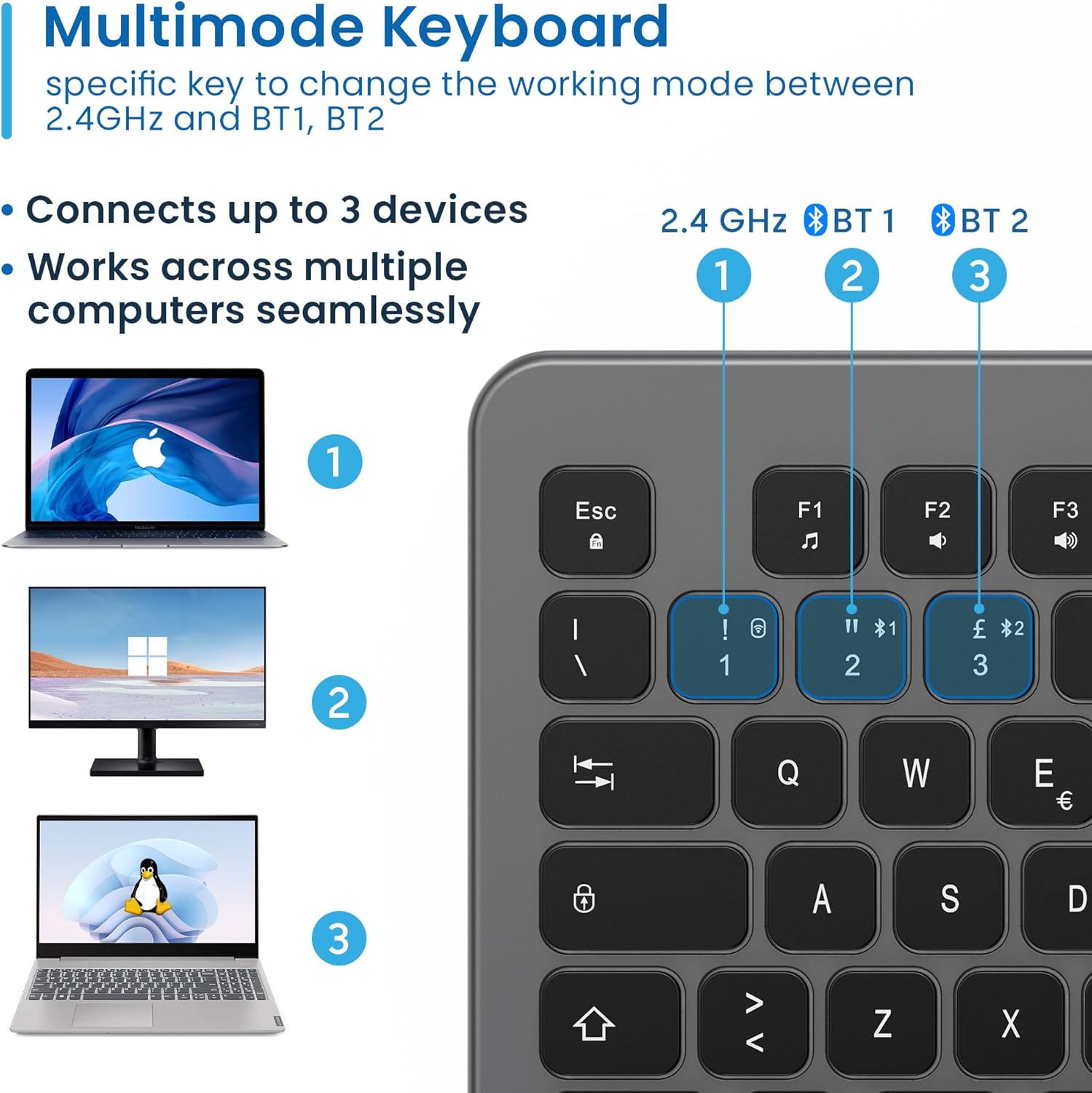
Figure 4.3: Multi-device connectivity options for the EW3295 keyboard.
4.2.3 Skift mellem tilsluttede enheder
Once multiple devices are paired, you can easily switch between them:
- Trykke Fn + 1 to switch to the 2.4GHz connected device.
- Trykke Fn + 2 to switch to the Bluetooth 1 connected device.
- Trykke Fn + 3 to switch to the Bluetooth 2 connected device.
5. Betjeningsvejledning
5.1 Grundlæggende skrivning
The EW3295 features a full-size Italian QWERTY layout. Its flat and silent keys provide a comfortable and precise typing experience, reducing noise in quiet environments.

Figure 5.1: Illuminated Italian QWERTY Keyboard Layout.

Figure 5.2: Silent keys for reduced noise.
5.2 Backlight Control
The keyboard features an adjustable backlight for improved visibility in low-light conditions.
- Baggrundslys TIL/FRA: Tryk på Bloc Scorr key (often labeled with a lightbulb icon) to toggle the backlight on or off.
- Backlight Brightness Up: Trykke Fn + Pag ↑ for at øge baggrundsbelysningens lysstyrke.
- Backlight Brightness Down: Trykke Fn + Pag ↓ for at mindske baggrundsbelysningens lysstyrke.
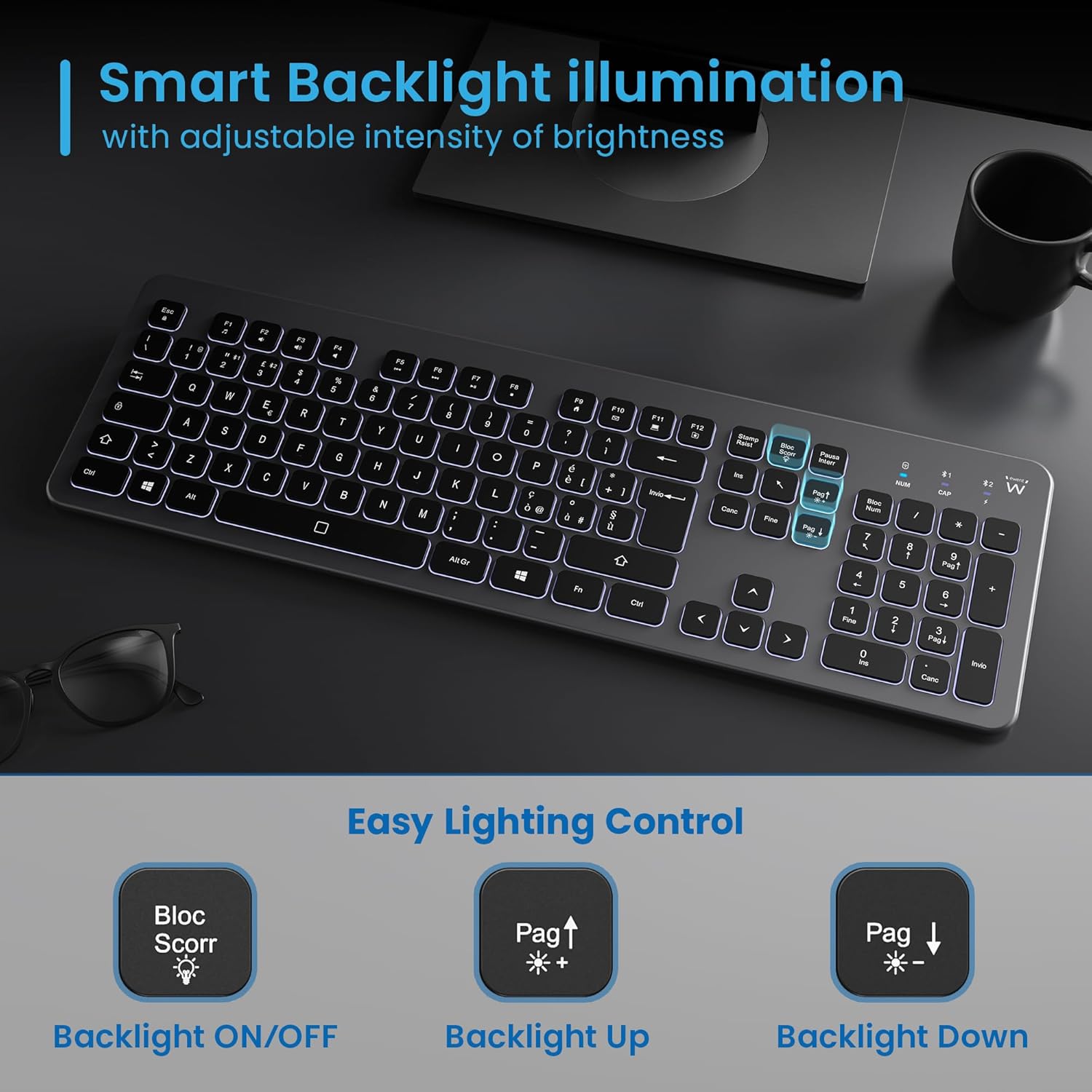
Figure 5.3: Backlight control keys.
5.3 multimedietaster
The keyboard includes 12 dedicated multimedia keys (F1-F12) that provide quick access to various functions. To use these functions, press the Fn tasten samtidigt med den ønskede F-tast.
| Nøglekombination | Fungere |
|---|---|
| Fn + F1 | Medieafspiller |
| Fn + F2 | Lydstyrke ned |
| Fn + F3 | Lydstyrke op |
| Fn + F4 | Stum |
| Fn + F5 | Forrige spor |
| Fn + F6 | Næste spor |
| Fn + F7 | Afspil/pause |
| Fn + F8 | Stop |
| Fn + F9 | Hjemmeside |
| Fn + F10 | |
| Fn + F11 | Min computer |
| Fn + F12 | Kalkulator |
6. Vedligeholdelse og pleje
Korrekt vedligeholdelse sikrer dit tastaturs levetid og optimale ydeevne.
- Rensning: Use a soft, dry, lint-free cloth to clean the keyboard surface. For stubborn dirt, slightly dampRengør kluden med vand eller et mildt, ikke-slibende rengøringsmiddel. Undgå for meget fugt.
- Undgå væsker: Do not spill liquids on the keyboard. In case of accidental spills, immediately disconnect the keyboard and allow it to dry completely before re-using.
- Opbevaring: Når tastaturet ikke er i brug i længere perioder, skal det opbevares køligt og tørt, væk fra direkte sollys og ekstreme temperaturer.
- Batteripleje: To prolong battery life, avoid fully discharging the battery frequently. Charge the keyboard when the low battery indicator appears.
- Modtageropbevaring: When transporting the keyboard, store the USB wireless receiver in its dedicated compartment on the rear panel to prevent loss.
7. Fejlfinding
If you encounter issues with your EW3295 keyboard, please refer to the following common solutions:
| Problem | Mulig årsag | Løsning |
|---|---|---|
| Keyboard not responding (2.4GHz) | Low battery; Receiver not plugged in; Incorrect channel selected. | Charge the keyboard; Ensure USB receiver is securely plugged in; Press Fn + 1 to select 2.4GHz mode. |
| Tastaturet svarer ikke (Bluetooth) | Low battery; Bluetooth not enabled on device; Not paired; Incorrect channel selected. | Charge the keyboard; Enable Bluetooth on your device; Re-pair the keyboard (see Section 4.2.2); Press Fn + 2 or Fn + 3 to select the correct Bluetooth channel. |
| Baggrundslys virker ikke | Baggrundsbelysningen er slukket; Lavt batteri. | Trykke Bloc Scorr to turn on/off; Increase brightness with Fn + Pag ↑; Charge the keyboard. |
| Tasterne er klæbrige eller reagerer ikke | Dirt or debris under keys; Physical damage. | Clean the keyboard (see Section 6); If physical damage, contact support. |
| Kort batterilevetid | Hyppig brug af baggrundsbelysning; Batteriforbrug over tid | Reduce backlight brightness or turn it off when not needed; Ensure full charge cycles. |
8. Specifikationer
| Feature | Detalje |
|---|---|
| Modelnavn | Tastiera Wireless Retroilluminata EW3295 |
| Varemodelnummer | EW3295 |
| Mærke | Ewent |
| Forbindelsesteknologi | Bluetooth 5.0 (x2), 2.4GHz Wireless |
| Tastaturbeskrivelse | Multimedia, Full-size, Italian Layout |
| Kompatible enheder | PC (Windows XP, 7, 8.1, 10, 11), Android |
| Batteritype | Genopladeligt 300mAh lithiumbatteri |
| Baggrundsbelysning | Justerbar intensitet |
| Dimensioner (L x B x H) | Ca.. 432mm x 122mm x 22mm |
| Vægt | Ca. 390 g |
| Materiale | High-density Polycarbonate |

Figure 8.1: Keyboard dimensions and weight.
9. Garantioplysninger
Ewent products are designed and manufactured to the highest quality standards. This product is covered by a limited warranty from the date of purchase. Please refer to the warranty card included with your product or visit the official Ewent website for detailed warranty terms and conditions specific to your region. The warranty typically covers defects in materials and workmanship under normal use.
10. Kundesupport
For technical support, troubleshooting assistance, or any questions regarding your Ewent EW3295 keyboard, please contact Ewent customer support. You can typically find contact information (phone, email, support portal) on the official Ewent webwebsted eller i produktemballagen.
Please have your product model number (EW3295) and purchase details ready when contacting support.


