1. Introduktion
This manual provides detailed instructions for the installation, operation, and maintenance of your UNITOPSCI 2G+64G Android Car Stereo Radio. Please read this manual thoroughly before installation and use to ensure proper function and safety.
The UNITOPSCI 2G+64G Android Car Stereo Radio is an advanced in-dash multimedia system featuring a 7-inch capacitive touchscreen, Android 13 operating system, 2GB RAM, and 64GB ROM. It integrates wireless CarPlay, Android Auto, GPS navigation, Bluetooth, FM/RDS radio, and supports a backup camera and steering wheel controls.
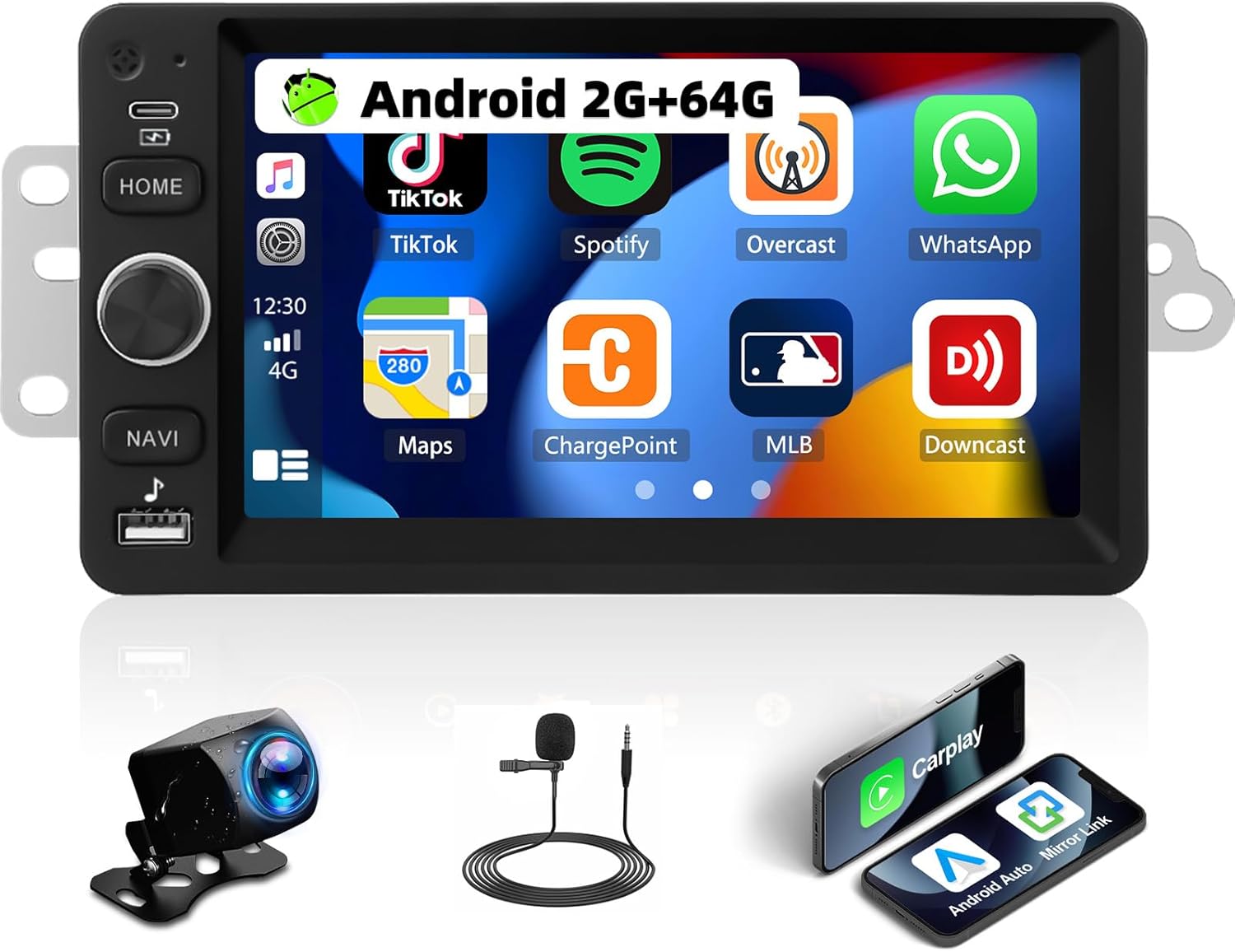
Image 1.1: UNITOPSCI 2G+64G Android Car Stereo Radio and included components.
2. Køretøjskompatibilitet
This Android car stereo is designed to fit specific vehicle models. Please verify your vehicle's compatibility before proceeding with installation.
- Chevy Chevrolet: Silverado, SSR, Tahoe (2003-2006)
- GMC: Siera, Yukon (2003-2006)
- Hummer: (2003-2006)
It is recommended to measure the size and shape of your original radio in the car's center console to confirm fitment.

Image 2.1: Visual comparison of a vehicle's dashboard before and after installing the UNITOPSCI car stereo.

Image 2.2: Detailed list of compatible Chevrolet, GMC, Hummer, Isuzu, Oldsmobile, Saturn, Pontiac, Buick, and Cadillac models and their respective years.
Special Note for Bose Audio System Owners:
If your vehicle is factory-equipped with a Bose premium audio system, a high-end wiring harness and a Bose-specific CANBUS decoder are required for proper function of all features, including the audio system and steering wheel controls. Consult with a professional or the manufacturer for accessory recommendations if unsure.
3. Opsætning og installation
3.1. Pakkens indhold
Bekræft at alle komponenter er til stede i pakken:
- Android Car Stereo Unit
- Strømkabler
- RCA-kabel
- Bagkamera indgangskabel
- Kamera
- GPS antenne
- Canbus kasse
- USB-kabel(er)
- Small Horn (External Microphone)
- Antenne adapter
- Radio Antenne
- Brugermanual

Image 3.1: Illustration of all items included in the product package.
3.2. Ledningsdiagram
Refer to the following diagrams for correct wiring connections. Incorrect wiring can damage the unit or vehicle electronics.

Image 3.2: Comprehensive wiring diagram illustrating connections for power, RCA, USB, camera, GPS, and CANBUS.
- Strømkabel: Tilsluttes køretøjets strømforsyning (ACC, B+, GND).
- RCA-kabel: For audio output (FR OUT, FL OUT, RR OUT, RL OUT, SUBWOOFER) and auxiliary input (AUX IN L/R), video output (VIDEO OUT), and camera input (CVBS IN).
- USB-kabel: Til tilslutning af USB-enheder.
- Indgangskabel til bagkamera: Connects the backup camera.
- GPS-antenne: Monter på et sted med frit view af himlen for optimal signalmodtagelse.
- Canbus-boks: Connect for vehicle data communication, especially for steering wheel controls and vehicle information.
- Radioantenne: Tilslut for FM/AM-radiomodtagelse.
Vigtige monteringsbemærkninger:
- Sørg for, at alle forbindelser er sikre for at forhindre periodiske problemer.
- If your vehicle does not provide an Ignition (IGN) wire, a manual switch may be required to power the unit.
- For vehicles with complex wiring or premium sound systems, professional installation is recommended.
4. Betjeningsvejledning
4.1. Grundlæggende betjening
- Tænd/sluk: Press and hold the power button (usually labeled HOME or a dedicated power icon) to turn the unit on or off. A short press typically mutes or returns to the home screen.
- Lydstyrkekontrol: Use the physical knob or on-screen controls to adjust the audio volume.
- Touchskærm: The 7-inch capacitive touchscreen responds to touch gestures for navigation and control.
4.2. Trådløs CarPlay og Android Auto
Connect your smartphone wirelessly to access navigation, music, calls, and messages through the car stereo interface.
- Sørg for, at Bluetooth og Wi-Fi er aktiveret på din smartphone.
- Vælg CarPlay- eller Android Auto-appen på bilstereoen.
- Følg vejledningen på skærmen for at parre din enhed.
- Voice control functions (Siri for CarPlay, Google Assistant for Android Auto) are supported.

Image 4.1: Demonstrates the user interfaces for Wireless CarPlay, Android Auto, and Mirror Link functionality.
4.3. Spejllink
Mirror your smartphone screen to the car stereo display for video and map viewing.
- Compatible with both Android and iOS devices.
- Access the Mirror Link application on the stereo and follow the pairing instructions.
4.4. WiFi and GPS Navigation
The unit features built-in WiFi and GPS for online and offline navigation.
- WiFi: Connect to a Wi-Fi hotspot to access online functions such as streaming videos (YouTube), online TV, music, and downloading applications.
- GPS: Preloaded with free offline maps. Connect to Wi-Fi to download updated maps via applications like Here WeGo. Supports online real-time navigation.

Image 4.2: Displays the interfaces for WiFi connectivity, GPS navigation, FM/RDS radio, and the audio equalizer settings.
4.5. Bluetooth
Enable hands-free calling and audio streaming via Bluetooth.
- Par din telefon med stereoanlægget via Bluetooth-indstillingerne.
- Supports hands-free calling, Bluetooth audio streaming, and automatic phone book download.
- An external microphone can be added for improved call quality.
4.6. FM/RDS-radio
Enjoy radio broadcasts with 18 preset stations.
- Tune to your preferred FM stations.
- RDS (Radio Data System) giver yderligere oplysninger som stationsnavn og sangtitel, hvor det er muligt.
4.7. EQ Audio Settings
Tilpas din lydoplevelse med den indbyggede equalizer.
- Adjust various frequency bands to match your audio preferences.
- Pre-set EQ modes may also be available.
4.8. Split Screen-funktionalitet
Display two applications simultaneously on the screen.
- F.eksampBrug navigation på den ene side og musikafspilning på den anden.
- Easily switch between applications.

Image 4.3: Illustrates the Bluetooth interface, split-screen mode, various UI themes, and the clarity of the HD touchscreen.
4.9. Bakkamera
The system supports a backup camera for safer parking.
- Automatically switches to the clear reversing image when the vehicle is in reverse.
- The included camera features a 170-degree wide viewing angle, night vision, and is waterproof.

Image 4.4: Shows the clear reversing image from the backup camera and the interface for setting up steering wheel controls.
4.10. Ratbetjening (SWC)
Configure your vehicle's steering wheel buttons to control the stereo functions.
- Access the SWC settings menu on the stereo.
- Follow the on-screen instructions to map functions (e.g., volume, track skip, mode) to your steering wheel buttons.
4.11. Videoudgang
Share video content with rear-seat passengers.
- The unit can work with a headrest monitor to display the same video content.
- A USB video output box may be required (not included).

Image 4.5: Depicts the video output feature, allowing rear-seat passengers to view content on separate monitors.
4.12. Multiple UI Themes
Personalize the stereo's appearance with various user interface themes.
- Choose from 26 available UI themes to match your preference.
5. Vedligeholdelse
For at sikre din bilstereos levetid og optimale ydeevne skal du følge disse vedligeholdelsesretningslinjer:
- Rensning: Brug en blød, tør klud til at rengøre berøringsskærmen og enhedens yderside. Undgå slibende rengøringsmidler eller opløsningsmidler.
- Softwareopdateringer: Periodically check for and install software updates provided by UNITOPSCI to enhance features and improve stability.
- Miljøforhold: Undgå at udsætte enheden for ekstreme temperaturer, direkte sollys i længere perioder eller for høj fugtighed.
- Kabelstyring: Sørg for, at alle kabler er korrekt ført og fastgjort for at forhindre skader fra vibrationer eller fastsætning.
6. Fejlfinding
If you encounter issues with your UNITOPSCI car stereo, refer to the following common problems and solutions:
6.1. Ingen strøm
- Tjek strømforbindelser: Ensure the power cable is securely connected to the vehicle's power supply (ACC, B+, GND).
- Vehicle Fuse: Inspect the vehicle's fuse box for any blown fuses related to the radio or accessory power.
- Tændledning: If your vehicle lacks a dedicated IGN wire, verify that any custom wiring for ignition is correctly implemented.
6.2. Ingen lyd
- Højttalerforbindelser: Verify that all speaker wires are correctly connected to the stereo and the vehicle's speaker harness.
- Lydstyrke: Sørg for, at lydstyrken ikke er slået fra eller indstillet til et meget lavt niveau.
- Bose-system: If your vehicle has a Bose audio system, confirm that the correct wiring harness and CANBUS decoder are installed.
- Lydkilde: Check if the correct audio source (e.g., Radio, Bluetooth, CarPlay) is selected.
6.3. Ratbetjening virker ikke
- CANBUS-forbindelse: Ensure the CANBUS box is correctly connected and configured in the stereo's settings.
- SWC Learning: Re-perform the steering wheel control learning process in the stereo's settings menu.
- Køretøjskompatibilitet: Confirm that your vehicle's steering wheel control system is compatible with the stereo's CANBUS.
6.4. Problemer med GPS-signalet
- Antenneplacering: Ensure the GPS antenna is mounted in a location with an unobstructed view af himlen.
- Antenneforbindelse: Check that the GPS antenna is securely connected to the stereo.
- Map Data: Verify that offline maps are downloaded and up-to-date, or that a stable internet connection is available for online maps.
6.5. Berøringsskærmen reagerer ikke
- Genstart enhed: Try restarting the car stereo.
- Rens skærm: Sørg for, at skærmen er ren og fri for snavs eller fugt.
Ved vedvarende problemer bedes du kontakte kundesupport.
7. Specifikationer
| Feature | Detalje |
|---|---|
| Model | 2G+64G Android bilstereo |
| Operativsystem | Android 13 |
| VÆDDER | 2 GB |
| ROM | 64 GB |
| Skærmstørrelse | 7 tommer |
| Skærmopløsning | 1024*600 |
| Forbindelsesteknologi | Bluetooth, WiFi |
| Særlige funktioner | Wireless CarPlay, Android Auto, Mirror Link, Built-in GPS, FM/RDS Radio, EQ Audio, Split Screen, Backup Camera Support, Steering Wheel Control |
| Lydudgangstilstand | Stereoanlæg |
| Monteringstype | Dashboard montering |
| Varens vægt | 0.634 ounce |
| Pakkedimensioner | 13.54 x 9.06 x 4.25 tommer |
8. Garantioplysninger
The UNITOPSCI 2G+64G Android Car Stereo Radio comes with a 1 års garanti from the date of purchase. Additionally, a replacement is available within 24 months for eligible issues.
This warranty covers manufacturing defects and malfunctions under normal use. It does not cover damage caused by improper installation, misuse, accidents, unauthorized repairs, or external factors.
Gem venligst dit købsbevis for garantikrav.
9. Kundesupport
For any questions, technical assistance, or warranty claims, please contact UNITOPSCI customer support:
- E-mail: UNITOPSCI@126.com
- Svartid: Quick responses typically within 16 hours.
- Eftersalgssupport: Livstids eftersalgsrådgivning og teknisk support tilbydes.
- Returnerer: 60-day no-worry return policy.


