1. Introduktion
This manual provides detailed instructions for the setup, operation, and maintenance of your THOMSON Bluetooth Sound Bar (Model B210-black). Please read this manual thoroughly before using the product to ensure proper functionality and to maximize your audio experience.
2. Produktet er slutview
2.1. Nøglefunktioner
- Immersive 3D Sound & Deep Bass: 100W sound bar with 4 full-range speakers and 2 bass diaphragms for room-filling 3D surround sound.
- Bluetooth 5.3-forbindelse: Stable wireless streaming for audio from phones, tablets, and TVs.
- Alsidige forbindelsesmetoder: Supports Bluetooth, USB, AUX, Optical, and ARC inputs.
- Personalized Audio Modes: Three EQ modes (Music, Movie, Game) to optimize listening experience.
- Dobbelt kontrolmuligheder: Operate via the included remote control or the integrated touch screen on the sound bar.
2.2. Pakkens indhold
Sørg for at alle varer er til stede i pakken:
- THOMSON Bluetooth Sound Bar (Model B210-black)
- Fjernbetjening
- Strømadapter
- Brugervejledning (dette dokument)
- Audio Cables (e.g., Optical, AUX, HDMI ARC - check packaging for specific types)
Note: Specific cable types included may vary. Please check your packaging.

Image: THOMSON Bluetooth Sound Bar with its remote control and a smartphone connected via Bluetooth.
3. Opsætning
3.1. Placering
Place the sound bar on a stable, flat surface in front of your TV or mount it on a wall. Ensure there are no obstructions in front of the speakers for optimal sound delivery.

Image: Proper placement of the sound bar below a television, demonstrating remote control usage.
3.2. Tilslutning til strøm
- Connect the power adapter to the DC IN port on the back of the sound bar.
- Sæt den anden ende af strømadapteren i en stikkontakt.
3.3. Lydforbindelser
The sound bar supports multiple audio input options. Choose the connection method that best suits your device.

Image: Rear panel connections of the sound bar, highlighting AUX, Optical, HDMI ARC, USB, and power input ports.

Image: The sound bar's compatibility with various devices such as projectors, PCs, game consoles, and smartphones.
- HDMI ARC: For optimal audio quality and control with your TV. Connect an HDMI cable from the sound bar's ARC port to your TV's HDMI ARC port. This allows you to control the sound bar volume with your TV remote.
- Optisk: Connect an optical cable from the sound bar's OPTICAL port to your TV's optical output.
- AUX: Connect a 3.5mm audio cable from the sound bar's AUX port to your device's audio output.
- USB: Indsæt et USB-drev i USB-porten for at afspille lyd files direkte.
- Bluetooth: For wireless connection to Bluetooth-enabled devices. (See Section 4.1 for details).
4. Betjeningsvejledning
4.1. Bluetooth-forbindelse
- Tænd for soundbaren.
- Press the "MODE" button on the remote or the touch panel until "BT" (Bluetooth) mode is selected.
- Aktiver Bluetooth på din enhed (smartphone, tablet, TV) og søg efter tilgængelige enheder.
- Select "THOMSON Sound Bar" from the list.
- Once paired, the sound bar will indicate a successful connection.

Image: Demonstrating Bluetooth connectivity for streaming audio from a smartphone to the sound bar.
4.2. Selecting Input Modes
Press the "MODE" button on the remote control or the touch panel on the sound bar to cycle through available input modes: Bluetooth, USB, AUX, Optical, and ARC.
4.3. Audio Equalizer (EQ) Modes
The sound bar features three preset EQ modes to optimize your listening experience:
- Musiktilstand: Enhances musical clarity and bass.
- Filmtilstand: Optimizes dialogue and special effects for cinematic immersion.
- Spiltilstand: Provides dynamic sound for gaming.
Press the "EQ" button on the remote control to switch between these modes.

Image: Visual representation of the sound bar's Music, Movie, and News (or Game) EQ modes.
4.4. Lydstyrkekontrol
- Use the Volume Up (+) and Volume Down (-) buttons on the remote control or the touch panel.
- In ARC mode, you may be able to control the sound bar volume using your TV's remote control.
- To mute the sound instantly, press the Mute button on the remote control.
5. Vedligeholdelse
- Rensning: Brug en blød, tør klud til at rengøre overfladen på soundbaren. Brug ikke flydende rengøringsmidler eller slibende materialer.
- Opbevaring: Hvis du opbevarer soundbaren i længere tid, skal du afbryde strømmen til den og opbevare den et køligt og tørt sted.
- Undgå fugt: Hold soundbaren væk fra vand og høj luftfugtighed.
6. Fejlfinding
| Problem | Mulig årsag | Løsning |
|---|---|---|
| Ingen strøm | Strømkabel ikke tilsluttet; Strømudtag ikke aktivt. | Sørg for, at strømkablet er korrekt tilsluttet. Prøv en anden stikkontakt. |
| Ingen lyd | Incorrect input mode selected; Volume too low; Audio cable not connected properly. | Select the correct input mode (e.g., ARC, Optical, Bluetooth). Increase volume. Check audio cable connections. |
| Bluetooth-parring mislykkedes | Soundbaren er ikke i parringstilstand; Enheden er for langt væk; Interferens. | Ensure sound bar is in Bluetooth mode. Move device closer. Restart both devices. |
| Fjernbetjening virker ikke | Batteries depleted; Obstruction between remote and sound bar. | Replace remote control batteries. Ensure clear line of sight to the sound bar's sensor. |
7. Specifikationer
| Feature | Detalje |
|---|---|
| Modelnavn | TV Sound Bar (B210-black) |
| Mærke | THOMSON |
| Højttaler type | Sound Bar with 3D audio capabilities |
| Højttalerkonfiguration | 4 Full-Range Speakers, 2 Bass Diaphragms |
| Højttaler Maksimal udgangseffekt | 100W (Total System Power) / 50 Watts (Individual Speaker Output) |
| Forbindelsesteknologi | Bluetooth 5.3, HDMI ARC, Optisk, AUX, USB |
| Produktmål (L x B x H) | 36.5 cm D x 4.7 cm B x 2.9 cm H (ca. 92.7 cm x 11.8 cm x 7.3 cm) |
| Varens vægt | 11 pund |
| Monteringstype | Vægmontering, bordplade |
| Inkluderede komponenter | Fjernbetjening |
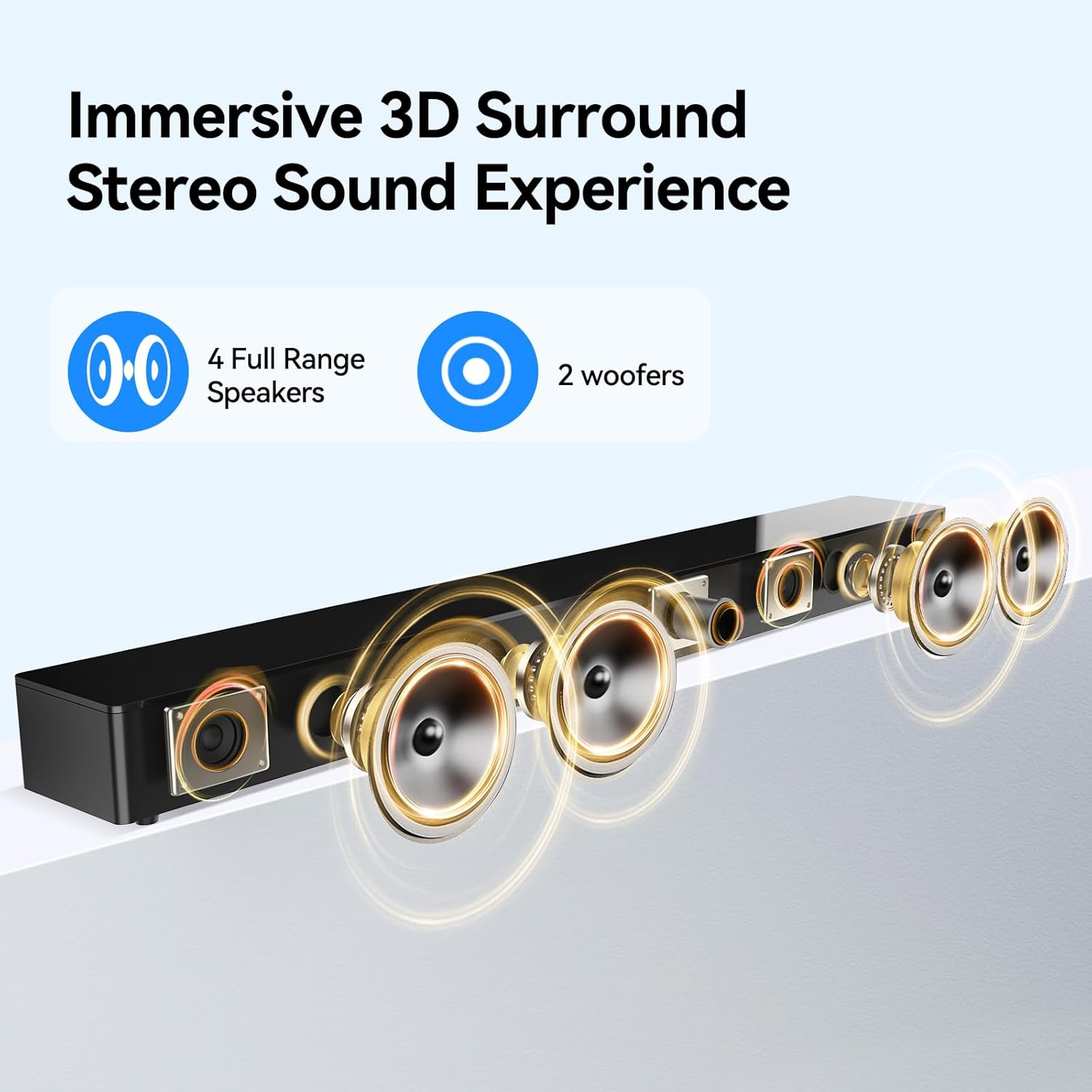
Image: Internal speaker configuration with 4 full-range speakers and 2 woofers.
8. Garanti og support
For warranty information and technical support, please refer to the warranty card included with your product or contact THOMSON customer service. Keep your purchase receipt for warranty claims.
Manufacturer: Maxtalent Manufacturer for THOMSON


