1. Introduktion
This manual provides essential information for the safe and efficient operation of your DOOGEE Blade10 Energy rugged smartphone. Please read this manual thoroughly before using your device to ensure proper functionality and to prevent damage.
The DOOGEE Blade10 Energy is designed for durability and performance, featuring an Android 15 operating system, an octa-core processor, a 6.56-inch HD+ 90Hz display, a 16MP camera, and IP68/IP69K water and dust resistance.
2. Pakkens indhold
Bekræft at alle varer er til stede i pakken:
- DOOGEE Blade 10 Energy rugged phone
- Type-C USB-kabel
- Oplader
- Tempered Glass Protective Film (Pre-applied)
- Slynge
- Brugermanual
- Garantikort
- Beskyttende etui

Image: Contents of the DOOGEE Blade10 Energy retail package, including the phone, charger, cable, and accessories.
3. Enhedslayout
Familiarize yourself with the physical components of your smartphone.
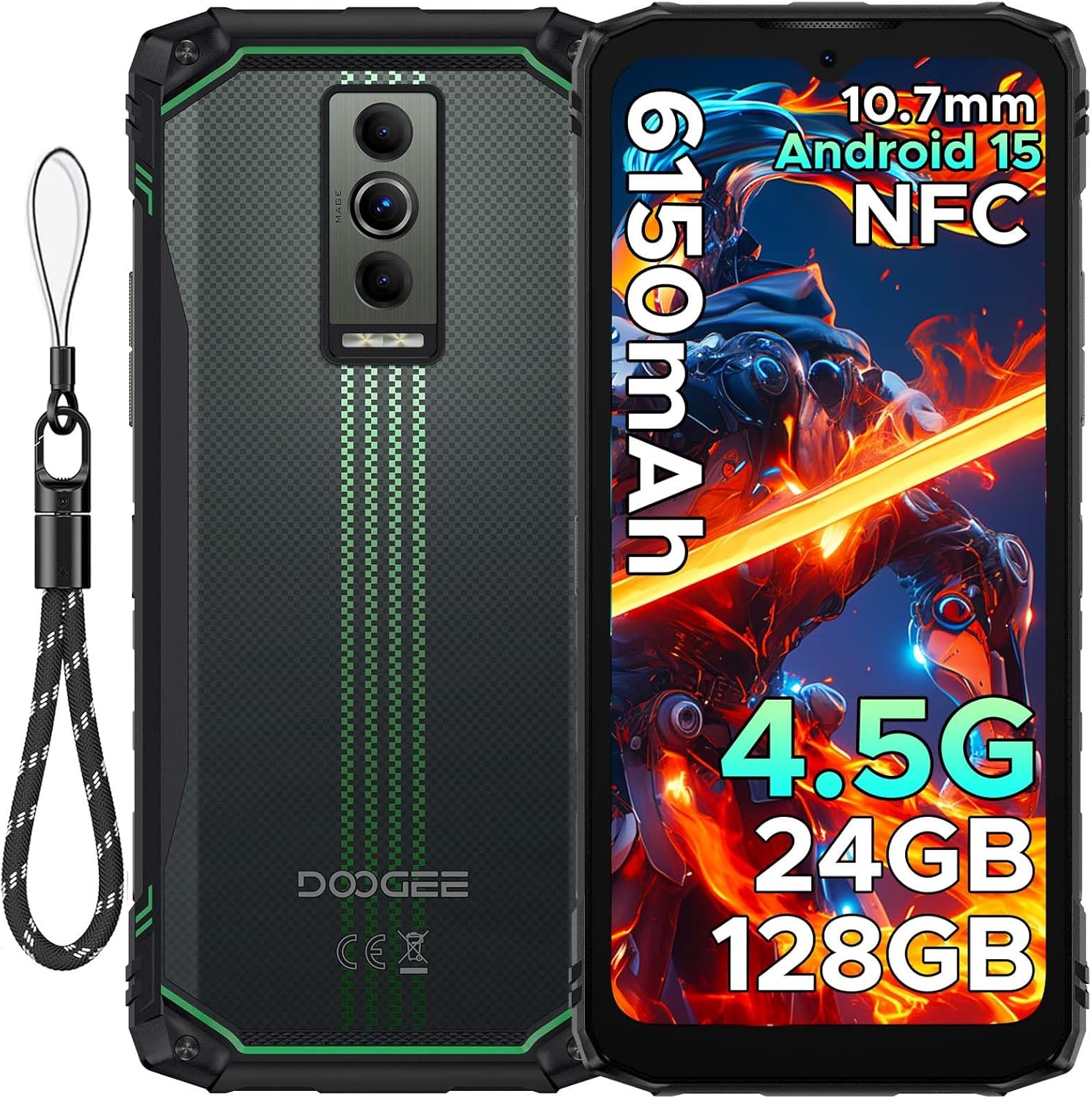
Billede: Foran og bagpå view of the DOOGEE Blade10 Energy smartphone, highlighting the display, cameras, and side buttons.
- Front: 6.56" HD+ Display, 8MP Front Camera
- Bag: 16MP Main Camera, Flashlight
- Sider: Power Button, Volume Buttons, SIM/MicroSD Card Slot, USB Type-C Port
4. Opsætning
4.1. Installation af SIM-kort og MicroSD-kort
- Locate the SIM/MicroSD card slot on the side of the device.
- Brug det medfølgende SIM-kortudløserværktøj til at åbne bakken.
- Carefully place your Nano-SIM cards and/or MicroSD card into the designated slots. Ensure correct orientation.
- Skub forsigtigt bakken tilbage i åbningen, indtil den flugter med telefonens kabinet.

Image: Close-up of the SIM/MicroSD card tray, illustrating the correct placement of cards.
4.2. Første opladning
Before first use, fully charge your device using the provided Type-C USB cable and charger.
- Tilslut Type-C-kablet til telefonens opladningsport.
- Tilslut den anden ende af kablet til opladeren, og sæt derefter opladeren i en stikkontakt.
- Opladningsindikatoren vises på skærmen.

Image: The DOOGEE Blade10 Energy connected to its charger via a Type-C cable.
5. Betjeningsvejledning
5.1. Tænd/sluk og genstart
- Tænd: Tryk og hold tænd/sluk-knappen nede, indtil skærmen lyser.
- Sluk/genstart: Press and hold the Power button until the power options menu appears. Select "Power off" or "Restart".
5.2. Android 15-operativsystem
Your DOOGEE Blade10 Energy runs on Android 15, offering enhanced performance, smarter interactions, and improved privacy features. Navigate through the interface using touch gestures.

Image: Screenshot of the Android 15 home screen and app icons on the DOOGEE Blade10 Energy.
5.3. Skærmfunktioner
The 6.56-inch HD+ display with a 90Hz refresh rate provides a smooth visual experience. Widevine L1 support ensures high-definition streaming content playback.

Image: The DOOGEE Blade10 Energy display showcasing vibrant colors and smooth motion.
5.4. Kamerabetjening
Capture photos and videos using the 16MP rear camera and 8MP front camera. The device also features an underwater shooting mode for aquatic environments.

Image: The DOOGEE Blade10 Energy camera interface, highlighting the underwater shooting mode.
5.5. Sikkerhedsfunktioner
Unlock your phone using Face ID for quick and secure access.

Image: An illustration of the Face ID recognition feature in use on the DOOGEE Blade10 Energy.
5.6. NFC-funktionalitet
The NFC (Near Field Communication) feature allows for contactless payments, data sharing, and card emulation. Enable NFC in your phone's settings to use these functions.

Image: The DOOGEE Blade10 Energy being used for a contactless payment via NFC.
6. Holdbarhedsfunktioner
The DOOGEE Blade10 Energy is built to withstand harsh environments with its IP68/IP69K and MIL-STD-810H certifications.
- IP68/IP69K: Provides dustproof and waterproof protection. The phone can withstand immersion in water up to 1.5 meters deep for 30 minutes.
- MIL-STD-810H: Certificeret til faldmodstand op til 1.5 meter.

Image: The DOOGEE Blade10 Energy shown in various rugged scenarios, highlighting its dustproof, drop-proof, and waterproof design.
Video: This video demonstrates the IP68/IP69K waterproof capabilities of the DOOGEE Blade10 Energy.
7. Batteristyring
The device is equipped with a 6150mAh silicon anode battery for extended usage. It also supports reverse charging.
Image: The DOOGEE Blade10 Energy showcasing its 6150mAh battery and the reverse charging capability with another device.
7.1. Omvendt opladning
To use your phone as a power bank, connect a compatible device to your Blade10 Energy using a USB-C to USB-C cable or a USB-C to the appropriate cable for the other device. Ensure reverse charging is enabled in the settings if it doesn't start automatically.
Video: This video highlights the ultra-thin design and long battery life of the DOOGEE Blade 10 series, including the Blade10 Energy.
8. Forbindelse
- 4.5G dobbelt SIM-kort: Supports dual SIM cards for flexible network usage.
- GPS: Integrated with Beidou, Galileo, GLONASS, and GPS for accurate positioning.
- Wi-Fi: Supports standard Wi-Fi connectivity.
9. Vedligeholdelse
To ensure the longevity and optimal performance of your DOOGEE Blade10 Energy, follow these maintenance guidelines:
- Hold enheden ren ved at tørre den af med en blød, damp klæde. Undgå skrappe kemikalier.
- Ensure all port covers are securely closed when the device is exposed to water or dust.
- Undgå at udsætte enheden for ekstreme temperaturer eller direkte sollys i længere perioder.
- Sikkerhedskopier dine data regelmæssigt for at forhindre tab.
10. Fejlfinding
Hvis du støder på problemer med din enhed, kan du bruge følgende almindelige løsninger:
| Problem | Løsning |
|---|---|
| Enheden tænder ikke | Sørg for, at batteriet er opladet. Tilslut det til opladeren, og vent et par minutter, før du forsøger at tænde det igen. |
| Dårligt netværkssignal | Kontrollér installationen af SIM-kortet. Flyt til et område med bedre netværksdækning. Genstart enheden. |
| Touchscreen reagerer ikke | Restart the device. If the issue persists, perform a factory reset (note: this will erase all data). |
| Batteriet aflades hurtigt | Close unused applications. Reduce screen brightness. Disable unnecessary features like Wi-Fi, Bluetooth, or GPS when not in use. |
11. Specifikationer
| Feature | Detalje |
|---|---|
| Modelnavn | Blade10 Energy |
| Operativsystem | Android 15 |
| CPU model | Mediatek Dimensity 9000 (Octa-Core, 1.8 GHz) |
| VÆDDER | 24 GB (4GB Basic + 20GB Extended) |
| Intern opbevaring | 128 GB |
| Udvidelig opbevaring | Up to 2 TB (MicroSD/TF card) |
| Skærmstørrelse | 6.56 tommer |
| Opløsning | 720 x 1600 (HD+) |
| Opdateringshastighed | 90 Hz |
| Hovedkamera | 16 MP |
| Forreste kamera | 8 MP |
| Batterikapacitet | 6150 mAh |
| Forbindelse | 4.5G Dual SIM, Wi-Fi, NFC |
| Navigation | Beidou, Galileo, GLONASS, GPS |
| Holdbarhed | IP68/IP69K, MIL-STD-810H |
| Dimensioner | 6.45 x 2.98 x 0.33 tommer |
| Vægt | 6.9 ounces (195 gram) |
12. Garanti og support
Your DOOGEE Blade10 Energy comes with a two-year warranty. For technical support or warranty claims, please refer to the contact information provided on the warranty card included in your package or visit the official DOOGEE support webwebsted.
The package includes a Warranty Card and a Service Card for your reference.


