1. Introduktion
The REDRIE HK33 GPS Drone is designed for both adults and beginners, offering advanced features in a lightweight, portable package. Weighing under 250g, it typically does not require FAA registration, providing a hassle-free flying experience. This manual provides essential information for safe and effective operation.
2. Sikkerhedsretningslinjer
Always prioritize safety during drone operation. Failure to follow these guidelines may result in injury or damage to property.
- Tjek før flyvning: Ensure all components are in good working order before each flight.
- Vejrforhold: Avoid flying in strong winds (above Level 5), heavy rain, or fog.
- Synslinje: Hold altid synslinjen i forhold til din drone.
- Begrænsede områder: Do not fly near airports, military bases, power lines, or crowded areas.
- Batterisikkerhed: Use only approved batteries and chargers. Do not overcharge or puncture batteries.
3. Pakkens indhold
Bekræft, at alle nedenstående varer er inkluderet i din pakke:
- REDRIE HK33 Drone x 1
- Fjernbetjening x 1
- Drone Batteries x 2 (1800mAh Lithium Ion)
- USB-opladerkabel x 1
- Reserveblade x 4
- Skruetrækker x 1
- Brugervejledning x 1
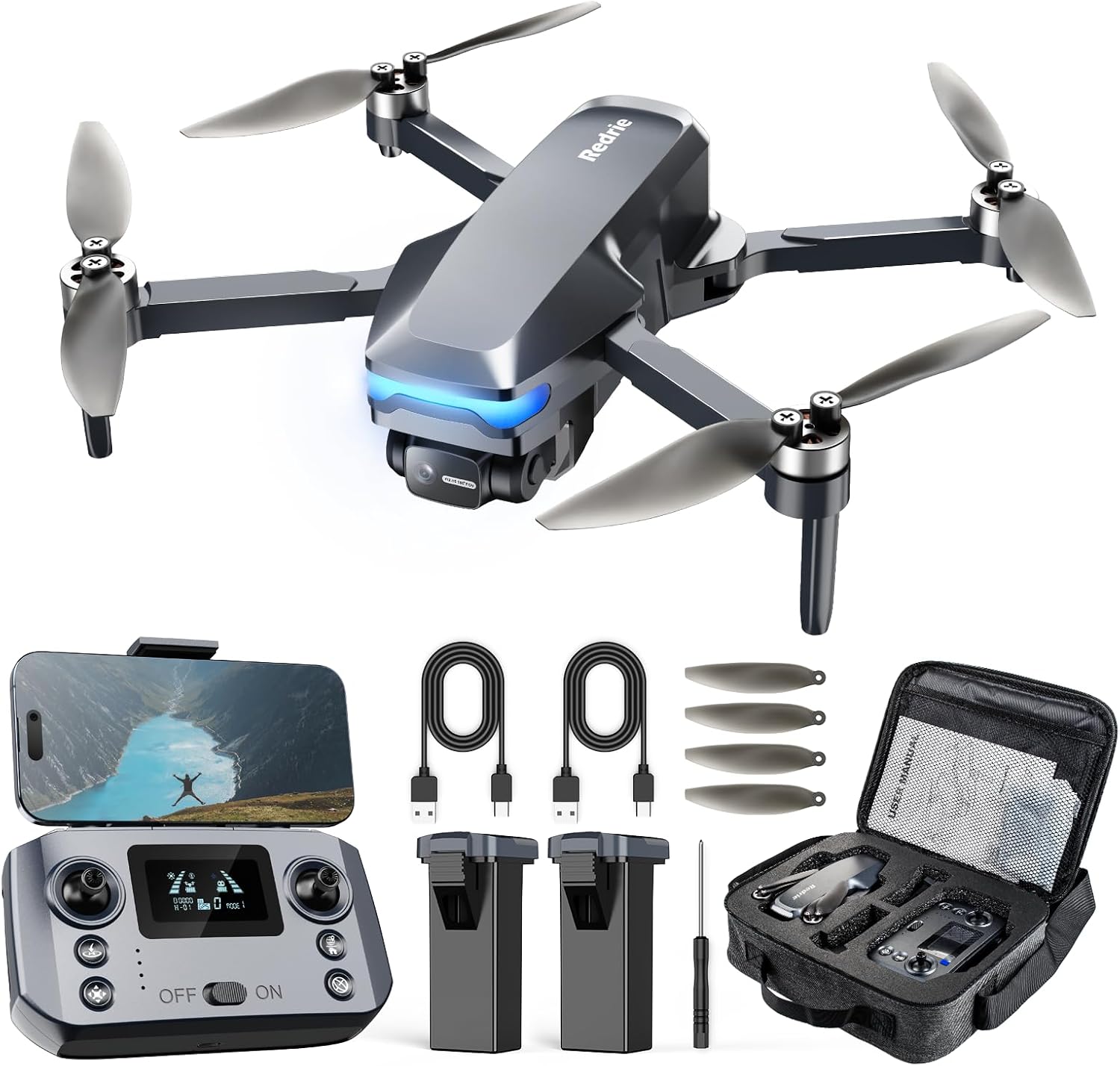
The package includes the foldable HK33 drone, a remote control, two 1800mAh Lithium Ion batteries for extended flight, a USB charging cable, four spare blades, a screwdriver for maintenance, and this user manual. All items are designed for easy portability and quick setup.
4. Opsætning
4.1 Opladning af batterier
Connect the drone batteries to the USB charging cable and plug into a suitable USB power source. The battery indicator lights will show charging status. Ensure both batteries are fully charged before flight.
4.2 Installation af batterier
Insert a fully charged battery into the drone's battery compartment. Ensure it clicks securely into place. For the remote control, ensure it is also charged via its USB port.
4.3 Udfoldning af dronen
Gently unfold the drone arms until they lock into position. Ensure all propellers are free from obstruction and can rotate freely.
4.4 Appinstallation og -forbindelse
Download the dedicated drone control app from your device's app store. Power on the drone and the remote control. Connect your mobile device to the drone's 5G WiFi network. The app will display the live camera feed once connected.

The drone utilizes 5G WiFi for stable FPV video transmission up to 300 meters. The remote controller's built-in repeater extends the maximum flight distance to 500 meters.
5. Betjening af dronen
5.1 Tjekliste før flyvning
- Sørg for, at batterierne til dronen og fjernbetjeningen er fuldt opladet.
- Kontroller, at propellerne er sikkert fastgjort og ubeskadigede.
- Check for clear flight path and suitable weather conditions.
- Confirm successful app connection and live video feed.
- Allow the drone to acquire sufficient GPS satellites for stable flight.
5.2 Takeoff and Landing (One Key Start)
After powering on and connecting, place the drone on a flat, open surface. Press the One Key Start button on the remote control or within the app. The drone will automatically take off and hover at a safe altitude. Press the One Key Landing button to initiate an automatic landing.
5.3 Grundlæggende flyvekontrol
Brug joystickene på fjernbetjeningen til at manøvrere dronen:
- Venstre joystick: Styrer højde (op/ned) og drejning (rotation til venstre/højre).
- Højre joystick: Styrer bevægelse fremad/bagud og venstre/højre bevægelse.
5.4 GPS Intelligent Functions
The HK33 drone features an advanced GPS module for enhanced flight capabilities:
- GPS Auto Return: The drone will automatically return to its takeoff point if the signal is lost, battery is low, or the Auto Return button is pressed.
- GPS-følg: The drone will follow your mobile device's GPS signal, recording your movements.
- Route Planning (Waypoint Fly): Set a custom flight path on the app map, and the drone will fly autonomously along the designated route.
- Cirkelflue: The drone will fly in a circular path around a designated point of interest.

5.5 Kamerabetjening
The drone is equipped with an adjustable 4K camera:
- Opløsning: Captures 4096x3072P images and records 2048x1088P videos.
- Anti-shake: Features physical vibration reduction for stable shots.
- Fjernjustering: The camera angle can be adjusted 90° remotely via the app or remote control.
- Opbevaring: Media can be saved to a Micro SD card (not included) or directly to your mobile device.

5.6 hastighedstilstande
The HK33 offers two speed gears (3m/s and 6m/s) to accommodate different skill levels. Start with the slower speed for beginners and gradually increase as you gain proficiency.
6. Vedligeholdelse
Proper maintenance ensures the longevity and optimal performance of your drone.
- Rensning: Regularly clean the drone body and propellers with a soft, dry cloth. Avoid water or harsh chemicals.
- Udskiftning af propel: If propellers are damaged, replace them immediately using the provided spare blades and screwdriver.
- Batteripleje: Store batteries in a cool, dry place. Do not leave them fully discharged for extended periods.
- Opbevaring: Når dronen ikke er i brug, skal den foldes sammen og opbevares i dens bæretaske for at forhindre skader.
7. Fejlfinding
Se tabellen nedenfor for almindelige problemer og løsninger på disse:
| Problem | Mulig årsag | Løsning |
|---|---|---|
| Dronen tænder ikke | Lavt batteri; Forkert batteriinstallation | Oplad batteriet; Geninstaller batteriet korrekt |
| Intet videofeed i appen | No WiFi connection; App not open | Connect to drone WiFi; Open app |
| Drone driver afsted under flyvning | Uncalibrated; Strong wind | Perform calibration; Fly in calm conditions |
| Poor camera stability | Vibration; Protective cover still on | Ensure protective cover is removed; Check for propeller damage |
8. Specifikationer
| Feature | Detalje |
|---|---|
| Mærke | REDRIE |
| Modelnavn | HK33 |
| Varens vægt | 249 gram (8.8 ounce) |
| Videooptagelsesopløsning | 4K (2048x1088P video) |
| Effektiv stillopløsning | 12 MP (4096x3072P images) |
| Forbindelsesteknologi | 5G Wi-Fi |
| Max flyvetid | 45 Minutes (with 2 batteries) |
| Maksimal rækkevidde | 1640 fod (500 meter) |
| Særlige funktioner | Auto Follow, Auto-Landing, Integrated GPS, Brushless Motors, Two Speed Modes |
| Batterikapacitet | 1800 mioamp Timer (pr. batteri) |
9. Garanti og support
For warranty information, technical support, or any inquiries regarding your REDRIE HK33 drone, please refer to the contact details provided in the original product packaging or visit the official REDRIE website. Each item is verified by Transparency with a unique code before shipping.

