1. Introduktion
Tak for købetasing the UPERFECT 15.6-inch 4K Portable Monitor. This device is designed to enhance your productivity and entertainment experience with its stunning 4K UHD resolution, vibrant color reproduction, and versatile connectivity. This manual provides essential information for proper setup, operation, and maintenance to ensure optimal performance and longevity of your monitor.

Figure 1: UPERFECT 15.6-inch 4K Portable Monitor
2. Pakkens indhold
Tjek venligst pakken for følgende varer:
- UPERFECT 15.6-inch 4K Portable Monitor
- Magnetic Protective Cover (doubles as a stand)
- USB Type-C to Type-C Cable (x2)
- HDMI til mini-HDMI-kabel (x1)
- USB Type-A Power Adapter (PSE certified) (x1)
- Brugervejledning (dette dokument)
Figur 2: Medfølgende tilbehør
3. Produktet er slutview
Familiarize yourself with the monitor's components and ports.
3.1. Monitor Components
- Skærmpanel: 15.6-inch 4K UHD (3840x2160) IPS non-glare screen.
- Magnetisk dæksel: Protects the screen and functions as a multi-angle stand.
- Indbyggede højttalere: Two 8Ω 1W speakers for audio output.
- Kontrolknapper: Power, Menu, Up, Down, Back buttons for OSD navigation.
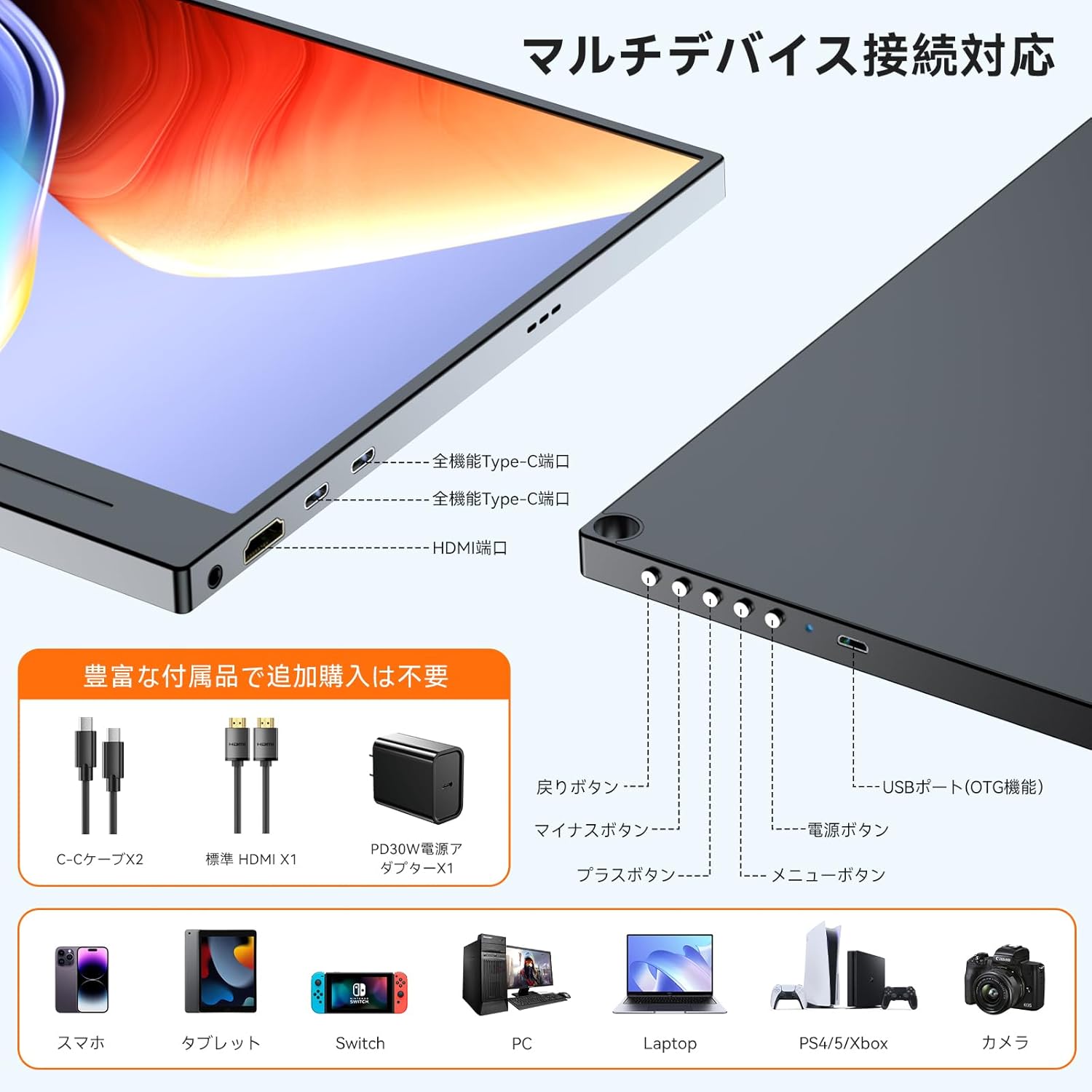
3.2. Porte og kontroller

Figure 3: Ports and Controls Layout
- Full-function USB-C Ports (x2): For video signal, data transfer, and power delivery.
- Mini HDMI-port (x1): For video signal input.
- USB-A Port (OTG function) (x1): For connecting peripherals like a keyboard or mouse.
- 3.5 mm lydstik (x1): Til tilslutning af hovedtelefoner eller eksterne højttalere.
- Power knap: Tænder/slukker skærmen.
- Menu-knap: Åbner OSD-menuen (On-Screen Display).
- Navigationsknapper (+/-): Used to navigate and adjust settings within the OSD menu.
- Tilbage knap: Returns to the previous OSD menu level.
4. Opsætning
Follow these steps to set up your UPERFECT portable monitor.
4.1. Tilslutning til en strømkilde
The monitor can be powered via a USB-C connection from a compatible device or an external power adapter.
- Via USB-C (Single Cable Solution): If your device (e.g., laptop, smartphone) has a full-function USB-C port (supporting DisplayPort Alternate Mode and Power Delivery), connect one end of the provided USB-C to USB-C cable to your device and the other end to one of the monitor's full-function USB-C ports. This single cable can provide both video signal and power. Note: If your device's USB-C port does not support sufficient power delivery, or if it's not Thunderbolt 3/4 compatible, you may need to connect an external power source.
- Via External Power Adapter: Connect the provided USB Type-A power adapter to a power outlet and then to one of the monitor's USB-C ports using a USB-C cable. This ensures stable power delivery, especially when using HDMI for video input or connecting power-intensive devices.
4.2. Tilslutning til enheder
The monitor supports various devices through USB-C and HDMI connections.
- For Laptops/PCs (USB-C): Connect a USB-C to USB-C cable from your laptop's full-function USB-C port to the monitor. Ensure your laptop's USB-C port supports DisplayPort Alternate Mode.
- For Laptops/PCs (HDMI): Connect the provided HDMI to Mini HDMI cable from your laptop's HDMI port to the monitor's Mini HDMI port. You will also need to connect the monitor to a power source via USB-C.
- Til smartphones: Connect a USB-C to USB-C cable from your smartphone's full-function USB-C port to the monitor. Ensure your smartphone supports video output via USB-C (DisplayPort Alternate Mode).
- For Gaming Consoles (Nintendo Switch, PS4/PS5, Xbox): Connect the provided HDMI to Mini HDMI cable from your console's HDMI output to the monitor's Mini HDMI port. The monitor must also be powered via its USB-C port using the external power adapter.
- For kameraer: Connect your camera via HDMI to Mini HDMI. Ensure the monitor is powered externally.

Figur 4: Forbindelse mellem flere enheder
4.3. Using the Magnetic Protective Cover
The included magnetic cover not only protects your monitor but also serves as a versatile stand. Fold the cover into a triangular shape to prop up the monitor at various viewing vinkler.
5. Betjeningsvejledning
Learn how to operate your monitor and adjust its settings.
5.1. Tænd/sluk
- Tænd: Press the Power button located on the side of the monitor.
- Sluk: Tryk og hold tænd/sluk-knappen nede i et par sekunder, indtil skærmen slukker.
5.2. On-Screen Display (OSD) menu
OSD-menuen giver dig mulighed for at tilpasse forskellige skærmindstillinger.
- Adgangsmenu: Tryk på knappen Menu for at åbne OSD-menuen.
- Navigere: Use the '+' and '-' buttons to move through menu options.
- Vælg/Bekræft: Press the Menu button again to select an option or confirm a setting.
- Udgang: Press the Back button to go back or exit the OSD menu.
5.3. Key Settings and Features
- Lysstyrke/kontrast: Adjust these settings for optimal visibility in different lighting conditions. The monitor features 300 nits brightness and a 1300:1 contrast ratio.
- Farveindstillinger: Fine-tune color temperature, hue, and saturation. The monitor offers 100% sRGB color gamut for accurate color reproduction.
- HDR-tilstand: Enable High Dynamic Range for enhanced visual depth and contrast in compatible content.
- Reduktion af blåt lys: Activate this feature to reduce eye strain during prolonged use.
- Inputkilde: Manually select between USB-C and HDMI input if auto-detection is not desired.
- Aspektforhold: Adjust the display aspect ratio (e.g., 16:9).
- FreeSync: For compatible gaming setups, enable FreeSync to reduce screen tearing and stuttering.

Figure 5: 4K Resolution Detail

Figure 6: High Contrast Ratio

Figure 7: 100% sRGB Color Gamut

Figure 8: 3ms Response Time and FreeSync
5.4. Visningstilstande
Depending on your connected device, you can configure the display mode:
- Udvid tilstand: Udvider dit skrivebord på tværs af begge skærme, hvilket giver mere arbejdsplads.
- Duplikattilstand: Spejler din primære skærm og viser det samme indhold på begge skærme.
- Portræt/Landskabstilstand: The monitor supports both horizontal and vertical orientations. Settings for these modes are typically adjusted on the connected PC or device.

Figure 9: Portrait Mode Usage
6. Vedligeholdelse
Proper care will extend the life of your monitor.
- Rengøring af skærmen: Tør forsigtigt skærmen af med en blød, fnugfri klud. Ved genstridige mærker, tør let afampRengør kluden med vand eller en skærmrengøringsopløsning. Undgå skrappe kemikalier eller slibende materialer.
- Rengøring af Casing: Brug en blød, tør klud til at rengøre skærmens casing.
- Opbevaring: When not in use, store the monitor in its protective magnetic cover in a cool, dry place away from direct sunlight and extreme temperatures.
- Håndtering: Undgå at tabe skærmen eller udsætte den for kraftige stød.
7. Fejlfinding
Hvis du støder på problemer, kan du se følgende almindelige problemer og løsninger.
| Problem | Mulig årsag | Løsning |
|---|---|---|
| Intet display/Intet signal |
|
|
| Screen flickering/Unstable display |
|
|
| Ingen lyd fra højttalere/hovedtelefoner |
|
|
| Cannot connect keyboard/mouse via OTG |
|
|
8. Specifikationer
Detailed technical specifications for the UPERFECT 15.6-inch 4K Portable Monitor.
| Feature | Specifikation |
|---|---|
| Mærke | OPERFEKT |
| Modelnummer | 15.6-inch 4K Portable Monitor |
| Skærmstørrelse | 15.6 tommer |
| Opløsning | 3840 x 2160 (4K UHD) |
| Paneltype | IPS, Non-glare |
| Aspektforhold | 16:9 |
| Farveskala | 100 % sRGB |
| Kontrastforhold | 1300:1 |
| Lysstyrke | 300 nits |
| Svartid | 3 ms |
| Opdateringshastighed | 60 Hz |
| Havne | 2x Full-function USB-C, 1x Mini HDMI, 1x USB-A (OTG), 1x 3.5mm Audio Jack |
| VESA Mount | 75 mm kompatibel |
| Dimensioner (B x H x D) | 355 x 225 x 11 mm |
| Vægt | 932 g |
| Strømforbrug | 12.00 W |
9. Garanti og support
UPERFECT is committed to providing high-quality products and excellent customer service.
- Garantiperiode: Dette produkt leveres med en 12 måneders garanti fra købsdatoen.
- PSE-certificering: The included power adapter is PSE certified, ensuring compliance with electrical appliance safety standards.
- Kundesupport: UPERFECT offers unlimited customer support. If you have any questions regarding product usage, or encounter any issues such as damage during shipping or defective accessories, please contact our support team. We aim to resolve issues within 12 hours.
- Kontaktoplysninger: Please refer to the contact details provided on the UPERFECT official webwebsted eller din købsplatform for at få support.

Figure 10: UPERFECT Customer Support


