1. Produktet er slutview
The AGM M6 is a rugged 4G LTE feature phone designed for durability and essential communication. It features a large button and font interface, an ultra-loud speaker, and robust protection against water, dust, and drops, making it suitable for outdoor and demanding environments.

Billede: Forside og bagside view of the AGM M6 Feature Phone, highlighting its robust design and large rear speaker.
Nøglefunktioner:
- 4G LTE Dual SIM: Supports T-Mobile network with dual Nano SIMs for reliable connectivity.
- Holdbarhed i militærklasse: IP68/IP69K waterproof and dustproof, MIL-STD-810H certified, withstands 2-meter drops and submersion up to 1.5 meters for 30 minutes.
- Brugervenligt design: 2.4-inch screen with large font and buttons, including a clear 21-key layout and a dedicated green call key.
- Minimalist Operating System: Runs on Mocor RTOS, focusing on core phone functions like calls, texts, and FM radio, without GPS, apps, or Wi-Fi.
- Ultra-Loud Speaker: Equipped with a 3.5W 35mm 109dB speaker for clear calls and powerful audio.
- Langtidsholdbart batteri: 2500mAh removable battery provides up to 360 hours of standby time, with Type-C charging and optional desktop dock support.
- Integreret lommelygte: Top-mounted LED flashlight activated by an orange side-key.

Image: Demonstrates the phone's IP68/IP69K waterproof, 2-meter drop-proof, and 99% dust-proof features, with the phone submerged in water, dropped, and covered in dust.
2. Hvad er der i æsken
Upon unboxing your AGM M6 Feature Phone, please ensure all the following items are present:
- AGM M6 Robust funktionstelefon
- Strømadapter
- USB-kabel (Type-C)
3. Opsætningsvejledning
3.1. Installation af SIM-kort og batteri
- Åbn batteridækslet: Locate the notch on the bottom edge of the phone. Carefully pry open the battery access panel. This may require a thin, non-metallic tool to avoid damage.
- Indsæt SIM-kort: The AGM M6 supports dual Nano SIM cards. Insert your primary 4G Nano SIM into SIM slot 1 and an optional 2G Nano SIM into SIM slot 2, ensuring the gold contacts face downwards and the cut corner aligns with the slot.
- Indsæt MicroSD-kort (valgfrit): If you wish to expand storage, insert a MicroSD card (up to 128GB) into the dedicated slot.
- Installer batteri: Align the 2500mAh battery contacts with the phone's terminals and gently press it into place.
- Luk batteridækslet: Securely close the battery cover until it clicks into place, ensuring a tight seal for water and dust resistance.
3.2. Opladning af telefonen
Oplad telefonens batteri helt før første brug.
- Connect the provided USB Type-C cable to the charging port on the phone. The Type-C port is reversible, allowing connection from either side.
- Tilslut den anden ende af USB-kablet til strømadapteren.
- Sæt strømadapteren i en stikkontakt.
- Telefonen vil vise opladningsstatus på skærmen.
- For convenient charging, an optional desktop charging dock is available (sold separately). Simply place the phone into the dock to charge.

Image: Illustrates the Type-C charging port on the phone and the phone placed in its optional desktop charging dock.
4. Betjeningsvejledning
4.1. Tænd/sluk
- For at tænde: Tryk på tænd/sluk-knappen/afslut opkald (rød knap), og hold den nede, indtil skærmen lyser.
- For at slukke: Tryk på tænd/sluk-knappen/afslut opkald, og hold den nede, indtil sluk-mulighederne vises, og vælg derefter "Sluk".
4.2. Foretage og modtage opkald
- Sådan foretager du et opkald: Dial the number using the keypad and press the Green Call button.
- For at besvare et opkald: Tryk på den grønne opkaldsknap, når telefonen ringer.
- Sådan afslutter du et opkald: Tryk på den røde Afslut opkald-knap.
4.3. Afsendelse af tekstbeskeder
- Naviger til "Beskeder" fra hovedmenuen.
- Vælg "Skriv besked" eller "Ny besked".
- Indtast modtagerens nummer, eller vælg fra kontakter.
- Type your message using the keypad. The phone supports smart typing.
- Tryk på "Send".

Image: A hand holding the AGM M6, demonstrating the large font on the screen and the prominent, easy-to-press buttons on the keypad.
4.4. Brug af lommelygten
The AGM M6 features a powerful LED flashlight located at the top of the device.
- To turn on the flashlight, press the dedicated orange side-key located on the right side of the phone.
- Press the orange side-key again to turn off the flashlight.
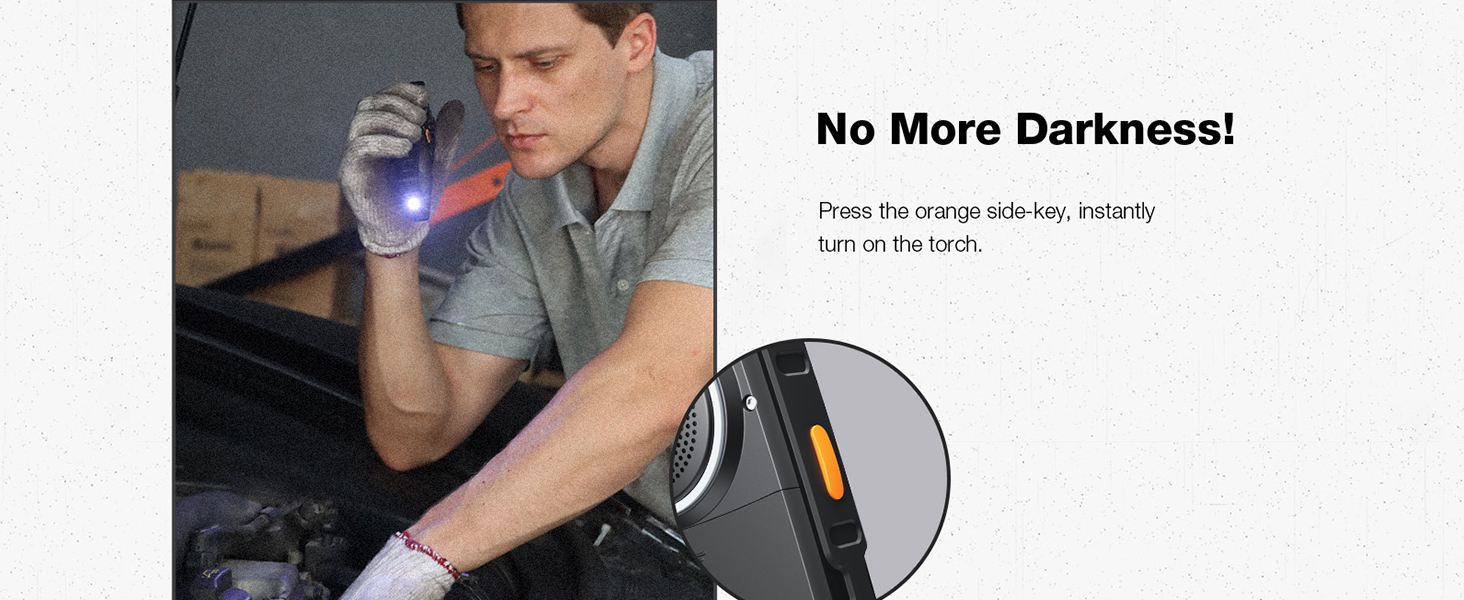
Image: A person using the AGM M6's top-mounted LED flashlight in a dark environment, highlighting its utility.
4.5. FM Radio
The phone includes a built-in FM radio. No headphones are required as the loud speaker can be used.
- Naviger til "FM-radio" i hovedmenuen.
- Brug navigationstasterne til at søge efter stationer eller manuelt stille ind på en frekvens.
- Adjust volume using the dedicated volume keys on the side.
4.6. Camera and Storage
The AGM M6 features a 0.3MP camera for basic photo capture and supports expandable storage up to 128GB via MicroSD card.
- To access the camera, navigate to "Camera" from the main menu.
- Tryk på den midterste navigationstast for at tage et billede.
- Photos are saved to the phone's internal memory or the inserted MicroSD card.
5. Vedligeholdelse
Proper maintenance ensures the longevity and optimal performance of your AGM M6 phone, especially given its rugged nature.
5.1. Rengøring af din telefon
- After exposure to dust, dirt, or mud, wipe the phone with a soft, damp klæde.
- If exposed to saltwater or chemicals, rinse the phone thoroughly with fresh water. Ensure all ports (USB-C, speaker) are closed before rinsing.
- Dry the phone completely with a clean, dry cloth before charging or opening any ports.
- Brug ikke skrappe kemikalier, rengøringsopløsningsmidler eller stærke rengøringsmidler.
5.2. Batteripleje
- Avoid exposing the battery to extreme temperatures (below -4°F or above 140°F) as this can reduce its lifespan.
- For optimal battery health, avoid frequently draining the battery completely or keeping it at 100% charge for extended periods.
- Hvis telefonen ikke skal bruges i en længere periode, skal batteriet oplades til ca. 50%, før du lægger det væk.
5.3. Opbevaring
- Opbevar telefonen et køligt og tørt sted, væk fra direkte sollys og ekstreme temperaturer.
- Ensure the battery cover is securely closed to maintain its waterproof and dustproof integrity during storage.
6. Fejlfinding
Dette afsnit omhandler almindelige problemer, du kan støde på med din AGM M6-telefon.
| Problem | Mulig årsag | Løsning |
|---|---|---|
| Telefonen tænder ikke. | Low battery; Battery not installed correctly; Software issue. | Charge the phone for at least 30 minutes. Ensure the battery is properly seated. Perform a soft reset by removing and reinserting the battery. |
| Kan ikke foretage eller modtage opkald. | Intet netværkssignal; SIM-kort ikke isat korrekt; SIM-kort ikke aktiveret. | Check network signal strength. Reinsert the SIM card(s). Contact your T-Mobile service provider to ensure your SIM is active. Move to an area with better reception. |
| Opladningsproblemer. | Cable or adapter faulty; Charging port obstruction; Battery issue. | Try a different USB Type-C cable and power adapter. Check the charging port for debris and clean carefully if necessary. Ensure the battery is securely connected. |
| Højttalerlydstyrken er lav eller forvrænget. | Volume settings; Speaker obstruction; Software glitch. | Increase volume using the side volume keys. Check the speaker grille for any blockages and clean gently. Restart the phone. |
| Vanskeligheder med at åbne batteridækslet. | Tight seal for water/dust proofing. | Use a thin, non-metallic tool (e.g., a plastic pry tool or guitar pick) to carefully pry down the battery panel from the designated notch. Apply firm, even pressure. |
7. Specifikationer
Detailed technical specifications for the AGM M6 Feature Phone.
| Feature | Specifikation |
|---|---|
| Modelnavn | M6 |
| Mærke | generalforsamling |
| Operativsystem | RTOS |
| Trådløs bærer | T-Mobile (4G LTE) |
| Forbindelsesteknologier | 4G |
| Skærmstørrelse | 2.4 tommer |
| Opløsning | 240 x 320 |
| Batterikapacitet | 2500 mioamp Hours (removable) |
| Standby tid | Op til 360 timer |
| Installeret RAM-hukommelsesstørrelse | 48 MB |
| Hukommelseslagringskapacitet | 0.12 GB (kan udvides op til 128 GB via MicroSD) |
| Kamera | 0.3MP bagside |
| Særlige funktioner | Dual SIM, Expandable Memory, Rugged Body, Water Resistant, 109dB Speaker, LED Flashlight |
| Holdbarhedsvurdering | IP68/IP69K Waterproof/Dustproof, MIL-STD-810H Drop-Proof |
| Varens vægt | 10 ounce |
| Pakkedimensioner | 5.6 x 2.4 x 0.73 tommer |
| Farve | Sort |
8. Garanti og support
AGM is committed to providing reliable products and excellent customer service.
8.1. Produktgaranti
For detailed warranty information, please refer to the warranty card included with your product or visit the official AGM website. AGM offers hassle-free replacement for eligible products.
8.2. Kundesupport
Our dedicated team of experts is available 24/7 to assist you with any questions or issues regarding your AGM M6 phone. You can reach professional support through the contact information provided on the official AGM webwebsted eller via din købsplatform.
For mere information og support, besøg AGM's officielle butik på Amazon.


