1. Produktet er slutview
Thank you for choosing the BACKWIN In-Ear Wired Earphones. These earphones are designed to provide a high-quality audio experience with deep bass, comfort, and noise isolation. They feature a standard 3.5mm jack for broad compatibility and an integrated microphone for convenient communication.
Nøglefunktioner:
- Premium lyd: Dynamic subwoofer unit delivers immersive, high-quality audio.
- Komfortpasform: Includes three types of ear hooks and S/M/L ear pads for a secure and comfortable fit.
- Bred kompatibilitet: Standard 3.5mm audio jack connects seamlessly to various devices.
- Holdbarhed: Features durable, fold-resistant wires and enhanced metallic design.
- High-Definition Microphone: Equipped with an HD microphone for clear voice and calls.
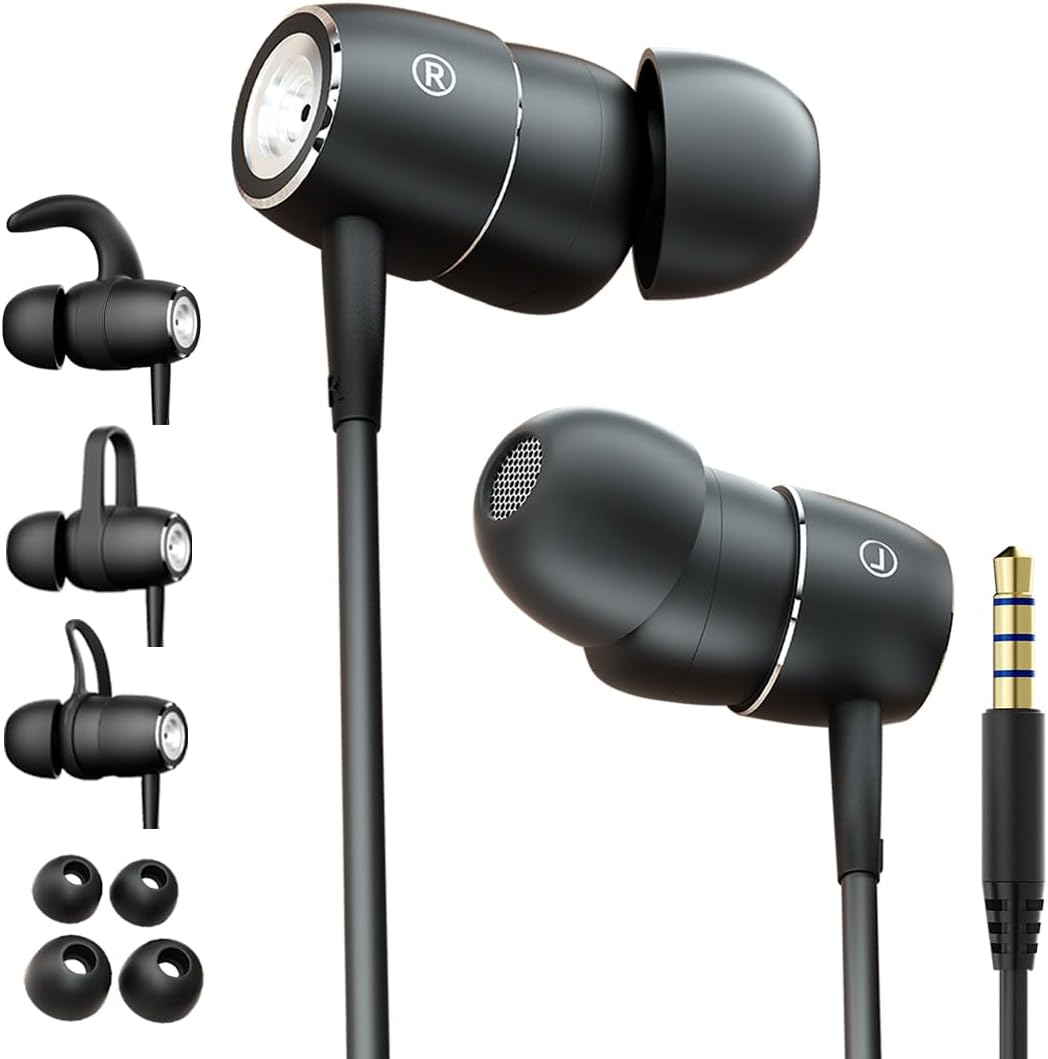
Figure 1: BACKWIN In-Ear Wired Earphones. This image displays the BACKWIN In-Ear Wired Earphones, highlighting their sleek black design, the 3.5mm audio jack, and the various ear hooks and ear tips provided for a customized fit.
2. Opsætning og installation
2.1 Choosing the Right Ear Tips and Ear Hooks
For optimal sound quality and comfort, select the ear tips and ear hooks that best fit your ears. Experiment with the different sizes (S/M/L ear pads) and styles of ear hooks provided.
- Ørespidser: Gently pull off the pre-installed ear tips. Select a size that creates a good seal in your ear canal without causing discomfort. Push the new ear tip firmly onto the earphone nozzle.
- Ørekroge: The ear hooks provide additional stability, especially during physical activity. Choose a hook style that comfortably secures the earphone in your outer ear. Attach the ear hook to the designated slot on the earphone body.

Figure 2: Earphones with interchangeable ear hooks and ear tips. A close-up view of the BACKWIN earphones alongside their interchangeable ear hooks and ear tips, demonstrating the customization options for comfort and secure fit.

Figure 3: Three types of ear hooks. This image provides a detailed look at the earphone unit and the three distinct styles of ear hooks, illustrating how they can be attached to secure the earphone in place.
2.2 Tilslutning til din enhed
The earphones feature a standard 3.5mm audio jack for universal compatibility.
- Locate the 3.5mm audio port on your smartphone, tablet, laptop, or other audio device.
- Insert the 3.5mm jack of the earphones firmly into the device's audio port until it clicks into place.
- Sørg for, at forbindelsen er sikker for at forhindre lydafbrydelser.

Figure 4: Earphones with 3.5mm jack and inline controls. The earphones are shown with their 3.5mm jack and the integrated inline remote control, which includes buttons for volume adjustment and playback.
2.3 Sådan tager du øretelefonerne på
Proper placement ensures comfort and optimal sound isolation.
- Identificér venstre (L) og højre (R) øretelefoner.
- Før forsigtigt hver øretelefon ind i den tilsvarende øregang.
- Adjust the earphone and ear hook (if used) until it feels secure and comfortable. The ear tip should form a gentle seal in your ear canal.

Figure 5: Proper earphone placement. A young man wearing the BACKWIN In-Ear Wired Earphones, demonstrating their discreet and comfortable fit during use.

Figure 6: Secure fit with ear hooks. A young woman wearing the BACKWIN In-Ear Wired Earphones, illustrating how the ear hooks provide a secure and stable fit, ideal for active use.
3. Betjeningsvejledning
3.1 Lydafspilning
Once connected, audio from your device will automatically play through the earphones. Adjust the volume using your device's controls or the inline remote control.
3.2 Inline Remote Control Functions
The earphones are equipped with an inline remote for convenient control of audio and calls.
- Afspil/pause: Tryk én gang på centerknappen for at afspille eller sætte lyd på pause.
- Næste nummer: Tryk hurtigt to gange på midterknappen for at springe til næste nummer.
- Forrige nummer: Tryk hurtigt tre gange på midterknappen for at gå tilbage til det forrige nummer.
- Lydstyrke op: Tryk på '+'-knappen for at øge lydstyrken.
- Skrue ned for lyden: Tryk på '-' knappen for at sænke lydstyrken.
3.3 Foretage og modtage opkald
The integrated high-definition microphone allows for hands-free calls.
- Besvar/afslut opkald: Press the center button once to answer an incoming call or end an ongoing call.
- Afvis opkald: Tryk og hold den midterste knap nede i cirka 2 sekunder for at afvise et indgående opkald.
4. Vedligeholdelse og pleje
Proper maintenance will extend the lifespan of your earphones and ensure optimal performance.
- Rengøring af ørepropper: Fjern regelmæssigt ørepropperne og rengør dem med en blød klud.amp cloth. For deeper cleaning, they can be washed with mild soap and water, then thoroughly dried before reattaching.
- Rengøring af øretelefoner: Tør øretelefonerne og kablet af med en tør, blød klud. Undgå at bruge skrappe kemikalier eller slibende materialer.
- Opbevaring: When not in use, store the earphones in a clean, dry place, preferably in a small pouch or case to prevent tangling and damage to the wires.
- Undgå ekstreme forhold: Udsæt ikke øretelefonerne for ekstreme temperaturer, fugtighed eller direkte sollys.
- Håndteres med forsigtighed: While the wires are designed to be fold-resistant, avoid excessive bending or pulling on the cable, especially near the connectors.
5. Fejlfinding
Hvis du støder på problemer med dine høretelefoner, kan du bruge følgende almindelige løsninger:
- Ingen lyd:
- Sørg for, at 3.5 mm-stikket er sat helt i enhedens lydport.
- Check the volume level on your device and using the inline remote.
- Test the earphones with another device to rule out a device-specific issue.
- Ensure the audio output is directed to the headphone jack on your device settings.
- Dårlig lydkvalitet (forvrængning, lav lydstyrke):
- Sørg for, at ørepropperne sidder ordentligt fast i øregangen. Prøv ørepropper i forskellige størrelser.
- Rengør eventuelt snavs fra øretelefondyserne og ørepropperne.
- Check if the audio source is of good quality.
- Mikrofonen virker ikke:
- Ensure the 3.5mm jack is fully inserted. Some devices require a TRRS (4-pole) jack for microphone functionality, which these earphones provide.
- Kontrollér din enheds lydindgangsindstillinger for at sikre, at den eksterne mikrofon er valgt.
- Test mikrofonen med en anden applikation eller enhed.
- Høretelefoner bliver ved med at falde ud:
- Experiment with different ear tip sizes and ear hook styles to find the most secure fit for your ears.
- Ensure the ear hooks are correctly attached and positioned.
6. Specifikationer
| Feature | Specifikation |
|---|---|
| Modelnavn | B220 |
| Forbindelsesteknologi | Kablet |
| Hovedtelefonstik | 3.5 mm Jack |
| Følsomhed | 106 dB |
| Frekvensrespons | 2000 KHz |
| Impedans | 16 Ohm |
| Støjkontrol | Lydisolering |
| Formfaktor | In Ear |
| Øreplacering | In Ear |
| Farve | Sort |
| Materiale | Metal |
| Fabrikant | backwin |
| Kompatible enheder | Laptops, Mobile phones |
| Kontroltype | Lydstyrkekontrol |
| Inkluderede komponenter | øreproppen |
7. Garanti og support
For warranty information and customer support, please refer to the documentation included with your purchase or contact the manufacturer directly. You can typically find contact details on the product packaging or the manufacturer's official webwebsted.
Fabrikant: backwin


