Indledning
This manual provides essential instructions for setting up, operating, maintaining, and troubleshooting your AT&T 6723D Cingular Flex 2 unlocked phone. Please read this guide thoroughly to ensure optimal performance and longevity of your device.
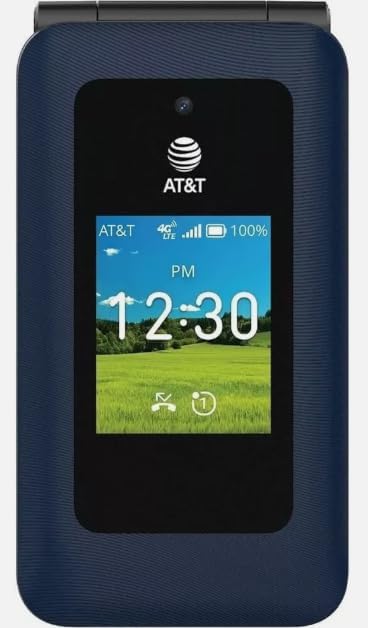
Billede: Forside view of the AT&T 6723D Cingular Flex 2 phone in Classic Navy, showing the external display with time and network status.
Opsætning
1. Udpakning og indledende inspektion
Carefully remove all items from the packaging. Verify that the phone and the included power adapter are present and undamaged.
2. SIM-kort installation
- Find SIM-kortstikket, typisk på siden eller under batteridækslet.
- Insert your activated Nano-SIM card into the designated slot with the gold contacts facing down. Ensure it clicks into place.
3. Batteriopladning
- Connect the power adapter to the USB Type C port on your phone.
- Sæt strømadapteren i en stikkontakt.
- Lad telefonen oplades helt, før den tages i brug første gang. Batteriindikatoren på skærmen viser opladningsstatus.
4. Tænd og indledende konfiguration
- Tryk og hold tænd/sluk-knappen nede, indtil skærmen lyser.
- Følg vejledningen på skærmen for at vælge dit sprog og din region og oprette forbindelse til et Wi-Fi-netværk.
- Complete any necessary KaiOS account setup or updates.
Betjeningsvejledning
1. Grundlæggende navigation
- Retningspude: Use the up, down, left, and right keys to navigate through menus and options.
- Centernøgle: Selects highlighted items.
- Softkeys: The keys directly below the screen perform functions indicated by the on-screen labels.
- Tilbage/Slet-tast: Returns to the previous screen or deletes characters.
2. Foretage og modtage opkald
- Sådan foretager du et opkald: Open the phone application, dial the number using the keypad, and press the Call key (green button).
- For at besvare et opkald: When the phone rings, press the Call key.
- Sådan afslutter du et opkald: Press the End Call key (red button).
3. Afsendelse og modtagelse af beskeder
- Navigate to the Messages application.
- Select 'New Message' or 'Compose'.
- Indtast modtagerens nummer, eller vælg fra kontakter.
- Indtast din besked ved hjælp af tastaturet.
- Tryk på 'Send'.
4. Tilslutning til netværk
- Wi-Fi: Go to Settings > Network & Connectivity > Wi-Fi. Turn Wi-Fi on, select your desired network, and enter the password if required.
- Mobildata (4G/LTE): Ensure your SIM card is active and has a data plan. Go to Settings > Network & Connectivity > Cellular & Data to enable mobile data.
5. Kamerabrug
- Open the Camera application from the main menu.
- Komponer dit billede ved hjælp af skærmen som en viewfinderen.
- Press the Center key to capture a photo.

Billede: Bagside view of the AT&T 6723D Cingular Flex 2 phone, showing the textured Classic Navy finish and speaker grille.
Opretholdelse
1. Rengøring af enheden
Brug en blød, fnugfri klud til forsigtigt at tørre telefonens skærm og kabinet af. Undgå at bruge skrappe kemikalier eller slibende materialer.
2. Batteripleje
- Undgå at udsætte telefonen for ekstreme temperaturer.
- Lad ikke telefonen oplade i længere tid, efter den er fuldt opladet.
- Use only the original or certified compatible power adapter.
3. Softwareopdateringer
Regularly check for and install software updates to ensure your phone has the latest features and security enhancements. Go to Settings > Device > Software Update.
4. Lagerstyring
With 64 GB of internal storage, regularly review og slet unødvendige files, photos, and applications to maintain optimal performance. You can check storage usage in Settings > Storage.
Fejlfinding
1. Phone Not Turning On
- Sørg for, at batteriet er opladet. Tilslut telefonen til opladeren i mindst 15 minutter.
- Tryk og hold tænd/sluk-knappen nede i 10-15 sekunder.
2. Ingen netværksforbindelse
- Kontroller, om SIM-kortet er korrekt isat.
- Verify that mobile data is enabled in Settings.
- Genstart telefonen.
- Contact your service provider to confirm your SIM card and plan are active.
3. Opladningsproblemer
- Ensure the power adapter and cable are securely connected to both the phone and the power outlet.
- Try using a different compatible charger and cable.
- Kontroller opladningsporten for snavs.
4. Phone Freezing or Unresponsive
- Tryk og hold tænd/sluk-knappen nede i cirka 10 sekunder for at fremtvinge en genstart.
- Hvis problemet fortsætter, bør du overveje at udføre en fabriksnulstilling (Advarsel: Dette vil slette alle data på din telefon. Sikkerhedskopier vigtige oplysninger først.
Specifikationer
| Feature | Detalje |
|---|---|
| Modelnavn | Cingular Flex 2 |
| Varemodelnummer | 6723D |
| Mærke | AT&T |
| Operativsystem | KaiOS |
| Trådløs bærer | Ulåst |
| Cellulær teknologi | 4G, LTE |
| Skærmopløsning | 720 x 1280 |
| Hukommelseslagringskapacitet | 64 GB |
| Batterikapacitet | 1400 mioamp Timer |
| Lydstik | USB Type C |
| Farve | Classic Navy |
| Hvad er der i kassen | Strømadapter |
Garantioplysninger
For specific warranty details, please refer to the documentation provided with your purchase or contact the seller directly. Standard manufacturer warranties typically cover defects in materials and workmanship under normal use.
Støtte
If you encounter issues not covered in this manual or require further assistance, please contact your point of purchase or the AT&T customer support for your region. Have your device model number (6723D) and purchase information ready.


