1. Introduktion
Thank you for choosing the UNITOPSCI 7086W Double Din Car Stereo. This advanced multimedia system is designed to enhance your driving experience with its 6.9-inch IPS touchscreen, wireless Apple CarPlay, Android Auto, Bluetooth 5.2, and a range of connectivity options. This manual provides essential information for installation, operation, and maintenance to ensure optimal performance and safety.

Image 1.1: UNITOPSCI 7086W Double Din Car Stereo and accessories.
2. Sikkerhedsoplysninger
- Always consult a professional for installation to prevent damage to the unit or your vehicle.
- Betjen ikke enheden på en måde, der distraherer dig fra kørslen. Prioritér altid trafiksikkerhed.
- Sørg for, at alle ledninger er korrekt tilsluttet for at undgå kortslutninger eller elektriske farer.
- Hold enheden væk fra vand og overdreven fugt.
- Forsøg ikke at reparere enheden selv. Kontakt kvalificeret servicepersonale.
- Brug kun den angivne strømforsyning (DC 12V).
3. Pakkens indhold
Bekræft at alle varer er til stede i pakken:
- 1 x Car MP5 Player (UNITOPSCI 7086W)
- 1 x strømkabel
- 1 x højttalerkabel
- 1 x mikrofon (MIC)
- 1 x Steering Wheel Control (Battery Not Included)
- 1 x brugermanual
- 1 x D-BUS-kabel
- 1 x backup kamera
- 1 x Remote Control (Battery Not Included)
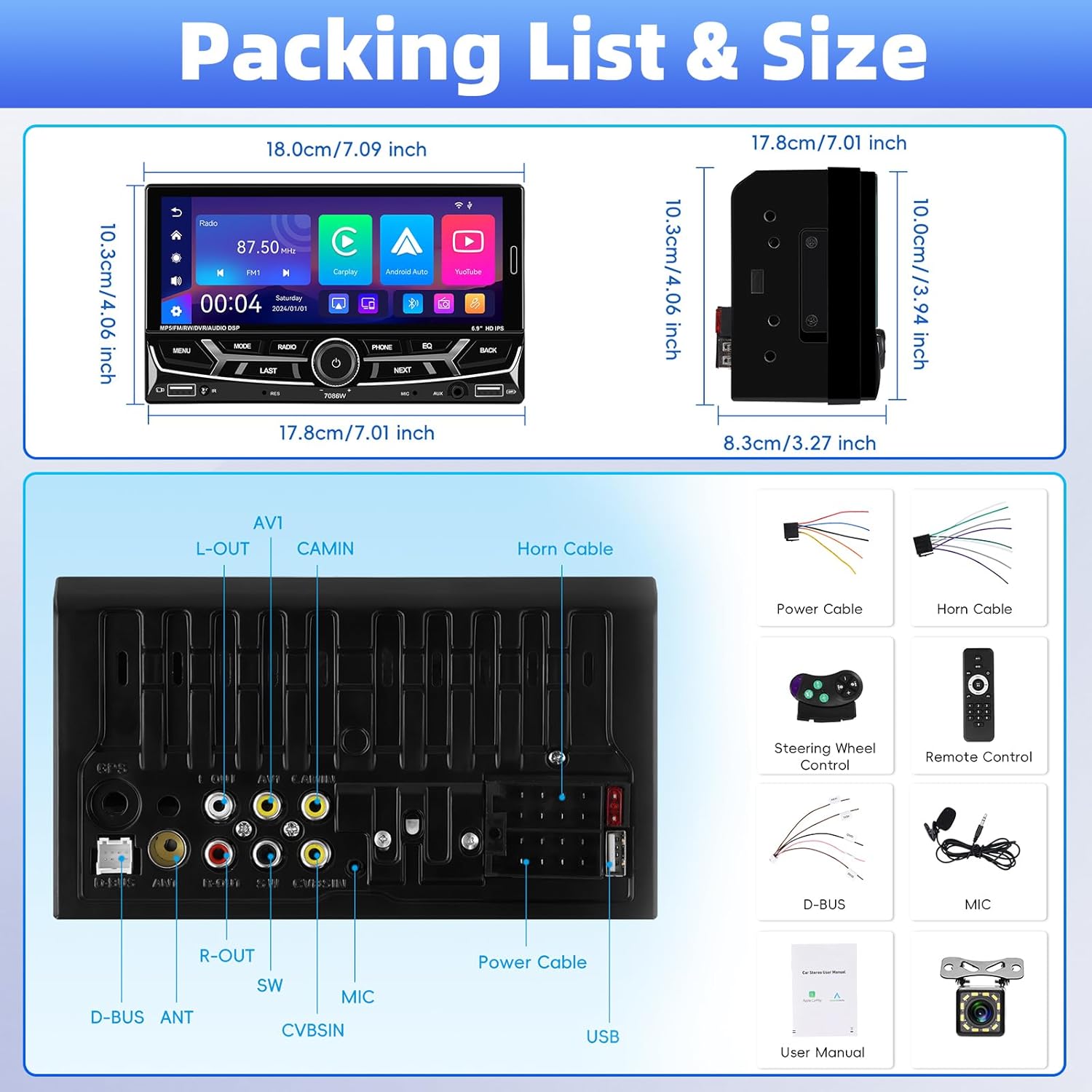
Billede 3.1: Detaljeret view of package contents and wiring diagram.
4. Specifikationer
| Feature | Specifikation |
|---|---|
| Model | 7086W |
| Skærmmateriale | IPS |
| Voltage | DC 12V |
| CPU-chip | 2900 |
| Skærmstørrelse | 6.9 tommer |
| Skærmopløsning | 1280*480 |
| Mirror Link | Understøttelse (iOS op til 13.4, Android op til 10.1) |
| Radio Band | FM/AM/RDS |
| Radiochip | QN8035 |
| Strømudgang | 45W*4 (Max 180 Watts) |
| Arbejdstemperatur | -10~60℃ |
| Bluetooth version | 5.2 |
| Farverigt baggrundslys | Støtte (7 farver) |
| Omvendt indgang | AHD720/CVBS |
| Magt Amplifier Chip | TDA7388 |
| Radiofrekvens | FM: 87.5-108MHz, AM: 530-1710KHz |
| Lydformat | MP3/WMA/WAV/APE/FLAC |
| Videoformat | RM/RMVB/AVI/MP4/MKV/3GP |
| Billedformat | JPG BMP PNG |
| Produktdimensioner | 4.37 x 7 x 4.01 tommer |
| Varens vægt | 2.64 pund |
5. Opsætning og installation
Korrekt installation er afgørende for din bilstereos ydeevne og sikkerhed. Det anbefales kraftigt at få enheden installeret af en kvalificeret fagmand.
5.1 Ledningsforbindelser
Refer to the detailed wiring diagram provided in Image 3.1 (Packing List & Size) and the included user manual for specific connection points. Key connections include:
- Strømkabel: Connect to vehicle's power supply (constant 12V, accessory 12V, and ground).
- Højttalerkabel: Tilslut til dit køretøjs højttalere. Sørg for korrekt polaritet.
- Backup Camera Input (CVBSIN): Connect the included backup camera for automatic rear view vise.
- Mikrofon (MIC): Connect the external microphone for improved hands-free calling.
- Ratbetjening (SWC): Connect to your vehicle's steering wheel control wires for integrated control.
- USB-porte: Two USB ports are available for media playback, charging, and DVR input.
- AUX-indgang: Til tilslutning af eksterne lydenheder.
Sørg for, at alle forbindelser er sikre og isolerede for at forhindre kortslutninger.
6. Betjeningsvejledning
6.1 Tænd/sluk og grundlæggende betjeningselementer
The unit powers on automatically with the vehicle's ignition. Use the physical knob and buttons on the front panel for basic operations like volume control, mode selection, and track skipping.
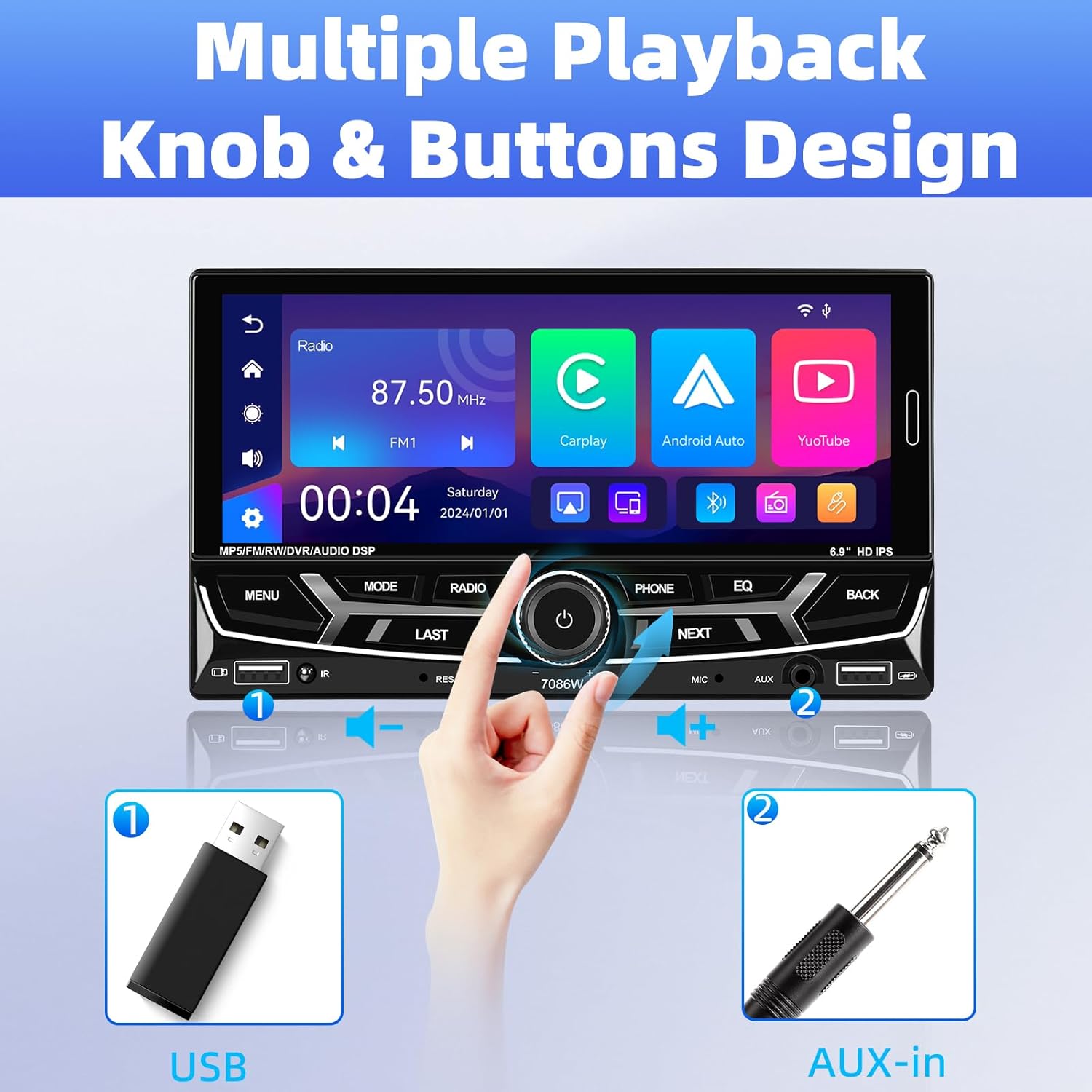
Image 6.1: Front panel controls and connectivity options.
6.2 Trådløs Apple CarPlay og Android Auto
Connect your smartphone wirelessly via Bluetooth to access Apple CarPlay or Android Auto. This allows you to use navigation, make calls, send messages, and listen to music directly from your phone's interface displayed on the stereo screen.
- Sørg for, at Bluetooth er aktiveret på din smartphone.
- On the car stereo, navigate to the Bluetooth settings and pair with your phone.
- Once paired, select the CarPlay or Android Auto icon on the stereo's main menu.
- Follow any on-screen prompts on your phone to grant necessary permissions.

Image 6.2: Wireless Apple CarPlay and Android Auto interfaces.
6.3 Bluetooth 5.2 Hands-free Calling and Audio Streaming
The built-in Bluetooth 5.2 module allows for stable hands-free calling and high-quality audio streaming.
- Parring: Go to the Bluetooth menu on the stereo, search for your phone, and pair.
- Håndfri opkald: Once paired, you can dial numbers, answer, or end calls directly from the stereo's touchscreen or via voice commands (e.g., Siri). The external microphone ensures clear communication.
- Lydstreaming: Play music from your phone through the car's speakers via Bluetooth.

Image 6.3: Bluetooth 5.2 hands-free and audio features.
6.4 Spejllinkfunktion
The Mirror Link function allows you to display your smartphone's screen directly onto the car stereo. This is compatible with iOS devices up to version 13.4 and Android devices up to version 10.1.
- Connect your smartphone to the stereo via a USB cable.
- Select the 'Mirror Link' option on the stereo.
- Follow the on-screen instructions to establish the connection.
6.5 FM/AM/RDS-radio
Access local radio stations with the built-in FM/AM/RDS tuner.
- tuning: Use the touchscreen to scan for stations or manually tune to a specific frequency.
- Forudindstillede stationer: Gem op til 30 af dine yndlingsstationer for hurtig adgang.
- RDS (Radio Data System): Displays station information such as song title or program type where available.
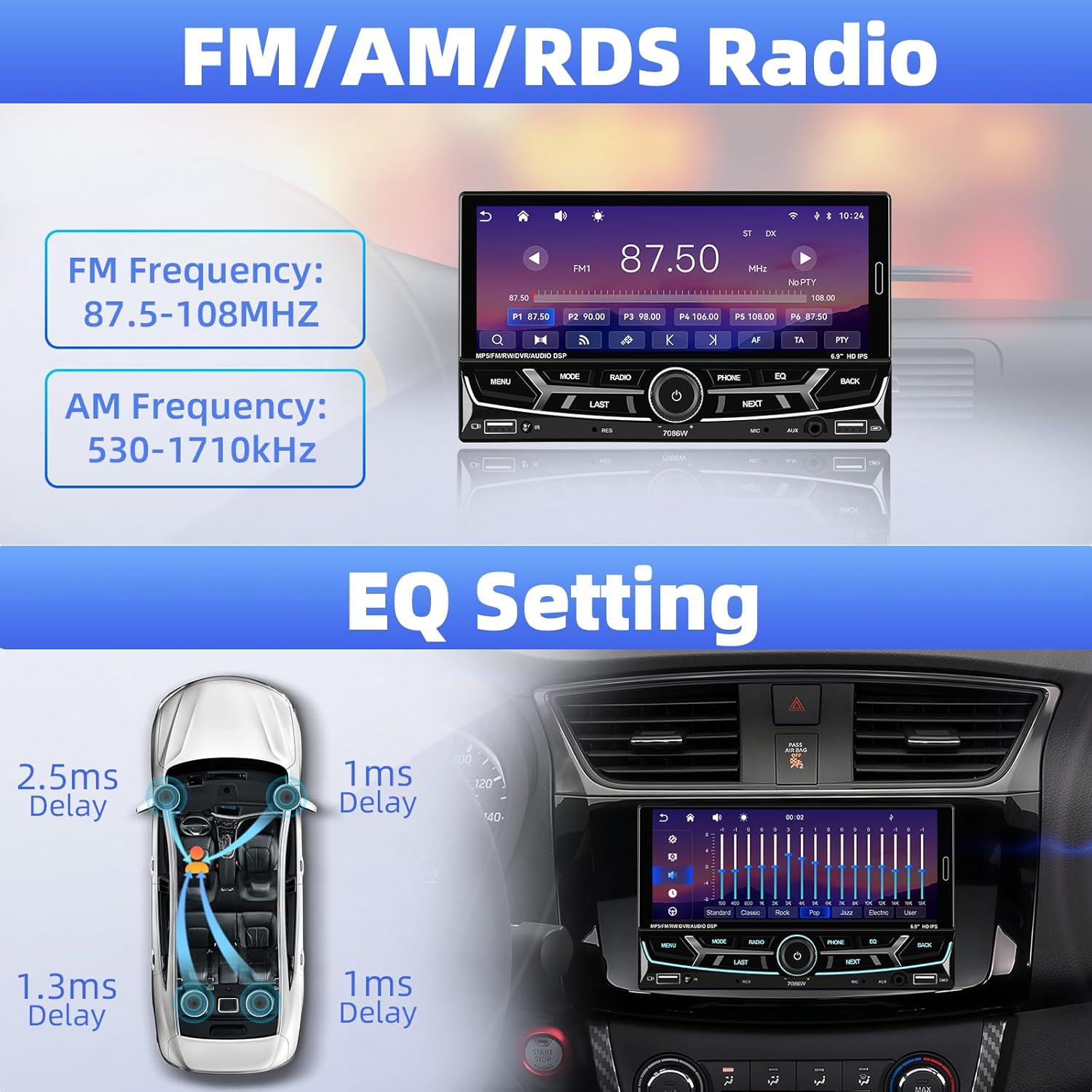
Image 6.4: FM/AM/RDS Radio interface and EQ settings.
6.6 DSP/EQ Audio Setting
Customize your audio experience with the Digital Sound Processor (DSP) and Equalizer (EQ) settings. Choose from preset sound styles like Pop, Rock, Classic, Jazz, or create your own custom profile.
6.7 USB Playback and Charging / Auxiliary Audio Input
- USB: Insert a USB drive into one of the USB ports for media playback (audio/video/pictures) or to charge your devices.
- AUX: Connect external audio devices (e.g., MP3 players) to the 3.5mm AUX input on the front panel.
6.8 bag View Kamera
When the vehicle is shifted into reverse gear, the stereo automatically displays the feed from the connected backup camera. The included camera features 12 LEDs, a 170° wide angle, and night vision for clear visibility, along with parking guidelines.

Billede 6.5: Bagside view kameraets display og funktioner.
6.9 Ratbetjening (SWC)
If your vehicle supports steering wheel controls, connect the SWC wires to the stereo. This allows you to control functions like volume, track skipping, and mode switching directly from your steering wheel for convenience and safety.
Image 6.6: Steering wheel control functionality.
6.10 6.9-Inch IPS Touchscreen and 7-Color Backlight Display
The high-definition IPS touchscreen offers clear visuals and responsive touch control. You can customize the backlight color of the physical buttons to match your vehicle's interior or personal preference, choosing from 7 available colors.

Image 6.7: IPS Touchscreen and 7-color backlight display.
7. Vedligeholdelse
- Rengøring af skærmen: Brug en blød, fnugfri klud til forsigtigt at tørre berøringsskærmen af. Brug ikke slibende rengøringsmidler eller opløsningsmidler.
- Generel rengøring: Keep the unit free from dust and debris. Use a soft, dry cloth for cleaning the exterior.
- Undgå ekstreme temperaturer: Udsæt ikke enheden for længerevarende direkte sollys eller ekstrem kulde, da dette kan påvirke ydeevne og levetid.
8. Fejlfinding
| Problem | Mulig årsag | Løsning |
|---|---|---|
| Ingen strøm | Forkert ledningsføring; Sprunget sikring | Check power cable connections; Inspect and replace fuse if necessary. |
| Ingen lyd | Speaker wires disconnected; Volume too low; Incorrect audio source | Verify speaker connections; Increase volume; Select correct audio input. |
| Bluetooth forbinder ikke | Bluetooth off on phone/stereo; Incorrect pairing process | Sørg for, at Bluetooth er aktiv på begge enheder; Gentag parringsprocessen. |
| CarPlay/Android Auto starter ikke | Phone not compatible; Incorrect connection; App issues | Check phone compatibility; Ensure proper Bluetooth connection; Restart phone and stereo. |
| Bakkameraet viser ikke | Camera wiring incorrect; Reverse trigger wire not connected | Check camera power and video signal cables; Ensure reverse trigger wire is connected to vehicle's reverse light. |
| Steering Wheel Control not working | SWC wires not connected; Incorrect configuration | Verify SWC wiring; Refer to vehicle-specific instructions for SWC setup. |
Hvis problemerne fortsætter, bedes du kontakte kundesupport.
9. Garanti og support
UNITOPSCI er forpligtet til at levere produkter af høj kvalitet og kundetilfredshed.
- Udskiftning: Udskiftning mulig inden for 24 måneder efter købet.
- Returnerer: 60-day no-worry return policy.
- Teknisk support: Livstids eftersalgsrådgivning og teknisk support.
- Svartid: Hurtigt svar på forespørgsler inden for 16 timer.
For support, kontakt os venligst på: UNITOPSCI@126.com


