1. Introduktion
The ATTACK SHARK L80PRO is a versatile wireless gaming headset designed for an immersive audio experience across multiple platforms. It features Tri-Mode connectivity (2.4GHz, Bluetooth, and wired), a unique built-in and detachable dual microphone system, and an ergonomic, lightweight design for extended comfort. This manual provides detailed instructions for setting up, operating, maintaining, and troubleshooting your L80PRO headset.

Image: The ATTACK SHARK L80PRO headset, highlighting its sleek white design, detachable microphone, and the included USB-A/Type-C dongle.
2. Opsætning
2.1. Opladning af headsettet
Before first use, fully charge the headset. Connect the included USB-C charging cable to the headset's charging port and a USB power source. The indicator light will show charging status.
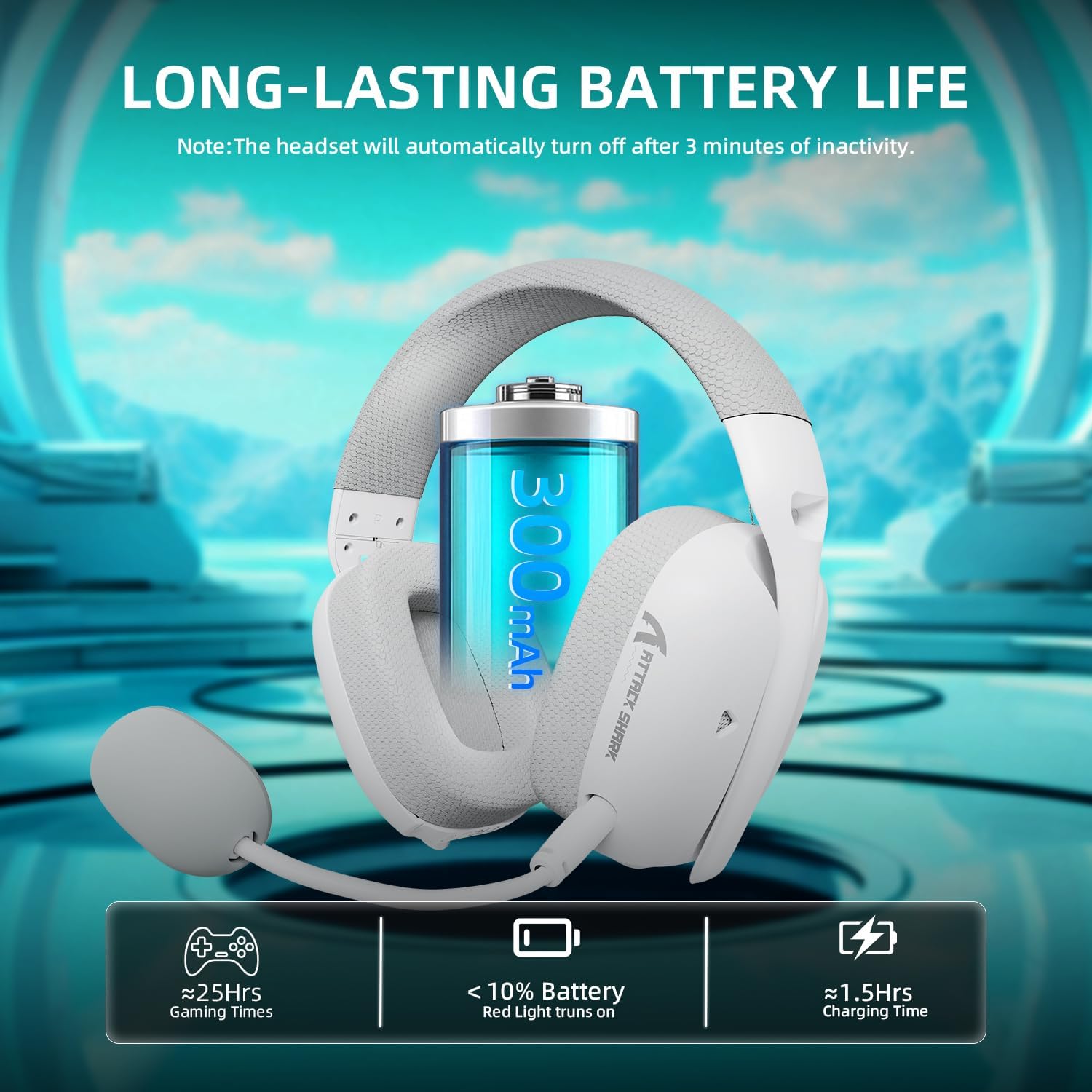
Image: Visual representation of the headset's long battery life (approximately 25 hours of gaming) and quick charging time (approximately 1.5 hours). A red light indicates battery below 10%.
2.2. Tilslutning af headsettet
The L80PRO supports three connection modes: 2.4GHz wireless, Bluetooth, and wired 3.5mm.
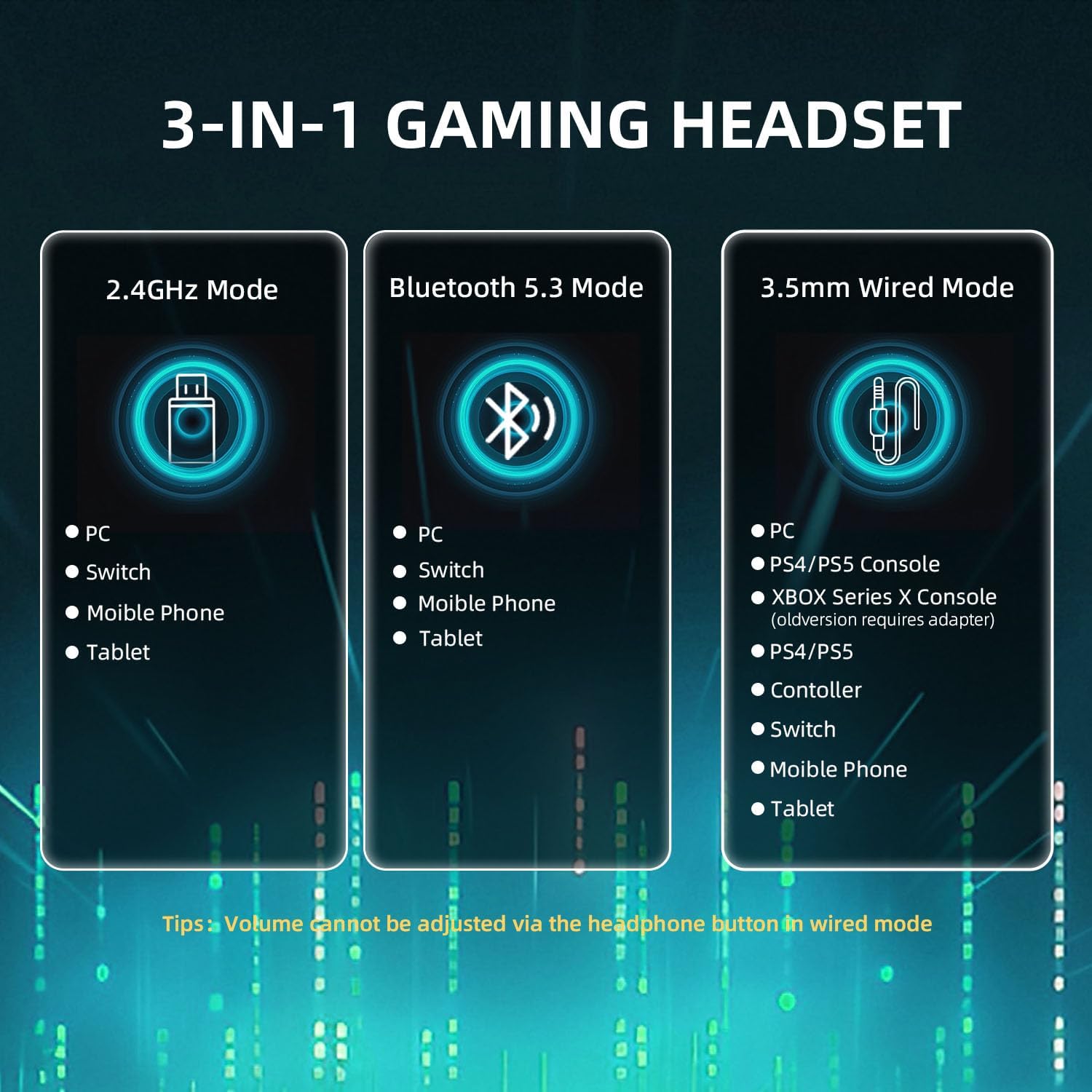
Image: A visual guide to the headset's tri-mode connectivity, showing compatibility with PC, Switch, mobile phones, tablets via 2.4GHz and Bluetooth, and PC, PS4/PS5, Xbox Series X, controllers, Switch, mobile phones, and tablets via 3.5mm wired connection.
2.2.1. 2.4 GHz trådløs tilstand
This mode offers ultra-low latency for gaming. The 2.4GHz receiver features both USB-A and Type-C connectors for broad compatibility.
- Plug the 2.4GHz USB dongle into an available USB-A or USB-C port on your PC, Mac, Switch, or compatible gaming console.
- Tænd headsettet ved at trykke længe på tænd/sluk-knappen i 3 sekunder.
- The headset will automatically connect to the dongle. The indicator light will confirm connection.
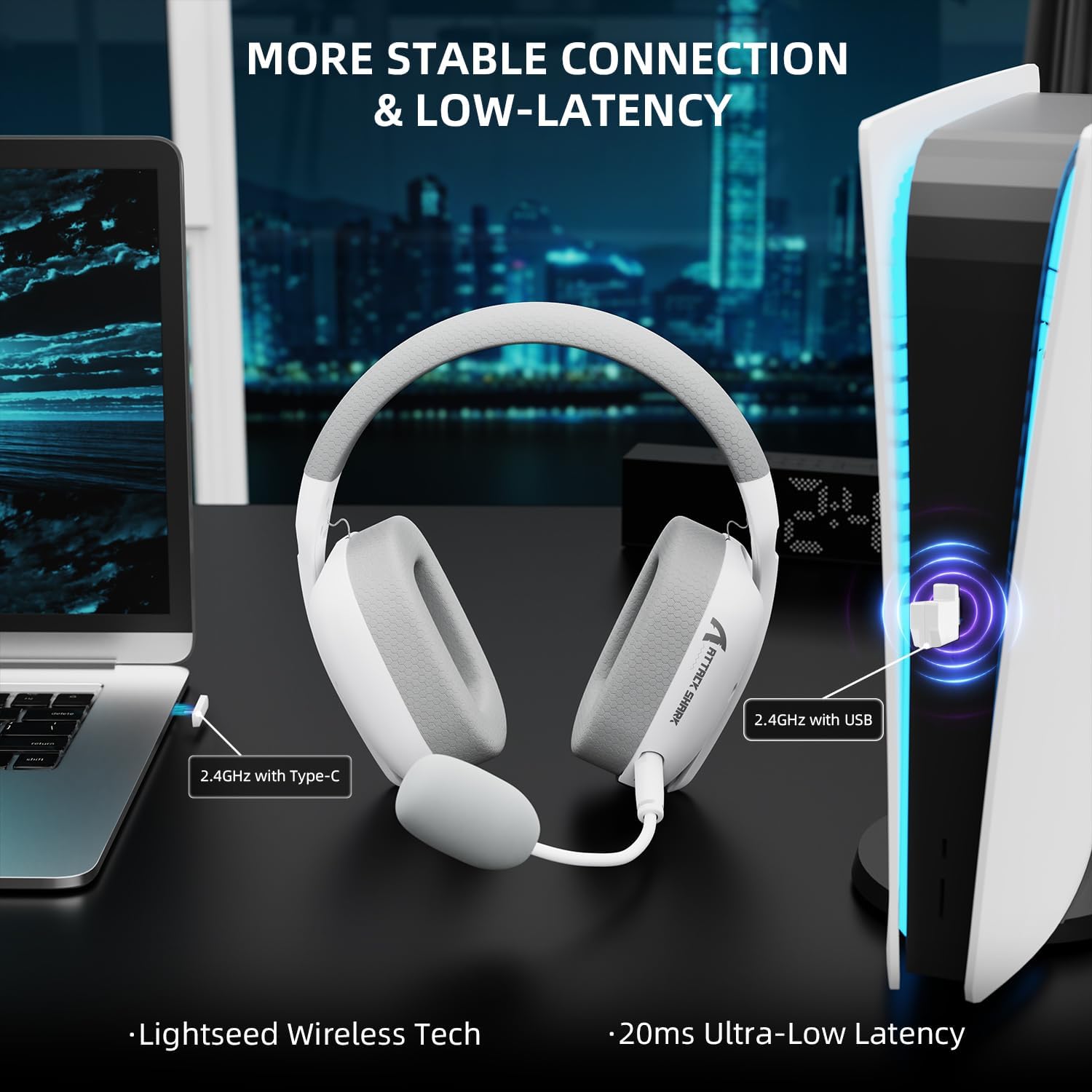
Image: The headset demonstrating its 2.4GHz wireless connection to a laptop via USB-C and a PlayStation 5 console via USB-A, emphasizing stable and low-latency performance.
2.2.2. Bluetooth-tilstand
Ideal for mobile devices and general use.
- Tænd headsettet.
- Double-click the mode switching button (usually the power button or a dedicated button) to switch to Bluetooth mode. The indicator light will flash, indicating pairing mode.
- On your device (smartphone, tablet, PC), go to Bluetooth settings and select "ATTACK SHARK L80PRO" from the list of available devices.
- Når parringen er foretaget, lyser indikatorlampen konstant.
2.2.3. Wired Mode (3.5mm)
For universel kompatibilitet og når batteriniveauet er lavt. Note: In wired mode, the headset's volume button is disabled. Adjust volume directly on your connected device. Xbox compatibility is only available through a wired connection.
- Connect the 3.5mm audio cable to the headset's 3.5mm port.
- Connect the other end of the 3.5mm audio cable to your device's 3.5mm audio jack.
- Headsettet skifter automatisk til kablet tilstand.
3. Betjening af headsettet
3.1. On-Ear-kontroller
The L80PRO headset features intuitive controls located on the earcups for easy access.
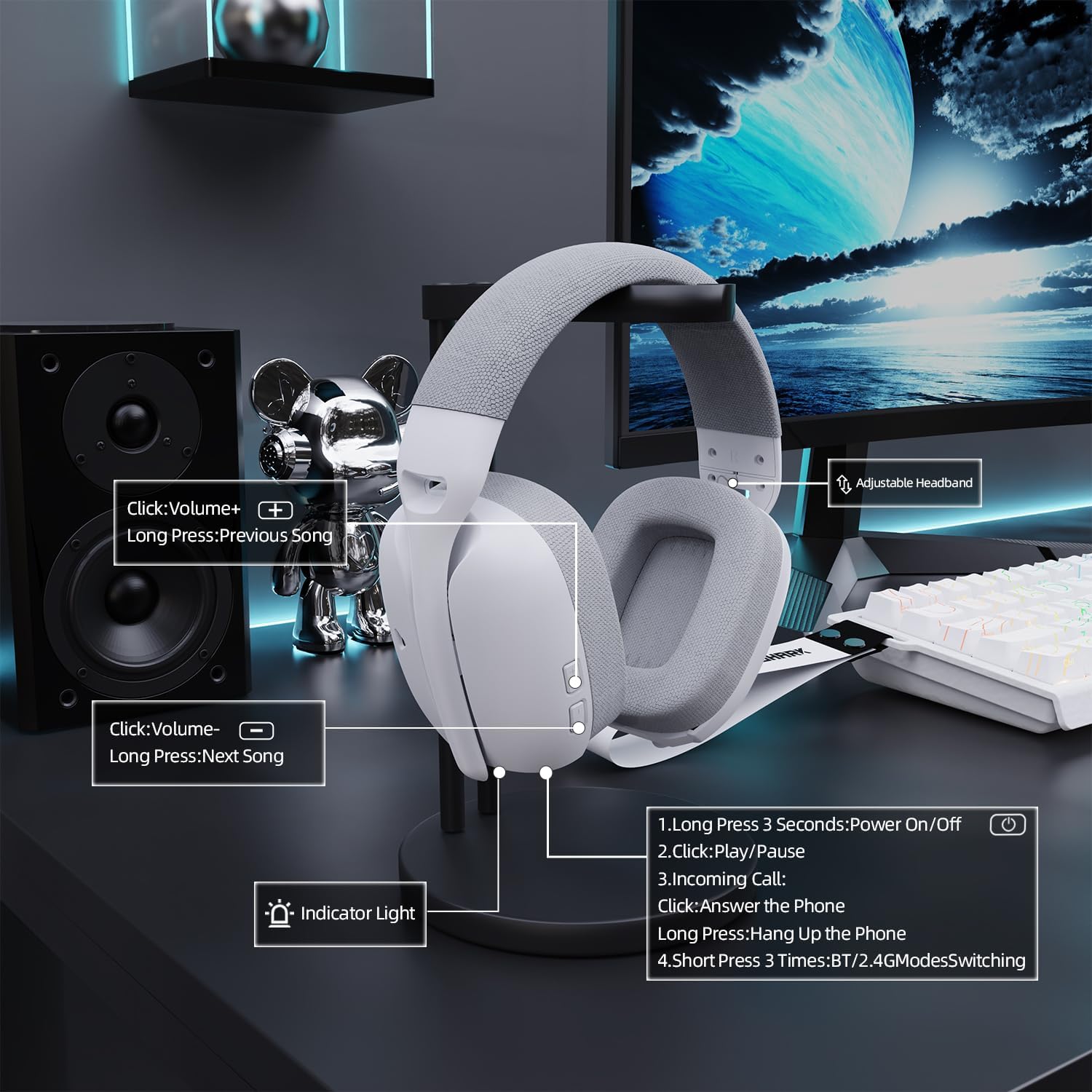
Billede: En detaljeret view of the headset's on-ear controls, illustrating functions such as volume adjustment, track skipping, power on/off, play/pause, call answering/hanging up, and Bluetooth/2.4G mode switching.
- Tænd/sluk: Tryk længe på tænd/sluk-knappen i 3 sekunder.
- Afspil/pause: Klik én gang på tænd/sluk-knappen.
- Indgående opkald: Click the power button to answer, long press to hang up.
- BT/2.4G Mode Switching: Short press the mode switching button (often the power button) 3 times.
- Lydstyrke op: Click the Volume+ button.
- Forrige sang: Long press the Volume+ button.
- Skrue ned for lyden: Click the Volume- button.
- Næste sang: Long press the Volume- button.
- Mikrofon til/fra: Use the dedicated microphone mute button (if present) or the on-ear control as indicated.
3.2. Mikrofonbrug
The L80PRO features both a built-in microphone and a detachable boom microphone for versatile communication.

Image: The headset illustrating its dual microphone design, featuring a built-in microphone for casual use and a 360-degree adjustable, detachable microphone for high-definition recording and clear communication during gaming.
- Indbygget mikrofon: Suitable for casual calls and general use. It is always active when the detachable microphone is not connected.
- Aftagelig mikrofon: For crystal-clear communication during intense gaming sessions or high-definition recording. Simply plug it into the designated port on the headset. Ensure it is securely connected. The detachable microphone is 360-degree adjustable for optimal positioning.
4. Vedligeholdelse
Proper maintenance ensures the longevity and optimal performance of your ATTACK SHARK L80PRO headset.
4.1. Rensning
- Tør forsigtigt ørekopperne og hovedbøjlen af med en blød, tør og fnugfri klud.
- Til genstridigt snavs, let dampRengør kluden med vand eller et mildt, ikke-slibende rengøringsmiddel. Undgå for meget fugt.
- Do not use harsh chemicals, solvents, or abrasive materials, as these can damage the headset's finish.
- Hold opladningsporten og 3.5 mm-stikket fri for støv og snavs.
4.2. Opbevaring
- Opbevar headsettet et køligt, tørt sted væk fra direkte sollys og ekstreme temperaturer.
- When not in use, it is recommended to store the headset in a protective case or on a headset stand to prevent damage.
4.3. Batteripleje
- To maximize battery life, avoid fully discharging the headset frequently.
- If the headset will not be used for an extended period, charge it to about 50% before storing.
- The smart power-saving mode automatically shuts down the headset after 3 minutes of inactivity in wireless mode to conserve battery.
5. Fejlfinding
If you encounter issues with your ATTACK SHARK L80PRO headset, refer to the following common problems and solutions.
| Problem | Mulig årsag | Løsning |
|---|---|---|
| Ingen lyd fra headsettet | Headset not powered on; Incorrect connection mode; Device volume too low; Headset not selected as audio output. | Ensure headset is powered on. Verify correct connection mode (2.4GHz, BT, Wired). Increase device volume. Select L80PRO as default audio output in device settings. |
| Mikrofon virker ikke | Microphone muted; Detachable mic not fully inserted; Incorrect mic selected in device settings. | Ensure microphone is not muted via headset control or software. Re-insert detachable microphone firmly. Select L80PRO microphone as default input device in your system's sound settings. |
| 2.4GHz connection unstable/laggy | Interference from other wireless devices; Dongle too far from headset; Low headset battery. | Move closer to the dongle. Ensure no major obstructions. Try a different USB port. Charge the headset. |
| Problemer med Bluetooth-parring | Headset not in pairing mode; Device Bluetooth off; Previously paired device interfering. | Ensure headset is in Bluetooth pairing mode (flashing indicator). Turn device Bluetooth off and on again. Forget previous pairings on your device and try again. |
| Headset volume control not working in wired mode | This is normal behavior for wired mode. | Adjust volume directly on the connected device (PC, console, phone). |
6. Specifikationer
| Feature | Detalje |
|---|---|
| Modelnavn | L80PRO |
| Forbindelsesteknologi | Wireless (2.4GHz RF, Bluetooth), Wired (3.5mm) |
| Kompatible enheder | Desktops, Laptops, Gaming Consoles (PC, Mac, PS4, PS5, Switch, Xbox via wired), Tablets, Telephones |
| Audio driver type | Dynamisk driver (40 mm) |
| Ørestykke form | Over-øre |
| Varens vægt | 13.7 ounces (ca. 388 g) |
| Batterikapacitet | 300mAh |
| Opladningstid | Ca. 1.5 timer |
| Spilletid | Ca. 25 timer |
| Mikrofon | Built-in & Detachable Boom Mic |
| Farve | Hvid |
7. Garanti og support
ATTACK SHARK products are designed and manufactured to the highest quality standards. For information regarding warranty coverage and support, please refer to the warranty card included with your product or visit the official ATTACK SHARK webwebsted.
If you experience any issues that cannot be resolved using the troubleshooting guide, please contact ATTACK SHARK customer support for assistance. Have your product model (L80PRO) and purchase details ready when contacting support.


