1. Introduktion
Tak for købetasing the Karlsson Vogue Alarm Clock. This versatile device combines a digital alarm clock, a wireless induction charger, and a Bluetooth speaker, designed to enhance your daily routine. Please read this manual carefully before using the product to ensure proper operation and to maximize its lifespan. Keep this manual for future reference.
Sikkerhedsforanstaltninger
- Udsæt ikke enheden for vand eller for høj luftfugtighed.
- Undgå ekstreme temperaturer.
- Du må ikke skille enheden ad eller forsøge at reparere den selv.
- Use only the provided or recommended USB adapter for power.
- Sørg for tilstrækkelig ventilation omkring enheden under drift.
2. Produktet er slutview
The Karlsson Vogue Alarm Clock features a sleek design with a fabric-covered front and intuitive controls. Below is an overview of its main components and controls.
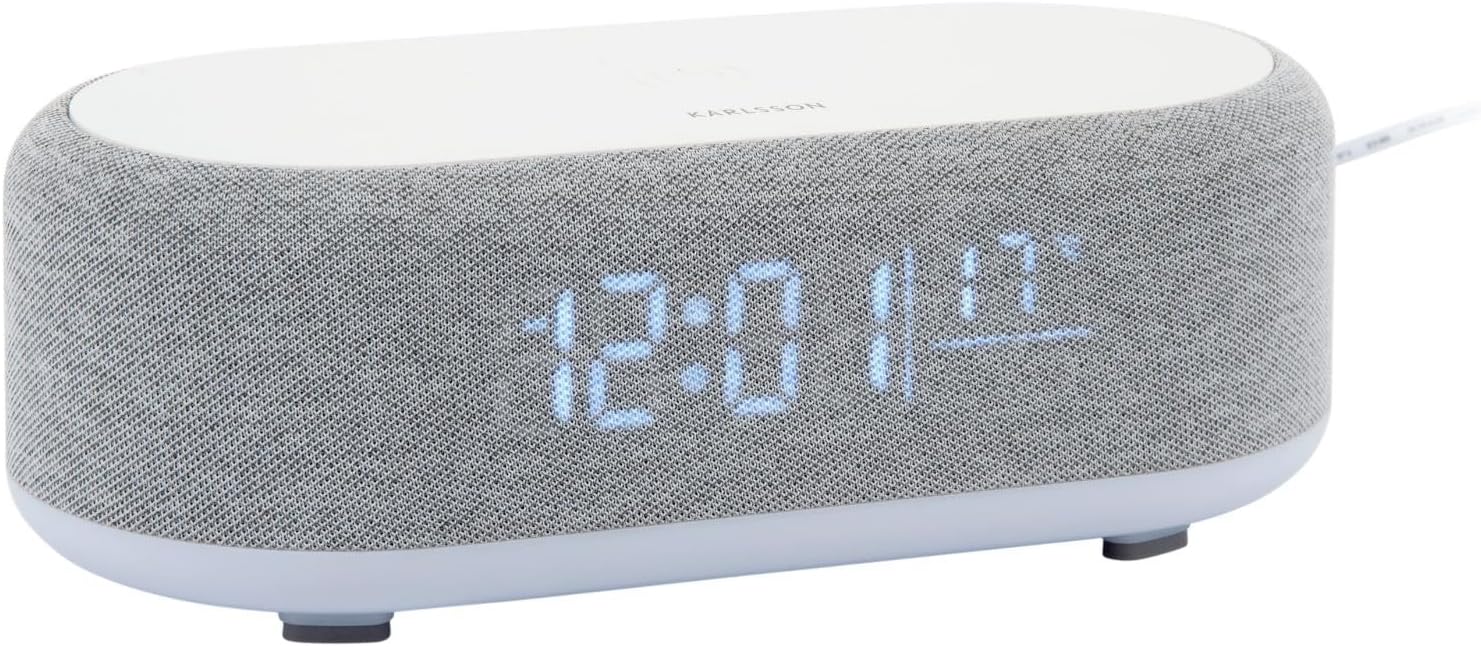
Figur 2.1: Forside view of the Karlsson Vogue Alarm Clock, displaying the digital time and temperature.
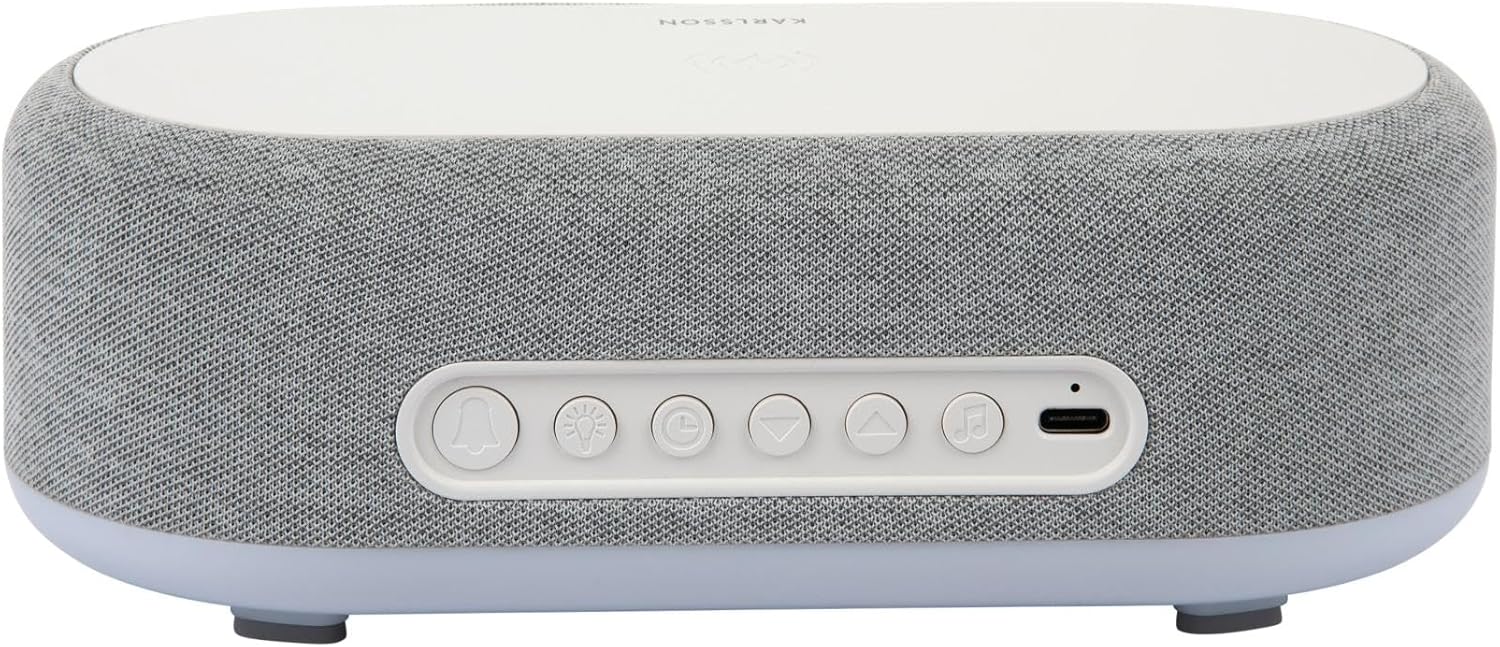
Figur 2.2: Bagside view of the alarm clock, highlighting the control buttons and USB-C power input.
Control Buttons (from left to right on rear panel):
- Alarm 1 knap: Press to activate/deactivate Alarm 1. Long press to set Alarm 1 time.
- Alarm 2 knap: Press to activate/deactivate Alarm 2. Long press to set Alarm 2 time.
- Brightness/Snooze Button: Press to adjust display brightness. When alarm sounds, press to snooze.
- Tidsindstillingsknap: Langt tryk for at gå ind i tidsindstillingstilstand.
- Ned-knap: Decrease values during setting, navigate menus.
- Op-knap: Increase values during setting, navigate menus.
- Bluetooth/Afspil/Pause-knap: Long press to enter Bluetooth pairing mode. Press to play/pause music.
- USB-C strømindgang: Tilslut strømadapteren her.
Toppanel:
- Trådløs opladningsplade: Place compatible devices here for wireless charging.
3. Opsætning
3.1 Strømtilslutning
- Connect the provided USB adapter to the USB-C Power Input port on the rear of the alarm clock.
- Plug the USB adapter into a standard wall outlet.
- Displayet lyser op, hvilket indikerer, at enheden er tændt.
3.2 Indstilling af starttidspunkt
- Tryk længe på Tidsindstillingsknap (clock icon) on the rear panel. The hour digits will start flashing.
- Brug Up og Ned knapper for at justere timen.
- Tryk på Tidsindstillingsknap igen for at bekræfte timetallet og gå videre til minutindstilling. Minuttiffrene vil blinke.
- Brug Up og Ned knapper for at justere minuttet.
- Tryk på Tidsindstillingsknap one more time to confirm the minute and exit time setting mode.
4. Betjeningsvejledning
4.1 Indstilling af alarmer
Enheden understøtter to uafhængige alarmer (Alarm 1 og Alarm 2).
- To set Alarm 1: Tryk længe på Alarm 1 knap (bell icon with '1'). The hour digits for Alarm 1 will flash.
- Brug Up og Ned knapper for at justere alarmens time.
- Tryk på Alarm 1 knap igen for at bekræfte timen og gå videre til minutindstilling.
- Brug Up og Ned knapper for at justere alarmminuttet.
- Tryk på Alarm 1 knap one more time to confirm and exit alarm setting. The alarm icon will appear on the display.
- To set Alarm 2: Følg de samme trin ved hjælp af Alarm 2 knap (bell icon with '2').
4.2 Aktivering/deaktivering af alarmer
- Tryk på den respektive Alarm 1 knap or Alarm 2 knap briefly to toggle the alarm on or off. The alarm icon on the display will indicate its status.
4.3 Snooze -funktion
- Når en alarm lyder, skal du trykke på Brightness/Snooze Button (light bulb icon) to activate snooze. The alarm will temporarily stop and sound again after approximately 9 minutes.
- To turn off the alarm completely, press any other button on the rear panel.
4.4 Betjening af Bluetooth-højttaler
- Parring: Tryk længe på Bluetooth/Afspil/Pause-knap (music note icon) until the display shows "BT" and starts flashing, indicating pairing mode.
- On your mobile device, enable Bluetooth and search for "Karlsson Vogue". Select it to connect.
- Once connected, the "BT" indicator will stop flashing. You can now play audio through the alarm clock's speaker.
- Afspilning: Tryk på Bluetooth/Afspil/Pause-knap briefly to play or pause music.
- Volume control is managed via your connected mobile device.
4.5 Wireless Induction Charging
The top surface of the alarm clock features a wireless charging pad compatible with Qi-enabled devices.
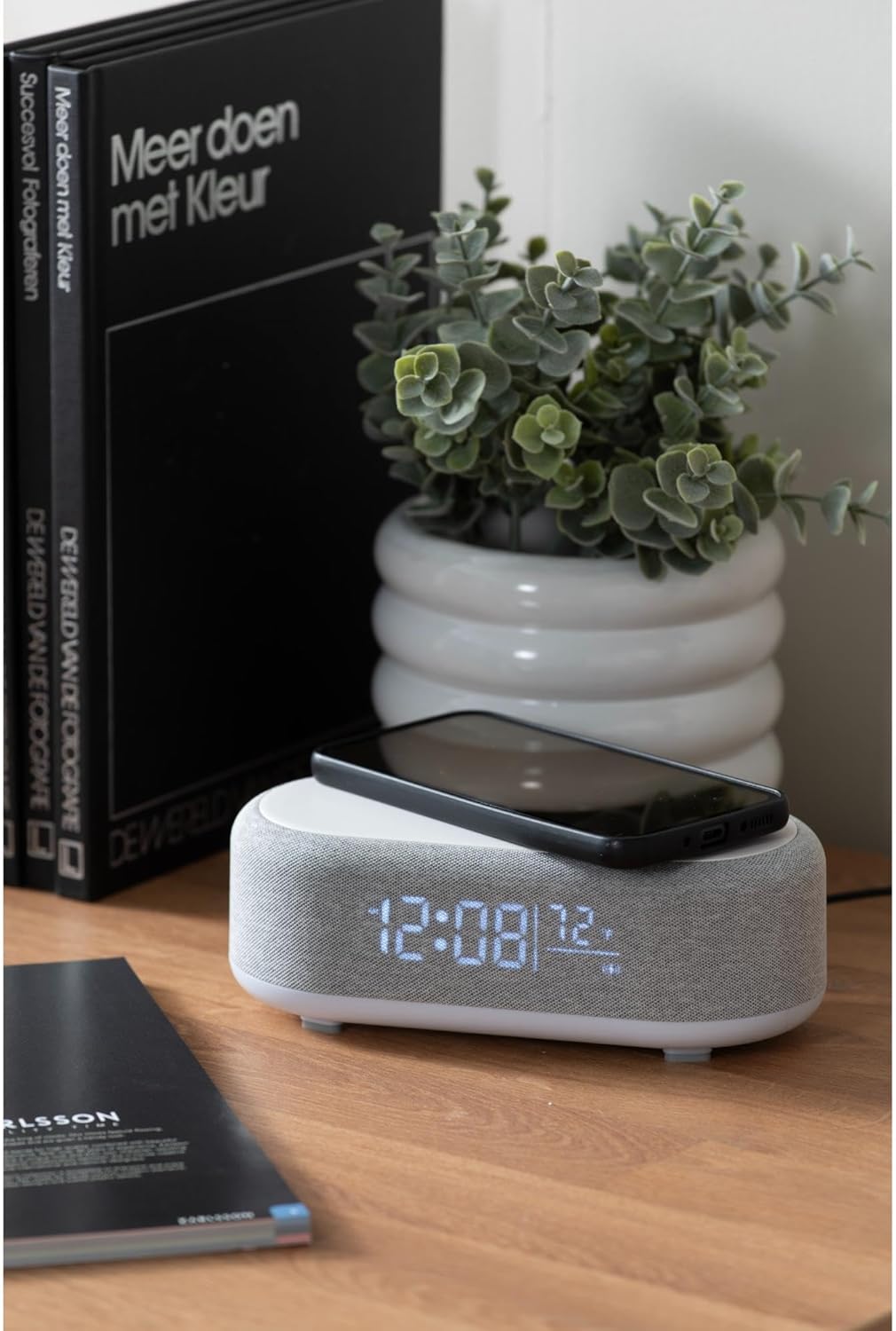
Figure 4.1: A smartphone placed on the wireless charging pad of the alarm clock.
- Place your Qi-compatible smartphone or other device directly onto the center of the top charging pad.
- Ensure the device is properly aligned. A charging indicator (usually on your phone screen) will confirm charging has begun.
- Fjern din enhed, når den er fuldt opladet.
4.6 Justering af displayets lysstyrke
- Tryk på Brightness/Snooze Button (light bulb icon) repeatedly to cycle through different brightness levels for the display.
5. Vedligeholdelse
5.1 Rengøring
- Before cleaning, disconnect the power adapter.
- Wipe the surface of the alarm clock with a soft, dry, or slightly damp klæde.
- Do not use abrasive cleaners, solvents, or strong chemicals, as they may damage the surface.
5.2 Opbevaring
- If storing the device for an extended period, disconnect it from power.
- Opbevares på et køligt, tørt sted væk fra direkte sollys og ekstreme temperaturer.
6. Fejlfinding
| Problem | Mulig årsag | Løsning |
|---|---|---|
| Enheden tænder ikke. | Ingen strømforbindelse eller defekt adapter. | Ensure the USB-C cable is securely connected and the adapter is plugged into a working outlet. Try a different outlet. |
| Bluetooth opretter ikke forbindelse. | Enheden er ikke i parringstilstand; allerede forbundet til en anden enhed; mobilenheds Bluetooth er slået fra. | Long press the Bluetooth button to enter pairing mode. Ensure no other device is connected. Turn off and on Bluetooth on your mobile device. |
| Trådløs opladning virker ikke. | Phone not Qi-compatible; phone not aligned; phone case too thick. | Ensure your device supports Qi wireless charging. Re-position the device on the center of the pad. Remove thick phone cases. |
| Alarmen lyder ikke. | Alarm deactivated; volume too low (for Bluetooth alarm). | Check if the alarm icon is displayed. Ensure the alarm time is set correctly. If using Bluetooth audio for alarm, ensure phone volume is adequate. |
7. Specifikationer
| Feature | Detalje |
|---|---|
| Mærke | Karlsson |
| Modelnummer | KA6033GY |
| Farve | Grå |
| Materiale | Plast (ABS) |
| Dimensioner (L x B x H) | 19.8 x 9.8 x 7 cm (7.8 x 3.86 x 2.76 tommer) |
| Vægt | 0.46 kg (1.01 lbs) |
| Strømindgang | USB (Adapter included) |
| Trådløs opladning | Induction (Qi-compatible) |
| Forbindelse | Bluetooth |
8. Garanti og support
For warranty information and customer support, please refer to the documentation provided with your purchase or contact your retailer. You may also visit the official Karlsson webwebsted for yderligere hjælp.
Webwebsted: Karlsson Official Store


