1. Introduktion
Welcome to the user manual for your new innioasis Y1 MP3 Player with Bluetooth. This guide provides essential information for setting up, operating, maintaining, and troubleshooting your device to ensure optimal performance and enjoyment.
2. Sikkerhedsoplysninger
- Udsæt ikke enheden for ekstreme temperaturer, direkte sollys eller høj luftfugtighed.
- Undgå at tabe eller udsætte enheden for kraftige stød.
- Hold enheden væk fra vand og andre væsker.
- Forsøg ikke selv at adskille eller reparere enheden. Kontakt kundesupport for at få hjælp.
- Brug kun godkendte opladningskabler og tilbehør.
- Længerevarende lytning ved høje lydstyrker kan forårsage høreskader.
3. Pakkens indhold
Markér venligst feltet for følgende elementer:
- innioasis Y1 MP3 Player
- USB-C ladekabel
- Kablede ørepropper
- Brugermanual
4. Enhed overview
Familiarize yourself with the physical features and controls of your innioasis Y1 MP3 Player.

Figur 1: Forside view of the innioasis Y1 MP3 Player displaying the main menu options including Home, Now Playing, Music, Videos, Audiobook, Photos, FM radio, and Bluetooth. The device features a classic click wheel control for navigation.

Figur 2: Detaljeret view of the classic click wheel control on the innioasis Y1 MP3 Player. The wheel allows for touch and rotate navigation, providing a light, compact, and portable user experience.
5. Opsætning
5.1. Opladning af enheden
Oplad din MP3-afspiller helt inden første brug.
- Tilslut det medfølgende USB-C-kabel til opladningsporten på enheden.
- Plug the other end of the USB-C cable into a compatible USB power adapter (not included) or a computer's USB port.
- Batteriindikatoren på skærmen viser opladningsstatus. En fuld opladning tager typisk cirka 3 timer.
5.2. Transferring Music and Files
To add audio, video, or photo files to your device:
- Connect the MP3 player to your computer using the USB-C cable.
- Enheden vises som et flytbart diskdrev på din computer.
- Træk og slip det ønskede files (MP3, FLAC, WAV, etc.) into the appropriate folders on the device (e.g., 'Music', 'Videos', 'Photos').
- Tag enheden sikkert ud af computeren, før du frakobler kablet.
5.3. Tilslutning af Bluetooth-enheder
The innioasis Y1 supports Bluetooth connectivity for wireless audio.
- From the main menu, navigate to and select Bluetooth.
- Turn on Bluetooth. The device will begin searching for nearby Bluetooth devices.
- Vælg dine ønskede Bluetooth-hovedtelefoner eller -højttalere fra listen for at parre.
- Når den er parret, vil lyden blive sendt via den tilsluttede Bluetooth-enhed.

Figure 3: The Bluetooth connection screen on the innioasis Y1 MP3 Player, illustrating fast pairing and stable connection capabilities with Bluetooth earphones, speakers, and car Bluetooth systems.
Video 1: This video demonstrates the features of a 128GB MP3 Player with upgraded Bluetooth 5.3, highlighting its connectivity and storage capabilities. While not the exact innioasis Y1 model, it showcases similar functionalities relevant to Bluetooth pairing and storage for MP3 players.
6. Betjening af enheden
6.1. Grundlæggende navigation
The innioasis Y1 features a classic click wheel for intuitive navigation:
- Drej hjulet: Scroll through menu options or lists.
- Midter knap: Select an item or play/pause during playback.
- Venstre/højre knap: Skip tracks or fast-forward/rewind.
- Top Button (Menu/Back): Go back to the previous screen or access context menus.
6.2. Musikafspilning
Access your music library and enjoy high-fidelity audio.
- Fra hovedmenuen skal du vælge Musik.
- Browse by All Songs, Playlists, Artists, Albums, Genres, or Folders.
- Vælg en sang for at starte afspilningen.
- During playback, use the click wheel controls to adjust volume, skip tracks, or pause/play.

Figure 4: The music management interface of the innioasis Y1 MP3 Player, demonstrating powerful management for categories and playlist creation. Users can sort by song name, select multiple items, and add to playlists.

Figure 5: The innioasis Y1 MP3 Player showcasing its HiFi sound capabilities with equalizer support, allowing users to customize their audio experience. The screen displays a song playing with album art and playback controls.
6.3. Videoafspilning
The device supports 720p video playback.
- Fra hovedmenuen skal du vælge Videoer.
- Vælg en video file at spille.
- Use the click wheel controls for playback options.

Figure 6: The innioasis Y1 MP3 Player in landscape mode, displaying a video. This image highlights the device's capability for premium cinema experience, supporting 720p video playback.
6.4. Afspilning af lydbog
Listen to your favorite audiobooks on the go.
- Fra hovedmenuen skal du vælge Lydbog.
- Browse your audiobook library and select a title.
- The device supports bookmark management for audiobooks.

Figure 7: The innioasis Y1 MP3 Player displaying a list of audiobooks. The device supports audiobooks, allowing users to transfer files into an 'audiobook' folder from a laptop.
6.5. FM Radio
Nyd FM-radioudsendelser.
- Fra hovedmenuen skal du vælge FM radio.
- Ensure wired headphones are connected as they act as the antenna.
- Use the click wheel to tune to stations.
6.6. Indstillinger
Customize your device experience.
- Fra hovedmenuen skal du vælge Indstillinger.
- Adjust options such as display brightness, backlight timeout, date & time, language, and more.
- The equalizer settings allow for sound customization.
7. Vedligeholdelse
- Clean the device with a soft, dry cloth. Avoid abrasive materials or harsh chemicals.
- Hold opladningsporten fri for støv og snavs.
- Opbevar enheden på et køligt, tørt sted, når det ikke er i brug.
8. Fejlfinding
8.1. Enheden tænder ikke
- Sørg for, at enheden er fuldt opladet. Tilslut den til en strømkilde i mindst 30 minutter.
- Tryk og hold tænd/sluk-knappen nede i flere sekunder.
8.2. Cannot Connect to Bluetooth
- Make sure Bluetooth is enabled on both the MP3 player and the target device.
- Ensure both devices are within close proximity (typically 10 meters).
- Prøv at ophæve parringen og parre enhederne igen.
- Restart both the MP3 player and the Bluetooth device.
8.3. FileSpiller ikke
- Bekræft, at file format is supported by the device (MP3, AAC, FLAC, WAV, WMA, OGG).
- Sørg for files are correctly transferred to the appropriate folders on the device.
- Tjek om file is corrupted by trying to play it on another device.
9. Specifikationer
| Feature | Detalje |
|---|---|
| Produktdimensioner | 3.86 x 2.4 x 0.35 tommer |
| Varens vægt | 5.9 ounce (0.17 kilo) |
| Fabrikant | Innioasis |
| Varemodelnummer | Y1 |
| Batteri | 1 ikke-standard batteri (inkluderet) |
| Forbindelsesteknologi | Bluetooth |
| Hukommelseslagringskapacitet | 128 GB |
| Skærmstørrelse | 1.8 tommer |
| Displayteknologi | LCD |
| Understøttede standarder | MP3, AAC, FLAC, WAV, WMA, OGG |
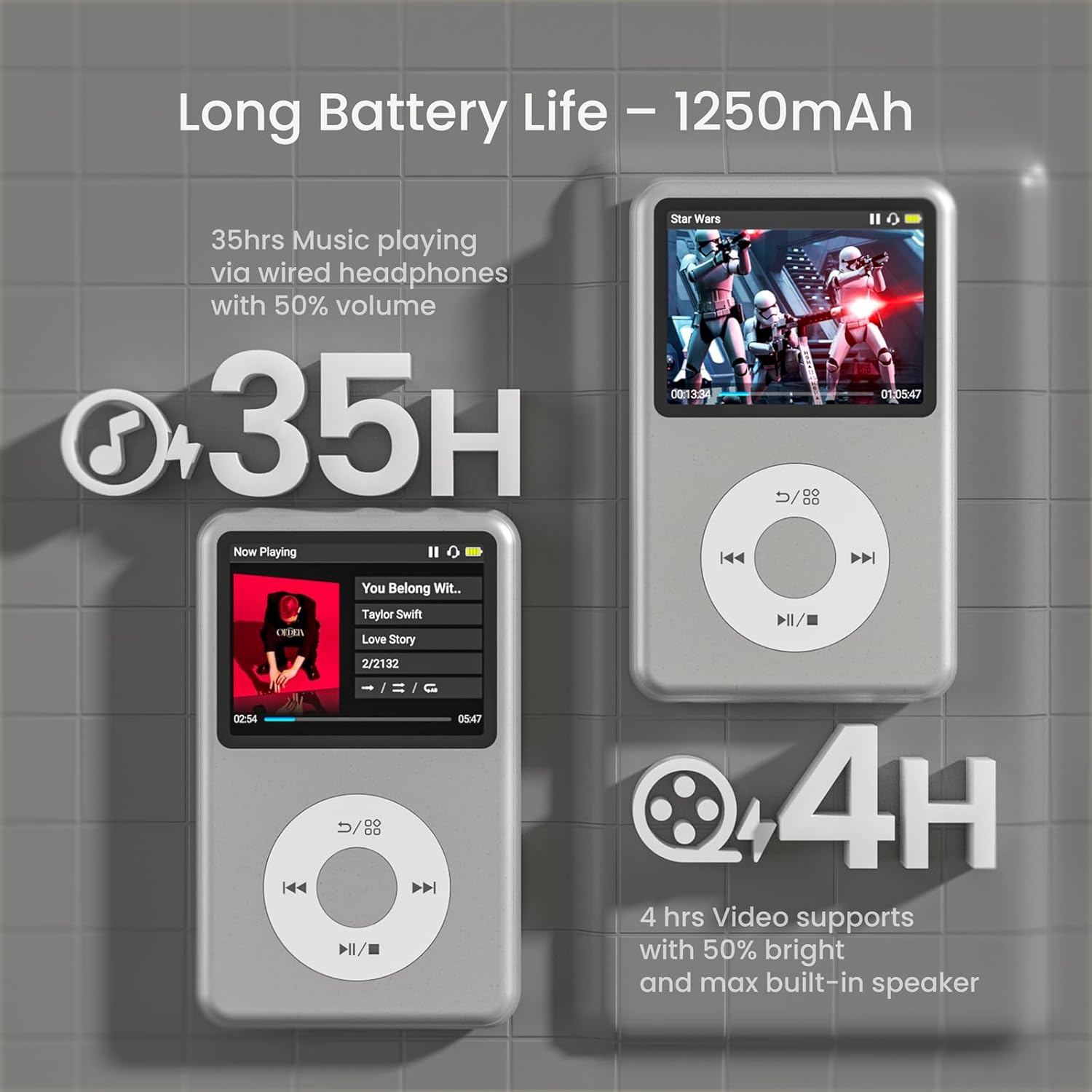
Figure 8: The innioasis Y1 MP3 Player highlighting its long battery life of 35 hours for music playback via wired headphones at 50% volume, and 4 hours for video support at 50% brightness with max built-in speaker.

Figure 9: The innioasis Y1 MP3 Player displaying compatibility with 21 music formats, including MP3, WAV, FLAC, APE, OGG, M4A, AAC, WMA, MP2, and AMR.
10. Garanti og support
For warranty information, technical support, or any inquiries regarding your innioasis Y1 MP3 Player, please refer to the contact details provided in the product packaging or visit the official innioasis webwebsted.


