1. Introduktion
Thank you for choosing the MAONO WM760 A2 Wireless Microphone System. This system is designed to provide clear, stable audio for a variety of applications, including vocal performances, public speaking, karaoke, and more. It features two wireless handheld microphones and a compact receiver, ensuring reliable performance and ease of use.
Please read this manual thoroughly before operating the device to ensure proper setup, optimal performance, and safe handling.
2. Produktet er slutview og komponenter
The MAONO WM760 A2 system includes the following components:
- 2 x trådløse håndholdte mikrofoner
- 1 x trådløs modtager (med 6.35 mm jackstik)
- 1 x 6.35mm to 3.5mm Jack Adapter
- 2 x Anti-roll Rings (for microphones)
- 2 x mikrofonbetræk i skum
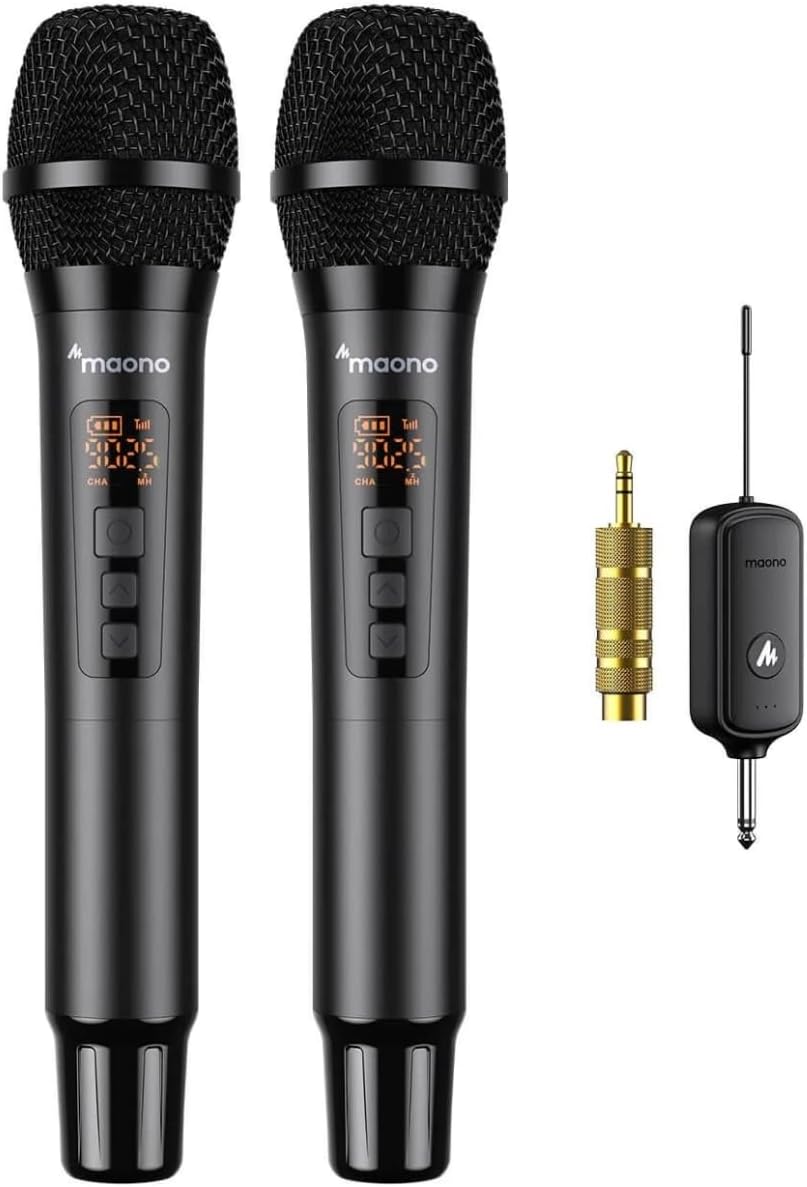
Figur 2.1: Overview of the MAONO WM760 A2 Wireless Microphone System, showing two microphones, the receiver, and the 6.35mm to 3.5mm adapter.

Figure 2.2: The complete MAONO WM760 A2 system, including two microphones, the receiver, jack adapter, anti-roll rings, and foam covers.
3. Opsætningsvejledning
3.1 Batteriinstallation
The MAONO WM760 A2 system requires a total of 6 AA batteries (not included) for operation: 2 for each microphone and 2 for the receiver.
- For Microphones: Unscrew the bottom part of each microphone. Insert 2 AA batteries, ensuring correct polarity (+/-). Screw the bottom part back on securely.
- Til modtager: Open the battery compartment on the receiver. Insert 2 AA batteries, ensuring correct polarity (+/-). Close the battery compartment.

Figure 3.1: Illustration of battery installation for both the wireless microphone and the receiver unit.
3.2 Tilslutning af modtageren
The receiver features a standard 6.35mm (1/4 inch) jack. Connect it to the audio input of your desired sound system. This can include:
- Vocal systems
- Aktive højttalere
- Sound cards
- Amplivførere
- Karaoke systems
- Blandere
If your audio system has a 3.5mm (1/8 inch) input, use the included 6.35mm to 3.5mm jack adapter.

Figure 3.2: The receiver being plugged into an audio input, demonstrating its direct connection capability.
3.3 Tænd og automatisk parring
- After connecting the receiver to your audio system, turn on the receiver.
- Turn on both handheld microphones.
- The microphones and receiver will automatically pair within a few seconds. The display on the microphones will show connection status.
- Once paired, you can begin using the microphones.
4. Betjening
4.1 Brug af mikrofonerne
Hold the microphone firmly and speak or sing directly into the top mesh grille. The microphone features a cardioid polar pattern, which means it primarily picks up sound from the front, reducing background noise.

Figur 4.1: En eksploderet view illustrating the internal components of the microphone and a diagram of its cardioid polar pattern, showing sound pickup directionality.
4.2 Changing Frequencies (UHF Channels)
The WM760 A2 system offers 20 UHF channels to prevent interference. If you experience signal drops or interference, you can manually change the frequency on the microphone:
- Locate the frequency adjustment buttons on the microphone (usually labeled 'CHA' and 'MH' or similar, near the display).
- Press the appropriate button to cycle through available channels until you find a clear frequency.
- Modtageren synkroniserer automatisk til den nye frekvens.
4.3 Brug af flere systemer
The WM760 A2 system is designed to allow multiple units to operate simultaneously without interference. Each system will automatically select available channels upon power-on. If you need more than two microphones, you can use additional WM760 A2 systems.
4.4 Driftsområde
The system has an operating range of up to 80 meters (approximately 260 feet) in open areas. Performance may vary depending on environmental factors such as obstacles, Wi-Fi signals, and other wireless devices.
5. Vedligeholdelse
- Rensning: Brug en blød, tør klud til at rengøre mikrofonerne og modtageren. Brug ikke flydende rengøringsmidler eller opløsningsmidler.
- Opbevaring: When not in use for extended periods, remove batteries from both microphones and the receiver to prevent leakage. Store the system in a cool, dry place.
- Håndtering: Avoid dropping the microphones or exposing them to excessive shock, moisture, or extreme temperatures.
6. Fejlfinding
| Problem | Mulig årsag | Løsning |
|---|---|---|
| Ingen lyd fra mikrofonerne. |
|
|
| Interferens eller statisk støj. |
|
|
| Kort driftsrækkevidde. |
|
|
7. Specifikationer
| Feature | Detalje |
|---|---|
| Mærke | MAONO |
| Modelnavn | WM-760 (Draadloos microfoonsysteem) |
| Mikrofontype | Trådløs håndholdt |
| Antal mikrofoner | 2 |
| Trådløs teknologi | UHF (20 Channels) |
| Driftsområde | Op til 80 meter (ca. 260 fod) |
| Strømkilde | 6 x AA Batteries (2 per mic, 2 for receiver) |
| Anbefalede anvendelser | Singing, Karaoke, Videoconferencing, Public Speaking |
| Inkluderede komponenter | Microphone, Receiver, Pop Filter (Foam Covers) |
| Fabrikant | Redshow |
| Oprindelsesland | Kina |
8. Sikkerhedsoplysninger
- Udsæt ikke enheden for regn, fugt eller ekstreme temperaturer.
- Forsøg ikke at skille enheden ad eller ændre den. Dette vil ugyldiggøre garantien og kan forårsage skade eller personskade.
- Opbevares utilgængeligt for børn.
- Bortskaf batterier ansvarligt i henhold til lokale regler.
9. Garanti og support
For warranty information and technical support, please refer to the documentation provided with your purchase or visit the official MAONO website. If you encounter any issues not covered in this manual, please contact MAONO customer service for assistance.
Online ressourcer:


