1. Introduktion
This manual provides detailed instructions for the setup, operation, and maintenance of your VOKSUN Home Weather Station Model 3378QX. This device offers comprehensive environmental monitoring and timekeeping features for your home or office.
Nøglefunktioner omfatter:
- Multifunktionsdisplay: Indoor and outdoor temperature and humidity, sunrise/sunset times, current time and date, alarm with snooze, temperature alerts, moon phase, tide pressure, comfort and mold risk indicators, and a 12-hour weather forecast.
- Stor farveskærm: A 7.5-inch HD LCD color display ensures clear readability of all important weather information. Features multi-level backlighting and high-visibility typography.
- Nøjagtig tidtagning: Automatic time synchronization via DCF radio waves. Supports two independent alarms with workday/weekend settings.
- Wireless External Sensor: Equipped with one wireless outdoor sensor and supports up to three sensors simultaneously. Offers a wireless transmission range of up to 60 meters (200 feet) in open areas.
- Dobbelt strømtilstande: Operates via DC5V power adapter for continuous display or batteries for portable use with an energy-saving display mode.
2. Pakkens indhold
Tjek venligst pakken for følgende varer:
- VOKSUN Home Weather Station Main Unit
- Wireless Outdoor Sensor (1 unit)
- DC5V strømadapter
- Instruktionsmanual
3. Produktet er slutview
Familiarize yourself with the main unit and its components.
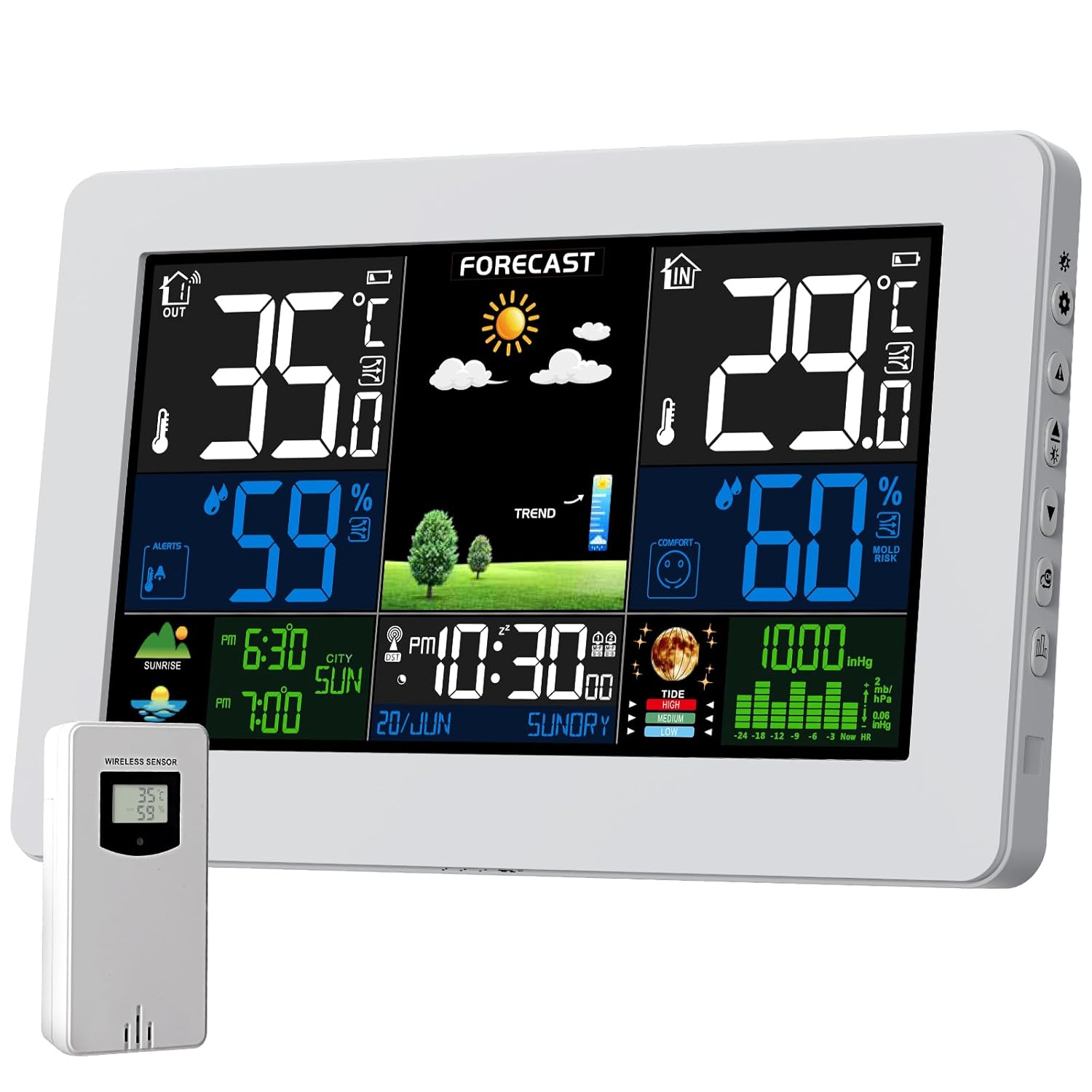
Figure 3.1: VOKSUN Home Weather Station Main Unit and Wireless Outdoor Sensor.
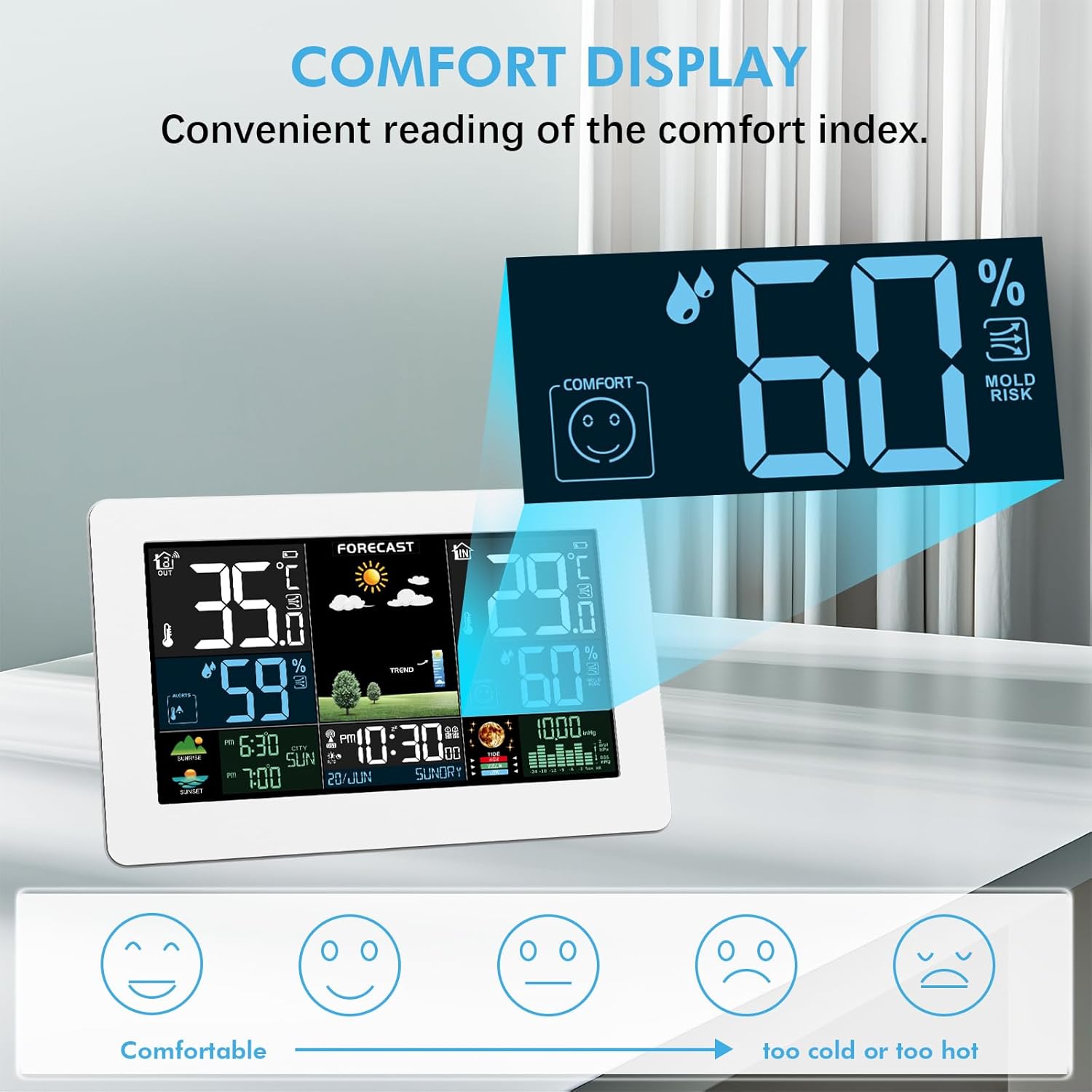
Figure 3.2: The weather station features a large 7.5-inch HD LCD screen displaying temperature, humidity, time, date, weather forecast, moon phase, and barometric pressure.

Figure 3.3: The weather station calculates a 12-hour weather forecast based on barometric pressure trends, displaying icons for sunny, slightly cloudy, cloudy, rainy, stormy, and snowy conditions.

Figure 3.4: The comfort display provides a convenient reading of the indoor comfort index, indicating comfortable, neutral, or uncomfortable conditions, along with mold risk.

Figure 3.5: The weather station supports synchronization with up to three external wireless sensors, allowing monitoring of different locations like a patio, bedroom, or basement.

Figure 3.6: The weather station offers two power modes: DC5V adapter for continuous operation and display, or battery power for portability with an automatic 15-second display timeout to save energy.
4. Opsætning
4.1 Strømforsyning
- Hovedenhed: Connect the provided DC5V power adapter to the weather station and a power outlet for continuous display. For backup and to retain settings during power loss, insert 2x AA batteries (not included) into the battery compartment. If operating solely on batteries, the display will automatically turn off after 15 seconds to conserve power. Press any button to reactivate the display.
- Trådløs udendørs sensor: Insert 2x AA batteries (not included) into the battery compartment of the wireless sensor.
4.2 Initial Setup (Time, Date, Units)
Upon initial power-on, the weather station will attempt to synchronize time via DCF radio waves. This process may take approximately 7 minutes. If automatic synchronization is not successful or if you prefer manual settings:
- Refer to the detailed instructions in the included manual for setting time, date, time zone, and measurement units (e.g., Celsius/Fahrenheit, hPa/inHg).
- Ensure the unit is placed in a location with good reception for DCF signals if automatic synchronization is desired.
4.3 External Sensor Pairing
The main unit will automatically search for and pair with the wireless outdoor sensor once both are powered on.
- Ensure the outdoor sensor is within the effective transmission range of up to 60 meters (200 feet) in an open area. Walls and other obstructions may reduce this range.
- If you have multiple sensors, ensure each is set to a different channel (CH1, CH2, CH3) before pairing. The main unit can display data from up to three sensors.
5. Betjeningsvejledning
5.1 Vis information
The main display provides a comprehensive overview of environmental data:
- Indendørs/udendørs temperatur og luftfugtighed: Aktuelle aflæsninger for begge miljøer.
- Tid og dato: Aktuel tid, ugedag og dato.
- Sunrise/Sunset Times: Calculated based on location settings.
- Månefase: Displays the current lunar phase.
- Barometrisk tryk: Current atmospheric pressure with a trend indicator.
- Vejrudsigt: Graphical representation of the predicted weather for the next 12 hours.
- Komfortindikator: An icon indicating the indoor comfort level.
- Mold Risk: An indicator for potential mold growth conditions.
5.2 Vejrudsigt
The weather station predicts weather conditions for approximately the next 12 hours based on changes in barometric pressure. For optimal accuracy, allow 7 to 10 days for the station to calibrate to your local environment after initial setup.
5.3 Alarmfunktioner
The device supports two independent alarms with customizable settings:
- Indstilling af alarmer: Configure specific times for Alarm 1 and Alarm 2.
- Alarmtilstande: Choose between workday (Monday-Friday), weekend (Saturday-Sunday), or daily alarm modes.
- Snooze-funktion: Activate snooze for a delay of 5 to 60 minutes after the alarm sounds.
5.4 Komfortindikator
The comfort indicator provides a quick visual reference for indoor conditions:
- A happy face indicates comfortable conditions.
- A neutral face indicates moderate conditions.
- A sad face indicates uncomfortable conditions (too hot/cold or too humid/dry).
5.5 Frost Alert
When the outdoor temperature falls between -1°C (30°F) and 3°C (37°F), a frost alert icon will flash on the display to warn of potential freezing conditions.
5.6 Barometrisk tryk
The weather station displays barometric pressure, which can be configured in two modes:
- Relative Pressure: This setting allows you to adjust the pressure reading to your local altitude for a more accurate local forecast.
- Absolut pres: Displays the raw atmospheric pressure reading.
6. Vedligeholdelse
- Rensning: Brug en blød, tør klud til at rengøre displayet ogasing. Avoid using abrasive cleaners, solvents, or chemical agents, as these may damage the surfaces.
- Sensorplacering: Position the outdoor sensor in a sheltered area to protect it from direct sunlight, heavy rain, and extreme weather conditions. Ensure adequate air circulation around the sensor for accurate readings.
- Udskiftning af batteri: Replace batteries in both the main unit (if used for primary power) and the outdoor sensor when the low battery indicator appears on the display.
7. Fejlfinding
| Problem | Mulig årsag | Løsning |
|---|---|---|
| No display or partial display | Power adapter not connected; batteries depleted or incorrectly inserted. | Ensure power adapter is securely connected. Check and replace batteries if necessary, ensuring correct polarity. |
| Outdoor sensor not connecting/displaying data | Sensor batteries depleted; sensor out of range; interference; sensor not paired. | Replace sensor batteries. Move sensor closer to the main unit. Avoid placing near large metal objects or electronics. Re-pair the sensor by resetting both units and initiating pairing. |
| Unøjagtige temperatur-/fugtighedsmålinger | Sensor exposed to direct sunlight, heat sources, or moisture. | Relocate the outdoor sensor to a shaded, well-ventilated area, protected from direct weather elements. |
| Vejrudsigten er upræcis | Insufficient calibration time; local weather variations. | Allow 7-10 days for the station to calibrate to local barometric pressure trends. Forecasts are based on pressure changes and may not always match official forecasts. |
| DCF time synchronization failure | Weak signal; electronic interference. | Move the weather station away from electronic devices (TVs, computers). Try repositioning the unit, especially near a window, for better signal reception. Manually set the time if synchronization consistently fails. |
8. Specifikationer
- Modelnummer: 3378QX
- Hovedenhedsdimensioner: 20.5 cm (bredde) x 13 cm (højde) x 3 cm (dybde)
- Vægt: 620 g
- Strømkilde (hovedenhed): DC5V Power Adapter or 2x AA Batteries (not included)
- Strømkilde (udendørs sensor): 2x AA batterier (medfølger ikke)
- Indendørs temperaturområde: -9.9°C til +50°C (14°F til 122°F)
- Udendørs temperaturområde: -40°C til +70°C (-40°F til 158°F)
- Indendørs/udendørs luftfugtighedsområde: 20% RH til 95% RH
- Trådløs transmissionsrækkevidde: Op til 60 meter (200 fod) i åbne områder
- Forbindelse teknologi: Trådløs
- Materiale: Polycarbonat (PC)
- Særlige funktioner: Adjustable Brightness, Wireless Connectivity, Large Color Display
9. Garanti og support
For information regarding product warranty, technical support, or service inquiries, please refer to the warranty card included with your product or contact VOKSUN customer service directly through the retailer where the product was purchased.


