1. Produktet er slutview
The TABWEE T20 is a versatile 10-inch Android tablet designed for both productivity and entertainment. It features a high-resolution Incell display, a powerful Octa-Core processor, and ample memory and storage, making it suitable for a wide range of applications from content creation to multimedia consumption.
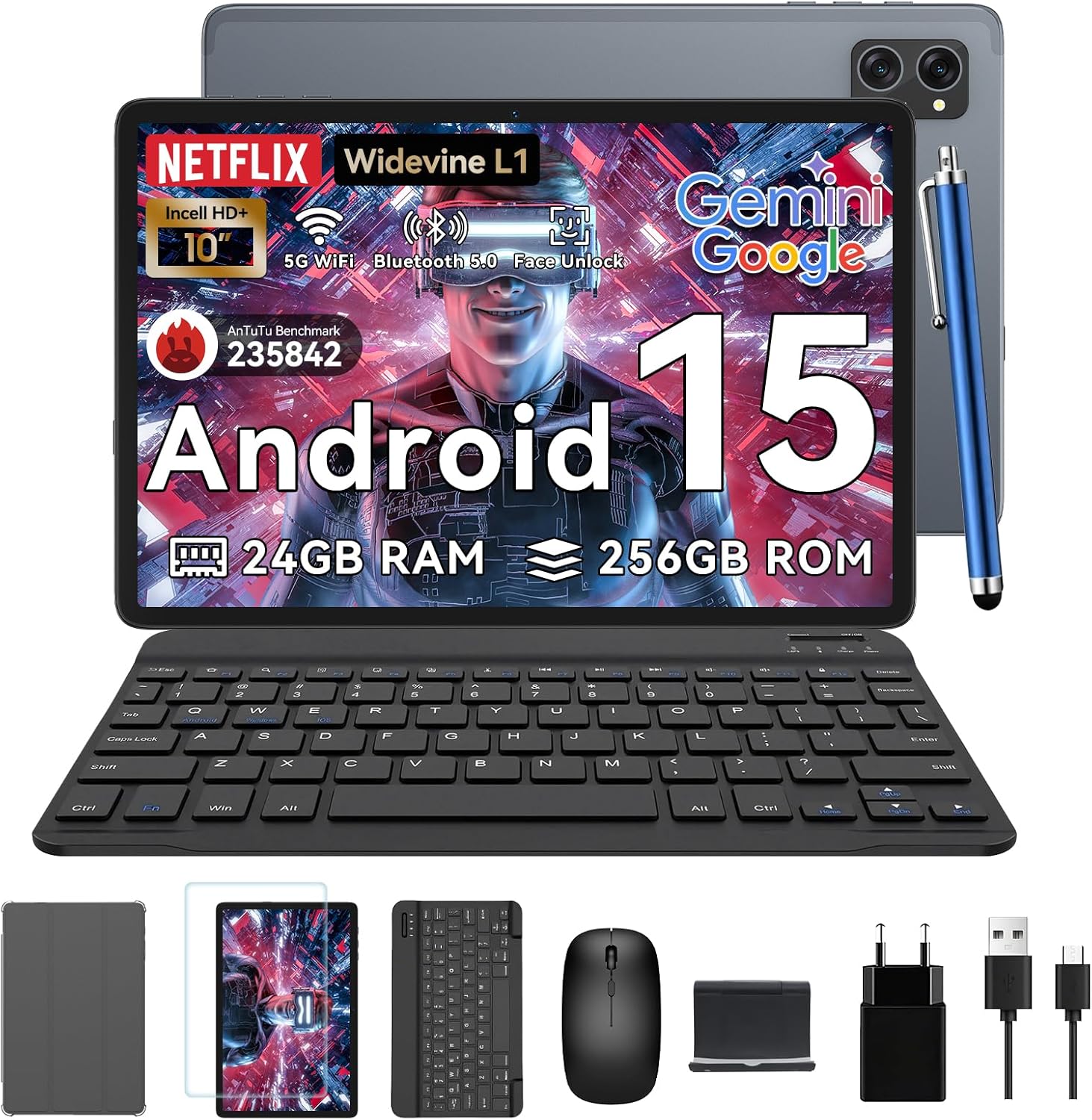
Figure 1.1: TABWEE T20 Tablet and its complete accessory package, including a Bluetooth keyboard, mouse, stylus, protective case, screen protector, charger, and USB cable.
Hvad er der i æsken
Upon unboxing your TABWEE T20 Tablet, verify that all components are present:

Figure 1.2: Contents of the TABWEE T20 Tablet retail package.
- 1x TABWEE T20 Tablet
- 1 x Bluetooth tastatur
- 1 x mus
- 1x Stylus
- 1x beskyttelsesetui
- 1x skærmbeskytter
- 1x Tablet Stand
- 1x oplader
- 1 x USB-kabel
2. Opsætning og første brug
Opladning af tabletten
Before first use, fully charge the tablet using the provided charger and USB cable. Connect the charger to a power outlet and the USB cable to the tablet's charging port. The charging indicator will illuminate.
Tænd/sluk
- For at tænde: Tryk på tænd/sluk-knappen, og hold den nede, indtil TABWEE-logoet vises på skærmen.
- For at slukke: Tryk på tænd/sluk-knappen og hold den nede, indtil menuen med strømindstillinger vises. Vælg "Sluk", og bekræft.
- For at genstarte: Fra menuen med strømindstillinger skal du vælge "Genstart" og bekræfte.
Initial Setup Wizard
Når tabletten tændes første gang, vil den guide dig gennem en indledende opsætningsguide. Følg instruktionerne på skærmen for at:
- Vælg dit sprog.
- Opret forbindelse til et Wi-Fi-netværk.
- Log ind med din Google-konto, eller opret en ny.
- Konfigurer skærmlås (pinkode, mønster, adgangskode eller ansigtslås).
- Review og accepterer vilkår og betingelser.
Tilslutning af tilbehør
The TABWEE T20 comes with a Bluetooth keyboard and mouse for enhanced productivity.
- Bluetooth Keyboard:
- Sørg for, at tastaturet er opladet og tændt.
- Gå til på tabletten Indstillinger > Forbundne enheder > Bluetooth.
- Turn on Bluetooth and tap "Pair new device".
- Select the keyboard from the list of available devices and follow pairing instructions.
- Bluetooth-mus:
- Sørg for, at musen er tændt og i parringstilstand.
- Gå til på tabletten Indstillinger > Forbundne enheder > Bluetooth.
- Tap "Pair new device" and select the mouse from the list.
- Stylus: The included stylus can be used directly on the screen for navigation, drawing, and note-taking. It features palm-rejection precision.
3. Betjening af tabletten
Android 15 operativsystem
The TABWEE T20 runs on Android 15, offering enhanced privacy controls, seamless cross-device collaboration, and improved multitasking capabilities.

Figure 3.1: Key features of the Android 15 operating system.
Gemini AI Integration
The tablet integrates Google Gemini AI, which intelligently optimizes tasks, from photo editing to document formatting, while prioritizing security with a dedicated encrypted privacy space.

Figur 3.2: Overview of Gemini AI capabilities on the tablet.
Display and Multimedia
The 10.1-inch Incell HD+ display (1280x800 resolution) provides vivid colors and crisp details. With Widevine L1 certification, you can enjoy 1080P streaming on platforms like Netflix, Disney+, and Hulu.

Figure 3.3: Display features and eye-friendly modes.
The tablet also features Dual Smart-K Box Speakers for an immersive audio experience.

Figure 3.4: Dual Smart-K Box Speakers for enhanced audio.
Kamerafunktioner
Equipped with an 8MP rear camera and a 5MP front camera, the tablet supports Google Lens integration for smart scanning and object recognition. Face Unlock is also supported for convenient security.

Figure 3.5: Camera specifications and features.

Figure 3.6: Smart Google Lens functionalities.
Forbindelse
The TABWEE T20 supports dual-band 5G WiFi and Bluetooth 5.0 for fast and stable connections.
- Wi-Fi: Connect to 2.4GHz or 5GHz networks for seamless streaming and quick downloads.
- Bluetooth 5.0: Pair with wireless earbuds, speakers, or other Bluetooth-enabled devices with 20% faster data transfer speed.
- OTG Support: Allows for easy transfer of files to and from external storage devices.

Figure 3.7: Advanced Bluetooth 5.0 connectivity.

Figure 3.8: Lightning Fast WiFi 5 Technology.
4. Vedligeholdelse og pleje
Korrekt vedligeholdelse sikrer din TABWEE T20 tablets lange levetid og optimale ydeevne.
Batteristyring
The 5000mAh battery provides extended usage times. To maximize battery life:
- Undgå ekstreme temperaturer.
- Use the provided charger.
- Enable smart power-saving modes in settings.
- Luk ubrugte programmer, der kører i baggrunden.

Figure 4.1: 5000mAh Mega Battery performance metrics.
Rengøring af tabletten
- Brug en blød, fnugfri klud til at rengøre skærmen og kabinettet.
- Til genstridige pletter, let dampRengør kluden med vand eller en skærmrens.
- Undgå at bruge skrappe kemikalier eller slibende materialer.
Opbevaring og hukommelsesstyring
The tablet comes with 256GB of internal storage and supports up to 2TB TF card expansion. It also features 24GB RAM (8GB physical + 16GB virtual) for smooth multitasking.

Figure 4.2: Storage and RAM expansion capabilities.
To optimize performance and storage:
- Regularly clear cache and temporary files.
- Afinstaller ubrugte programmer.
- Utilize the 2TB TF card slot for large files like 4K videos and design documents.
5. Fejlfinding
This section addresses common issues you might encounter with your TABWEE T20 Tablet.
| Problem | Mulig årsag | Løsning |
|---|
| Tabletten tænder ikke. | Lavt batteri; systemnedbrud. | Oplad tabletten i mindst 30 minutter. Hvis den stadig ikke reagerer, skal du trykke på tænd/sluk-knappen og holde den nede i 10-15 sekunder for at fremtvinge en genstart. |
| Problemer med Wi-Fi-forbindelse. | Incorrect password; router issues; out of range. | Verify Wi-Fi password. Restart your router. Ensure tablet is within Wi-Fi range. Forget the network and reconnect. |
| Bluetooth accessories not pairing. | Accessory not in pairing mode; Bluetooth off on tablet. | Ensure accessory is in pairing mode. Turn Bluetooth off and on again on the tablet. Restart both devices. |
| Slow performance or app crashes. | For mange apps kører; lav lagerplads; forældet software. | Close background apps. Clear app caches. Free up storage space. Check for system updates in Indstillinger > System > Systemopdatering. |
| Skærmen reagerer ikke. | Midlertidig softwarefejl. | Tving genstart af tabletten ved at holde tænd/sluk-knappen nede i 10-15 sekunder. |
Hvis problemet fortsætter efter at have forsøgt disse løsninger, bedes du kontakte kundesupport.
7. Garanti og support
TABWEE is committed to providing excellent customer service and support for your T20 Tablet.
Garantioplysninger
Your TABWEE T20 Tablet is covered by a 2-års garanti from the date of purchase. This warranty covers manufacturing defects and ensures risk-free ownership.
Kundesupport
For any technical assistance, troubleshooting, or warranty claims, please contact our support team:
- E-mail support: serviceplus.linda@gmail.com
- Online Call Support: Available 24/7 for US/CA customers.
- Repair Support: 2-Year Repair Support is provided.

Figure 7.1: TABWEE Customer Support Services.
Please have your purchase details and tablet model number ready when contacting support to expedite the process.


