1. Introduktion
Tak for købetasing the SYMA X100 Drone. This manual provides essential information for safe operation, setup, and maintenance of your new quadcopter. The SYMA X100 is designed for ease of use, featuring automatic obstacle avoidance, one-key controls, and stable flight capabilities, making it suitable for beginners and experienced users alike.

Image 1.1: SYMA X100 Drone, Remote Control, and Batteries
2. Sikkerhedsretningslinjer
- Indendørs brug: The drone is designed for safe indoor flying due to its obstacle avoidance and durable build. Ensure sufficient clear space.
- Udendørs brug: Fly outdoors only in calm weather conditions (no wind) to maintain control and prevent loss.
- Undgåelse af forhindringer: The 4-way infrared sensing technology detects obstacles within 30cm. While effective, always maintain visual contact and avoid intentionally crashing.
- Propelskærme: The full-enclosed propeller guard protects against accidental contact with high-speed blades. Do not remove during operation.
- Batterisikkerhed: Use only approved charging cables and batteries. Do not overcharge or puncture batteries. Discontinue use if batteries show signs of damage or swelling.
- Aldersanbefaling: Recommended for ages 8-12 and up. Adult supervision is advised for younger users.
3. Pakkens indhold
Bekræft at alle varer er til stede i din pakke:
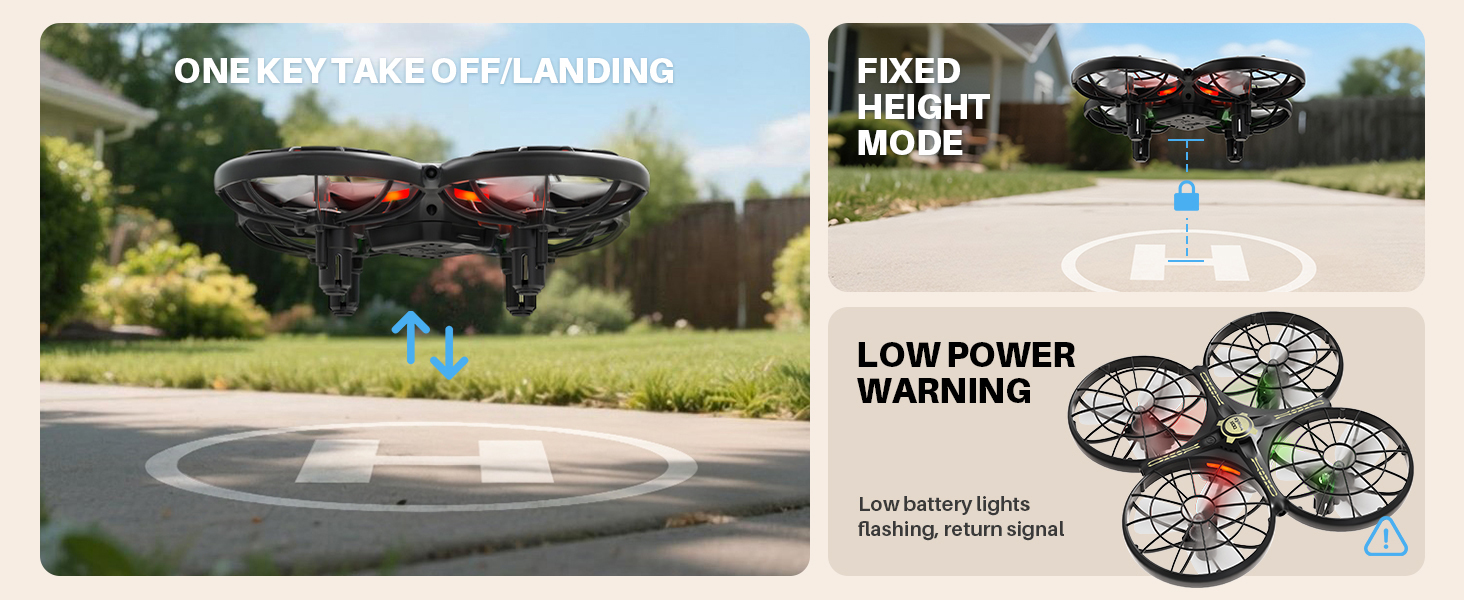
Image 3.1: SYMA X100 Drone Package List
- Drone (including 1 battery) x 1
- Fjernbetjening x 1
- Spare battery x 1
- USB-opladningskabel x 2
- Spare propeller A/B x 2 sets
- Skruetrækker x 1
- Brugervejledning x 1
4. Komponenter overview
4.1 Drone
The SYMA X100 drone features a compact design with integrated propeller guards for enhanced safety and durability. It includes LED lights for visibility and orientation.
4.2 Fjernbetjening
The remote control is ergonomically designed for comfortable handling. It provides precise control over the drone's movements and special functions.
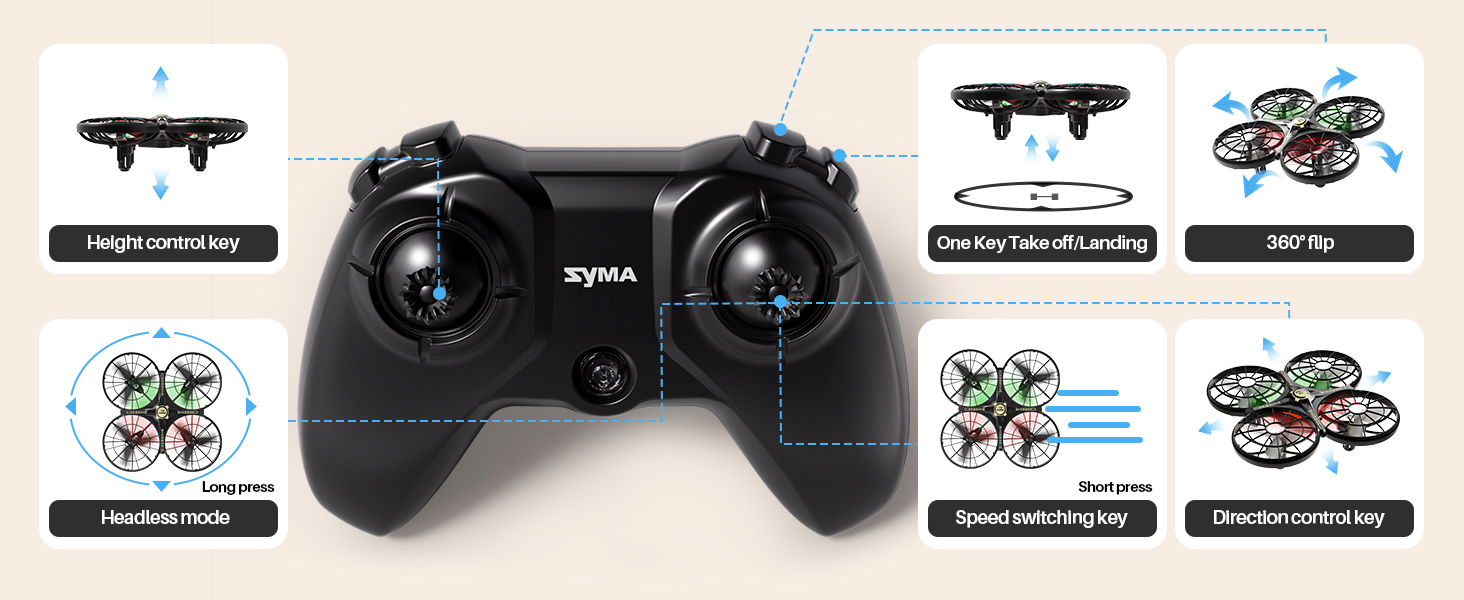
Image 4.1: Remote Control Layout
- Venstre joystick: Styrer højde (op/ned) og rotation (venstre/højre).
- Højre joystick: Styrer bevægelse fremad/bagud og venstre/højre.
- Knap til start/landing med én knap: Starter automatisk start eller landing.
- Speed Switching Key: Toggles between slow and fast flight modes.
- Hovedløs tilstandsknap: Activates headless mode for simplified orientation.
- 360° vippeknap: Executes aerial flips.
- Height Control Key: Adjusts and maintains flight altitude.
5. Batteriinstallation og opladning
5.1 Drone batteri
- Insert the drone battery into the battery compartment on the underside of the drone. Ensure it clicks securely into place.
- To charge, connect the drone battery to the USB charging cable. Plug the USB end into a compatible USB power source (e.g., computer, USB wall adapter).
- Charging time is approximately 90 minutes for a full charge. The LED indicator on the charging cable will show charging status.
- Two batteries are included to extend flight time.
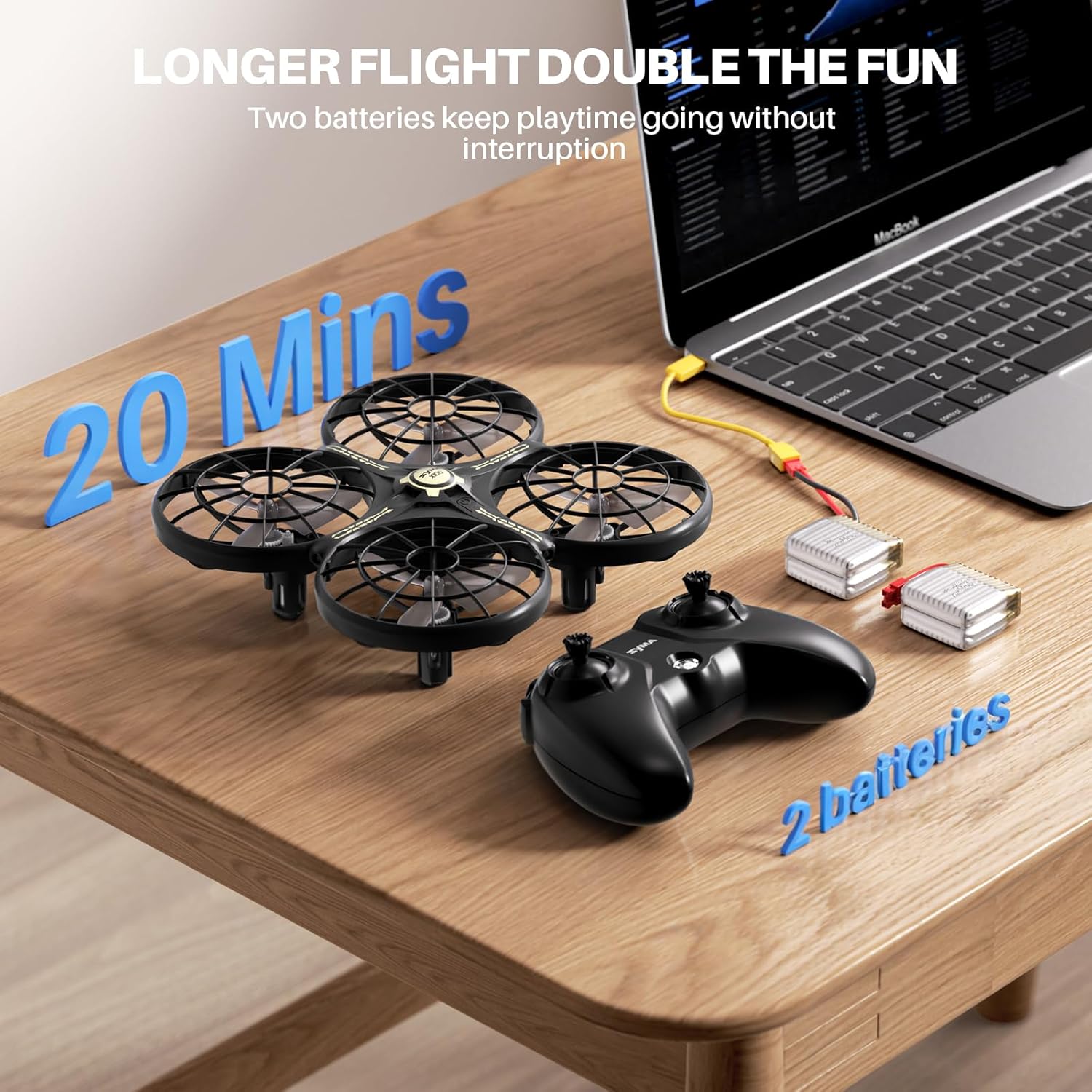
Image 5.1: Charging Drone Batteries
5.2 batteri til fjernbetjening
- Open the battery compartment on the back of the remote control using the provided screwdriver.
- Isæt 2 AAA-batterier (medfølger ikke) i henhold til polaritetsmarkeringerne.
- Luk batterirummet og fastgør det med skruen.
6. Opsætning og parring
- Ensure both the drone and remote control batteries are fully charged.
- Placer dronen på en flad, plan overflade.
- Power on the drone by pressing the power button on its underside. The drone's LED lights will flash.
- Power on the remote control. The remote's indicator light will flash.
- To pair, push the left joystick on the remote control fully up, then fully down. The drone's LED lights and the remote's indicator light will become solid, indicating successful pairing.
7. Betjeningsvejledning
7.1 One-Key Takeoff/Landing
After pairing, press the One-Key Takeoff/Landing button. The drone will automatically ascend to a stable hovering altitude or descend gently for landing.
7.2 Altitude Hold
The drone features an altitude hold function, allowing it to maintain a stable height automatically. This simplifies control, especially for beginners.
7.3 Hovedløs tilstand
Press the Headless Mode button to activate. In this mode, the drone's orientation is relative to the pilot, eliminating the need to adjust for the drone's front or back direction.
7.4 Hastighedsskift
Press the Speed Switching key to toggle between two speed modes: slow (1 m/s) for beginners and fast (1.5 m/s) for more experienced pilots.
7.5 360° vendinger
Press the 360° Flip button, then move the right joystick in any direction to perform an aerial flip.

Image 7.1: Performing 360° Flips
7.6 Undgåelse af forhindringer
The SYMA X100 utilizes 4-way infrared sensing to detect obstacles within 30cm and automatically adjust its flight path to avoid collisions. This feature is particularly useful for indoor flying.

Image 7.2: Smart Obstacle Avoidance in Action
7.7 Bevægelseskontrol
The drone supports multi-player gesture control, allowing users to guide its flight with hand movements or pass it mid-air for interactive play.

Image 7.3: Indoor Flying with Gesture Control
8. Vedligeholdelse
- Rensning: Brug en blød, tør klud til at rengøre dronen og fjernbetjeningen. Undgå vand eller skrappe kemikalier.
- Udskiftning af propel: If propellers are damaged, use the provided screwdriver to replace them with spare propellers (A/B types must match their respective positions).
- Opbevaring: Store the drone and accessories in a cool, dry place away from direct sunlight. Remove batteries from the remote control if not used for extended periods.
9. Fejlfinding
- Dronen svarer ikke: Ensure both drone and remote are powered on and successfully paired. Check remote control batteries.
- Drone Drifting: Perform a calibration by placing the drone on a level surface and following the calibration instructions in the full user manual.
- Kort flyvetid: Ensure batteries are fully charged. Flight time can be affected by aggressive flying or strong winds.
- Advarsel om lavt strømforbrug: The drone's lights will flash when the battery is low, signaling it's time to land and recharge.
10. Specifikationer
| Feature | Specifikation |
|---|---|
| Modelnavn | X100 |
| Produktdimensioner | 5.16 cm L x 5.16 cm B x 1.77 cm H |
| Varens vægt | 58 gram (2.05 ounce) |
| Materiale | ABS |
| Brug miljø | Indoors or outdoors (no wind) |
| Flyvetid | 20 minutter (med 2 batterier) |
| Opladningstid | Cirka 90 minutter |
| Flyvehøjde | Mindre end 30 meter |
| Obstacle Avoidance Distance | 30cm sensing distance, 320° sensing range |
| Fjernbetjening afstand | Cirka 30 meter |
| Forbindelsesteknologi | 2.4 GHz radiofrekvens |
| Kontroltype | Fjernbetjening, Bevægelseskontrol |
| Batterikapacitet | 700 mioamp Timer |
| LED lys | Green light indicates rear, red light indicates front. Four flashing lights indicate low battery warning. |
11. Garanti og support
For warranty information or technical support, please contact SYMA customer service:
- Telefon: +1 (718) 312-0558
- E-mail: usa@symatoys.com (USA)
Gem venligst dit købsbevis for garantikrav.


