Indledning
Tak for købetasing the VTech VM5267 Digital Video Baby Monitor. This manual provides comprehensive instructions for setting up, operating, and maintaining your new baby monitor. Please read this manual thoroughly before use to ensure proper operation and safety.
Pakkens indhold
- Forældreenhed (med 5-tommer LCD-skærm)
- Babyenhed (kamera)
- Two power adapters
- Brugermanual
- Hurtig start guide

Image: The VTech VM5267 Digital Video Baby Monitor package contents, including the parent unit with a 5-inch display and the baby unit (camera).
Opsætning
1. Powering On the Baby Unit
- Connect the small plug of the power adapter to the DC jack on the back of the baby unit.
- Tilslut det store stik på strømadapteren til en stikkontakt.
- Babyenheden tændes automatisk.
2. Powering On the Parent Unit
- Connect the small plug of the power adapter to the DC jack on the side of the parent unit.
- Tilslut det store stik på strømadapteren til en stikkontakt.
- Tryk og hold på MAGT knappen på forældreenheden, indtil skærmen tændes.
Note: For optimal performance, ensure both units are placed within range and away from other electronic devices that may cause interference.
Betjening af monitoren
Viewing Your Baby
Once both units are powered on and linked, the parent unit will display the video feed from the baby unit. The 5-inch high-resolution color LCD screen provides a clear view.
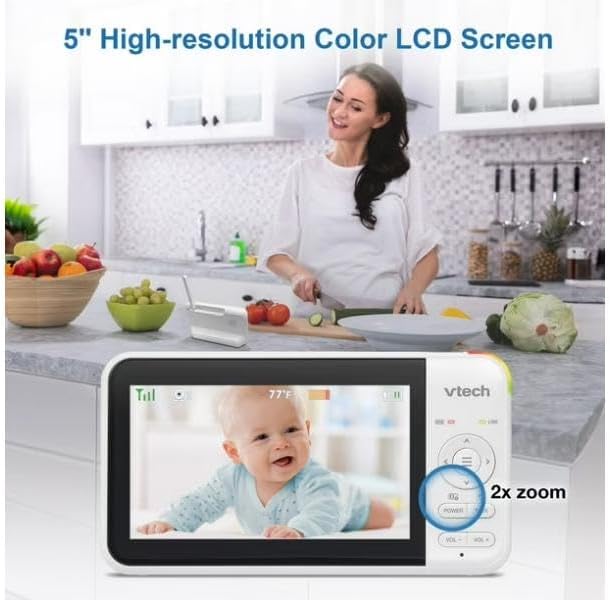
Image: The parent unit's 5-inch high-resolution color LCD screen showing a clear image of a baby, with an indication of 2x zoom capability.
Pan og tilt funktion
Use the navigation buttons on the parent unit to remotely pan (move horizontally) and tilt (move vertically) the camera lens of the baby unit. This allows you to adjust the viewing angle without physically moving the camera.
Tovejs intercom med tilbagekobling
Tryk og hold på TALE knappen på forældreenheden for at tale med din baby gennem babyenhedens højttaler. Slip knappen for at høre din baby.

Image: A visual representation of the two-way talk-back intercom, demonstrating communication between the parent unit and the baby unit.
Night Light and Soothing Sounds
The baby unit features a multi-color night light and can play soothing sounds and lullabies. Use the dedicated buttons on the parent unit to control these features.
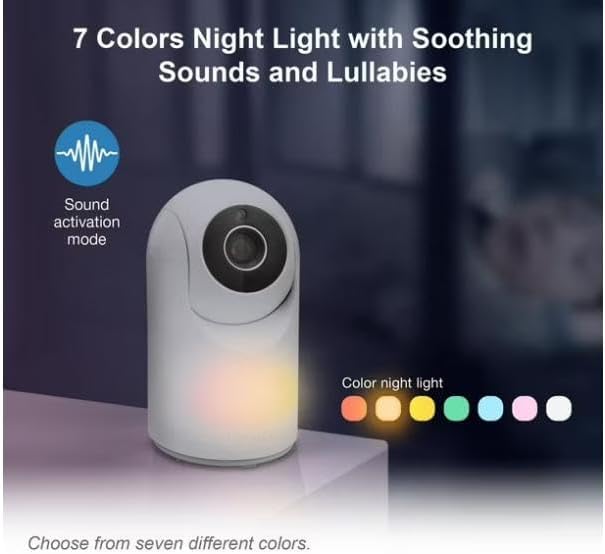
Image: The baby unit showcasing its 7-color night light feature, along with an icon indicating sound activation mode.
Automatisk infrarød nattesyn
The baby unit is equipped with infrared LEDs that automatically activate in low-light conditions, providing a clear black-and-white video image of your baby, even in complete darkness.

Image: A side-by-side comparison illustrating the superior clarity of VTech's enhanced night vision compared to standard night vision.
Sound Activation Screen
The parent unit screen can be set to automatically turn on when sound is detected from the baby unit, conserving battery life. The night light on the baby unit can also be configured to turn on with sound detection.

Image: The parent unit displaying a baby, with visual cues indicating the sound activation feature that turns the screen on when noise is detected.
Opretholdelse
Rengøring af enhederne
- Tør overfladerne på forældreenheden og babyenheden af med en blød klud.amp klæde.
- Brug ikke rengøringsspray eller flydende rengøringsmidler.
- Ensure units are dry before reconnecting to power.
Battery Care (Parent Unit)
- The parent unit uses a rechargeable battery.
- Oplad batteriet i mindst 12 timer før første brug.
- To prolong battery life, fully discharge the battery periodically before recharging.
- If storing the unit for an extended period, remove the battery.
Fejlfinding
| Problem | Mulig løsning |
|---|---|
| No link / Out of range |
|
| Intet billede / Sort skærm |
|
| Statisk eller interferens |
|
Specifikationer
- Model: VM5267
- Vise: 5-inch (12.7 cm) Color LCD
- Kamerafunktioner: Pan, Tilt, Digital Zoom, Automatic Infrared Night Vision, Multi-color Night Light
- Lydfunktioner: Two-Way Talk-Back Intercom, Soothing Sounds & Lullabies, Sound Activation
- Magt: AC power adapters for both units; Rechargeable battery for Parent Unit
- Driftsfrekvens: 2.4 GHz FHSS
- Driftsområde: Op til 300 meter (åbent felt)
- Dimensioner (forældreenhed): Approximately 7.62 x 7.62 x 5.08 cm (as per parcel dimensions, actual unit dimensions may vary slightly)
- Vægt: Approximately 750 g (total package weight)
Garanti og support
For garantioplysninger og teknisk support henvises til garantikortet, der følger med produktemballagen, eller besøg den officielle VTech website. Please have your product model number (VM5267) and purchase date ready when contacting support.
VTech-officielle Webwebsted: www.vtechphones.com


