1. Introduktion
The PGST A107F Wireless Home Security Alarm System is designed to provide comprehensive protection for your home or business. Featuring a full-touch screen control panel, this smart system offers real-time alerts via the Tuya APP, supports DIY installation of various sensors, and is compatible with voice assistants like Alexa and Google Assistant. This manual provides detailed instructions for setting up, operating, and maintaining your alarm system to ensure optimal performance and security.
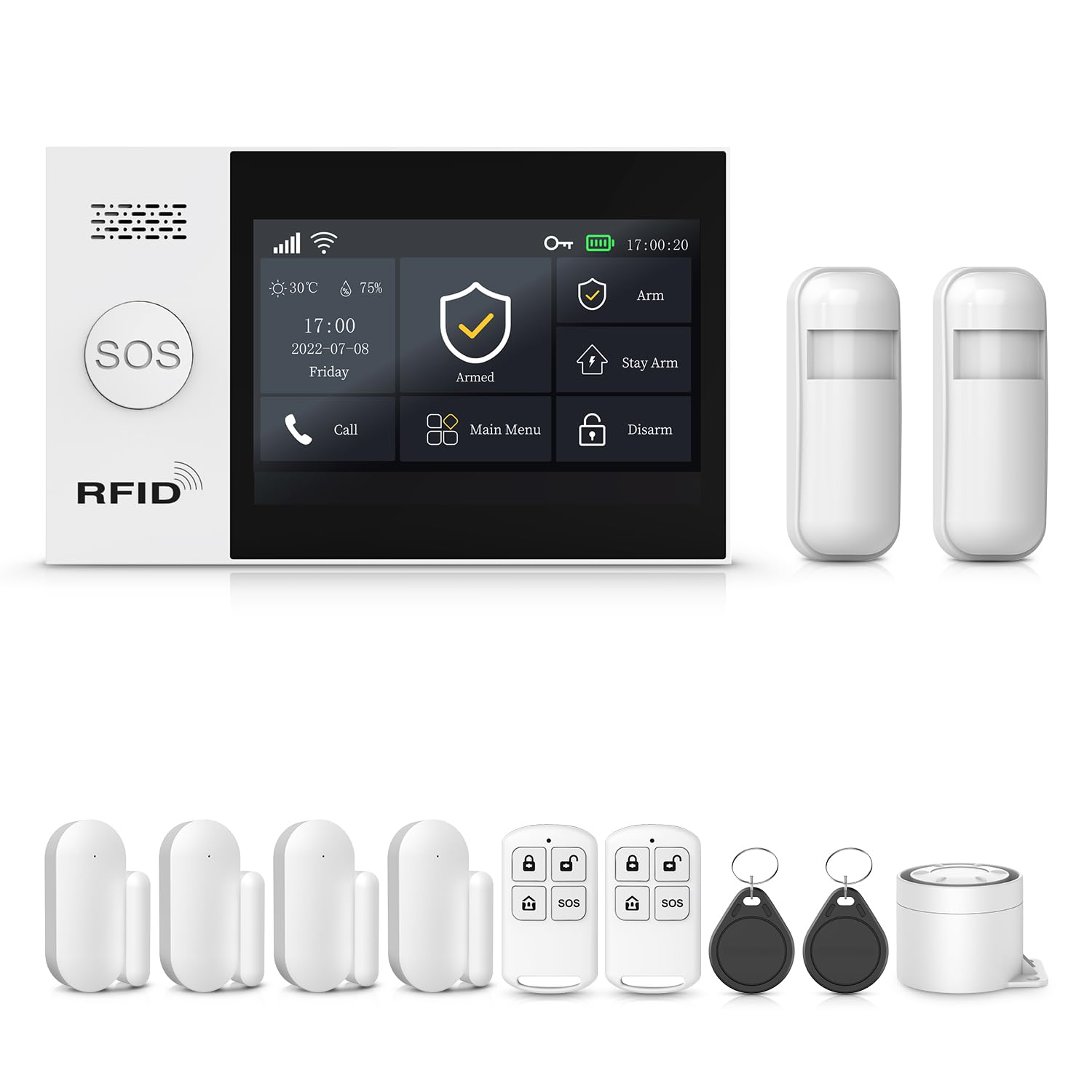
Image: The PGST A107F Wireless Home Security Alarm System with its main control panel and various sensors.

Image: The PGST Alarm System Host, featuring a large touch screen display for easy interaction.

Billede: Et nærbillede view of the 4.3-inch TFT colorful display screen, highlighting its multi-function capabilities.

Image: An illustration demonstrating how the PGST system can link with other smart home products for an integrated security solution.
2. Pakkens indhold
Verify that all components are present in your package (12 PIECE KITS):
- 1x PGST A107F Alarm System Control Panel (Host)
- 2x PIR Motion Detectors
- 4x dør-/vinduessensorer
- 2x fjernbetjeninger
- 2x RFID Tags
- 1x strømadapter
- 1x Brugermanual (dette dokument)
- Monteringsudstyr (skruer, klæbepuder)

Billede: Overview of the PGST A107F 12-piece kit components, including the control panel, motion sensors, door/window sensors, remote controls, and RFID tags.
3. Sikkerhedsoplysninger
- Do not expose the control panel or sensors to extreme temperatures, direct sunlight, or moisture.
- Use only the provided power adapter for the control panel.
- Keep the system away from strong electromagnetic fields.
- Ensure proper ventilation for the control panel.
- Forsøg ikke selv at adskille eller reparere enheden. Kontakt kundesupport for at få hjælp.
- Replace batteries in sensors with the correct type and dispose of old batteries responsibly.
4. Opsætning
4.1 Installation af kontrolpanel
- Choose a central location in your home for the control panel, away from direct sunlight and heat sources.
- Mount the control panel securely to a wall using the provided screws or adhesive pads. Ensure it is within Wi-Fi range.
- Connect the power adapter to the control panel and plug it into a power outlet.
- The control panel will power on and display the main interface.

Image: A hand demonstrating the easy installation of the control panel on a wall.
4.2 Network Configuration and App Connection
The PGST A107F system connects to your home Wi-Fi network and is managed via the Tuya Smart or Smart Life application. Follow these steps to configure the network:
- Download appen "Tuya Smart" eller "Smart Life" fra din smartphones appbutik.
- Registrer eller log ind på din konto.
- On the control panel, navigate to Menu > Wi-Fi.
- Vælg enten Blød AP-konfiguration or Konfiguration af luftforbindelse.
- Follow the on-screen instructions on the control panel and in the app to complete the Wi-Fi connection and device pairing.
- Once connected, the app will allow you to manage your alarm system remotely.
4.3 Sensor Installation and Pairing
Install and pair your door/window sensors and PIR motion detectors:
- Dør-/vinduessensorer: Install the two parts of the sensor on a door or window frame, ensuring they are aligned and within 1 cm of each other when the door/window is closed.
- PIR-bevægelsesdetektorer: Mount motion detectors in corners or on walls to cover key areas, ensuring a clear line of sight within their 110-degree detection range. Avoid placing them near heat sources or direct sunlight.
- Parring: Refer to the control panel's menu or the app for instructions on how to add new sensors. Typically, this involves putting the control panel into pairing mode and then triggering the sensor (e.g., separating the door sensor parts, waving in front of the motion sensor).

Image: A door/window sensor installed on a window frame, demonstrating its magnetic field detection technology.
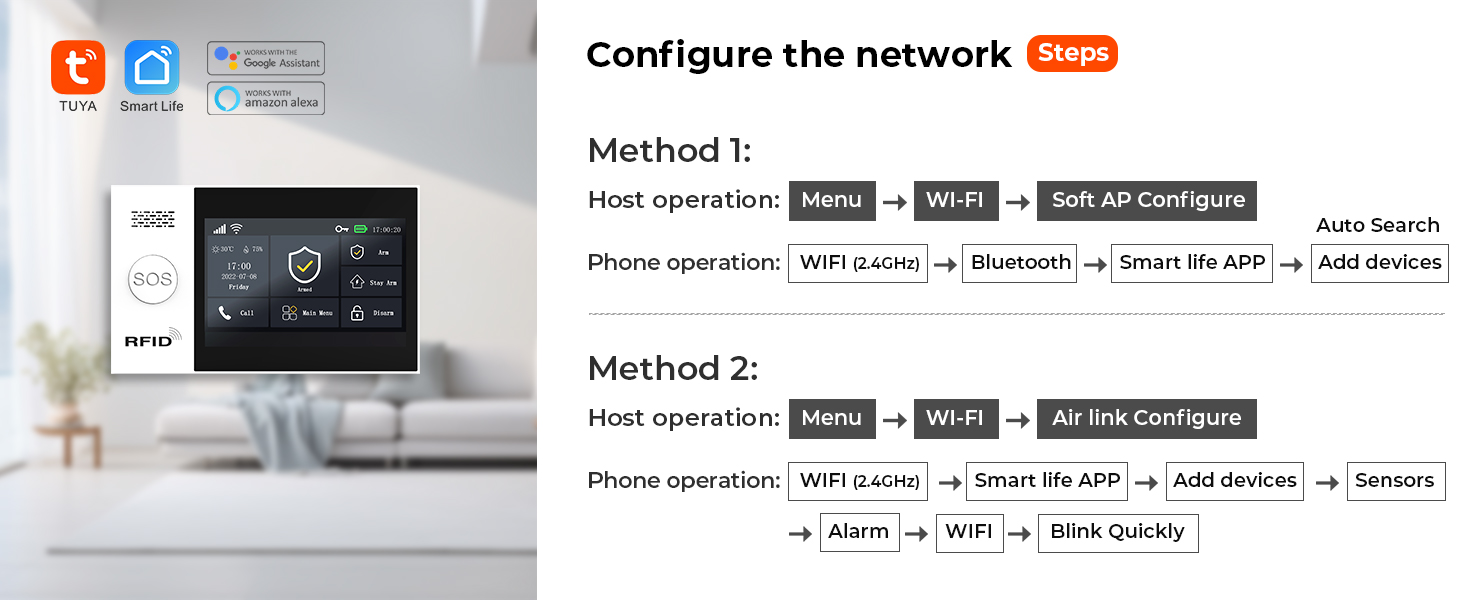
Image: A PIR motion detector mounted on a wall, illustrating its infrared detection capability for intruders.
4.4 Anti-nedrivningsalarmfunktion
The control panel features an anti-demolition alarm. If the device is detached from its mounting location, it will trigger an alarm and send notifications.

Billede: En detaljeret view of the anti-demolition alarm switch located on the back of the alarm host, designed to trigger an alert if the device is removed.
4.5 Setting Up Emergency Contacts
Configure up to five emergency contact numbers in the app or control panel. In case of an alarm, the system will sequentially dial these numbers and send SMS alerts.

Image: The alarm system sending notifications to five pre-set contacts, ensuring no alert is missed.
5. Betjeningsvejledning
5.1 Til- og frakobling
The system offers various arming modes:
- Arm (Away Arm): Activates all sensors. Use when leaving the premises.
- Hold arm (Hjemme arm): Activates perimeter sensors (e.g., door/window sensors) while allowing movement within the property. Use when at home.
- Afvæbne: Deaktiverer alle sensorer.
You can arm/disarm using the control panel, remote controls, RFID tags, or the Tuya Smart/Smart Life app.

Billede: Eksamples of scheduled arming and disarming, such as disarming upon waking up and arming when leaving or sleeping.
5.2 SOS-funktion
Press the SOS button on the control panel or remote control in an emergency. The system will immediately trigger an alarm and notify your preset emergency contacts.
5.3 App Control and Real-Time Alerts
The Tuya Smart/Smart Life app provides full control over your alarm system and delivers instant notifications:
- Arm/Disarm remotely.
- Receive real-time alerts when sensors are triggered.
- View system status and event history.
- Manage sensors and settings.
5.4 Integration af stemmestyring
The system is compatible with Amazon Alexa and Google Assistant, allowing for convenient voice commands to arm or disarm your system.

Image: Users disarming their home using voice commands with Amazon Alexa and Google Assistant.
5.5 Voice Intercom (with compatible cameras)
If integrated with compatible smart cameras, the system allows for voice intercom functionality through the app, enabling you to communicate with visitors or deter intruders.
Video: Demonstrates the voice intercom feature, showing how linked cameras can be used to communicate or deter potential intruders.
6. Vedligeholdelse
6.1 Udskiftning af batteri
Sensors are battery-powered. The system will notify you via the app when a sensor's battery is low. Replace batteries promptly to ensure continuous protection.

Image: Illustration of the low battery alert system for wireless sensors, showing how notifications are pushed to the app.
- Refer to the specific sensor's compartment for battery type (e.g., CR2032 for small sensors, AA/AAA for larger ones).
- Åbn forsigtigt sensoren casing, remove the old battery, and insert the new one, observing polarity.
- Luk casing sikkert.
6.2 Rengøring
Wipe the control panel and sensors with a soft, dry cloth. Do not use liquid cleaners or abrasive materials.
6.3 firmwareopdateringer
Periodically check the Tuya Smart/Smart Life app for available firmware updates for your control panel. Updates can improve performance and add new features.
7. Fejlfinding
| Problem | Mulig årsag | Løsning |
|---|---|---|
| No app notifications/silent notifications | App notification settings are disabled; phone's silent mode; network issues. |
|
| Sensor not pairing | Sensor too far from control panel; low sensor battery; incorrect pairing mode. |
|
| Falske alarmer | Improper sensor placement; environmental factors (pets, drafts); sensor malfunction. |
|
| Kontrolpanel reagerer ikke | Power issue; system crash. |
|
8. Specifikationer
| Feature | Detalje |
|---|---|
| Mærke | PGST |
| Modelnummer | PGST A107F |
| Farve | Hvid |
| Strømkilde | Elektrisk med ledning |
| Kompatible enheder | Smartphone (Tuya Smart/Smart Life App), Amazon Alexa, Google Assistant |
| Varedimensioner (L x B x H) | 6 x 8 x 4 tommer |
| Forbindelsesteknologi | Trådløs (Wi-Fi) |
| Installationstype | Indskruning |
| Alert Type | Audio & Motion, App Notifications, SMS, Phone Call |
| Kontrolmetode | App, Control Panel, Remote Control, RFID Tag, Voice Assistant |
| Battericellesammensætning | Alkalisk (til sensorer) |
| Inkluderede komponenter | 1X PGST107 ALARM SYSTEM (refer to Package Contents for full kit details) |
| Sensor Technology | Motion Sensor, Magnetic Door/Window Sensor |
| Connector Type | USB Type C (for power adapter) |
| Varens vægt | 1.81 pund |
| Batterier inkluderet? | Yes (1 Nonstandard Battery for control panel, others for sensors) |
9. Garanti og support
The PGST A107F Wireless Home Security Alarm System comes with a 1-års garanti fra købsdatoen. Denne garanti dækker fabrikationsfejl og funktionsfejl under normal brug.
For technical support, troubleshooting assistance, or warranty claims, please contact PGST customer service through the retailer's platform or visit the official PGST website for contact information. Please have your product model number (PGST A107F) and purchase details ready when contacting support.


