1. Introduktion
This manual provides essential information for the safe and effective operation of your ION Audio Retro Glow Boombox. This device combines classic audio playback with modern connectivity, featuring an AM/FM radio, cassette player/recorder, Bluetooth 5.3, USB, and SD card playback capabilities. Please read this manual thoroughly before use and retain it for future reference.
2. Sikkerhedsoplysninger
- Udsæt ikke enheden for vand eller fugt.
- Undgå at placere enheden i nærheden af varmekilder eller i direkte sollys.
- Sørg for ordentlig ventilation; bloker ikke ventilationsåbninger.
- Brug kun tilbehør/tilbehør specificeret af producenten.
- Tag stikket ud af enheden under tordenvejr, eller når den ikke skal bruges i længere perioder.
- Overlad al service til kvalificeret servicepersonale.
3. Hvad er inkluderet
Ved udpakning skal du sørge for, at alle nedenstående varer er til stede og i god stand:
- ION Audio Retro Glow Boombox
- Strømkabel
- Hurtig start guide
4. Produktet er slutview
The Retro Glow Boombox features a translucent housing with multi-colored LED lights that synchronize with music. It includes dual full-range speakers for robust audio output.
Frontpanel

Figur 1: Forside view of the Retro Glow Boombox, showcasing the cassette deck, radio tuner, and illuminated dual speakers.
Øverste kontroller

Figur 2: Detaljeret view of the top panel, including volume, bass, treble controls, cassette function buttons (Pause, Stop/Eject, F.FWD, REW, Play, REC), and mode selectors (Tape, Aux, Radio, Bluetooth/USB/SD).
Side Panel and Rear
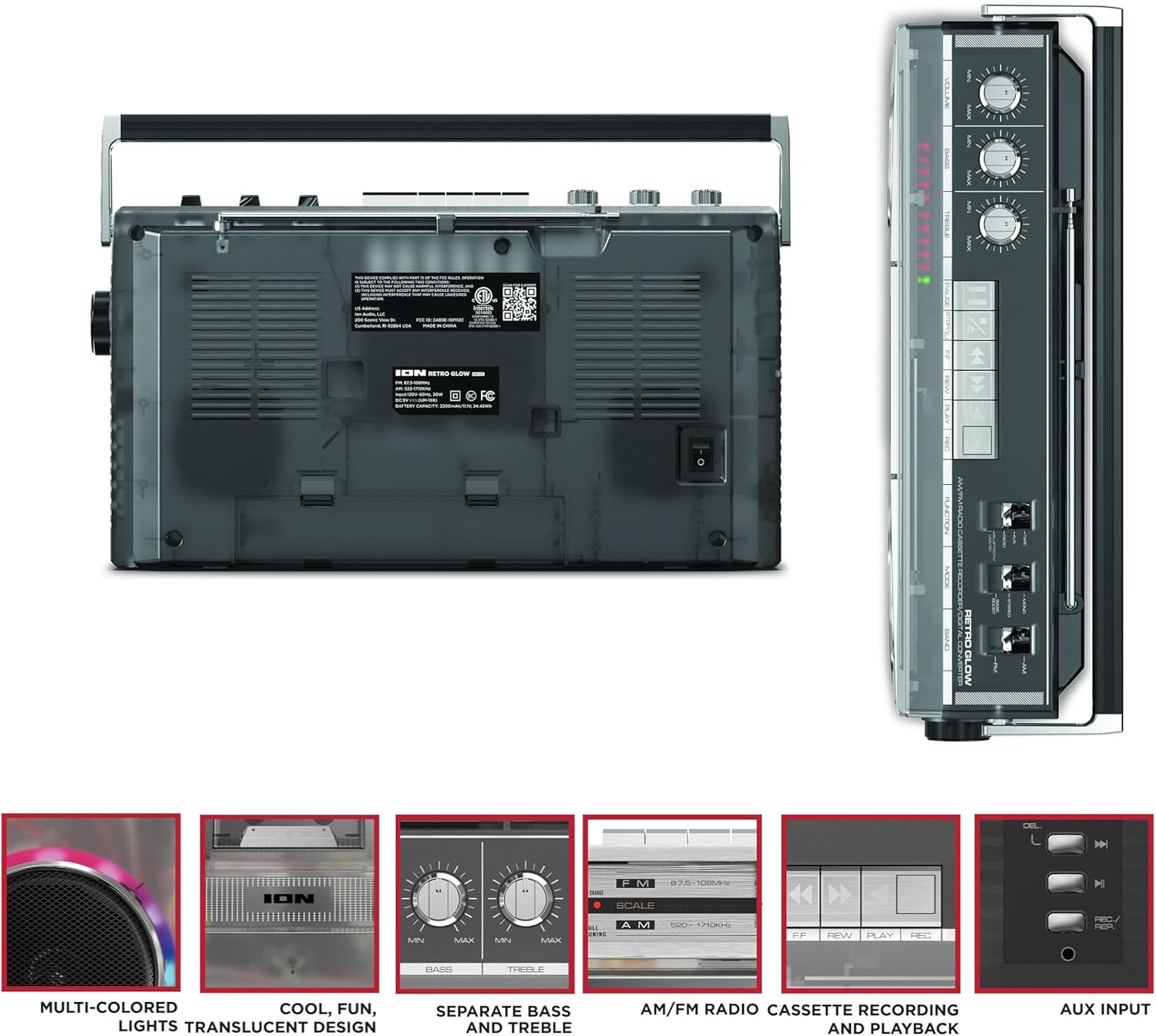
Figure 3: Side panel illustrating the USB port, SD card slot, and playback control buttons. The rear panel includes the power input and battery compartment.
5. Opsætning
Strøm til Ghettoblasteren
The Retro Glow Boombox can be powered via the included AC power cable or by batteries for portable use.
- AC strøm: Connect the power cable to the AC input on the rear of the unit and then to a wall outlet.
- Batteristrøm: Open the battery compartment on the rear and insert the required batteries (type and quantity specified in specifications).

Figur 4: Bagside view of the boombox, highlighting the power input and the battery compartment for portable operation.
6. Betjeningsvejledning
Generel drift
- Tænd/sluk: Use the power switch to turn the unit on or off.
- Lydstyrkekontrol: Adjust the 'VOLUME' knob on the top panel to increase or decrease the sound level.
- Tone Control: Use the 'BASS' and 'TREBLE' knobs to customize the audio output to your preference.
- LED lys: The multi-colored LED lights around the speakers dance in sync with the music. Refer to the Quickstart Guide for specific controls to change light modes or turn them off.
Radiofunktionalitet
- Switch the 'FUNCTION' selector to 'RADIO'.
- Select 'AM' or 'FM' using the 'BAND' switch.
- Træk teleskopantennen ud for optimal FM-modtagelse. Drej enheden for at opnå den bedste modtagelse ved AM.
- Use the 'TUNING' knob to scan for stations.
Cassette Player/Recorder
- Afspilning: Press the 'STOP/EJ' button to open the cassette door. Insert a cassette tape and close the door. Press 'PLAY' to begin playback.
- Indspilning: To record from the radio, built-in microphone, or an external source (via Aux input), ensure a blank cassette is inserted. Select the desired source using the 'FUNCTION' switch. Press the 'REC' button (often simultaneously with 'PLAY') to start recording.
- Hurtigt frem/tilbage: Use the 'F.FWD' and 'REW' buttons for tape navigation.
Bluetooth-forbindelse
- Switch the 'FUNCTION' selector to 'BLUETOOTH/USB/SD'. The unit will enter pairing mode.
- On your Bluetooth-enabled device, search for 'Retro Glow Boombox' and select it to pair.
- Once paired, you can stream audio wirelessly to the boombox.
USB- og SD-kortafspilning
- Insert a USB drive or SD card into the respective slot on the side panel.
- Switch the 'FUNCTION' selector to 'BLUETOOTH/USB/SD'. The unit should automatically detect and begin playing audio files fra det indsatte medie.
- Use the playback control buttons (play/pause, skip forward/backward) on the side panel to manage your audio.
Hjælpeindgang
- Connect an external audio device (e.g., smartphone, MP3 player) to the 'AUX' input using a 3.5mm audio cable (not included).
- Switch the 'FUNCTION' selector to 'AUX'. Audio from your external device will play through the boombox speakers.
7. Vedligeholdelse
- Rensning: Brug en blød, tør klud til at rengøre enhedens yderside. Brug ikke slibende rengøringsmidler eller opløsningsmidler.
- Pleje af kassettebåndoptager: Rengør regelmæssigt tapehovederne og trykkrullerne let med en vatpind.ampmed isopropylalkohol for at sikre optimal lydkvalitet og forhindre beskadigelse af båndet.
- Opbevaring: When not in use, store the boombox in a cool, dry place away from direct sunlight and extreme temperatures.
8. Fejlfinding
Ingen strøm
- Sørg for, at strømkablet er korrekt tilsluttet både enheden og en fungerende stikkontakt.
- If using batteries, check if they are inserted correctly and are not depleted.
Ingen lyd
- Check the volume level on the boombox and the connected audio source (if applicable).
- Ensure the correct function mode (Radio, Tape, Bluetooth, USB/SD, Aux) is selected.
- For cassette playback, verify the tape is inserted correctly and the heads are clean.
Problemer med Bluetooth-parring
- Make sure the boombox is in Bluetooth pairing mode.
- Ensure your Bluetooth device is within range (typically 30 feet or 10 meters).
- Prøv at ophæve parringen og parre enheden igen.
9. Specifikationer
| Produktdimensioner | 9.25 x 16.25 x 5.25 tommer |
| Varens vægt | 8.93 pund |
| Forbindelsesteknologi | Bluetooth 5.3, USB, SD Card, Aux Input |
| Højttaler type | Stereo, Full-Range |
| Strømkilde | AC Power Cable, Rechargeable Battery (approx. 10-hour life) |
| Særlige funktioner | AM/FM Radio, Cassette Player/Recorder, Multi-colored LED Lights, Retro VU Meters, Separate Bass and Treble Controls |
10. Garanti og support
For warranty information or technical support, please refer to the Quickstart Guide included with your product or visit the official ION Audio website. Keep your purchase receipt as proof of purchase may be required for warranty claims.


