1. Produktet er slutview
The CHOETECH B695 is a versatile 10000mAh magnetic power bank designed for convenient charging of multiple devices. It features both wireless charging capabilities and multiple wired output options, including built-in USB-C and Lightning cables. Its compact design and integrated safety features make it an ideal portable power solution.

Billede: Forside og bagside view of the CHOETECH B695 Magnetic Power Bank, showcasing dens kompakte design og forskellige porte.
Nøglefunktioner:
- 10000mAh kapacitet: Giver ample strøm til flere opladninger.
- 2-i-1 opladning: Supports both magnetic wireless charging and wired charging.
- Indbyggede kabler: Integrated USB-C and Lightning cables for direct device connection.
- Flere udgange: Includes USB-A, Type-C (input/output), and dedicated wireless charging for phones and watches.
- Magnetisk justering: Ensures secure and efficient wireless charging for compatible devices.
- LED digitalt display: Clearly indicates remaining battery percentage.
- Omfattende sikkerhedsbeskyttelse: Built-in safeguards against overcharge, overdischarge, overcurrent, overvoltage, temperature, short circuit, overpower, recovery, and electromagnetic field issues.
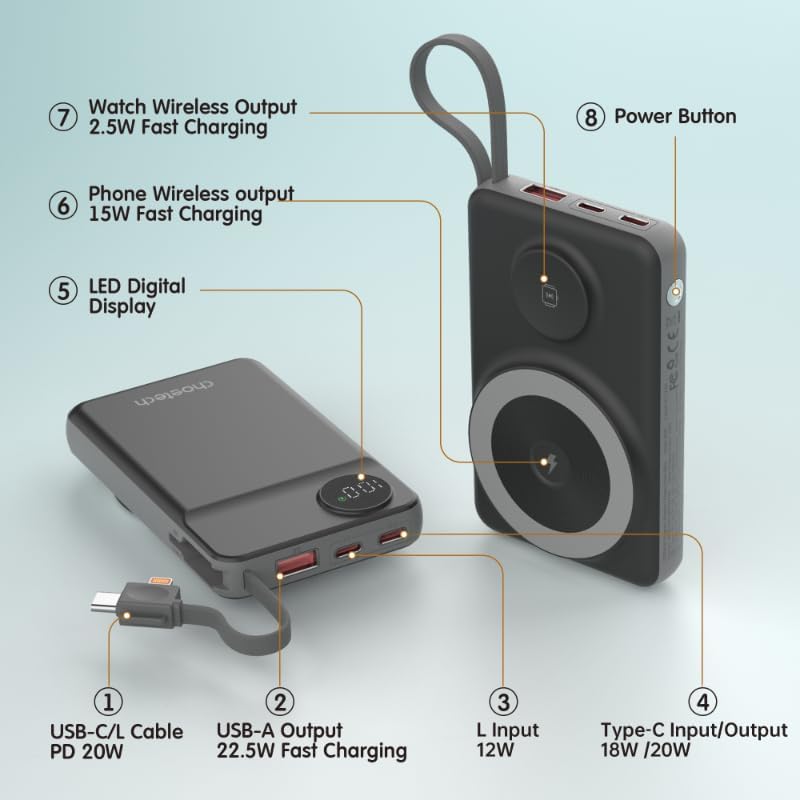
Image: Detailed diagram labeling the ports and features of the CHOETECH B695, including USB-C/L cable, USB-A output, L input, Type-C input/output, LED display, phone wireless output, watch wireless output, and power button.
2. Kom godt i gang: Opsætning
2.1 Opladning af powerbanken
Before initial use, fully charge your CHOETECH B695 power bank. This ensures optimal performance and battery longevity.
- Connect a compatible USB-C charging cable (not included) to the Type-C Input/Output port (4) on the power bank.
- Connect the other end of the cable to a USB wall adapter (not included).
- The LED Digital Display (5) will show the charging progress. It will display "100" when fully charged.
- Alternatively, you can use the built-in Lightning input (3) to charge the power bank with a Lightning cable and adapter.
Note: For fastest charging of the power bank, use a PD (Power Delivery) compatible wall adapter with the Type-C port.
3. Betjeningsvejledning
3.1 Kontrol af batteriniveau
Press the Power Button (8) once to activate the LED Digital Display (5), which will show the current battery percentage.
3.2 Kablet opladning
The CHOETECH B695 offers multiple wired charging options:
- Using Built-in USB-C/L Cable (1):
- Pull out the integrated USB-C or Lightning cable from its storage slot.
- Connect the appropriate cable end to your device's charging port.
- Opladningen begynder automatisk.
- Using USB-A Output (2):
- Connect your device's USB charging cable to the USB-A Output port (2).
- Tilslut den anden ende af kablet til din enhed.
- Charging will commence.
- Using Type-C Input/Output (4):
- Connect your device's USB-C charging cable to the Type-C Input/Output port (4).
- Tilslut den anden ende af kablet til din enhed.
- Charging will commence.

Image: The CHOETECH B695 power bank connected to a smartphone via its built-in USB-C cable, demonstrating wired charging.
3.3 Wireless Charging (Phone)
The power bank supports magnetic wireless charging for compatible smartphones (e.g., iPhone 12 series and newer, or Android phones with magnetic cases).
- Sørg for, at powerbanken er tilstrækkeligt opladet.
- Align your compatible smartphone with the larger magnetic charging pad (6) on the power bank.
- The phone should snap into place magnetically, and wireless charging will begin.

Image: A smartphone magnetically attached to the larger wireless charging pad and a smartwatch on the smaller pad of the CHOETECH B695, illustrating simultaneous wireless charging.
3.4 Wireless Charging (Watch)
The power bank includes a dedicated smaller magnetic charging pad for smartwatches.
- Sørg for, at powerbanken er tilstrækkeligt opladet.
- Place your compatible smartwatch onto the smaller magnetic charging pad (7).
- The watch should align magnetically, and wireless charging will begin.
3.5 Samtidig opladning
The CHOETECH B695 can charge multiple devices simultaneously using a combination of its wired and wireless outputs.

Image: The CHOETECH B695 power bank connected to and wirelessly charging multiple devices, including smartphones and a smartwatch, demonstrating its multi-output capability.
4. Sikkerhedsoplysninger og beskyttelsesfunktioner
The CHOETECH B695 is equipped with multiple safety mechanisms to protect your devices and the power bank itself.
- Beskyttelse mod overopladning: Forhindrer, at batteriet oplades ud over dets kapacitet.
- Overafladningsbeskyttelse: Beskytter batteriet mod at blive helt afladet, hvilket forlænger dets levetid.
- Overstrømsbeskyttelse: Beskytter mod for høj strøm.
- Overvoltage Beskyttelse: Beskytter mod voltage bølger.
- Temperaturbeskyttelse: Overvåger og regulerer den indvendige temperatur for at forhindre overophedning.
- Kortslutningsbeskyttelse: Slukker automatisk ned i tilfælde af kortslutning.
- Overmandsbeskyttelse: Prevents power output beyond safe limits.
- Gendannelsesbeskyttelse: Allows the device to recover from protection states.
- Beskyttelse mod elektromagnetisk felt: Shields against harmful electromagnetic interference.

Image: An infographic detailing the nine safety protection features integrated into the CHOETECH B695 power bank, including overcharge, overdischarge, overcurrent, overvoltage, temperature, short circuit, overpower, recovery, and electromagnetic field protection.
Vigtig: Do not expose the power bank to extreme temperatures, direct sunlight, or water. Do not disassemble or attempt to repair the device. Keep out of reach of children.
5. Vedligeholdelse
- Rensning: Use a soft, dry cloth to clean the power bank. Avoid liquid cleaners.
- Opbevaring: Opbevar powerbanken et køligt, tørt sted væk fra direkte sollys og ekstreme temperaturer.
- Batteriets sundhed: For at opretholde batteriets sundhedstilstand skal powerbanken oplades og aflades helt mindst én gang hver tredje måned, hvis den ikke er i regelmæssig brug.
- Kabelpleje: Handle the built-in cables gently. Avoid excessive bending or pulling to prevent damage.
6. Fejlfinding
6.1 Powerbanken oplader ikke
- Ensure the charging cable is securely connected to both the power bank's input port and the wall adapter.
- Kontroller, at vægadapteren fungerer korrekt og er tilsluttet en stikkontakt.
- Try a different USB-C or Lightning charging cable and wall adapter.
6.2 Enhed oplades ikke fra powerbank
- Kablet opladning:
- Check if the power bank has sufficient charge (refer to the LED display).
- Sørg for, at opladningskablet er korrekt tilsluttet både powerbankens udgangsport og din enhed.
- Try a different charging cable or a different output port on the power bank.
- Press the power button once to activate output if necessary.
- Trådløs opladning:
- Ensure your device is compatible with magnetic wireless charging.
- Fjern alle tykke etuier eller metalgenstande fra din enhed, der kan forstyrre trådløs opladning.
- Ensure your device is correctly aligned with the magnetic charging pad on the power bank.
- Tjek om powerbanken har tilstrækkelig opladning.
6.3 Langsom opladning
- Ensure you are using a fast-charging compatible cable and adapter for both charging the power bank and charging your devices.
- Some devices may limit charging speed when multiple devices are connected simultaneously.
- Miljøfaktorer (f.eks. høj temperatur) kan påvirke opladningseffektiviteten.
6.4 LED Display Not Working
- Tryk hårdt på tænd/sluk-knappen.
- If the power bank is completely depleted, the display may not light up until it receives some charge.
7. Specifikationer
| Model | B695 |
| Batterikapacitet | 10000mAh |
| Indbygget kabeludgang | USB-C/L Cable PD 20W |
| USB-A-output | 22.5W hurtig opladning |
| Type-C input/output | 18W / 20W |
| Lynindgang | 12W |
| Phone Wireless Output | 15W hurtig opladning |
| Se trådløs udgang | 2.5W hurtig opladning |
| Dimensions (L x W x Thickness) | 7.7L x 9.7W x 16.2Th centimeters |
| Varens vægt | 0.05 kilo (50 g) |
| Farve | Sort |
8. Garanti og support
CHOETECH products are designed and manufactured to the highest quality standards. For warranty information and customer support, please refer to the warranty card included with your purchase or visit the official CHOETECH webwebsted.
If you encounter any issues or have questions regarding your CHOETECH B695 power bank, please contact CHOETECH customer service for assistance.


