1. Introduktion
Thank you for choosing the FL ESPORTS GEO 65 HE Gaming Keyboard. This 60% mechanical keyboard features Hall Effect magnetic switches, rapid trigger functionality, and adjustable actuation for a highly customizable gaming experience. This manual provides detailed instructions for setup, operation, maintenance, and troubleshooting to ensure optimal performance.
2. Pakkens indhold
Kontroller venligst, at alle varer er til stede i din pakke:
- FL ESPORTS GEO 65 HE Gaming Keyboard
- USB-C til USB-A-kabel
- Keycap aftrækker
- Aftrækker
- Brugermanual

Image: Contents of the FL ESPORTS GEO 65 HE keyboard package, showing the keyboard, USB-C cable, keycap puller, and switch puller.
3. Opsætning
- Tilslut tastaturet: Plug the USB-C end of the provided cable into the keyboard and the USB-A end into an available USB port on your computer. The keyboard will automatically be recognized by your operating system.
- Installer software (valgfrit, men anbefalet): For full customization of RGB lighting, key remapping, macros, and performance settings (including rapid trigger and actuation point adjustment), download and install the official FL ESPORTS software from the manufacturer's webwebsted.

Billede: Overview of the FL ESPORTS keyboard's features, including the software interface for customization and performance settings.
4. Betjeningsvejledning
4.1 Grundlæggende nøglefunktioner
The GEO 65 HE features a compact 60% layout. Many standard functions are accessed via the Fn key in combination with other keys. Refer to the keyboard's keycaps for secondary functions (e.g., arrow keys, function row).
4.2 Hall Effect Switches and Rapid Trigger
This keyboard utilizes Hall Effect magnetic switches, allowing for precise control over actuation and rapid trigger functionality. Rapid Trigger enables keys to reset instantly upon release, allowing for faster repeated inputs.
- Justerbar aktivering: The actuation point (the distance a key needs to travel to register an input) can be customized via the software. This allows you to set a shallow actuation for quick responses or a deeper one for more deliberate presses.
- Hurtig udløser: This feature can be enabled and configured through the software, allowing you to set the reset sensitivity for individual keys.
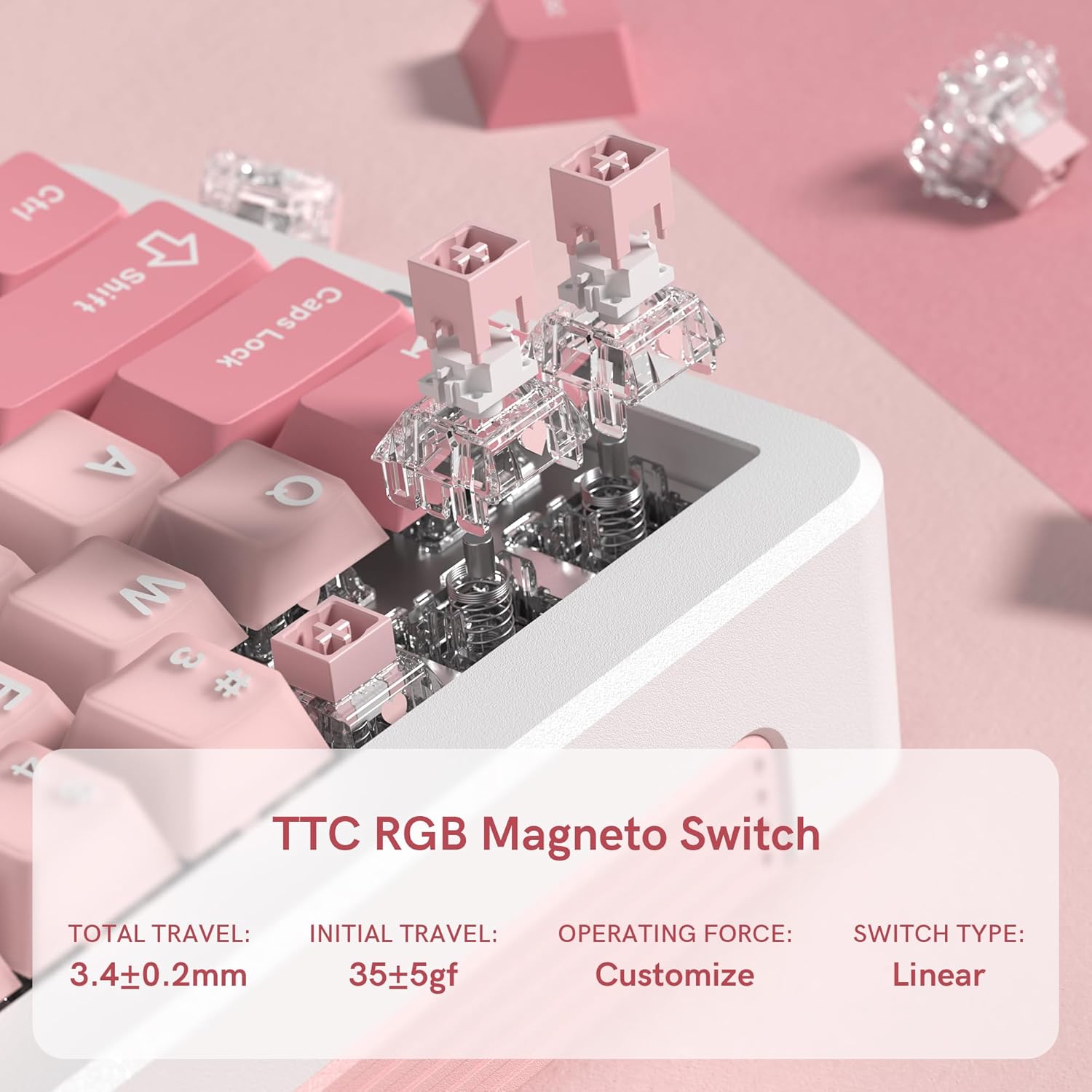
Billede: Et nærbillede view of the TTC RGB Magneto Switches, highlighting their design and key specifications such as total travel and operating force.
4.3 Tilpasning af RGB-belysning
The keyboard features per-key RGB lighting. Lighting effects, colors, and brightness can be adjusted using the FL ESPORTS software. Some basic lighting modes may be accessible via Fn key combinations.
4.4 Softwarekonfiguration
The dedicated software provides comprehensive control over your keyboard:
- Nøgleomlægning: Assign custom functions to any key.
- Makrostyring: Create and assign complex macros for gaming or productivity.
- Indstillinger for ydeevne: Fine-tune actuation points, rapid trigger sensitivity, and polling rate.
- Lysindstillinger: Customize RGB effects, colors, and brightness.
- Firmwareopdateringer: Keep your keyboard updated with the latest features and improvements.

Image: Multiple screenshots illustrating the FL ESPORTS software interface, showing options for key configuration, lighting settings, performance adjustments, and macro management.
5. Vedligeholdelse
5.1 Rengøring
Sådan bevarer du dit tastaturs udseende og funktionalitet:
- Use a soft, dry cloth to wipe the keyboard surface.
- For en dybere rengøring skal du bruge den medfølgende tastaturaftrækker til at fjerne tastaturerne og rengøre undersiden med trykluft eller en lille børste.
- Undgå at bruge skrappe kemikalier eller slibende materialer.
5.2 Fjernelse af tastehætte og kontakt
The keyboard supports hot-swappable switches. Use the provided tools for safe removal:
- Fjernelse af nøglekapsel: Gently attach the keycap puller to the keycap and pull straight up.
- Fjernelse af switch: After removing the keycap, use the switch puller to grasp the top and bottom clips of the switch and pull straight up. Ensure the switch is properly aligned when reinserting.
6. Fejlfinding
- Tastaturet reagerer ikke:
- Sørg for, at USB-C-kablet er korrekt tilsluttet til både tastaturet og computeren.
- Prøv at tilslutte til en anden USB-port.
- Genstart din computer.
- RGB-belysning virker ikke/forkert:
- Check the lighting settings in the FL ESPORTS software.
- Sørg for, at tastaturets firmware er opdateret.
- Nøgler registreres ikke eller dobbelttastes:
- Rengør omkring den berørte kontakt for at fjerne eventuelt snavs.
- If the issue persists, consider replacing the switch using the provided switch puller.
- Verify actuation settings in the software.
- Software registrerer ikke tastatur:
- Sørg for, at softwaren er den nyeste version.
- Prøv at geninstallere softwaren.
- Temporarily disable any antivirus or firewall software that might be interfering.
7. Specifikationer
| Feature | Specifikation |
|---|---|
| Model | GEO 65 HE |
| Mærke | FL ESPORTS |
| Tastaturlayout | 60% (QWERTY) |
| Switch Type | Hall Effect Magnetic Switches (TTC RGB Magneto Switch) |
| Aktivering | Justerbar |
| Særlige funktioner | Rapid Trigger, Aluminum Alloy Case, RGB Backlighting, PBT Keycaps |
| Forbindelse | USB-C (kablet) |
| Kompatible enheder | PC (Windows/Mac) |
| Afstemningsfrekvens | 8KHz |
| Scanningshastighed | 256K |
| Lav latens | 0.125 ms |
| Rapid Trigger (RT) | 0.005 mm |
| Zero Dead Zone | 0 |
| Varens vægt | 1.2 pund |
| Pakkedimensioner | 10 x 2.7 x 2 tommer |
| Keyboard Dimensions (Approx.) | 323.3 mm (L) x 118.3 mm (B) x 34 mm (H) |
Billede: Top og side views of the FL ESPORTS GEO 65 HE keyboard with approximate dimensions indicated in millimeters.
8. Garanti og support
For garantioplysninger og teknisk support henvises til den officielle FL ESPORTS website or contact their customer service directly. Standard return policies typically allow for returns within 30 days of purchase. Extended protection plans may be available from your retailer.


