1. Introduktion
Thank you for choosing the IKIER X5 Pro Laser Engraver. This high-performance machine is designed for precise engraving and efficient cutting across a wide range of materials, including wood, metal, acrylic, and leather. Featuring a 5W laser output, a large working area of 410x380mm, and advanced safety features, the IKIER X5 Pro is suitable for both hobbyists and professionals.
This manual provides essential information for the safe and effective operation of your IKIER X5 Pro. Please read it thoroughly before assembly and use to ensure optimal performance and longevity of your device.

Figure 1.1: The IKIER X5 Pro Laser Engraver, showcasing its design and a sample engraving.
2. Sikkerhedsoplysninger
Operating a laser engraver involves potential hazards. Adhere to the following safety guidelines to prevent injury and damage to the equipment.
- Øjenbeskyttelse: Always wear the provided safety glasses or equivalent eye protection when the laser is active. The panoramic magnetic eye protection shield on the laser module filters 97% of strong light, but additional protection is recommended.
- Ventilation: Brug maskinen i et godt ventileret område for at fjerne dampe og røg, der produceres under gravering og skæring.
- Brandsikkerhed: Keep a fire extinguisher nearby. Do not leave the machine unattended during operation, especially when cutting materials that may ignite. The machine is equipped with a flame detector that triggers an alarm and stops operation if a flame is detected.
- Tilt beskyttelse: The IKIER X5 Pro features a gyroscope that automatically stops operation if the machine tilts more than 15 degrees, preventing accidental laser exposure.
- Materialesikkerhed: Only engrave or cut materials specified in this manual. Avoid highly reflective, flammable, or unknown materials that may produce toxic fumes or catch fire.
- Børn og kæledyr: Keep children and pets away from the operating area. The laser protection cover also helps prevent pets from reaching the laser point.
- Strømforsyning: Brug kun den medfølgende strømadapter. Sørg for, at strømforsyningen er stabil og opfylder maskinens krav.

Figure 2.1: Illustration of the IKIER X5 Pro's integrated safety features, including flame detection and tilt protection.
3. Pakkens indhold
Before beginning assembly, verify that all components listed below are present in your package.
- IKIER X5 Pro Laser Engraving Machine (main frame and laser module)
- Installationsværktøjssæt
- Strømkabel
- Strømadapter
- USB-flashdrev
- Type C kabel
- X-akse forbindelseslinje
- Fokus Shims
- Sikkerhedsbriller
- Produktmanual

Figur 3.1: Overview of all items included in the IKIER X5 Pro package.
4. Opsætning og montering
The IKIER X5 Pro is designed for quick and straightforward assembly, typically completed within 10-20 minutes.
4.1. Mekanisk samling
- Pak alle komponenter ud, og læg dem på en ren, plan overflade.
- Follow the step-by-step instructions in the included Product Manual for assembling the frame and attaching the laser module. The integral lead screw design simplifies the process.
- Connect the X-axis connecting line and other necessary cables as indicated in the manual.
4.2. Strømtilslutning
- Tilslut strømadapteren til maskinens strømindgang.
- Plug the power cable into a standard electrical outlet (100-240V AC, 50/60Hz).
- Ensure the power switch on the machine is in the OFF position before connecting.
4.3. Software installation
The IKIER X5 Pro is compatible with popular laser engraving software.
- Understøttet software: LaserGRBL, LightBurn.
- Operativsystemer: Supports Win XP / Win 7 / Win 8 / Win 10 / Win 11 / MacOS Systems, and Linux.
- Install your preferred software on your computer. Drivers may be included with the software or on the provided USB flash drive.

Figure 4.1: Visual guide for quick assembly and various connection methods for the IKIER X5 Pro.
5. Betjeningsvejledning
This section outlines the general steps for operating your IKIER X5 Pro.
5.1. Materiale forberedelse
- Place the material to be engraved or cut on the working surface. The large working area is 410x380mm.
- Sørg for, at materialet er fladt og sikkert placeret for at forhindre bevægelse under drift.
- The laser features fixed-focus, eliminating the need for manual focusing adjustment.

Figure 5.1: The spacious working area of the IKIER X5 Pro, providing ampplads til forskellige projekter.
5.2. Connecting to the Machine
- USB-forbindelse: Slut maskinen til din computer ved hjælp af det medfølgende USB-kabel.
- Mobil app kontrol: Utilize the second-generation mobile application for convenient control. The app supports offline engraving, allowing you to operate without a continuous computer connection.
- USB-stik: For direct engraving, load your design files onto the USB flash drive and insert it into the machine.
5.3. Forberedelse af dit design
- Create or import your design using LaserGRBL, LightBurn, or the mobile app.
- Understøttet File Formater: NC, BMP, JPG, PNG, DXF, SVG, TIF, PDF.
- Adjust laser parameters (power, speed, passes) according to the material and desired effect.
5.4. Graverings- og skæreproces
- Initiate the engraving or cutting process from your software or app.
- The machine operates at a high speed of 400mm/s, ensuring efficient project completion.
- The laser spot area is 0.06*0.06mm, providing 0.01mm engraving precision for detailed work.
- The 5W laser output allows for single-pass cutting of materials like 5mm Paulownia wood and 3mm black acrylic.
- I tilfælde af en magt outage or accidental failure, the power loss recovery function allows the machine to resume engraving from the original position.

Figure 5.2: Demonstrates the high-speed capability and quality of photo engraving.
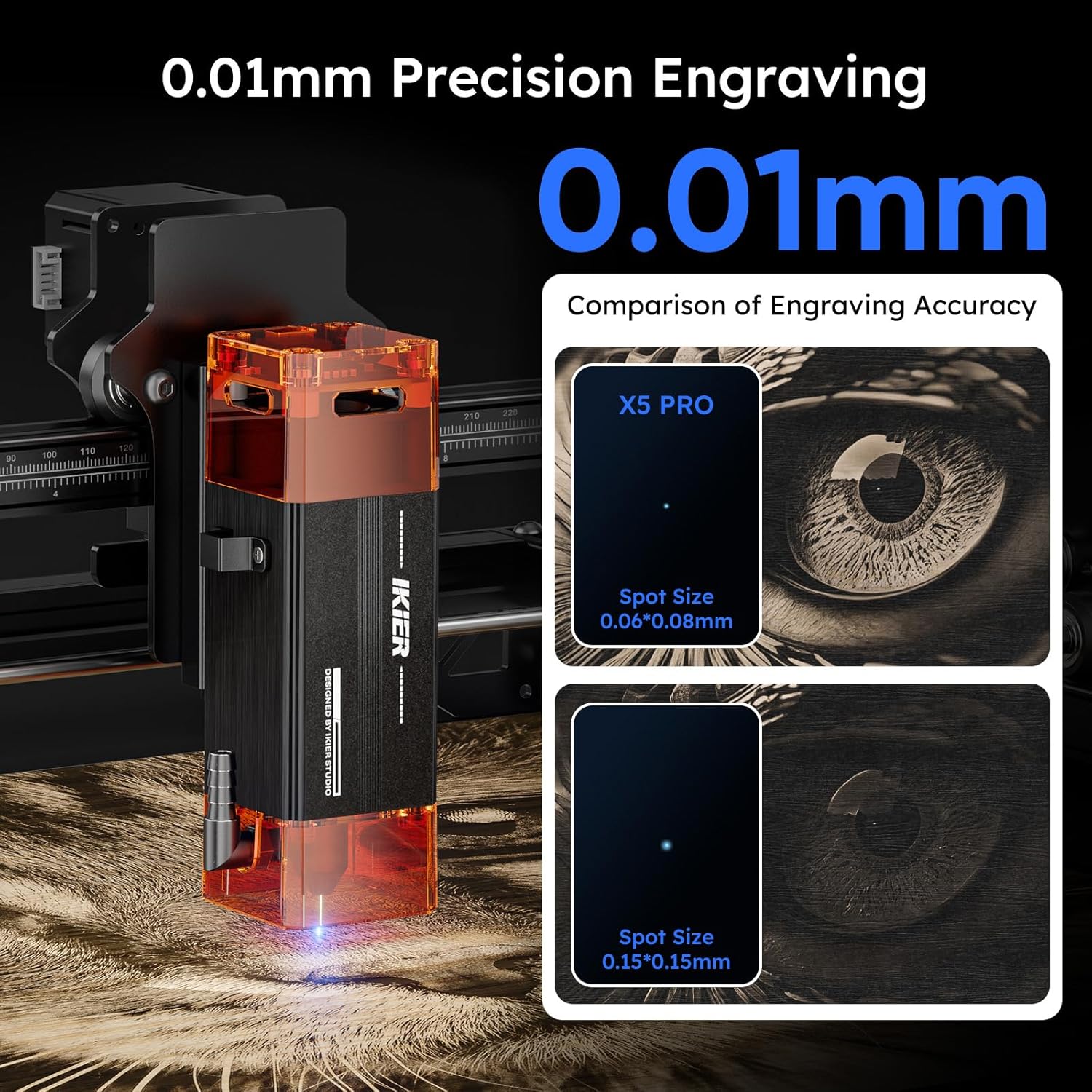
Figure 5.3: Illustrates the superior engraving precision of the IKIER X5 Pro.

Figure 5.4: Details the cutting power of the 5W laser module.
6. Vedligeholdelse
Regular maintenance ensures the longevity and optimal performance of your IKIER X5 Pro.
- Rengøring af linsen: Periodically clean the laser lens with a soft, lint-free cloth and lens cleaning solution to maintain engraving quality.
- Rengøring af maskinen: Use a soft brush or compressed air to remove dust and debris from the machine's frame, rails, and moving parts.
- Smøring: Apply a small amount of lubricant to the guide rails if you notice any friction or unusual noise during movement.
- Firmwareopdateringer: Tjek den officielle IKIER webwebstedet for tilgængelige firmwareopdateringer for at sikre, at din maskine har de nyeste funktioner og forbedringer.
7. Fejlfinding
Dette afsnit omhandler almindelige problemer, du kan støde på.
- Maskinen tænder ikke:
- Ensure the power cable is securely connected to both the machine and the power outlet.
- Kontroller, at strømadapteren fungerer korrekt.
- Kontroller tænd/sluk-knappen på maskinen.
- Laser Not Firing/Weak Output:
- Check if the laser module is properly seated and connected.
- Clean the laser lens for any dust or debris.
- Bekræft laserens effektindstillinger i din software.
- Engraving Quality Issues (Blurry/Inaccurate):
- Ensure the material is flat and securely fixed.
- Check for any loose belts or components that might affect movement precision.
- Verify the engraving speed and power settings are appropriate for the material.
- Rengør laserlinsen.
- Problemer med softwareforbindelse:
- Sørg for, at USB-kablet er korrekt tilsluttet.
- Restart both the machine and your computer.
- Reinstall the software and drivers if necessary.
- For app connection, ensure Bluetooth/Wi-Fi is enabled and the app is updated.
- Machine Stops Mid-Operation:
- Check for flame detection or tilt alarms. Address the cause (e.g., excessive smoke, unstable surface).
- Verify power supply stability. The power loss recovery feature should allow resuming.
For further assistance, please refer to the official IKIER support resources or contact customer service.
8. Specifikationer
| Feature | Specifikation |
|---|---|
| Produkt model | IKIER X5 Pro |
| Gravering Størrelse | 410 x 380 mm (16.14 x 14.96 tommer) |
| Electric Power Output | 40W |
| Laser udgangseffekt | 5.5 - 6W |
| Laser bølgelængde | 455 ± 5 kvm |
| Graveringspræcision | 0.01 mm |
| Laserpunktsområde | 0.06 x 0.06 mm |
| Graveringshastighed | Op til 400 mm/s |
| Fokuseringsmetode | Fixed-focus Laser (No adjustment needed) |
| Grænseafbrydere | 2 (1 on X-axis, 1 on Y-axis) |
| Sikkerhedsfunktioner | Laser Protection Cover, Flame Detector, Gyroscope (Tilt Protection) |
| Driftssoftware | LaserGRBL, LightBurn, Mobile App |
| Understøttet OS | Win XP / 7 / 8 / 10 / 11, MacOS, Linux |
| Understøttet File Formater | NC, BMP, JPG, PNG, DXF, SVG, TIF, PDF |
| Dataoverførselsmetode | USB Connection, Mobile App, USB Flash Drive |
| Strømforsyningsindgang | 100-240V AC, 50/60Hz |
| Strømforsyningsudgang | 12V 3A |
| Produktmål (L x B x H) | 59 x 56 x 19 cm (22.8 x 10.23 x 7.08 tommer) |
| Produktets vægt | 5.3 kg (11.68 lbs) |
| Rammemateriale | Fuld aluminiumslegering |
8.1. Engraving Materials
- Wood, Bamboo, Cardboard, Plastic, Leather, PCB Board, Anodized Aluminum, Non-reflective Electroplated and Painted Metals, 304 Mirror Stainless Steel, Glass, Ceramic, Cotton Fabric, Slate.
8.2. Cutting Materials
- Cardboard, Non-woven Fabric, Wood, Acrylic, Certain Thin Plastics, Sponge.
9. Garanti og support
IKIER provides a standard warranty for the X5 Pro Laser Engraver. For detailed warranty terms and conditions, please refer to the warranty card included in your package or visit the official IKIER webwebsted.
For technical support, troubleshooting assistance, or spare parts, please contact IKIER customer service through their official website or the contact information provided in your product documentation. When contacting support, please have your product model (IKIER X5 Pro) and purchase details ready.


