1. Introduktion
Thank you for choosing the ORION Cobalt CPE120 Active Down-Firing Subwoofer. This unit is designed to provide powerful, deep bass in a compact, space-saving enclosure, enhancing your vehicle's audio system. This manual provides essential information for proper installation, operation, and maintenance of your subwoofer.
The CPE120 features a built-in amplifier, eliminating the need for a separate external amplifier. Its design focuses on delivering robust bass performance while maintaining a slim profile suitable for various vehicle interiors, including under seats or in trunks.

Image 1.1: ORION Cobalt CPE120 12-inch active down-firing subwoofer enclosure with included remote bass knob.
2. Sikkerhedsoplysninger
Please read all instructions carefully before installation and use. Failure to follow these guidelines may result in damage to the product, vehicle, or personal injury.
- Professionel installation anbefales: Installation of car audio equipment can be complex. If you are unsure about any part of the installation process, seek assistance from a qualified professional.
- Afbryd batteriet: Frakobl altid bilens negative batteripol, inden du påbegynder elektrisk arbejde, for at undgå kortslutninger og elektriske farer.
- Korrekt ledningsføring: Ensure all wiring is correctly connected and insulated to prevent short circuits and potential fire hazards. Use appropriate gauge wires as specified in the installation section.
- Sikker montering: Mount the subwoofer securely to prevent it from shifting during vehicle movement, which could cause injury or damage.
- Undgå forhindring: Do not install the subwoofer in a location that obstructs the driver's view, interferes with vehicle controls, or impedes airbag deployment.
- Ventilation: Ensure adequate ventilation around the subwoofer's amplifier section to prevent overheating.
- Lydstyrkeniveauer: Langvarig eksponering for høj lydstyrke kan forårsage høreskader. Juster lydstyrken til et sikkert og behageligt niveau.
3. Pakkens indhold
Bekræft at alle varer er til stede i pakken:
- ORION Cobalt CPE120 Active Down-Firing Subwoofer Enclosure
- Remote Bass Knob with Cable
- High-Level Input Harness (if applicable, for direct speaker wire connection)
- Power Wiring Kit (typically sold separately, but essential for installation)
- Brugervejledning (dette dokument)
4. Nøglefunktioner
- Integreret Amplivligere: Built-in 2000W peak power (500W RMS) amplifier for clear and powerful bass reproduction.
- 12-inch Down-Firing Subwoofer: Optimized for deep bass response and efficient use of space.
- Compact Enclosure: Slank profile (21" x 7" x 14") designed for installation in tight spaces such as under seats or in vehicle trunks.
- Alsidige indgange: Features both High-Level (speaker level) and Low-Level (RCA) inputs for compatibility with various head units.
- Justerbar crossover: Low Pass Crossover (LPF) adjustable from 50Hz to 200Hz to fine-tune bass frequencies.
- Bass Boost: Adjustable bass boost from 0 to +12dB for enhanced low-frequency impact.
- Fasestyring: Switchable phase (0°/180°) to optimize bass integration with existing speakers.
- Fjernbassknap: Included wired remote for convenient adjustment of bass level from the driver's seat.
- Holdbar konstruktion: Constructed with a sealed MDF enclosure, spun aluminum cone, EPDM rubber surround, and copper-wound Kapton voice coil for enhanced sound quality and longevity.
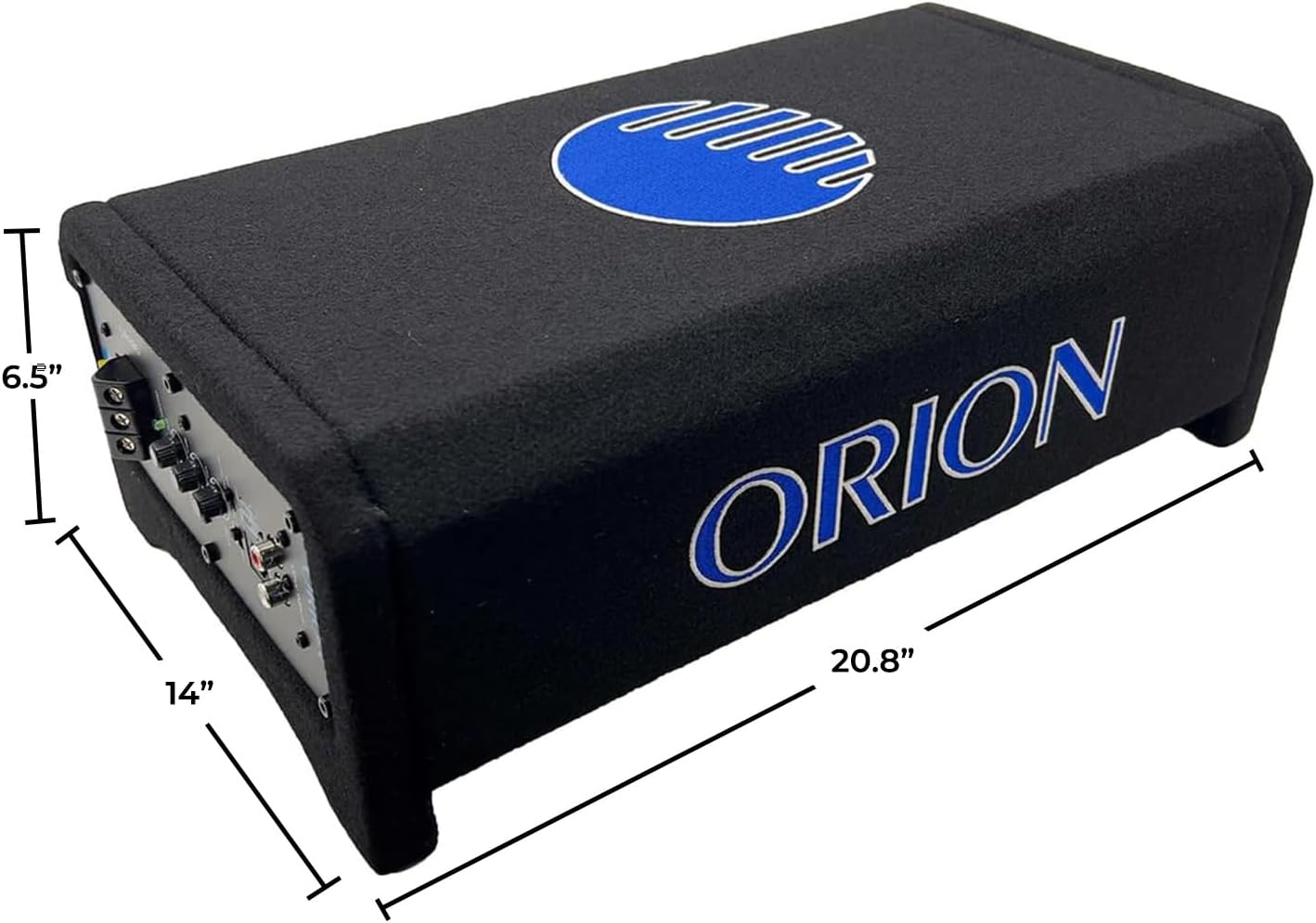
Image 4.1: Dimensions of the ORION Cobalt CPE120 subwoofer enclosure.
5. Installation og opsætning
5.1. Placering
The compact design of the CPE120 allows for flexible placement. Common locations include:
- Underneath a car seat (ensure adequate clearance and ventilation).
- In the trunk of a sedan.
- Behind or under the rear seat of a truck or SUV.
Ensure the subwoofer is securely mounted to prevent movement. Consider the proximity to the vehicle's battery for power wiring and the head unit for signal wiring.
5.2. Ledningsforbindelser
Before making any connections, disconnect the negative (-) terminal of your vehicle's battery.
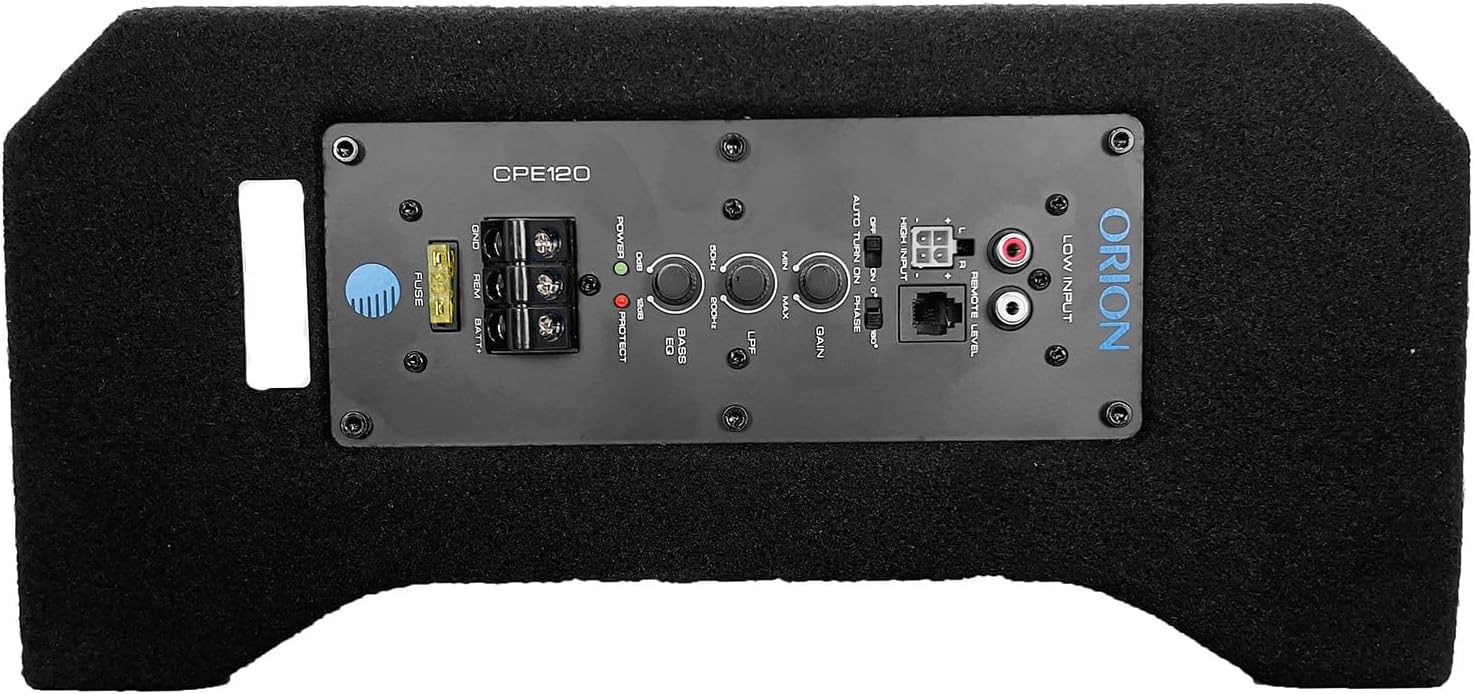
Image 5.1: Control panel with wiring terminals and adjustment knobs.
- Strøm (BATT+): Connect a suitable gauge power wire (e.g., 8 AWG or 4 AWG depending on total system power) directly from the vehicle's positive battery terminal to the BATT+ terminal on the subwoofer. Install an in-line fuse holder (with an appropriate fuse, typically 40A-60A) as close to the battery as possible (within 18 inches).
- Jord (GND): Connect a short (less than 3 feet) and equally suitable gauge ground wire from the GND terminal on the subwoofer to a clean, unpainted metal surface on the vehicle's chassis. Ensure a good electrical connection by scraping away any paint or rust.
- Fjerntænding (REM): Connect a remote turn-on wire from your head unit's remote output (usually a blue/white wire) to the REM terminal on the subwoofer. This wire tells the subwoofer to turn on and off with your head unit. If your head unit does not have a remote output, you may use the "Auto Turn On" feature (see Section 6.1).
- Lydindgang:
- Lavniveauindgang (RCA): If your head unit has RCA pre-outs, connect RCA cables from the head unit's subwoofer or full-range outputs to the "LOW INPUT" RCA jacks on the subwoofer.
- Højniveauindgang (højttalerniveau): If your head unit does not have RCA outputs, use the included high-level input harness. Connect the speaker wires from your head unit's rear speakers (or full-range speakers) to the corresponding wires on the high-level input harness. Plug the harness into the "HIGH INPUT" connector on the subwoofer.
- Fjernniveau kontrol: Connect the remote bass knob cable to the "REMOTE LEVEL" port on the subwoofer. Mount the remote knob in an accessible location for easy adjustment.
After all connections are made, reconnect the negative battery terminal.
6. Betjening og justeringer
The control panel on the subwoofer allows for fine-tuning of the audio output. Refer to Image 5.1 for control locations.
6.1. Kontrolpanelfunktioner
- SIKRING: Main power fuse for protection. Replace only with a fuse of the same rating.
- GND, REM, BATT+: Power and remote turn-on terminals (as described in Section 5.2).
- POWER/PROTECT LED:
- Green (POWER): Indicates the subwoofer is powered on and operating normally.
- Red (PROTECT): Angiver amplifier is in protection mode due to overheating, short circuit, or low voltage. Turn off the system and troubleshoot.
- AUTO TURN ON (ON/OFF): This switch enables or disables the automatic turn-on feature. When set to "ON" and using high-level inputs, the subwoofer will detect an audio signal and turn on automatically, eliminating the need for a remote turn-on wire. If using a remote turn-on wire, set this to "OFF".
- FASE (0°/180°): Adjusts the phase of the subwoofer output. If the bass sounds weak or out of sync with your main speakers, try switching the phase. One setting will typically sound better than the other.
- LPF (Low Pass Filter) (50Hz-200Hz): This knob controls the upper frequency limit of the subwoofer. Set it to allow only low frequencies to pass through to the subwoofer. A common starting point is around 80-100Hz, but adjust to blend smoothly with your main speakers.
- BASS EQ (0-+12dB): This control boosts the bass output at a specific frequency. Use sparingly to avoid distortion.
- FORSTÆRKNING (MIN/MAKS): This control matches the output level of your head unit to the input sensitivity of the subwoofer's amplifier. Start with the gain at minimum, then slowly increase it until the bass output is balanced with your main speakers without distortion. Do not use the gain control as a volume knob.
- HØJ INPUT: Connector for the high-level input harness.
- LAV INput: RCA jacks for low-level input.
- REMOTE LEVEL: Port for connecting the wired remote bass knob.
6.2. Remote Bass Knob

Image 6.1: Remote bass level control knob.
The remote bass knob provides convenient control over the subwoofer's output level from your driving position. This allows for quick adjustments to the bass intensity without needing to access the subwoofer's control panel.
7. Vedligeholdelse
- Rensning: Use a soft, dry cloth to clean the enclosure. Do not use harsh chemicals or abrasive cleaners.
- Inspektioner: Kontrollér regelmæssigt alle ledningsforbindelser for at sikre, at de er fastgjorte og fri for korrosion.
- Ventilation: Sørg for, at amplifier section of the subwoofer remains unobstructed to allow for proper heat dissipation.
- Udskiftning af sikring: If the fuse blows, replace it only with a fuse of the exact same type and rating (e.g., 40A). Using a fuse with a higher rating can cause serious damage or fire.
8. Fejlfinding
| Problem | Mulig årsag | Løsning |
|---|---|---|
| Ingen lyd fra subwooferen |
|
|
| Svag eller forvrænget bas |
|
|
| Subwooferen bliver varm |
|
|
Note on Tuning: Some users have found that maximizing the gain and bass EQ, while keeping the LPF at minimum, can yield optimal results for this unit. Experiment with settings to achieve your preferred sound.
9. Specifikationer
| Modelnavn | CPE120 |
| Højttaler type | Aktiv nedadgående subwoofer |
| Bashøjttaler diameter | 12 tommer |
| Spidseffekt | 2000 watt |
| RMS udgangseffekt | 500 watt |
| Impedans | 4 Ohm |
| Frekvensrespons | (Not explicitly stated, but LPF 50Hz-200Hz implies operating range) |
| Low Pass Crossover (LPF) | 50Hz - 200Hz |
| Bass Boost | 0 til +12dB |
| Monteringstype | Under Seat / Trunk |
| Indkapslingsmateriale | MDF (Medium-Density Fiberboard) |
| Kegelmateriale | Spundet aluminium |
| Surroundmateriale | EPDM-gummi |
| Stemmespole | Copper-wound Kapton |
| Produktmål (D x B x H) | 14 cm x 21 cm x 7 cm |
| Varens vægt | 28.9 pund |
| Kontrolmetode | Remote / On-unit controls |
| Forbindelsesteknologi | Coaxial (for RCA inputs) |
10. Garanti og support
10.1. Garantioplysninger
The ORION Cobalt CPE120 is covered by a 1 års begrænset producentgaranti. This warranty covers defects in materials and workmanship under normal use. It does not cover damage resulting from improper installation, accident, misuse, abuse, neglect, unauthorized modification, or normal wear and tear.
Gem venligst dit købsbevis for garantikrav.
10.2. Kundesupport
For technical assistance, warranty inquiries, or further information, please contact ORION customer support. Refer to the ORION official webwebstedet eller din købsdokumentation for at få de seneste kontaktoplysninger.
Du kan også besøge ORION Store on Amazon for yderligere produktinformation og ressourcer.


