1. Introduktion
Welcome to the user manual for your new Telefunken VIDAA XF32VP750M 32-inch Full HD HDR Smart TV. This manual provides essential information for setting up, operating, and maintaining your television. Please read it thoroughly to ensure proper use and to maximize your viewoplevelse.
The Telefunken VIDAA XF32VP750M Smart TV features a 32-inch (80 cm) Full HD display, HDR10 support for enhanced contrast and color, and an integrated triple tuner (DVB-C/T2/S2) for versatile reception. Powered by the VIDAA operating system, it offers access to a wide range of streaming applications and smart features.
2. Sikkerhedsoplysninger
Overhold altid følgende sikkerhedsforanstaltninger for at forhindre elektrisk stød, brand eller personskade:
- Udsæt ikke TV'et for regn eller fugt.
- Åbn ikke tv'etasing; overlad al service til kvalificeret personale.
- Sørg for tilstrækkelig ventilation. Bloker ikke ventilationsåbningerne.
- Placer tv'et på en stabil, plan overflade for at forhindre det i at falde ned.
- Hold tv'et væk fra direkte sollys, varmekilder og for meget støv.
- Tag stikket til tv'et ud af stikkontakten under tordenvejr eller når det ikke bruges i længere perioder.
3. Pakkens indhold
Please check that all items are present in your TV package:
- Telefunken VIDAA XF32VP750M 32-inch Full HD HDR Smart TV
- Fjernbetjening (med 2 AAA-batterier inkluderet)
- TV Stand (feet)
- Brugervejledning (dette dokument)
- Strømkabel
4. Opsætning
4.1. Fysisk opsætning
You can set up your TV using the included stand or by mounting it on a wall (wall mount not included).
Montering af stativ
Carefully place the TV screen-down on a soft, flat surface. Attach the provided stand feet to the designated slots on the bottom of the TV using the screws provided. Ensure they are securely fastened.
Wall Mounting (VESA)
This TV supports VESA wall mounts. The VESA pattern for this model is M4 75x75. Please refer to the wall mount manufacturer's instructions for installation. Ensure the wall mount can support the weight of the TV.
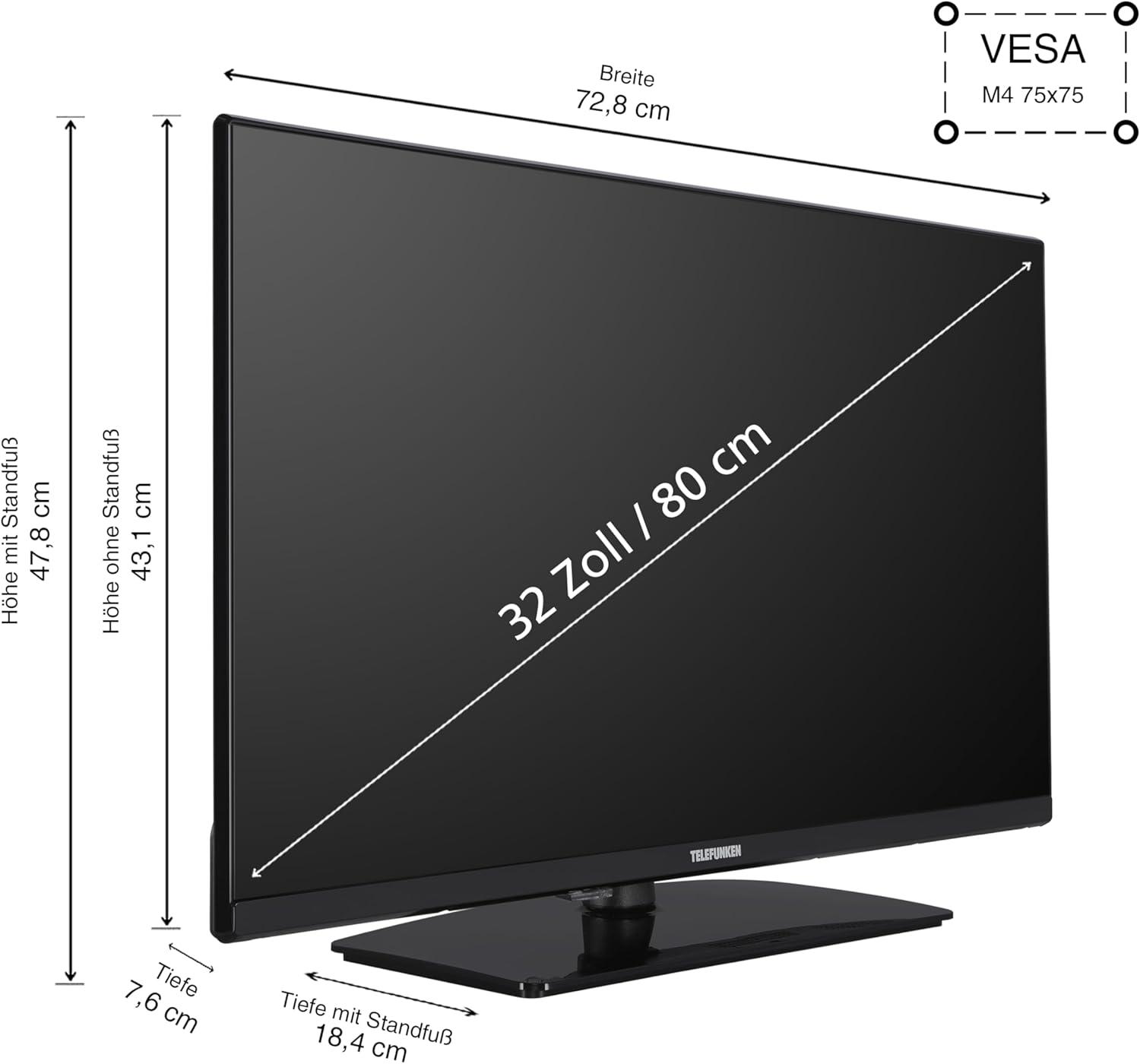
Billede 4.1: TV Dimensions and VESA Mount. This diagram illustrates the physical dimensions of the 32-inch TV, showing a width of 72.8 cm, height with stand of 47.8 cm, height without stand of 43.1 cm, and depth with stand of 18.4 cm. It also indicates the VESA M4 75x75 mounting standard for wall installation.
4.2. Tilslutning af enheder
Dit tv tilbyder forskellige tilslutningsporte til eksterne enheder:
- HDMI (x2): Connect Blu-ray players, game consoles, set-top boxes, or other HDMI-enabled devices. Supports CEC (Consumer Electronics Control) and ARC (Audio Return Channel) on one port.
- USB (x1): Tilslut USB-lagerenheder til medieafspilning.
- LAN (Ethernet): Til en kablet internetforbindelse.
- Antenne (RF/F): Connect your terrestrial or satellite antenna cable.
- CI slot: For Common Interface-moduler (f.eks. til betalings-tv-tjenester).
- Hovedtelefoner: Til tilslutning af hovedtelefoner.
- Digital lydudgang: For connecting to external audio systems (e.g., soundbars, AV receivers).

Billede 4.2: Tilslutningsporte overview. This image displays the various input and output ports available on the TV, such as two HDMI ports, one USB port, a LAN port for internet, an antenna input, a CI slot, a headphone jack, and a digital audio output.
4.3. Førstegangsopsætning
After connecting the power cable and turning on the TV for the first time, a setup wizard will guide you through the initial configuration:
- Sprogvalg: Vælg dit foretrukne sprog.
- Netværksopsætning: Opret forbindelse til dit Wi-Fi-netværk, eller brug en kablet LAN-forbindelse.
- Kanalscanning: Select your signal source (Antenna, Cable, or Satellite) and perform an automatic channel scan.
- Tidszone: Indstil din lokale tidszone.
5. Betjening af tv'et
5.1. Fjernbetjening overview
The included remote control allows you to navigate the TV's functions and menus. Batteries are pre-installed.

Billede 5.1: Remote Control. This image shows the TV remote control, highlighting dedicated buttons for popular streaming services like YouTube, Netflix, and Prime Video, allowing quick access to your favorite applications.
5.2. Grundlæggende funktioner
- Magt: Press the red power button to turn the TV on or off.
- Bind: Brug VOL +/- knapperne til at justere lydniveauet.
- Kanal: Brug CH +/- knapperne til at skifte kanal.
- Input: Press the INPUT button to select different input sources (HDMI, USB, etc.).
- Navigation: Brug piletasterne og OK-knappen til at navigere i menuerne.
5.3. VIDAA Smart TV-funktioner
Your Telefunken TV is equipped with the VIDAA operating system, providing a smart TV experience with access to numerous applications and media libraries.

Billede 5.2: VIDAA Smart TV Interface. This image displays the home screen of the VIDAA operating system, featuring a clean layout with quick access to popular streaming applications and personalized content recommendations.

Billede 5.3: Telefunken TV with Key Features. A front view of the 32-inch TV, visually emphasizing its VIDAA Smart TV capabilities, HDR10 support, and Full HD resolution.
Adgang til apps
From the home screen, you can easily launch applications such as Netflix, Prime Video, Disney+, YouTube, and DAZN. Use the remote's navigation buttons to select and open your desired app.
HDR10 and Full HD Display
The TV supports HDR10 and HLG, delivering stunning images with high contrast, natural colors, and impressive detail sharpness in Full HD resolution.

Billede 5.4: HDR10 Visual Enhancement. This image illustrates the difference HDR10 technology makes, showing a split screen where one side has standard image quality and the other displays the vibrant colors and deeper contrasts provided by HDR10.
5.4. Optimal Viewi Afstand
Til det bedste viewing experience, consider the recommended viewAfstand baseret på skærmstørrelse og opløsning:

Billede 5.5: Optimal Viewing Distance Chart. This chart provides guidelines for the ideal distance between the viewer and the television screen, categorized by screen size and resolution (4K, Full HD, HD), to ensure a comfortable and immersive viewing experience. For a 32-inch Full HD TV, the recommended distance is approximately 160 cm.
6. Vedligeholdelse
6.1. Rensning
- Tag altid stikket ud af tv'et inden rengøring.
- Brug en blød, tør klud til at tørre skærmen af ogasing.
- For genstridige mærker, gnid letampRengør kluden med vand eller et mildt, ikke-slibende skærmrensemiddel.
- Never spray cleaning liquids directly onto the screen or TV.
6.2. Opbevaring
If storing the TV for an extended period, ensure it is kept in a cool, dry place, protected from dust and extreme temperatures. Use the original packaging if available.
7. Fejlfinding
Hvis du støder på problemer med dit tv, kan du se følgende almindelige problemer og løsninger:
| Problem | Mulig årsag | Løsning |
|---|---|---|
| Ingen strøm | Strømkablet er frakoblet; ingen strøm fra stikkontakten | Check power cable connection; test outlet with another device |
| Intet billede, men der er lyd | Incorrect input source selected; faulty cable | Press INPUT button to cycle through sources; check HDMI/antenna cable connections |
| Ingen lyd, men der er billede | Lydstyrken er slået fra eller for lav; problem med det eksterne lydsystem | Increase volume; check mute status; verify external audio connections |
| Fjernbetjening virker ikke | Batteries depleted; obstruction between remote and TV | Replace batteries; remove any obstructions; ensure remote is pointed at TV sensor |
| Kan ikke oprette forbindelse til Wi-Fi | Forkert adgangskode; routerproblem; TV'et er for langt fra routeren | Re-enter password; restart router; move TV closer to router or use wired connection |
Hvis problemet fortsætter, bedes du kontakte kundesupport.
8. Specifikationer
Detailed technical specifications for the Telefunken VIDAA XF32VP750M TV:
- Modelnummer: XF32VP750M
- Skærmstørrelse: 32 tommer (80 cm)
- Displayteknologi: LCD, LED
- Opløsning: 1920 x 1080 (Fuld HD)
- Opdateringshastighed: 50 Hz
- Særlige funktioner: HDR TV, VIDAA Smart TV
- Operativsystem: VIDAA
- Forbindelse: 2x HDMI (CEC, ARC), 1x USB, Wi-Fi, LAN, Antenna (DVB-T2/C/S2), CI Slot, Digital Audio Output, Headphone Jack
- Aspektforhold: 16:9
- Farve: Sort
- Dimensioner (med stativ): 72.8 cm (B) x 18.4 cm (D) x 47.8 cm (H)
- Power Consumption (SDR): 26.0 W
- Power Consumption (HDR): 45.0 W
- Standby strømforbrug: 0.5 W
- Energieffektivitetsklasse: E (SDR), G (HDR)

Billede 8.1: EU Product Fiche. This document provides comprehensive technical details and energy consumption data for the Telefunken XF32VP750M television, as required by EU regulations.

Billede 8.2: EU Energy Label. This label indicates the energy efficiency class 'E' for SDR content and 'G' for HDR content, along with power consumption figures (26 kWh/1000h for SDR, 45 kWh/1000h for HDR) and a QR code linking to the EPREL database. For more details, visit the EPREL database (ID: 50745209).
9. Garanti og support
Telefunken provides a guarantee for the availability of spare parts for 7 years from the date of product discontinuation. For technical support or warranty claims, please refer to the contact information provided with your purchase documentation or visit the official Telefunken webwebsted.


