1. Introduktion
This manual provides essential instructions for the setup, operation, and maintenance of your Bemi Cognita Tab 5 E-Reader. The Cognita Tab 5 is a lightweight e-reader designed for comfortable reading, featuring a 5.76-inch e-paper display, Android 8.1 operating system, and Wi-Fi connectivity. Please read this manual thoroughly to ensure proper use and to maximize your device's potential.
2. Pakkens indhold
Upon unpacking your Bemi Cognita Tab 5, please verify that all the following items are included:
- Bemi Cognita Tab 5 E-Reader
- USB opladningskabel
- Hurtig startvejledning
- Brugervejledning (dette dokument)
- Garantikort

Image: Contents of the Bemi Cognita Tab 5 E-Reader package, including the device, charging cable, and documentation.
3. Enhed overview
Familiarize yourself with the physical components of your Bemi Cognita Tab 5.
3.1 Foran View
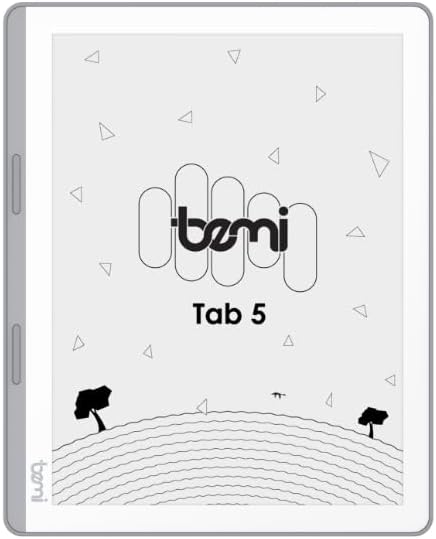
Billede: Forside view of the Bemi Cognita Tab 5 E-Reader, showing the e-paper display and side buttons.
- E-papirvisning: 5.76-inch screen with 920x680 resolution (198 ppi) and anti-glare coating.
- Page-Turn Buttons: Located on the side for convenient navigation through content.
3.2 Tilbage View

Billede: Bagside view of the Bemi Cognita Tab 5 E-Reader, highlighting its textured surface and branding.
- Rubberized Casing: Provides a secure grip and durability.
3.3 Porte og knapper
- Power knap: Used to turn the device on/off and put it to sleep.
- USB-port: Til opladning og dataoverførsel.
- MicroSD -kortplads: Til udvidelse af lagerplads op til 64 GB.
- Hovedtelefonstik: Til lydudgang.
4. Opsætning
4.1 Indledende opladning
Before first use, fully charge your Bemi Cognita Tab 5. Connect the provided USB cable to the device's USB port and plug the other end into a compatible USB power adapter (not included) or a computer's USB port. The charging indicator will show the charging status.
4.2 Tænd/sluk
- For at tænde: Tryk og hold tænd/sluk-knappen nede, indtil skærmen aktiveres.
- For at slukke: Press and hold the Power button, then select 'Power Off' from the options that appear on the screen.
- At sove/vågne: Tryk kort på tænd/sluk-knappen for at sætte enheden i dvaletilstand eller vække den.
4.3 Grundlæggende navigation
The Cognita Tab 5 features a responsive touchscreen for navigation. Tap to select items, swipe to scroll, and use pinch-to-zoom where applicable. The dedicated page-turn buttons on the side can also be used for navigating through e-books.
4.4 Wi-Fi-forbindelse
To access online content, transfer files wirelessly, or update software, connect your device to a Wi-Fi network:
- Gå til Indstillinger fra hovedmenuen.
- Vælge Wi-Fi.
- Slå Wi-Fi til/fra On.
- Vælg det ønskede netværk fra listen, og indtast adgangskoden, hvis du bliver bedt om det.
5. Betjeningsvejledning
5.1 Læsning af e-bøger
The Bemi Cognita Tab 5 supports various e-book formats including PDF, EPUB, and MOBI. To start reading:
- Naviger til Bøger section on your device.
- Tap on the cover of the e-book you wish to read.
- Use the touchscreen or the physical page-turn buttons to navigate through pages.

Image: A person holding the Bemi Cognita Tab 5 E-Reader, demonstrating the reading experience on its e-paper display.
5.2 Justering af baggrundsbelysning
The adjustable screen backlight allows for comfortable reading in various lighting conditions. Access backlight settings through the quick settings panel or the main Settings menu to adjust brightness levels.
5.3 File Overførsel
Du kan overføre files to your Cognita Tab 5 via USB or Wi-Fi.
- USB-overførsel: Connect the device to your computer using the USB cable. The device will appear as a removable storage drive, allowing you to drag and drop files.
- Wi-Fi-overførsel: Ensure both your device and the transmission device are on the same local area network (LAN). On your Cognita Tab 5, navigate to the Wi-Fi Transfer option (often found in the 'Storage' or 'Settings' menu). An IP address will be displayed (e.g., http://172.20.10.8:12580). Enter this address into a web browser on your computer or phone to access the device's storage and transfer files. Do not close this page during transmission.

Image: Screenshots showing the Wi-Fi transfer interface with an IP address and a file management screen on the Bemi Cognita Tab 5 E-Reader.
5.4 Installing Additional Applications
Running on Android 8.1, the Cognita Tab 5 allows for the installation of additional reading applications. You can typically install apps by transferring their APK files to the device and installing them through a file manager, or by using a pre-installed app store if available.
5.5 Lydfunktioner
Enheden understøtter lyd files and features text-to-speech functionality. Connect headphones to the headphone jack to listen to audiobooks or have your e-books read aloud.
5.6 Special Reading Features
The Cognita Tab 5 includes features to enhance your reading experience:
- PDF Reflow: Optimizes PDF documents for better readability on the smaller screen.
- Ordbog: Look up definitions of words directly from your e-book.
- Oversætter: Translate words or phrases within your reading material.
6. Vedligeholdelse
6.1 Rengøring
Brug en blød, fnugfri klud til at rengøre skærmen. Tør let ved genstridige pletter.ampen the cloth with water or a screen cleaner specifically designed for electronics. Avoid harsh chemicals or abrasive materials. For the device body, use a dry, soft cloth.
6.2 Pleje af batterier
To prolong battery life, avoid exposing the device to extreme temperatures. Charge the device regularly, but avoid leaving it fully discharged for extended periods. If storing the device for a long time, ensure it has a partial charge (around 50%).
6.3 Opbevaring
Store your Bemi Cognita Tab 5 in a cool, dry place away from direct sunlight and moisture. Protect the screen from scratches by using a protective cover or case when not in use.
7. Fejlfinding
If you encounter issues with your Bemi Cognita Tab 5, refer to the following common solutions:
- Enheden tænder ikke: Ensure the battery is charged. Connect the device to a power source and try again. If unresponsive, perform a hard reset by holding the power button for 10-15 seconds.
- Skærmen reagerer ikke: Genstart enheden. Hvis problemet fortsætter, skal du sørge for, at skærmen er ren og fri for snavs.
- Problemer med Wi-Fi-forbindelse: Verify your Wi-Fi password. Restart your router and the Cognita Tab 5. Ensure the device is within range of the Wi-Fi signal.
- Langsom ydeevne: Close unused applications. Clear cache if available in settings. Consider performing a factory reset (this will erase all data).
- Batteriet aflades hurtigt: Reducer skærmens lysstyrke. Sluk Wi-Fi, når den ikke er i brug. Luk baggrundsprogrammer.
Ved vedvarende problemer, der ikke er dækket her, bedes du kontakte kundesupport.
8. Specifikationer
| Feature | Specifikation |
|---|---|
| Modelnavn | Cognita Tab 5 (BRCT5) |
| Vise | 5.76-inch E-Paper, 920x680 resolution (198 ppi), Anti-glare |
| Processor | Cortex-A7 Quad-Core |
| VÆDDER | 1 GB |
| Intern opbevaring | 16 GB |
| Udvidelig opbevaring | MicroSD-kort op til 64 GB |
| Operativsystem | Android 8.1 |
| Forbindelse | Wi-Fi, USB |
| Særlige funktioner | Text-to-speech, Smart Reading, Headphone Jack, Scratch Resistant, Card Support |
| Understøttede e-bogsformater | PDF, EPUB, MOBI, and others |
| Batterilevetid | Op til 2 uger (typisk brug) |
| Vægt | 135 g |
| Tykkelse | 8 mm |
9. Garanti og support
9.1 Garantioplysninger
Your Bemi Cognita Tab 5 E-Reader comes with a warranty. Please refer to the included Warranty Card for specific terms, conditions, and duration of the warranty. Keep your proof of purchase for warranty claims.
9.2 Kundesupport
For technical assistance, troubleshooting beyond this manual, or warranty inquiries, please contact the seller or manufacturer directly. Contact information may be available on the product packaging or the official Bemi webwebsted.


