1. Introduktion
This manual provides essential information for the safe and efficient operation of your Ulefone Armor X31 rugged smartphone. Please read this manual thoroughly before using your device to ensure proper functionality and to understand its features.
The Ulefone Armor X31 is designed for durability and performance, featuring a robust build, advanced camera system, and long-lasting battery life, suitable for various environments.
2. Hvad er der i æsken
Bekræft, at alle varer er til stede i din produktemballage:
- Ulefone Armor X31 Smartphone
- AC Power Charger (100~240V)
- Type-C to Type-C Data Cable (100cm)
- Skærmbeskytter (forudmonteret eller separat)
- SIM-bakkeudkaster
- Snor
- Brugervejledning (dette dokument)
3. Enhed overview
Familiarize yourself with the physical components of your Ulefone Armor X31.

Billede: Forside og bagside view of the Ulefone Armor X31 rugged smartphone, showcasing dens robuste design og kameramodul.
3.1 Fysiske komponenter
- Front: 6.56-inch HD+ display with Corning Gorilla Glass, 16MP front camera, earpiece, sensors.
- Bag: 48MP main camera, 20MP night vision camera, 2MP macro camera, LED flash, fingerprint sensor, Ulefone branding.
- Sider: Power button, volume up/down buttons, custom key, SIM/microSD card slot, USB Type-C port, 3.5mm audio jack.
4. Indledende opsætning
4.1 Installing SIM Cards and MicroSD Card
- Find SIM-kortbakken på siden af enheden.
- Sæt SIM-kortbakkens udløserværktøj ind i det lille hul ved siden af bakken, og tryk godt ned, indtil bakken springer ud.
- Place your Nano-SIM cards (up to two) and/or a microSD card (for storage expansion up to 2TB) into the designated slots on the tray. Ensure the gold contacts face downwards.
- Sæt forsigtigt bakken tilbage i telefonen, indtil den klikker på plads.
4.2 Tænd/sluk
- For at tænde: Tryk og hold tænd/sluk-knappen nede, indtil Ulefone-logoet vises.
- For at slukke: Tryk på tænd/sluk-knappen og hold den nede, indtil menuen med strømindstillinger vises, og vælg derefter 'Sluk'.
- For at genstarte: Tryk på tænd/sluk-knappen og hold den nede, indtil menuen med strømindstillinger vises, og vælg derefter 'Genstart'.
4.3 Indledende konfiguration
Upon first power-on, follow the on-screen prompts to complete the initial setup, which includes selecting your language, connecting to Wi-Fi, setting up your Google account, and configuring security features.
5. Betjening af din enhed
5.1 Basic Phone Functions
- Foretage opkald: Åbn Telefon-appen, indtast nummeret, og tryk på opkaldsikonet.
- Afsendelse af beskeder: Åbn Beskeder-appen, tryk på 'Start chat', indtast modtager og besked, og send derefter.
- Internetforbindelse: Opret forbindelse til Wi-Fi via Indstillinger > Netværk og internet > Wi-Fi, eller aktiver mobildata via Indstillinger > Netværk og internet > Mobilnetværk.
5.2 Ydeevne og lagring

Image: Diagram illustrating the MediaTek Helio G91 processor, highlighting its 8-core CPU and 2.0GHz clock speed.
The Armor X31 is powered by a MediaTek Helio G91 8-core processor, ensuring smooth performance for daily tasks and applications. It features 6GB of physical RAM, expandable with up to 6GB of virtual RAM, totaling 12GB. Internal storage is 128GB, with support for up to 2TB via a microSD card.

Image: Graphic detailing the 12GB RAM (6GB physical + 6GB virtual) and 128GB ROM, with 2TB expansion capability.
5.3 Kamerafunktioner

Image: Visual representation of the Ulefone Armor X31's camera setup, including the 48MP main, 20MP night vision, 2MP macro, and 16MP front cameras, with exampbillederne.
- Hovedkamera: The 48MP main camera captures high-resolution photos. Open the Camera app and select 'Photo' mode.
- Nattesynskamera: The 20MP night vision camera allows for clear imaging in low-light or complete darkness. Select 'Night Vision' mode in the Camera app.
- Makro kamera: Use the 2MP macro camera for detailed close-up shots.
- Forreste kamera: The 16MP front camera is for selfies and video calls. Switch to the front camera in the Camera app.
- Undervandstilstand: This mode allows you to take photos and videos while submerged. Activate it from the camera settings or quick toggles. Ensure all ports are securely sealed before submerging the device.
5.4 Skærmfunktioner

Image: Graphic highlighting the 6.56-inch display with 720x1612 resolution, 90Hz refresh rate, 800 nits brightness, and Corning Gorilla Glass protection.
The 6.56-inch HD+ display offers a 720 x 1612 resolution and a 90Hz refresh rate for smooth visuals. With 800 nits brightness, it provides good visibility outdoors. The screen is protected by Corning Gorilla Glass for enhanced durability.
5.5 Batteristyring

Image: Illustration of the 6050mAh battery and its estimated usage times for standby, talk, music, and video playback.
The device is equipped with a 6050mAh battery, providing extended usage times. It supports 18W fast charging. The reverse charging feature allows you to use your phone as a power bank to charge other compatible devices via a USB-C to USB-C cable (sold separately).
5.6 Robuste funktioner
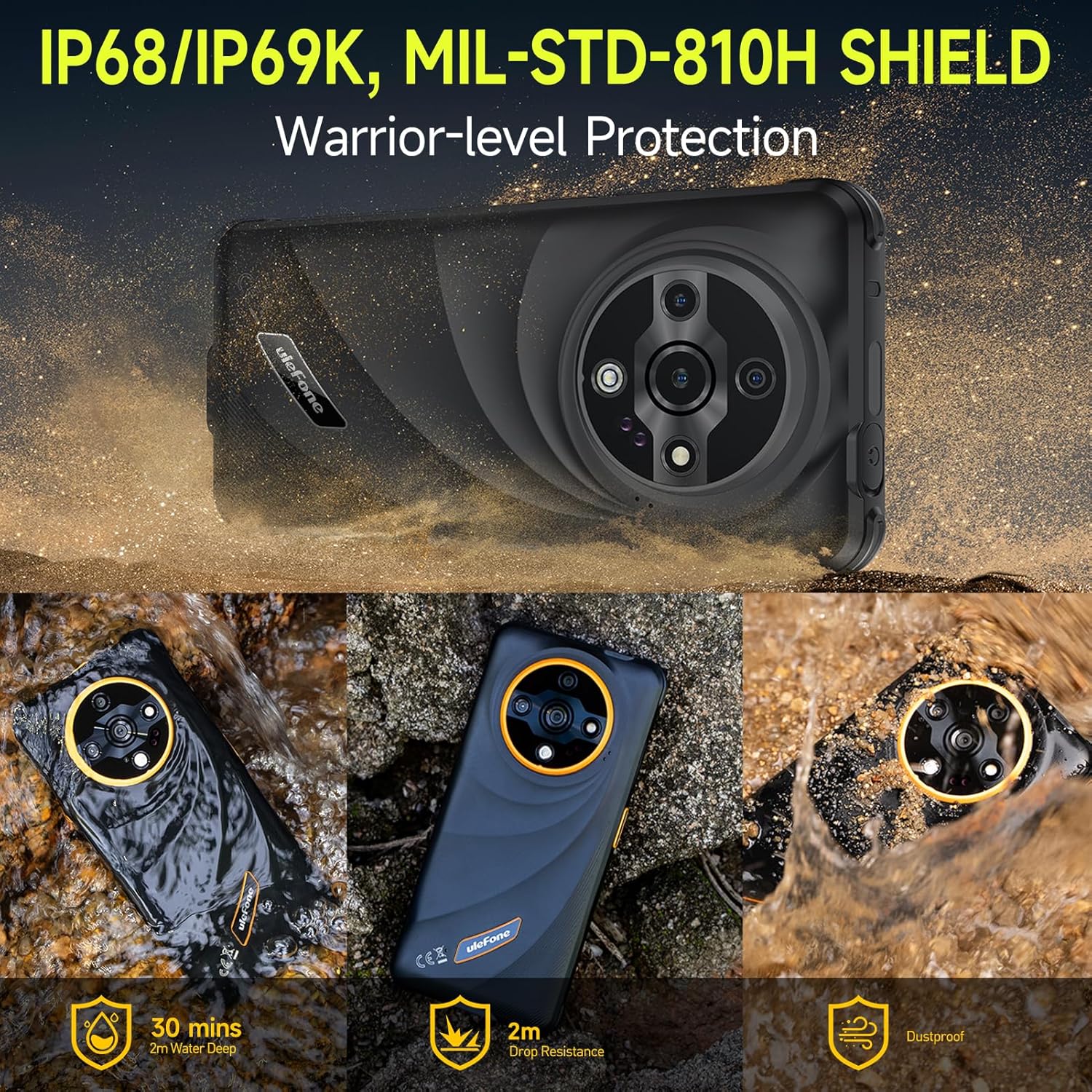
Image: Depiction of the Ulefone Armor X31's IP68/IP69K and MIL-STD-810H ratings, showing its resistance to water, drops, and dust in various scenarios.
The Armor X31 is IP68/IP69K certified and meets MIL-STD-810H standards, making it highly resistant to water, dust, and drops. It can withstand submersion in up to 2 meters of water for 30 minutes and drops from up to 2 meters.
5.7 Yderligere funktioner
- 120 Lumen Flashlight: An independent, high-brightness flashlight is integrated for illumination in dark environments.
- Google Lens Support: Utilize Google Lens through the camera for instant translations, object identification, and image searches.
- Widevine L1-understøttelse: Enables streaming of high-definition content from platforms like Netflix and Disney+.
- IR Blaster: Use your phone as a universal remote control for compatible home appliances.
- Fingerprint Unlock & Face Unlock: Sikr din enhed med biometrisk godkendelse.
- NFC: Supports contactless payments and data transfer.
- Headset-Free FM Radio: Listen to FM radio without needing to connect headphones as an antenna.
- Brugerdefineret nøgle: A programmable button for quick access to frequently used apps or functions.
- Outdoor Toolbox: A suite of utility apps designed for outdoor activities.
- 3-Card Slot: Accommodates two SIM cards and one microSD card simultaneously.
- GPS + GLONASS + Beidou + Galileo: Multiple navigation systems for accurate positioning.
- Gloves Mode: Enhances touch screen sensitivity for operation while wearing gloves.

Image: Graphic showing Widevine L1 support, enabling HD streaming on platforms like Netflix and Disney+.
6. Vedligeholdelse
6.1 Rengøring af din enhed
To clean your Armor X31, use a soft, lint-free cloth. For stubborn dirt or grime, especially after exposure to mud or saltwater, rinse the device under fresh water and ensure all ports are closed. Allow the device to air dry completely before charging or opening any ports.
6.2 Pleje af batterier
- Undgå at udsætte enheden for ekstreme temperaturer (under 0 °C eller over 45 °C), da dette kan forringe batteriets ydeevne.
- Use only the original charger and cable provided with your device to prevent damage and ensure optimal charging.
- Do not attempt to replace the battery yourself, as it is an integrated component and requires professional service.
6.3 Generel pleje
Despite its rugged design, avoid unnecessary drops or impacts. Ensure all port covers are securely closed when the device is exposed to water or dust.
7. Fejlfinding
This section addresses common issues you might encounter with your Ulefone Armor X31.
| Spørgsmål | Mulig løsning |
|---|---|
| Enheden tænder ikke | Sørg for, at batteriet er opladet. Tilslut opladeren, og vent et par minutter, før du forsøger at tænde den igen. Hvis den ikke reagerer, kan du udføre en tvungen genstart ved at holde tænd/sluk-knappen nede i 10-15 sekunder. |
| Dårligt netværkssignal | Check if your SIM card is properly inserted. Move to an area with better network coverage. Restart the device. Verify mobile data settings in 'Settings > Network & internet > Mobile network'. |
| Apps går ned eller fryser | Close and reopen the app. Clear the app's cache and data via 'Settings > Apps > [App Name] > Storage & cache'. Ensure the app is updated to the latest version. Restart the phone. |
| Touchscreen reagerer ikke | Restart the device. Ensure the screen is clean and dry. If using a screen protector, ensure it is properly applied and not interfering with touch sensitivity. |
| Enheden oplader ikke | Check the charging cable and adapter for damage. Ensure the USB-C port is clean and free of debris. Try a different power outlet. Use the original charger and cable. |
If you encounter issues not listed here or if solutions do not resolve the problem, please contact Ulefone customer support.
8. Specifikationer
| Feature | Detalje |
|---|---|
| Modelnavn | Ulefone Armor X31 |
| Operativsystem | Android 14 |
| Processor | MediaTek Helio G91, 8-core, 2.0 GHz |
| VÆDDER | 12 GB (6 GB fysisk + 6 GB virtuel) |
| Intern opbevaring | 128 GB |
| Udvidelig opbevaring | Op til 2 TB via microSD-kort |
| Vise | 6.56 inches HD+ (720 x 1612), 90 Hz Refresh Rate, 800 nits Max Brightness, Corning Gorilla Glass |
| Bagkameraer | 48MP Main Camera, 20MP Night Vision Camera, 2MP Macro Camera |
| Forreste kamera | 16 MP |
| Batterikapacitet | 6050 mAh |
| Opladning | 18W hurtigopladning, omvendt opladning |
| Holdbarhed | IP68/IP69K Waterproof & Dustproof, MIL-STD-810H Shockproof |
| Forbindelse | Dual 4G, Wi-Fi, Bluetooth 5.2, NFC, GPS (GPS+GLONASS+Beidou+Galileo), USB Type-C, 3.5mm Audio Jack |
| Særlige funktioner | 120 Lumen Flashlight, IR Blaster, Fingerprint Unlock, Face Unlock, Custom Key, Outdoor Toolbox, Widevine L1, Headset-Free FM Radio, Gloves Mode |
| Dimensioner | 6.84 x 3.23 x 0.54 tommer (173.78 x 82 x 13.65 mm) |
| Vægt | 10.6 ounce (301 gram) |
9. Garanti og support
9.1 Producentens garanti
The Ulefone Armor X31 comes with a 12-month manufacturer warranty service in the US. This warranty covers defects in materials and workmanship under normal use. It does not cover damage caused by misuse, accidents, unauthorized repairs, or normal wear and tear.
9.2 Kundesupport
For technical assistance, warranty claims, or any questions regarding your Ulefone Armor X31, please contact Ulefone customer support. Refer to the contact information provided in your product packaging or visit the official Ulefone webwebsted for supportdetaljer.


