1. Introduktion
Thank you for choosing the Pelonis 5L Evaporative Cooler. This 3-in-1 device combines the functions of an air cooler, fan, and humidifier, providing a comfortable environment for your home or office. Please read this manual thoroughly before operation to ensure proper use, maintenance, and safety.
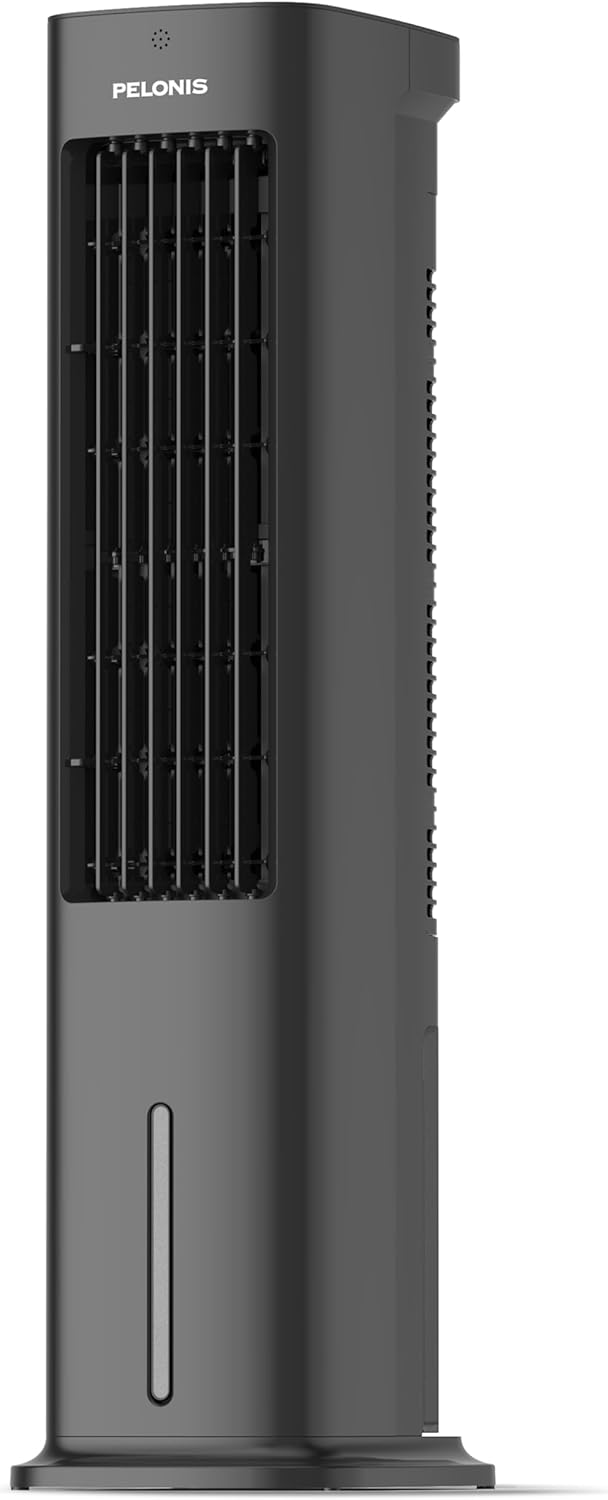
Figure 1.1: Pelonis 5L Evaporative Cooler (Side View)

Figure 1.2: The 3-in-1 functionality of the Pelonis Evaporative Cooler, illustrating its use as a fan, humidifier, and air cooler.
2. Vigtige sikkerhedsinstruktioner
For at mindske risikoen for brand, elektrisk stød eller personskade skal du altid følge disse grundlæggende sikkerhedsforanstaltninger:
- Læs alle instruktioner, før du bruger dette apparat.
- Betjen ikke en ventilator med en beskadiget ledning eller stik. Kassér blæseren eller returner til et autoriseret serviceværksted til undersøgelse og/eller reparation.
- Før ikke ledningen under gulvtæpper. Dæk ikke ledningen med tæpper, løbere eller lignende belægninger. Før ikke ledningen under møbler eller apparater. Anbring ledningen væk fra trafikområdet, og hvor den ikke vil blive snublet over.
- Always unplug the appliance from the power outlet when not in use, when moving it from one location to another, and before cleaning.
- Nedsænk ikke apparatet i vand eller andre væsker.
- Lad ikke børn betjene eller lege med apparatet.
- Brug kun apparatet til det tilsigtede brug i husholdningen som beskrevet i denne manual.
- Sørg for, at voltage angivet på apparatet svarer til din lokale netspændingtage før tilslutning af apparatet.
- Do not block air openings or operate near curtains or other objects that may block air intake.
- Placer altid apparatet på en stabil, plan overflade.
3. Pakkens indhold
Tjek venligst pakken for følgende varer:
- Pelonis 5L Evaporative Cooler Unit
- Fjernbetjening (2 AAA-batterier medfølger)
- 2 Cooling Pads
- Brugermanual
4. Produktet er slutview
Familiarize yourself with the main components of your Pelonis Evaporative Cooler.

Figur 4.1: Forside view of the cooler, highlighting its fan, humidification, and cooling functions.

Figure 4.2: Illustration of the 60-degree oscillation feature for wide air distribution.

Figure 4.3: The evaporative cooler being controlled by its remote, emphasizing wireless convenience.
5. Opsætning
Follow these steps to set up your evaporative cooler:
5.1 Base-samling
- Tag forsigtigt enheden ud af emballagen.
- Attach the base to the bottom of the main unit. Ensure it is securely fastened, typically by screwing it into place.
5.2 Påfyldning af vandtanken
The unit features a 5L water tank for humidification and cooling functions.
- Find vandtanken i bunden af enheden.
- Træk forsigtigt vandbeholderen ud.
- Fyld tanken med rent vand. Overskrid ikke den maksimale påfyldningslinje.
- For enhanced cooling, place the two cooling pads in the freezer until frozen, then place them into the water tank.
- Skub vandtanken tilbage i enheden, indtil den klikker på plads.

Figure 5.1: Instructions for filling the 5L water tank, showing the maximum fill line and warning against overfilling or tipping.
5.3 Installation af batteri i fjernbetjening
The remote control requires 2 AAA batteries (included).
- Åbn batterirummet på bagsiden af fjernbetjeningen.
- Isæt de 2 AAA-batterier, og sørg for at polerne vender korrekt (+/-).
- Luk batterirummet.
6. Betjeningsvejledning
Your Pelonis Evaporative Cooler offers multiple functions and settings for optimal comfort.
6.1 Tænd/sluk
- Sæt netledningen i en passende stikkontakt.
- Tryk på Magt knappen på kontrolpanelet eller fjernbetjeningen for at tænde eller slukke enheden.
6.2 Valg af tilstand
The unit has three primary modes: Fan, Evaporative Cooler, and Humidifier.
- Tryk på Mode knappen for at gennemgå de tilgængelige tilstande.
- Ventilatortilstand: Circulates air without humidification or cooling.
- Evaporative Cooler Mode: Uses water and cooling pads to provide a cooling effect. Ensure the water tank is filled.
- Luftfugtertilstand: Tilfører fugt til luften. Sørg for at vandtanken er fyldt.

Figure 6.1: Visual representation of the three operational modes: Humidifier, Air Cooler, and Fan.
6.3 hastighedsindstillinger
Choose from three fan speeds: Quiet, Standard, or Strong.
- Tryk på Hastighed knap for at justere blæserhastigheden.
- The current speed setting will be indicated on the display.
6.4 Oscillationsfunktion
The unit features a 60° automatic oscillation for wider air distribution.
- Tryk på oscillation button to activate or deactivate the automatic swing function.
- You can also manually adjust the vertical angle of the air outlet.
6.5 Timer funktion
Set the unit to automatically turn off after a specified period, up to 7 hours.
- Tryk på Timer button repeatedly to set the desired operating time in 1-hour increments.
- The timer indicator will show the selected duration.
6.6 Vindtilstande
Select from Natural, Sleep, or Normal wind modes for varied airflow patterns.
- Tryk på Vindtilstand button to cycle through Natural, Sleep, and Normal modes.
- Naturlig tilstand: Simulerer naturlig brise med varierende ventilatorhastigheder.
- Sove mode: Fungerer ved en lavere, mere stille hastighed for uforstyrret søvn.
- Normal tilstand: Konstant ventilatorhastighed.

Figure 6.2: The evaporative cooler operating in a bedroom, emphasizing its quiet night mode for optimal cooling during sleep.
7. Vedligeholdelse
Regelmæssig vedligeholdelse sikrer optimal ydeevne og levetid for din fordampningskøler.
7.1 Rengøring af vandtanken
Rengør vandtanken regelmæssigt for at forhindre vækst af skimmelsvamp og meldug.
- Tag enheden ud af stikkontakten.
- Fjern vandtanken.
- Tøm eventuelt resterende vand ud.
- Rengør tanken med en blød klud og et mildt rengøringsmiddel. Skyl grundigt med rent vand.
- Lad tanken lufttørre helt, før den sættes i igen.
7.2 Cleaning the Filter Screen
The removable filter screen should be cleaned periodically.
- Tag stikket ud af stikkontakten.
- Locate and remove the filter screen from the back of the unit.
- Rinse the filter screen under running water to remove dust and debris. For stubborn dirt, use a soft brush.
- Lad filterskærmen tørre helt, før du sætter den tilbage i enheden.

Figure 7.1: Illustration of the removable filter screen and the process of cleaning it for improved air quality.
7.3 Udvendig rengøring
- Tør ydersiden af enheden af med en blød, damp klæde.
- Brug ikke slibende rengøringsmidler eller opløsningsmidler.
7.4 Opbevaring
- If storing the unit for an extended period, ensure the water tank is empty and clean, and the filter screen is dry.
- Opbevar enheden et køligt, tørt sted, væk fra direkte sollys.
8. Fejlfinding
If you encounter issues with your Pelonis Evaporative Cooler, refer to the following table for common problems and solutions.
| Problem | Mulig årsag | Løsning |
|---|---|---|
| Enheden tænder ikke | Ingen strømforsyning Tænd/sluk-knappen er ikke trykket | Kontroller, om netledningen er sat ordentligt i. Tryk på tænd/sluk-knappen på enheden eller fjernbetjeningen. |
| No cool air / Weak cooling | Vandbeholder tom Cooling pads not frozen Filter screen clogged | Fyld vandtanken. Freeze the cooling pads before use. Rengør filterskærmen. |
| Enheden er støjende | Enheden står ikke på en plan overflade Fremmedlegeme indeni | Placer enheden på en stabil, flad overflade. Unplug and check for any obstructions. |
| Fjernbetjening virker ikke | Batterier døde eller forkert isat Blokering mellem fjernbetjening og enhed | Udskift batterierne og kontroller polariteten. Ensure a clear line of sight to the unit's receiver. |
Hvis problemet fortsætter efter at have prøvet disse løsninger, bedes du kontakte kundesupport.
9. Specifikationer
| Feature | Detalje |
|---|---|
| Modelnummer | PFC50A4AWGBDE |
| Dimensioner (L x B x H) | 29.5 x 23 x 85 cm |
| Vægt | 9.06 kilo |
| Vandtankkapacitet | 5 liter |
| Voltage | 220 volt |
| Kontroltype | Fjernbetjening |
| Særlige funktioner | Timer, Tower Base, Remote Controlled, Oscillating, Quiet Operation, Safety Certified |
| Certificering | CE, RoHS |
| Inkluderede komponenter | Fjernbetjening |
10. Garanti og support
This Pelonis Evaporative Cooler comes with a 2 års garanti fra købsdatoen. Denne garanti dækker fejl i materialer og udførelse ved normal brug.
For warranty claims, technical support, or any questions regarding your product, please contact Pelonis customer service through the retailer where you purchased the product or visit the official Pelonis webwebsted for kontaktoplysninger.
Gem venligst din købsbevis af garantihensyn.


