Indledning
The SUUNTO Aqua Light Open-Ear Swimming Bone Conduction Headphone is designed for active individuals, offering a unique audio experience while maintaining environmental awareness. Featuring bone conduction technology, a 32GB MP3 player for offline music, Bluetooth 5.4 connectivity, and IP68 waterproofing, these headphones are suitable for various sports, including swimming, running, and cycling.
This manual provides comprehensive instructions for setting up, operating, maintaining, and troubleshooting your SUUNTO Aqua Light headphones.

Image: SUUNTO Aqua Light headphones in Tidal Black, showcasing det åbne øre-design.

Image: SUUNTO Aqua Light headphones highlighting Bluetooth 5.4 for running and 32GB MP3 storage for swimming, with the headphones partially submerged in water.
Hvad er der i æsken
Når du åbner pakken, skal du sørge for, at alle følgende komponenter er til stede:
- SUUNTO Aqua Light-hovedtelefoner
- USB opladningskabel
- Svømmeørepropper
- Opbevaringspose
- Brugervejledning (dette dokument)
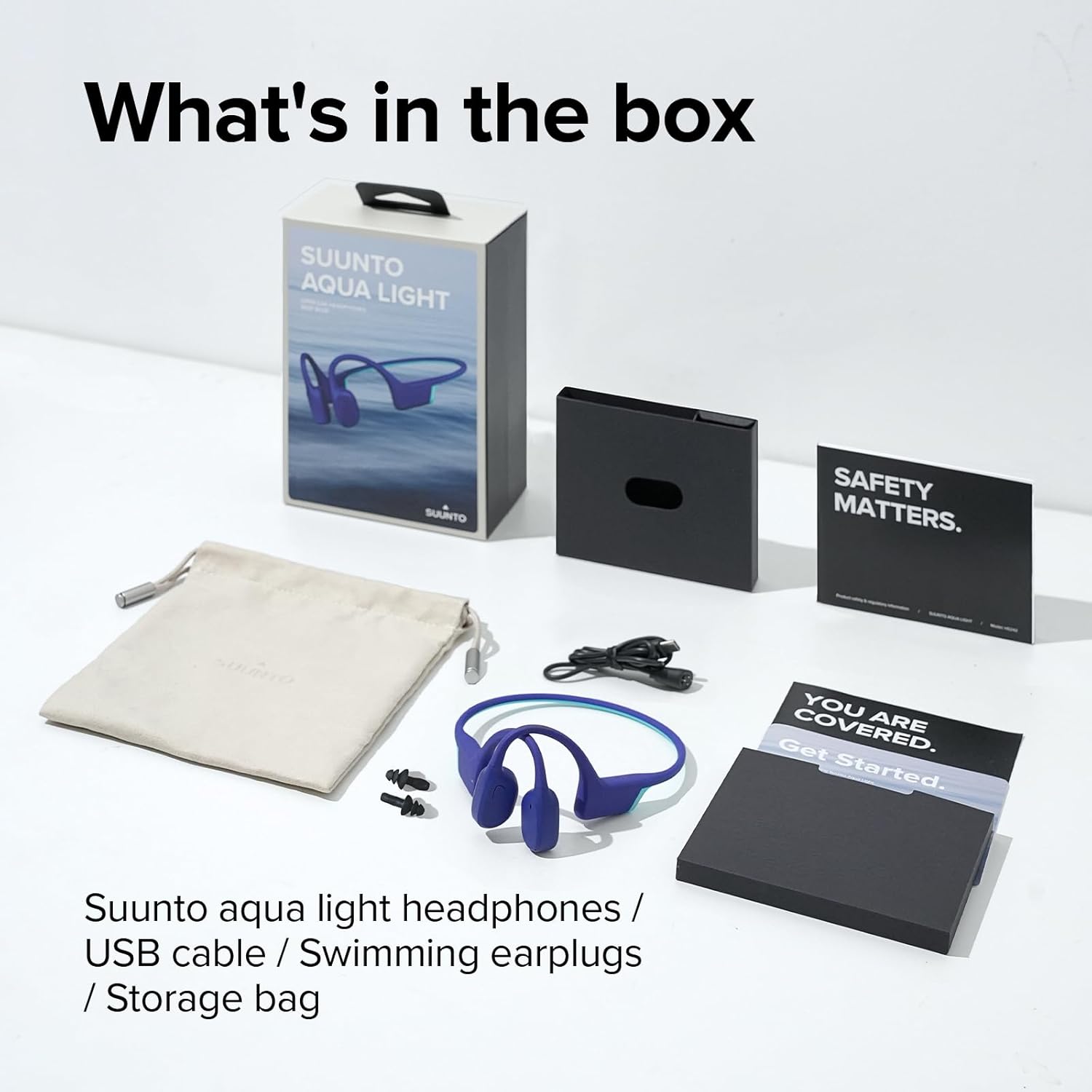
Image: All items included in the SUUNTO Aqua Light package: headphones, USB cable, swimming earplugs, and documentation.
Opsætning
Opladning af hovedtelefoner
Before first use, fully charge your SUUNTO Aqua Light headphones. Use the provided USB charging cable. Connect the magnetic end of the cable to the charging port on the headphones and the USB-A end to a compatible USB power source (e.g., computer USB port, wall adapter).
- En fuld opladning tager cirka 1 time.
- A 10-minute fast charge provides up to 3 hours of playtime.
- LED-indikatoren viser opladningsstatus (f.eks. rød for opladning, blå for fuldt opladet).

Image: SUUNTO Aqua Light headphones connected to a laptop via the USB charging cable, illustrating the charging process.
Bluetooth-parring
Sådan tilslutter du dine hovedtelefoner til en Bluetooth-aktiveret enhed:
- Sørg for, at hovedtelefonerne er slukket.
- Press and hold the Power/Multi-function button until the LED indicator flashes red and blue, indicating pairing mode.
- Aktiver Bluetooth på din enhed (smartphone, tablet, computer) og søg efter tilgængelige enheder.
- Select "SUUNTO Aqua Light" from the list of found devices.
- Når den er tilsluttet, lyser LED-indikatoren konstant blåt.
The headphones support dual-device connection, allowing seamless switching between two paired Bluetooth devices.
Betjeningsvejledning
Tænd/sluk
- Tænd: Tryk og hold tænd/sluk-/multifunktionsknappen nede i 2 sekunder.
- Sluk: Tryk og hold tænd/sluk-/multifunktionsknappen nede i 3 sekunder.
Controls (Touch Method)
| Fungere | Handling |
|---|---|
| Afspil/pause | Single tap on the Multi-function button. |
| Lydstyrke op | Tap the Volume Up button. |
| Lydstyrke ned | Tap the Volume Down button. |
| Næste spor | Double tap on the Multi-function button. |
| Forrige spor | Triple tap on the Multi-function button. |
| Besvar/afslut opkald | Single tap on the Multi-function button during a call. |
| Afvis opkald | Tryk og hold multifunktionsknappen nede i 2 sekunder under et indgående opkald. |
| Aktiver Voice Assistant | Tryk og hold multifunktionsknappen nede i 2 sekunder (når du ikke er i gang med et opkald). |
| Switch between Bluetooth/MP3 Mode | Press and hold the Volume Up and Volume Down buttons simultaneously for 2 seconds. |
Using the 32GB MP3 Player
The SUUNTO Aqua Light headphones feature an integrated 32GB MP3 player, ideal for use in environments where Bluetooth connectivity may be limited or unavailable, such as underwater. The player supports MP3, FLAC, WAV, AAC, M4A, APE, and WMA formats.
- To transfer music, connect the headphones to a computer using the USB cable. The headphones will appear as a removable storage device. Drag and drop your audio files into the device's storage.
- Switch to MP3 mode using the control table above.
- The headphones can store up to 8000 songs (assuming 4MB per song).
Sound Modes and Underwater EQ
The headphones offer different sound modes optimized for various activities, including an "Underwater EQ" mode for superior audio quality while swimming.

Image: A user interacting with the SUUNTO Aqua Light mobile application, which allows switching to an optimized Underwater EQ for swimming.
For optimal underwater performance, ensure the headphones are in MP3 mode and the Underwater EQ is activated, typically through the SUUNTO app or specific button combination (refer to app instructions for details).

Image: A swimmer wearing SUUNTO Aqua Light headphones, illustrating their IP68 waterproof capability for submersion up to 2 meters for 2 hours.
Open-Ear Safety and Comfort
The open-ear bone conduction design allows you to hear your surroundings while enjoying audio, enhancing safety during outdoor activities like cycling or running.

Image: A person wearing SUUNTO Aqua Light headphones while cycling, highlighting the open-ear design that maintains awareness of surroundings.
Dual Microphone & Noise Cancellation
Equipped with dual microphones and Environmental Noise Cancellation (ENC) technology, the headphones ensure clear voice quality during phone calls, even in noisy environments.

Image: A person wearing SUUNTO Aqua Light headphones by a swimming pool, demonstrating the effectiveness of the dual microphone and environmental noise cancellation for clear communication.
Opretholdelse
Rensning
Regular cleaning helps maintain the performance and longevity of your headphones:
- Tør hovedtelefonerne af med en blød, damp cloth after each use, especially after exposure to sweat, chlorine, or saltwater.
- Brug ikke slibende rengøringsmidler eller opløsningsmidler.
- Sørg for, at opladningsporten er tør, før du tilslutter opladningskablet.
Opbevaring
When not in use, store your headphones in the provided storage bag in a cool, dry place, away from direct sunlight and extreme temperatures.
Fejlfinding
| Problem | Mulig løsning |
|---|---|
| Hovedtelefonerne tændes ikke. | Sørg for, at hovedtelefonerne er fuldt opladet. Tilslut dem til opladeren, og kontroller LED-indikatoren. |
| Kan ikke parre med Bluetooth-enhed. |
|
| No sound in MP3 mode. |
|
| Sound quality is poor underwater. | Ensure you are in MP3 mode and the Underwater EQ setting is activated (if applicable via app). Use the provided swimming earplugs for optimal sound. |
| Hovedtelefonerne reagerer ikke. | Perform a soft reset by connecting the headphones to the charger for a few seconds, then disconnecting and attempting to power on. |
Specifikationer
| Feature | Detalje |
|---|---|
| Modelnavn | SUUNTO AQUA LYS |
| Modelnummer | SS051124000 |
| Forbindelsesteknologi | Trådløs (Bluetooth 5.4) |
| Intern opbevaring | 32GB MP3-afspiller |
| Vandmodstand | IP68 (Tåler nedsænkning ned til 2 meter i 2 timer) |
| Spilletid | Up to 10 hours (Bluetooth mode), Up to 6 hours (MP3 mode underwater) |
| Opladningstid | Approx. 1 hour (full charge), 10 minutes for 3 hours playtime |
| Vægt | 1.06 ounces (ca. 28 g) |
| Dimensioner | 4.92 x 4.02 x 1.77 tommer |
| Mikrofon | Dual-Mic with Environmental Noise Cancellation (ENC) |
| Kontrolmetode | Røre |
| Batteritype | Lithium Polymer (inkluderet) |
Garanti og support
For detailed warranty information and customer support, please refer to the official SUUNTO website or the included warranty card. You can also access the official user guide PDF for additional information:
Download den officielle brugervejledning (PDF)
For further assistance, contact SUUNTO customer service through their official channels.


