1. Introduktion
Welcome to the user manual for your DOOGEE Blade GT Pro 5G Rugged Smartphone. This guide provides essential information to help you set up, operate, maintain, and troubleshoot your device. Please read this manual thoroughly to ensure optimal performance and longevity of your smartphone.

Billede 1.1: Forside og bagside view of the DOOGEE Blade GT Pro 5G Rugged Smartphone.
2. Pakkens indhold
Bekræft, at alle varer er til stede i din produktpakke:
- 1 x DOOGEE Blade GT Pro Rugged Smartphone
- 1 x Type-C USB-kabel
- 1 x 18W oplader
- 1 x Serigrafitrykt beskyttelsesfilm (forudpåsat)
- 1 x eksplosionsbeskyttelsesfilm
- 1 x telefonsæt
- 1 x pakkeboks
- 1 x brugermanual og garantikort

Image 2.1: Illustration of the DOOGEE Blade GT Pro package contents.
3. Enhed overview
Familiarize yourself with the physical components and features of your DOOGEE Blade GT Pro smartphone.
3.1 Physical Dimensions and Durability
The Blade GT Pro features a slim 10.5 mm body and weighs approximately 260 grams, designed for a comfortable grip. It is built with aerospace-grade metal for enhanced durability.

Image 3.1: Device thickness and weight for ergonomic handling.
3.2 LED Light Effect
The device includes a customizable LED light bar on the back that provides visual alerts for calls, messages, and music synchronization. It supports various effects triggered by scenarios such as charging, gaming mode, or party mode. Brightness and lighting styles (constant-on, strobe) are adjustable.

Image 3.2: Customizable RGB lighting effects.
4. Opsætning
4.1 Installation af SIM-kort og MicroSD-kort
- Find SIM-kortbakken på siden af din enhed.
- Sæt SIM-kortudkastningsværktøjet i det lille hul ved siden af bakken, og tryk godt ned, indtil bakken springer ud.
- Placer dit/dine Nano-SIM-kort og/eller MicroSD-kort i de dertil beregnede pladser på bakken. Sørg for, at de gyldne kontakter vender nedad.
- Sæt forsigtigt bakken tilbage i telefonen, indtil den flugter med enhedens kabinet.

Image 4.1: Dual-card slot for SIM and MicroSD.
4.2 Indledende tænding
- Press and hold the Power button (located on the side of the device) until the DOOGEE logo appears on the screen.
- Følg vejledningen på skærmen for at fuldføre den indledende opsætning, herunder valg af sprog, Wi-Fi-forbindelse og opsætning af Google-konto.
5. Betjeningsvejledning
5.1 Display og navigation
The Blade GT Pro features a 6.72-inch FHD+ IPS display with a 120Hz refresh rate for smooth visuals. Navigation is primarily via touchscreen gestures and on-screen buttons.

Image 5.1: High refresh rate display for smooth visuals.
5.2 Kamerabrug
The device is equipped with a 108MP main camera, an 8MP wide-angle lens, a 2MP macro camera, and a 32MP selfie camera. Various modes are available for different photographic needs.
- Hovedkamera: Til billeder i høj opløsning.
- Vidvinkelobjektiv: Optag bredere scener.
- Makro kamera: For detaljerede nærbilleder.
- Selfie kamera: For self-portraits and video calls.
- Særlige tilstande: HDR, Night Mode, 360° Panorama, and Underwater Mode.

Image 5.2: Camera features and example skud.
5.3 Sikkerhedsfunktioner
The Blade GT Pro offers multiple security options:
- Oplåsning med fingeraftryk på siden: Registrer dit fingeraftryk for hurtig og sikker adgang.
- Face ID: Brug ansigtsgenkendelse til at låse din enhed op.
- PIN/Mønster/Adgangskode: Standard Android-sikkerhedsindstillinger.
5.4 NFC-funktionalitet
NFC (Near Field Communication) allows for contactless transactions and quick pairing with compatible devices. Enable NFC in your phone's settings to use features like Google Pay.
6. Vedligeholdelse
6.1 Rengøring af din enhed
To clean your smartphone, use a soft, lint-free cloth. Avoid abrasive materials or harsh chemicals that could damage the screen or casing. For stubborn dirt, slightly dampen klud med vand.
6.2 Vand-, støv- og faldmodstand
The DOOGEE Blade GT Pro is certified with IP68/IP69K and MIL-STD-810H standards, indicating strong resistance to water, dust, and drops. While designed for rugged use, proper care is still recommended:
- Sørg for, at alle portdæksler er forsvarligt lukket, før enheden udsættes for vand eller støv.
- Avoid intentional submersion in water beyond specified depths or durations.
- Rinse the phone with clean water if exposed to saltwater or other corrosive liquids, then dry thoroughly.
- Selvom den er faldbestandig, kan ekstreme stød stadig forårsage skade.
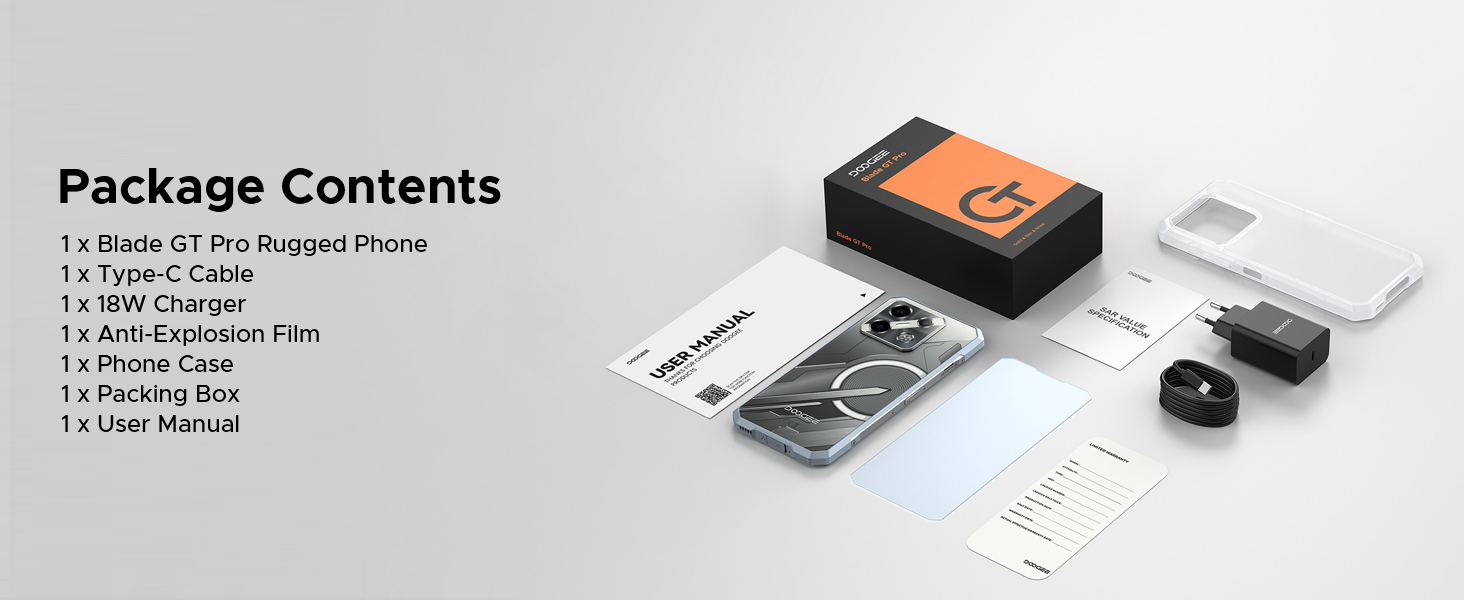
Image 6.1: Durability features for outdoor use.
6.3 Softwareopdateringer
Regularly check for and install software updates to ensure your device has the latest features, security patches, and performance improvements. You can usually find this option in the 'Settings' menu under 'System' or 'About Phone'.
7. Fejlfinding
This section addresses common issues you might encounter with your DOOGEE Blade GT Pro.
| Spørgsmål | Mulig løsning |
|---|---|
| Enheden tænder ikke | Sørg for, at batteriet er opladet. Tilslut opladeren, og vent et par minutter, før du forsøger at tænde den igen. Hvis den ikke reagerer, kan du udføre en tvungen genstart ved at holde tænd/sluk-knappen nede i 10-15 sekunder. |
| Dårlig netværksforbindelse | Check if the SIM card is correctly inserted. Verify that you are within network coverage. Restart the device. Ensure your carrier supports the device's frequency bands (Note: Does not support Verizon and AT&T networks). |
| Batteriet aflades hurtigt | Reduce screen brightness. Close unused applications running in the background. Disable Wi-Fi, Bluetooth, or GPS when not in use. Check for power-intensive apps in battery settings. |
| Apps går ned eller fryser | Clear the cache of the problematic app. Update the app to its latest version. If the issue persists, uninstall and reinstall the app. Ensure the phone's operating system is up to date. |
| Fingeraftryksscanneren virker ikke | Ensure your finger is clean and dry. Re-register your fingerprint. Check for any physical obstruction or damage to the sensor. |
8. Specifikationer
Key technical specifications for the DOOGEE Blade GT Pro 5G Rugged Smartphone:
| Feature | Detalje |
|---|---|
| Model | Blade GT Pro |
| Operativsystem | Android 14 |
| Processor | MediaTek Dimensity 7250, 6nm Octa-core |
| VÆDDER | 32GB (12GB physical + 20GB extended) LPDDR5 |
| Intern opbevaring | 256 GB (kan udvides op til 2 TB via MicroSD) |
| Vise | 6.72-inch FHD+ IPS, 1080x2408 resolution, 120Hz Refresh Rate, 380 nits brightness |
| Bagkamera | 108MP Main, 8MP Wide-Angle, 2MP Macro |
| Forreste kamera | 32 MP |
| Batteri | 5800mAh, 18W Fast Charging, OTG Support |
| Forbindelse | 5G, Wi-Fi 6, Bluetooth, NFC, USB Type-C |
| Holdbarhed | IP68/IP69K, MIL-STD-810H (Waterproof, Dustproof, Drop-resistant) |
| Sikkerhed | Side Fingerprint Unlock, Face ID |
| Dimensioner | 10.5 mm tykkelse |
| Vægt | 260 gram |
9. Garanti og support
9.1 Garantioplysninger
Your DOOGEE Blade GT Pro smartphone comes with a limited manufacturer's warranty. Please refer to the 'User Manual and Warranty Card' included in your package for specific terms, conditions, and duration of the warranty. Keep your proof of purchase for warranty claims.
9.2 Kundesupport
For further assistance, technical support, or service inquiries, please contact DOOGEE customer service through their official webwebstedet eller kontaktoplysningerne i din garantidokumentation.


