1. Produktet er slutview
The Nokia G310 5G Smartphone (Model TA-1573) offers lightning-fast 5G connectivity and modern mobile technology. It features a vibrant display for various tasks, a powerful processor for smooth performance, and an advanced camera system for detailed photos. Designed for daily use, it provides a comfortable grip and durable build quality. Enjoy extensive network compatibility, ample storage, a long-lasting battery with quick charging, and a user-friendly interface with regular software updates.
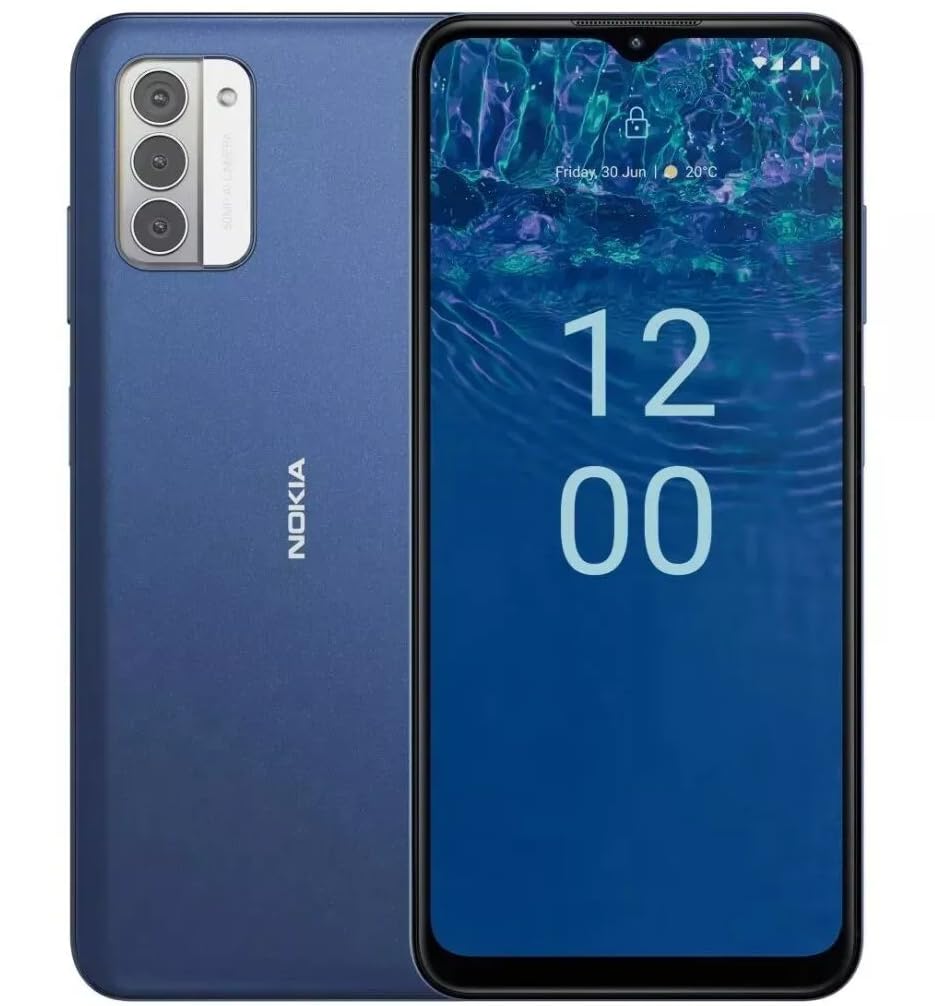
Billede: Bagside view of the Nokia G310 5G Smartphone, showcasing the triple camera module and Nokia branding.
Nøglefunktioner
- 5G-forbindelse: Experience ultra-fast mobile data speeds and low latency.
- Levende skærm: Large touchscreen display delivers vibrant colors and sharp visuals.
- Effektiv ydeevne: Processor handles everyday tasks smoothly, from browsing to gaming.
- Holdbart design: Sleek and modern smartphone design with durable construction.
2. Kom godt i gang
Hvad er der i æsken
- Nokia G310 5G smartphone
- Oplader
SIM and MicroSD Card Installation
Locate the SIM/MicroSD card tray on the side of your device. Use the provided SIM ejector tool to open the tray. Insert your Nano-SIM card(s) and/or MicroSD card into the designated slots. Ensure the cards are correctly oriented. Gently push the tray back into the device until it clicks into place.
Tænd/sluk
To power on your Nokia G310, press and hold the Power/Fingerprint Sensor button located on the right side of the device until the Nokia logo appears. To power off, press and hold the Power/Fingerprint Sensor button, then select 'Power off' from the options that appear on the screen.
3. Enhedslayout
Fysiske knapper og porte
- Lydstyrkeknapper: Located on the right side, above the Power/Fingerprint Sensor button, for adjusting media and call volume.
- Power/Fingerprint Sensor Button: Located on the right side, used for powering the device on/off, locking/unlocking the screen, and fingerprint authentication.
- USB-C-port: Placeret i bunden, bruges til opladning og dataoverførsel.
- 3.5 mm lydstik: Placeret i bunden til tilslutning af kablede hovedtelefoner.
- Højttaler: Placeret i bunden til lydudgang.
- Mikrofon: Integreret til opkald og stemmekommandoer.
Kamera modul
The rear of the device features a multi-lens camera module, including a main camera, along with a flash for low-light photography. The front-facing camera is discreetly placed within a notch at the top of the display.
4. Betjeningsvejledning
Grundlæggende navigation
The Nokia G310 operates on the Android operating system, offering an intuitive touchscreen interface. Swipe up from the bottom of the screen to access the app drawer, swipe down from the top for notifications and quick settings, and use gestures or navigation buttons (configurable in settings) to move between apps and screens.
Forbindelse
- 5G mobildata: The device supports 5G connectivity for ultra-fast mobile data speeds. Ensure your SIM card and plan support 5G.
- Wi-Fi: Opret forbindelse til trådløse netværk for at få internetadgang. Gå til Indstillinger > Netværk og internet > Wi-Fi for at administrere forbindelser.
- Bluetooth: Pair with other Bluetooth-enabled devices like headphones or speakers. Go to Settings > Connected devices > Bluetooth.
- GPS: Utilize built-in GPS for location services and navigation.
5. Kamerabrug
The Nokia G310 features an advanced camera system designed to capture memorable moments. Access the camera app from your home screen or app drawer.
Tager billeder
Open the Camera app, frame your shot, and tap the shutter button on the screen to take a picture. The advanced AI camera assists in optimizing settings for various scenes.
Optagelse af videoer
In the Camera app, switch to video mode, then tap the record button to start and stop recording. The phone supports various video resolutions.
Kameratilstande
Explore different camera modes available in the camera app, such as Portrait, Panorama, and Night mode, to enhance your photography experience.
6. Batteristyring
Opladning af din enhed
The Nokia G310 is equipped with a 5000 Milliamp Hours (5000.0 Battery Power Rating) battery. Connect the provided USB-C charger to the port at the bottom of the device. The phone supports quick charging for reduced downtime.
Optimering af batterilevetid
- Juster skærmens lysstyrke til et behageligt niveau.
- Aktiver batterisparetilstand, når batteriet er lavt.
- Luk ubrugte apps, der kører i baggrunden.
- Deaktiver Wi-Fi, Bluetooth eller GPS, når de ikke er i brug.
7. Tekniske specifikationer
| Modelnummer | TA-1573 |
| Operativsystem | Android |
| CPU model | MediaTek Helio P60T |
| Cellulær teknologi | 5G |
| Trådløs bærer | Ulåst |
| Hukommelseslagringskapacitet | 4 GB |
| Opløsning | 1080 x 2340 |
| Human Interface Input | Touchskærm |
| Batterikapacitet | 5000 mioamp Timer |
| Lydstik | 3.5 mm |
| Farve | Blå |
| Fabrikant | Nokia |
| Dato først tilgængelig | 31. januar 2025 |
8. Fejlfinding
If you encounter issues with your Nokia G310, try the following common troubleshooting steps:
- Enheden reagerer ikke: Tryk og hold tænd/sluk-knappen nede i cirka 10-15 sekunder for at fremtvinge en genstart.
- Forbindelsesproblemer: Toggle Wi-Fi or Bluetooth off and on. Restart your device. Check network settings.
- Appen virker ikke: Ryd appens cache og data i Indstillinger > Apps. Hvis problemet fortsætter, skal du afinstallere og geninstallere appen.
- Batteriet aflades hurtigt: Review battery usage in Settings > Battery to identify power-hungry apps. Adjust screen brightness and enable Battery Saver.
- Lagerplads fuld: Slet unødvendigt files, photos, or apps. Transfer media to a computer or cloud storage. Consider using a MicroSD card for additional storage.
9. Vedligeholdelse og pleje
- Rensning: Brug en blød, fnugfri klud til at rengøre din enhed. Undgå skrappe kemikalier eller slibende materialer.
- Softwareopdateringer: Regularly check for and install software updates to ensure your device runs optimally and has the latest security features. Go to Settings > System > System update.
- Lagerstyring: Periodisk vedrview your device's storage to free up space and maintain performance.
- Miljøforhold: Undgå at udsætte din enhed for ekstreme temperaturer, direkte sollys eller overdreven fugtighed.
10. Garanti og support
For warranty information, please refer to the warranty card included in your product packaging or visit the official Nokia support website. For further assistance, contact Nokia customer support.


