Majority Darwin Bluetooth Alarm Clock with 10W Wireless Charging
Model: Darwin | Brand: Majority
Indledning
This manual provides detailed instructions for the operation and maintenance of your Majority Darwin Bluetooth Alarm Clock. This device integrates an FM radio, dual alarm clock, 10W wireless charging, and ambient lighting to enhance your bedside experience.
Sikkerhedsoplysninger
- Læs alle instruktioner omhyggeligt før brug.
- Hold enheden væk fra vand og fugt.
- Må ikke udsættes for ekstreme temperaturer.
- Forsøg ikke selv at skille eller reparere enheden. Kontakt kvalificeret servicepersonale.
- Sørg for tilstrækkelig ventilation, når du bruger den trådløse opladningsfunktion.
Pakkens indhold
Kontroller, at alle varer er til stede i kassen:
- Majority Darwin Bedside Clock
- Strømadapter
- Brugermanual

Image: Package contents of the Majority Darwin alarm clock, including the clock, power adapter, and user manual.
Produkt overview
Familiarize yourself with the main components and control buttons of your Darwin alarm clock.
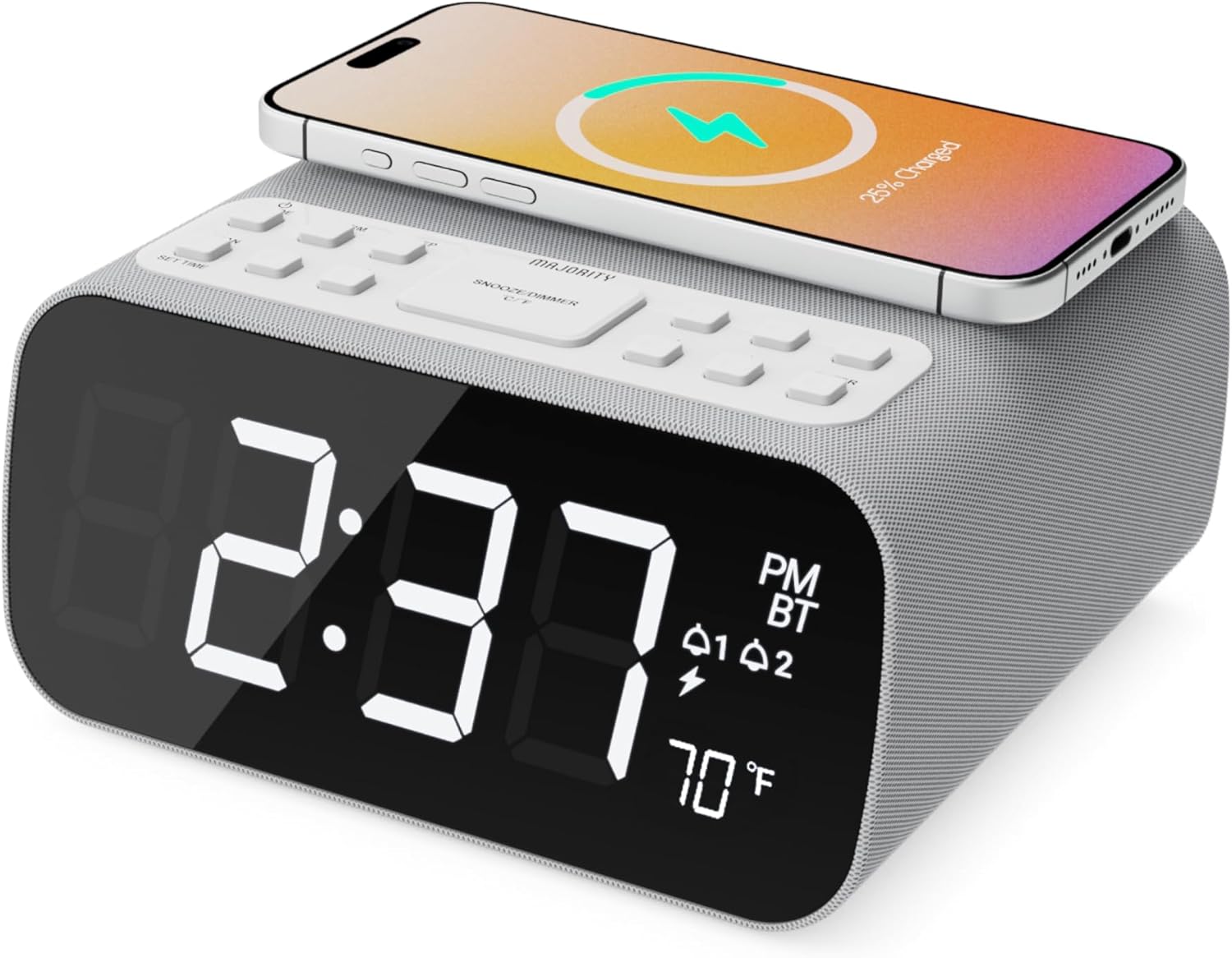
Billede: Forside view of the Majority Darwin alarm clock showing the large digital display, wireless charging pad on top, and control buttons.

Billede: Side view of the Majority Darwin alarm clock highlighting the control panel with buttons for time, alarm, volume, and light settings.
Kontrolpaneler på øverste panel
- Trådløs opladningsplade: Place compatible devices here for 10W wireless charging.
- Snooze/Lys knap: Short press to snooze alarm; long press to adjust display brightness or cycle through ambient light colors.
- Time/Date Set Button: Press to enter time/date setting mode.
- Alarm 1/2 knapper: Press to activate/deactivate Alarm 1 or Alarm 2. Long press to set alarm time.
- Volume/Tune Buttons: Adjust volume or tune FM radio stations.
- Mode knap: Switch between FM Radio, Bluetooth, and White Noise modes.
Rear Panel Controls & Ports
- DC 12V indgang: Connect the mains power adapter here.
- USB opladningsport: For charging additional devices via USB cable.
- Batterirum: For backup batteries (not for primary power).
- Display Dimmer Slider: Manually adjust the brightness of the main time display.
- Night Light Dimmer: Adjust brightness of the ambient light.
Opsætning
Strømtilslutning
Connect the provided mains power adapter to the DC 12V input port on the rear of the alarm clock and plug it into a wall outlet. The display will light up.
For battery backup, open the battery compartment on the bottom and insert 2 x AAA batteries (not included). This will retain time settings during a power outage but will not power the display or charging functions.
Billede: Bagside view of the Majority Darwin alarm clock with the power adapter connected to the DC 12V input.
Indledende tidsindstilling
- Tryk længe på Indstil tid/dato button on the top panel. The hour digits will start flashing.
- Brug Volume/Tune knapper for at justere timen.
- Tryk på Indstil tid/dato knappen igen for at bekræfte timeindstillingen og gå videre til minutindstillingen.
- Brug Volume/Tune knapper for at justere minutterne.
- Repeat this process for setting the year, month, and day.
- Tryk på Indstil tid/dato knappen en sidste gang for at gemme alle indstillinger.
Betjeningsvejledning
Time Display & Dimmer
The large LED display shows the current time.
Manuel dæmpning: Brug Display Dimmer Slider on the rear panel to manually adjust the brightness of the time display.
Automatisk dæmpning: The device features an auto-dimming function that adjusts display brightness at fixed time intervals (e.g., dimming at night, brightening during the day).

Billede: Forside view of the Majority Darwin alarm clock displaying time, AM/PM, and temperature, highlighting the dual alarm icons.
Alarm indstilling
The Darwin alarm clock supports two independent alarms (Alarm 1 and Alarm 2).
- Long press either the Alarm 1 or Alarm 2 button. The hour digits for that alarm will flash.
- Brug Volume/Tune knapperne for at indstille den ønskede alarmtime.
- Tryk på det tilsvarende Alarm knappen igen for at bekræfte timeindstillingen og gå videre til minutindstillingen.
- Brug Volume/Tune knapperne til at indstille de ønskede alarmminutter.
- Tryk på Alarm button again to select the alarm source (FM radio or built-in tone). Use Volume/Tune knapper for at vælge.
- Tryk på Alarm button again to set the alarm volume.
- Tryk på Alarm Tryk på knappen en sidste gang for at aktivere alarmen. Et alarmikon vises på displayet.
Deactivating an Alarm: Short press the corresponding Alarm 1 or Alarm 2 button to turn it off. The alarm icon will disappear.
Snooze funktion
When an alarm sounds, short press the Snooze/Lys button on the top panel to temporarily silence the alarm for 9 minutes. The alarm will sound again after the snooze period.
Betjening af FM-radio
- Tryk på Mode knappen, indtil "FM" vises på displayet.
- Brug Volume/Tune buttons to manually tune to your desired FM station.
- Auto Scan & Store Presets: Tryk længe på Mode button to automatically scan and save available FM stations as presets.
- Tryk kort på Mode -knappen for at gennemgå gemte forudindstillinger.
Bluetooth Pairing & Playback
- Tryk på Mode button until "BT" appears on the display and the Bluetooth indicator starts flashing.
- On your smartphone or other Bluetooth device, enable Bluetooth and search for "Majority Darwin".
- Select the device to pair. Once connected, the Bluetooth indicator on the alarm clock will stop flashing.
- You can now play audio from your device through the alarm clock's speaker. Use the Volume/Tune buttons on the alarm clock or your device to adjust volume.

Image: A smartphone displaying music playback, connected via Bluetooth to the Majority Darwin alarm clock.
Trådløs opladning
The top surface of the alarm clock features a 10W wireless charging pad.
- Place your Qi-compatible smartphone directly onto the wireless charging pad.
- Ensure the phone is centered on the charging symbol for optimal charging.
- A charging indicator (e.g., a lightning bolt icon) may appear on your phone's screen or the alarm clock's display to confirm charging.
USB opladningsport: An additional USB port on the rear allows you to charge other devices using a USB cable.
Image: The Majority Darwin alarm clock with a smartphone placed on top, indicating active wireless charging.
Night Light / Ambient Light
The alarm clock features an ambient light ring around its base.
- Tryk længe på Snooze/Lys button to turn the ambient light on/off.
- Tryk kort på Snooze/Lys button to cycle through different color modes (e.g., red, green, blue, purple, white, color cycle).
- Brug Natlysdæmper on the rear panel to adjust the brightness of the ambient light.

Image: The Majority Darwin alarm clock illuminated with a vibrant ambient light from its base.
White Noise Function
The device includes various white noise sounds to aid relaxation and sleep.
- Tryk på Mode button until the white noise mode is activated (indicated by a specific icon or text on the display).
- Brug Volume/Tune buttons to adjust the volume of the white noise.
- Tryk kort på Mode button again to cycle through different white noise sounds (e.g., nature sounds, fan noise).
Opretholdelse
- Rengør enheden med en blød, tør klud. Brug ikke slibende rengøringsmidler eller opløsningsmidler.
- Hold ventilationsåbningerne frie.
- If not in use for an extended period, disconnect from power and remove backup batteries.
Fejlfinding
Ingen strøm / Skærm slukket
- Sørg for, at strømadapteren er korrekt tilsluttet både enheden og en fungerende stikkontakt.
- Kontroller, om stikkontakten fungerer.
Trådløs opladning virker ikke
- Sørg for, at din enhed er Qi-kompatibel.
- Make sure your phone is centered on the charging pad.
- Fjern eventuelle tykke telefoncovers eller metalgenstande mellem telefonen og opladningspadden.
Problemer med Bluetooth-parring
- Ensure the alarm clock is in Bluetooth pairing mode (BT flashing).
- Make sure your device's Bluetooth is enabled and searching.
- Prøv at ophæve parringen og parre enheden igen.
- Ensure no other devices are currently connected to the alarm clock via Bluetooth.
Alarmen lyder ikke
- Bekræft, at alarmen er aktiveret (alarmikonet er synligt på displayet).
- Kontroller lydstyrkeindstillingen for alarmen.
- Ensure the correct alarm time is set.
Specifikationer
| Feature | Detalje |
|---|---|
| Mærke | Flertal |
| Modelnavn | Darwin |
| Trådløs opladningsoutput | 10W |
| Højttaler udgangseffekt | 12 watt |
| Forbindelsesteknologi | Bluetooth |
| Strømkilde | Mains Power (Battery Backup) |
| Produktdimensioner | 13.07 x 8.22 x 6.09 tommer |
| Varens vægt | 1.42 pund (645 gram) |
| Særlige funktioner | Adjustable Volume, Dual Alarm, Bluetooth, Wireless Charging, FM Radio, Dimmable Display, Ambient Night Light, White Noise |
Garanti & Support
The Majority Darwin Bluetooth Alarm Clock comes with a standard manufacturer's warranty. Please refer to the warranty card included in your package for specific terms and conditions.
For technical support, troubleshooting, or warranty claims, please visit the official Majority webwebsted eller kontakt deres kundeservice.
Online resources and FAQs may also be available on the product support page.


