Memorex MX-PS802 Genopladelig Festhøjttaler Brugermanual
Model: MX-PS802
1. Introduktion
Tak for købetasing the Memorex MX-PS802 Rechargeable Party Speaker. This manual provides essential information for the safe and efficient operation of your device. Please read it thoroughly before use and retain it for future reference.
2. Sikkerhedsoplysninger
- Udsæt ikke højttaleren for vand, fugt eller ekstreme temperaturer.
- Undgå at placere højttaleren i nærheden af varmekilder eller i direkte sollys.
- Forsøg ikke at skille højttaleren ad eller ændre den. Overlad al service til kvalificeret personale.
- Brug kun det medfølgende opladningskabel og adapter.
- Hold højttaleren væk fra børn og kæledyr.
- Sørg for tilstrækkelig ventilation omkring højttaleren under brug.
3. Pakkens indhold
Bekræft at alle varer er til stede i din pakke:
- Memorex MX-PS802 Party Speaker
- Ladekabel
- Brugervejledning (dette dokument)
4. Produktet er slutview
The Memorex MX-PS802 is an 8-inch rechargeable party speaker featuring Bluetooth 5.3, LED flame lighting, TWS pairing, and multiple input options.
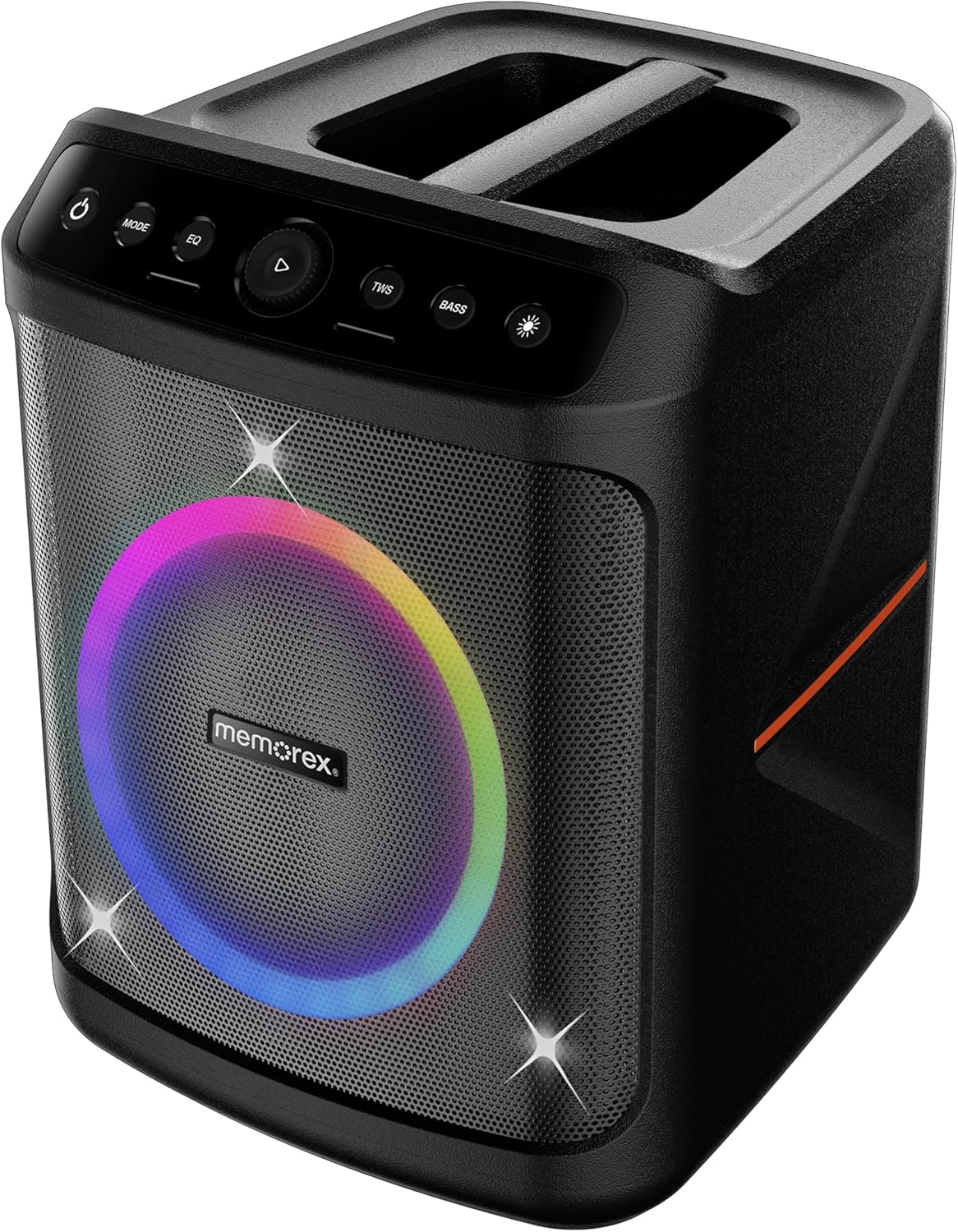
Front view of the Memorex MX-PS802 speaker, showcasing the illuminated woofer and the top-mounted control panel.
Kontrolpanel funktioner
- Tænd/sluk-knap (⏻): Tryk og hold nede for at tænde/slukke højttaleren.
- MODE knap: Short press to switch between input modes (Bluetooth, USB, SD).
- EQ knap: Kort tryk for at gennemgå equalizer-forudindstillinger.
- Play/Pause/Volume Knob (▶): Press to play or pause audio. Rotate to adjust volume.
- TWS knap: Tryk for at starte True Wireless Stereo-parring.
- BASS knap: Press to activate or deactivate bass boost.
- Lystilstandsknap (☀): Press to cycle through LED lighting modes or turn lights ON/OFF.
5. Opsætning
5.1 Opladning af højttaleren
- Tilslut opladningskablet til højttalerens opladningsport.
- Plug the other end of the cable into a suitable power outlet.
- The charging indicator will illuminate. Allow the speaker to fully charge before first use (approximately 3-4 hours).
- The indicator will change or turn off once charging is complete.
5.2 Tænd/sluk
- To power ON, press and hold the Power knap (⏻) for 2-3 seconds.
- To power OFF, press and hold the Power knap (⏻) again for 2-3 seconds.
6. Betjeningsvejledning
6.1 Bluetooth -parring
- Tænd højttaleren. Den vil automatisk gå i Bluetooth-parringstilstand, hvilket indikeres af en blinkende LED.
- Aktiver Bluetooth på din mobilenhed, og søg efter tilgængelige enheder.
- Vælg "Memorex MX-PS802" fra listen.
- Når højttaleren er parret, udsender den en bekræftelseslyd, og LED-lampen holder op med at blinke.
6.2 USB/SD-kortafspilning
- Insert a USB flash drive or SD card (with MP3 files) ind i den tilsvarende port.
- The speaker will automatically switch to USB/SD mode and begin playback. If not, press the MODE knappen for at vælge den korrekte indgang.
- Use the Play/Pause/Volume knob to control playback and volume.
6.3 Ægte trådløs stereo (TWS) parring
To pair two MX-PS802 speakers for stereo sound:
- Ensure both MX-PS802 speakers are powered on and in Bluetooth mode, but not connected to any device.
- På én højttaler (dette vil være den primære højttaler) skal du trykke på TWS button. It will emit a pairing tone.
- The two speakers will automatically connect to each other. A confirmation tone will sound once paired.
- Tilslut nu din mobilenhed til den primære højttaler via Bluetooth som beskrevet i afsnit 6.1.
6.4 Mikrofon- og guitarindgang
- Connect a microphone or guitar to the respective input jacks on the speaker.
- Adjust the volume of the connected instrument/microphone using its own controls or the speaker's main volume knob.
6.5 LED Flame Lighting
- Tryk på Lystilstandsknap (☀) to cycle through various LED lighting effects.
- Continue pressing to turn the lights off.
6.6 EQ and Bass Boost
- Tryk på EQ button to select different equalizer presets for optimized sound.
- Tryk på BASS button to toggle the bass boost feature ON or OFF.
7. Vedligeholdelse
- Rensning: Brug en blød, tør klud til at rengøre højttalerens yderside. Brug ikke slibende rengøringsmidler eller opløsningsmidler.
- Opbevaring: Opbevar højttaleren et køligt, tørt sted væk fra direkte sollys, når den ikke er i brug i længere perioder.
- Batteripleje: To prolong battery life, fully charge the speaker before storing it for long periods and recharge it every 3-6 months.
8. Fejlfinding
- Ingen strøm: Sørg for, at højttaleren er opladet. Tilslut den til en strømkilde, og prøv igen.
- Ingen lyd: Kontroller lydstyrken på både højttaleren og din tilsluttede enhed. Sørg for, at den korrekte inputtilstand er valgt.
- Bluetooth forbinder ikke: Ensure the speaker is in pairing mode. Turn off and on Bluetooth on your device. Forget the speaker from your device's Bluetooth list and try pairing again. Ensure no other devices are connected to the speaker.
- TWS-parringsfejl: Ensure both speakers are MX-PS802 models and are not connected to any other Bluetooth device before initiating TWS pairing.
- Forvrænget lyd: Reduce the volume on both the speaker and your device. Check for interference from other electronic devices.
9. Specifikationer
| Feature | Specifikation |
|---|---|
| Modelnavn | MX-PS802 |
| Højttaler type | Mono (can be paired for Stereo via TWS) |
| Højttaler størrelse | 8 tommer |
| Højttaler Maksimal udgangseffekt | 800 Watts PMPO (80W RMS) |
| Trådløs kommunikationsteknologi | Bluetooth 5.3 |
| Strømkilde | Batteridrevet (genopladeligt Li-ion) |
| Produktdimensioner | 11.33 x 10.78 x 16.57 tommer |
| Varens vægt | 12.12 pund |
| Inkluderede komponenter | Festhøjttaler |
10. Garanti og support
The Memorex MX-PS802 Party Speaker comes with a Begrænset garanti. Please refer to the warranty card included in your package for specific terms and conditions. For technical support or service inquiries, please contact Memorex customer service through their official webwebstedet eller de kontaktoplysninger, der følger med din købsdokumentation.


