Indledning
Thank you for choosing the Bonacell Wireless Controller. This manual provides detailed instructions for setting up, operating, and maintaining your controller. Please read this manual carefully before use to ensure optimal performance and longevity of your device.

Image: The Bonacell Wireless Controller, black with blue illuminated buttons, shown alongside its white USB receiver adapter.
Produktegenskaber
- Bred kompatibilitet: Supports PS4, PS5, PC (Windows), Android, and iOS devices.
- Dobbelt motorvibration: Enhances gaming immersion with realistic haptic feedback.
- 6-Axis Gyroscope Sensor: Giver præcis bevægelseskontrol til understøttede spil.
- Turbofunktion: Enables continuous rapid input for specific buttons.
- 3.5 mm lydstik: Allows connection of headphones for in-game audio.
- Touchpad: Integrated touchpad for additional control options.
- RGB Multi-color Buttons: Customizable lighting effects for personalized aesthetics.
- Lang batterilevetid: Built-in 1000mAh battery provides extended usage.

Billede: Nærbillede views highlighting the controller's 360-degree joysticks, 3.5mm headphone jack, and 6-axis gyroscope sensor.
Opsætning og tilslutning
1. Opladning af controlleren
The controller is equipped with a 1000mAh battery. Before first use, or when the battery is low, charge the controller using the provided Type-C cable or a compatible charging base.
- Opladningstid: Cirka 2.5 timer.
- Brugstid: Op til 16 timer på fuld opladning.

Image: Visual representation of the controller's battery specifications, including its 1000mAh capacity, working time, and charging duration.
2. Connecting to PS5 (Wireless Receiver)
To play PS5 games, the controller must be connected via the wireless receiver. Direct Type-C cable connection does not support PS5 games.
- Trin 1: Plug the wireless receiver adapter into a USB port on your PS5 console. Briefly press the pairing button on the adapter.
- Trin 2: On the Bonacell Wireless Controller, press and hold the DELE knappen og hold derefter nede P button simultaneously for 5 seconds to enter pairing mode.
- Trin 3: Once successfully paired, the lights on both the controller and the adapter will remain illuminated.
Note: For the first connection, it is recommended to activate the device with a USB cable before attempting wireless pairing.
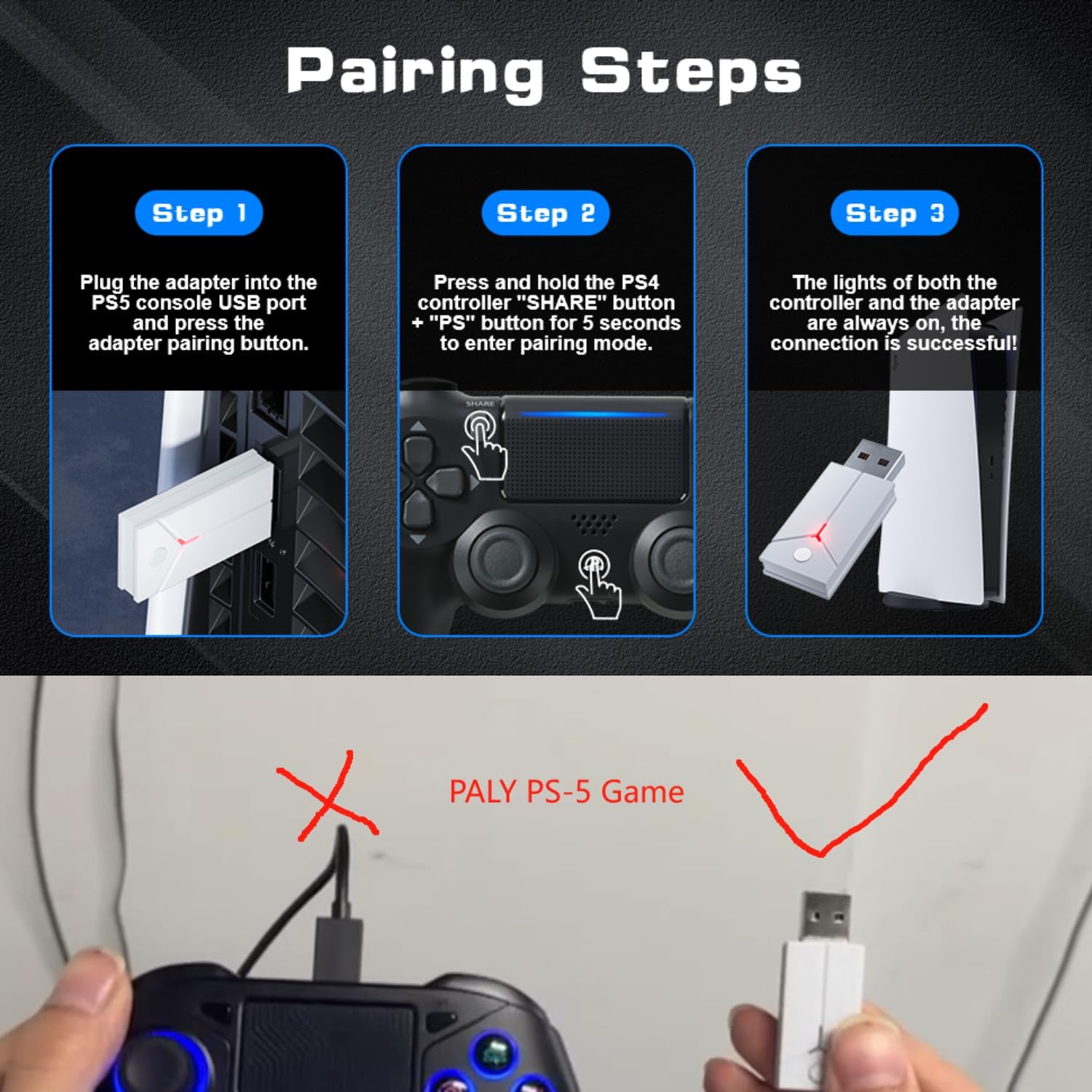
Image: A three-step visual guide demonstrating how to pair the controller with a PS5 console using the USB adapter.
3. Tilslutning til pc (kablet)
Connect the controller to your PC directly using the Type-C data cable.
4. Connecting to PC (Bluetooth)
- Trin 1: Ensure your PC's Bluetooth function is enabled.
- Trin 2: On the Bonacell Wireless Controller, press and hold the DELE knappen og P button simultaneously for 3 seconds to enter pairing mode.
- Trin 3: On your PC, search for and select the controller from the list of available Bluetooth devices to complete the pairing.
5. Connecting to Android and iOS (Bluetooth)
Supports iOS 13+ devices.
- Trin 1: Activate the Bluetooth function on your mobile phone or tablet.
- Trin 2: On the Bonacell Wireless Controller, press and hold the DELE knappen og P button simultaneously for 3 seconds to enter pairing mode.
- Trin 3: On your mobile device, search for and select the controller from the list of available Bluetooth devices to complete the pairing.

Image: An illustration showing the Bonacell Wireless Controller's compatibility with various platforms such as PS5, PS4, PC, Android, and iOS.
Betjeningsvejledning
1. RGB Multi-color Button Customization
- To change the light color: Press and hold the L3 knappen og R3 button simultaneously for 3 seconds. The controller will vibrate for 1 second, indicating that the light color can now be changed.
- To switch light effect modes: Press and hold the SÆT knappen og R3 button simultaneously. Cycle through modes: Colorful → Monochrome → Colorful Transformation → Monochrome Breathing.
2. Turbofunktion
The Turbo function allows for continuous rapid input of a button press. This can be useful in games requiring fast, repeated actions.
Specific instructions for activating and deactivating the Turbo function are typically found in the game's control settings or may involve a combination of the Turbo button (if present) and another action button. Refer to the controller's quick start guide or product packaging for exact button combinations if not detailed here.

Image: An illustration highlighting the dual vibration motors and the Turbo function capability of the controller.
Opretholdelse
- Rensning: Brug en blød, tør klud til at rengøre controlleren. Undgå at bruge skrappe kemikalier eller slibende materialer.
- Opbevaring: Opbevar controlleren et køligt, tørt sted væk fra direkte sollys og ekstreme temperaturer.
- Batteripleje: For at forlænge batteriets levetid bør du undgå at aflade controlleren helt ofte. Oplad den regelmæssigt, selvom den ikke er i brug i længere perioder.
Fejlfinding
- Controlleren forbinder ikke:
- Sørg for, at controlleren er opladet.
- Verify the correct pairing procedure for your device (PS5, PC, Android/iOS).
- For PS5, ensure you are using the wireless receiver.
- For Bluetooth connections, ensure Bluetooth is enabled on your host device and the controller is in pairing mode.
- Prøv at genstarte både controlleren og værtsenheden.
- Knapper eller joysticks reagerer ikke:
- Sørg for, at controlleren er korrekt tilsluttet.
- Kontrollér for eventuelle fysiske forhindringer eller snavs omkring knapperne/joystickene.
- If connected via PC, ensure drivers are up to date.
- Vibration virker ikke:
- Sørg for, at spillet understøtter vibrationsfeedback.
- Tjek indstillingerne i spillet for at sikre, at vibration er aktiveret.
Specifikationer
| Feature | Detalje |
|---|---|
| Produktnavn | Trådløs controller |
| Modelnummer | B0DT8G5RST |
| Dimensioner | 165 x 105 x 45 mm |
| Vægt | 0.26 kg (Item Package Weight: 300 g) |
| Batterikapacitet | 1000mAh Lithium Ion |
| Brugstid | Op til 16 timer |
| Opladningstid | Cirka 2.5 timer |
| Opladningsmetode | Base or Type-C charging |
| Forbindelse | 2.4GHz USB Receiver, Bluetooth, USB-C (wired) |
| Kompatibilitet | PS4, PS5, PC (Windows), Android (iOS 13+) |
| Nøglefunktioner | Dual Shock Motor, Six-Axis Gyroscope, Touchpad, 3.5mm Audio Jack, Turbo Function, RGB Buttons |
| Materiale | ABS |
Garanti og support
For warranty information or technical support, please refer to the product packaging or contact Bonacell customer service through the retailer's platform where the product was purchased.
