1. Sikkerhedsoplysninger
Please read all instructions carefully before assembly and operation. Failure to follow these instructions may result in injury or damage to the product.
- Sørg for, at alle komponenter er til stede og ubeskadigede før montering.
- Hold børn og kæledyr væk fra skrivebordet under drift.
- Do not place hands or other objects near moving parts of the desk frame.
- Sørg for, at netledningen ikke er i klemme eller beskadiget.
- Do not overload the desk. The maximum load capacity is 220 lbs (100 kg).
- Brug kun skrivebordet på en plan overflade.
- Afbryd strømmen før rengøring eller vedligeholdelse.
2. Pakkens indhold
The FLEXISPOT E6 Essential Standing Desk is typically shipped in two separate packages: one for the desktop and one for the frame components. Verify that all parts listed below are included in your packages.
2.1. Desktop Package
- Whole-piece Desktop (48x24 Inch, Mahogany)
2.2. Frame and Accessories Package
- Skrivebordsben (2)
- Fødder (2)
- Crossbar/Frame Support
- Kontrolboks
- Intelligent tastatur
- Strømadapter og kabel
- Kabelhåndteringsklemmer/-bånd
- Hardware Kit (screws, Allen wrenches)
- Instruktionsmanual
3. Monteringsvejledning
Assembly requires careful attention to detail. It is recommended to have two people for assembly, especially when handling the desktop. Ensure you have a clear, spacious area for assembly.
3.1. Nødvendigt værktøj
- Included Allen wrenches
- Stjerneskruetrækker (medfølger ikke)
- Bor (valgfrit, til forboringshuller om nødvendigt)
3.2. Trin-for-trin samling
- Udpak komponenter: Carefully remove all parts from their packaging and lay them out on a soft, clean surface to prevent scratches. Verify all parts are present against the package contents list.
- Assemble Desk Legs and Feet: Attach the feet to the bottom of each desk leg using the provided screws and Allen wrench. Ensure they are securely fastened.
- Fastgør tværstang: Connect the crossbar/frame support between the two desk legs. Adjust the length of the crossbar to match the width of your desktop (48 inches for this model). Secure with screws.
- Mount Control Box and Keypad: Attach the control box to the designated area on the underside of the desk frame. Mount the intelligent keypad to the front edge of the desktop, typically on the right side, using the provided screws.
- Tilslut kabler: Connect the motor cables from each leg to the control box. Connect the keypad cable to the control box. Finally, connect the power adapter to the control box.
- Attach Desktop to Frame: Carefully place the desktop upside down on a soft surface. Position the assembled frame onto the desktop, aligning the pre-drilled holes (if available) or marking new pilot holes. Secure the desktop to the frame using the provided screws. Note: Some desktops may require drilling new pilot holes for optimal alignment.
- Kabelstyring: Use the included cable management clips or ties to neatly route and secure all cables under the desk, preventing them from dangling or getting caught.
- Opret skrivebordet: With assistance, carefully flip the desk upright and place it in its desired location. Ensure the power cable is accessible and not obstructed.

Image: The FLEXISPOT E6 Essential Standing Desk with a laptop, coffee cup, and plant, showcasing its design and workspace.
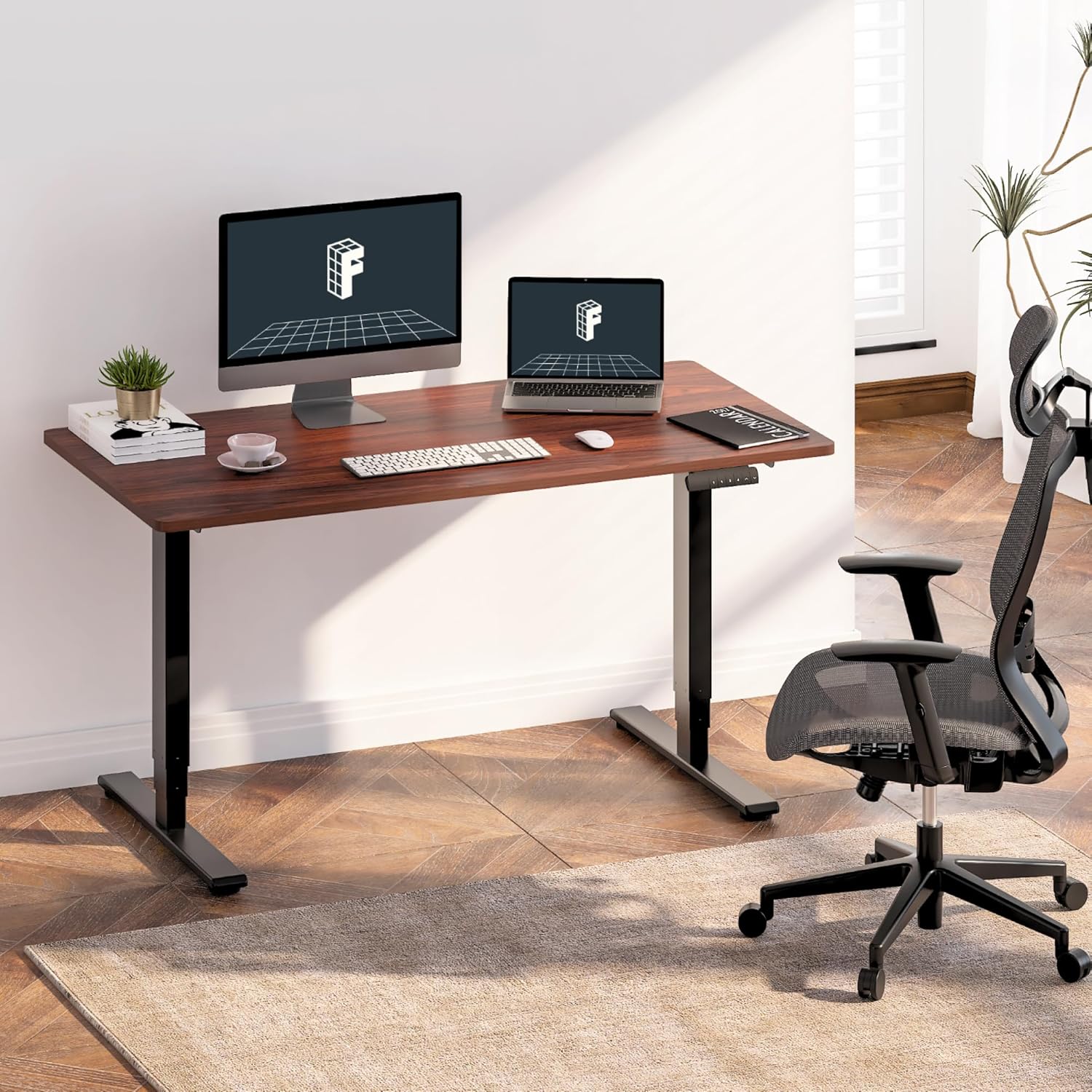
Image: The standing desk integrated into a home office, featuring dual monitors and an ergonomic chair, demonstrating its use.

Image: An illustration highlighting the strong steel structure of the desk frame, designed for stability and durability.
4. Betjeningsvejledning
The FLEXISPOT E6 Essential desk features an intelligent keypad for easy height adjustment and memory settings.
4.1. Første opstart
- Plug the power cable into a wall outlet. The LED display on the keypad should illuminate.
4.2. Højdejustering
- Brug Op (▲) og Ned (▼) arrow buttons on the keypad to raise or lower the desk to your desired height. The current height will be displayed on the LED panel.
- The desk operates smoothly and quietly with its dual motors, producing less than 50 dB of sound.
4.3. Hukommelsesforudindstillinger
The keypad allows you to save up to four preferred height settings for quick adjustments.
- Juster skrivebordet til den ønskede højde ved hjælp af Op/Ned-knapperne.
- Tryk på M button (or similar memory set button, often labeled 'S' or 'SET'). The display may flash.
- Immediately press one of the numbered memory buttons (1, 2, 3 eller 4) for at gemme den aktuelle højde til den forudindstillede værdi.
- To recall a saved height, simply press the corresponding numbered memory button. The desk will automatically move to the saved position.
4.4. Antikollisionssystem
The desk is equipped with an anti-collision system to prevent damage. If the desk encounters an obstacle during movement, it will automatically stop and reverse slightly.
- The sensitivity of the anti-collision system can often be adjusted via specific keypad combinations (refer to the full manual for advanced settings if available).

Billede: En detaljeret view of the intelligent keypad, showing the LED display, memory buttons (1-4), and up/down controls.

Image: A visual representation of the desk's height range (23.6" to 48.8"), indicating suitability for various user heights from children to tall adults.

Image: The desk supporting two 110 lbs weights, illustrating its robust maximum load capacity of 220 lbs.

Image: An illustration demonstrating the anti-collision system, where the desk stops and reverses upon detecting an obstacle.
5. Vedligeholdelse
Regelmæssig vedligeholdelse sikrer dit hæve- og sænkebords lange levetid og optimal ydeevne.
- Rensning: Tør skrivebordet og rammen af med en blød kludamp klud. Undgå skrappe kemikalier eller slibende rengøringsmidler, der kan beskadige overfladen.
- Kabeltjek: Periodically inspect all cables for wear, fraying, or damage. Ensure they are securely connected and properly managed.
- Fastgørelseskontrol: Kontrollér lejlighedsvis alle skruer og bolte for at sikre, at de forbliver fastspændte. Efterspænd om nødvendigt.
- Motordrift: Listen for any unusual noises during height adjustment. If you notice grinding or excessive noise, discontinue use and consult the troubleshooting section or contact support.
6. Fejlfinding
If you encounter issues with your FLEXISPOT E6 Essential Standing Desk, refer to the following common problems and solutions.
| Problem | Mulig årsag | Løsning |
|---|---|---|
| Desk does not move or respond to keypad. | Power cable disconnected; control box issue; motor cable disconnected. | Check power connection to wall and control box. Ensure all motor and keypad cables are securely plugged into the control box. Try resetting the desk (unplug for 30 seconds, then replug). |
| Skrivebordet bevæger sig ujævnt eller laver usædvanlige lyde. | Uneven load; loose fasteners; motor issue. | Ensure weight is evenly distributed on the desktop. Check and tighten all assembly screws. If the issue persists, contact customer support. |
| Antikollisionssystemet udløses for let eller slet ikke. | Sensitivity setting; obstruction. | Ensure no objects are obstructing the desk's path. Refer to the full manual for instructions on adjusting anti-collision sensitivity. |
| Memory presets are not saving or recalling correctly. | Forkert lagringsprocedure. | Follow the memory preset saving steps precisely: adjust height, press 'M' (or 'S'), then immediately press the desired number button (1-4). |
7. Specifikationer
Detailed technical specifications for the FLEXISPOT E6 Essential Standing Desk.
| Feature | Specifikation |
|---|---|
| Model | E6 Essential |
| Skrivebordsstørrelse | 48" x 24" (47.5"D x 23.6"W) |
| Skrivebordsmateriale | FSC-Certified Wood (Mahogany finish) |
| Ramme farve | Sort |
| Rammemateriale | Metal |
| Lift system | 3-Stage Dual Motor |
| Højdeområde | 23.6" til 48.8" |
| Maksimal belastningskapacitet | 220 lbs (100 kg) |
| Støjniveau | < 50 dB |
| Kontrolpanel | Intelligent Keypad with 4 Memory Presets |
| Sikkerhedsfunktioner | Anti-kollisionssystem |
| Montering påkrævet | Ja |
| Varens vægt | 55 Pounds (approximate, frame and desktop combined) |
| UPC | 840460433792 |
8. Garanti og support
FLEXISPOT provides a limited warranty for the E6 Essential Standing Desk.
8.1. Garantidækning
- 5-årig dækning: Applies to the desk frame and motor components.
- 2-årig dækning: Applies to the control panel and electronic components.
This warranty covers defects in materials and workmanship under normal use. It does not cover damage caused by misuse, accidents, unauthorized modifications, or failure to follow the instructions in this manual.
8.2. Kundesupport
For warranty claims, technical assistance, or any questions regarding your FLEXISPOT E6 Essential Standing Desk, please contact FLEXISPOT customer service. Refer to the contact information provided with your purchase or visit the official FLEXISPOT webwebsted.
Du kan også besøge FLEXISPOT Butik på Amazon for yderligere ressourcer og produktinformation.


