1. Introduktion
This manual provides detailed instructions for the setup, operation, and maintenance of your artfone G3 Flip Cell Phone. Designed with ease of use in mind, this phone features large buttons, a clear display, and essential functions for seniors, including an SOS button and speed dial capabilities. Please read this manual thoroughly to ensure proper use and to maximize your phone's functionality.
2. Pakkens indhold
Når du pakker ud, skal du kontrollere, at alle følgende varer er inkluderet i pakken:
- 1x artfone G3 Flip Phone
- 1x 1300mAh Lithium-ion Battery
- 1x USB-C opladerkabel
- 1x strømadapter
- 1x Charging Station (Cradle)
- 1x brugsanvisning

Image: Contents of the artfone G3 Flip Phone package.
3. Produktet er slutview
The artfone G3 is a clamshell-design flip phone featuring a 2.4-inch color display and a large, backlit keypad for easy dialing and navigation. It is equipped with a rear camera and a dedicated SOS button for emergencies.

Image: The artfone G3 Flip Phone in its open position, alongside its charging cradle.

Image: Detail of the phone's large fonts, symbols, and backlit buttons for enhanced visibility.
4. Opsætning
4.1. Installation af SIM-kort og Micro SD-kort
The artfone G3 supports Nano SIM cards and Micro SD cards (up to 64GB) for expanded storage. To install:
- Fjern forsigtigt telefonens bagcover.
- Insert your Nano SIM card(s) into the designated slot(s). Ensure the gold contacts face downwards.
- If desired, insert a Micro SD card into its slot.
- Insert the 1300mAh battery into the battery compartment, aligning the contacts.
- Sæt bagdækslet på igen, indtil det klikker sikkert på plads.

Image: Diagram illustrating the placement of Nano SIM, Micro SD card, and battery.
4.2. Opladning af batteriet
Before first use, fully charge the phone's battery. The artfone G3 offers two charging methods:
- Brug af opladningsholderen: Place the phone into the charging station. Ensure the phone is seated correctly and the charging indicator appears on the screen.
- Direct USB-C Cable Charging: Connect the USB-C cable directly to the phone's charging port and then to the power adapter. Plug the adapter into a wall outlet.
A full charge typically takes several hours. The phone features a 1300mAh battery, providing extended standby time.

Image: Illustration of direct cable charging and charging via the desktop cradle.
5. Grundlæggende betjening
5.1. Tænd/sluk
- For at tænde: Open the flip and press and hold the red 'End Call' button (power button) until the screen illuminates.
- For at slukke: Open the flip and press and hold the red 'End Call' button until the power-off options appear. Select 'Power Off'.
5.2. Foretage og modtage opkald
- Sådan foretager du et opkald: Open the flip, dial the number using the keypad, and press the green 'Call' button.
- Sådan modtager du et opkald: When the phone rings, open the flip or press the green 'Call' button to answer.
- Sådan afslutter du et opkald: Close the flip or press the red 'End Call' button.
5.3. Lydstyrkejustering
Use the dedicated volume buttons on the side of the phone to adjust the call volume or ringtone volume.
6. Nøglefunktioner
6.1. SOS-nødknap
The SOS button is located on the back of the phone. It allows you to quickly contact up to five pre-programmed emergency contacts. In a crisis, press and hold the SOS button for 3 seconds. The phone will sequentially call each contact until one answers. It will also send an emergency text message to these contacts.

Image: Visual representation of the SOS button functionality and emergency contact setup.
6.2. Hurtigopkald
The phone features dedicated A/B keys and numbers 2-9 for speed dial. You can assign frequently called contacts to these keys for quick access. Refer to the phone's menu for instructions on setting up speed dial contacts.
6.3. Photo Contacts
For users with visual or memory impairment, the phone supports photo contacts, making it easier to identify and call loved ones by associating their picture with their contact entry.
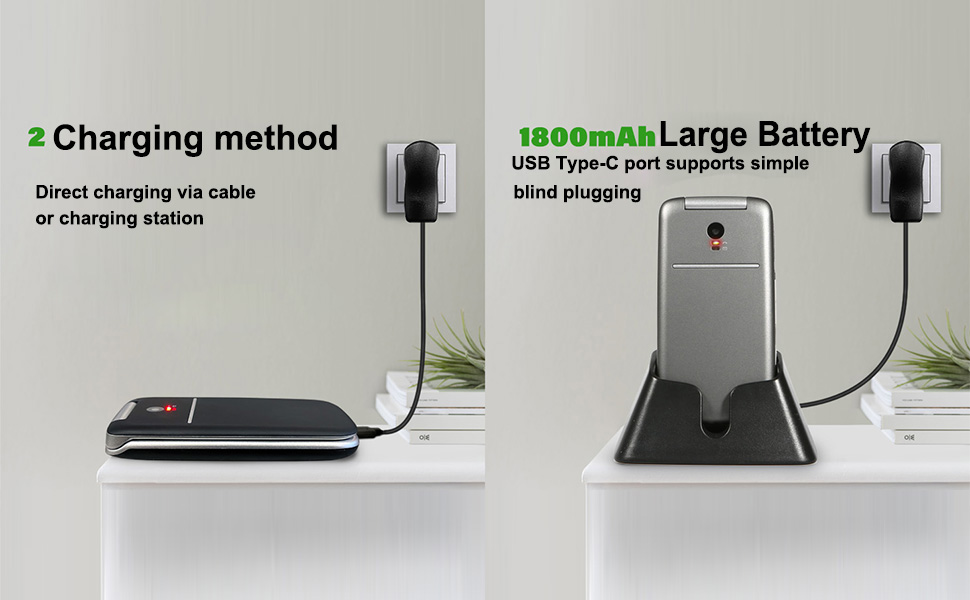
Image: The photo contacts feature, simplifying calling by visual recognition.
6.4. Talking Numbers
For the visually impaired, the phone can announce numbers as they are dialed. Additionally, long-pressing the volume button can activate a real-time voice broadcast function to read out the current time.
6.5. Andre praktiske funktioner
The artfone G3 includes several other useful features:
- FM-radio: Enjoy radio broadcasts without needing headphones.
- Lommelygte: En indbygget lommelygte for nemheds skyld.
- Bluetooth: Til trådløs forbindelse med kompatible enheder.
- Kalender: Keep track of dates and appointments.
- Lommeregner: Grundlæggende aritmetiske funktioner.
- Vækkeur: Indstil alarmer for påmindelser.
- Nøgle lås: Prevent accidental presses.

Billede: Overview of the phone's practical features.
7. Vedligeholdelse
- Hold telefonen tør. Fugt kan beskadige elektroniske kredsløb.
- Undgå ekstreme temperaturer. Høje temperaturer kan forkorte levetiden for elektroniske enheder og få visse typer plastik til at blive vridne eller smelte.
- Brug ikke skrappe kemikalier, rengøringsmidler eller stærke vaskemidler til at rengøre telefonen. Tør den af med en blød, tør klud.amp klæde.
- Handle the phone gently. Dropping, knocking, or shaking it can damage internal circuit boards.
- Do not attempt to disassemble the phone. Unauthorized disassembly voids the warranty.
8. Fejlfinding
If you encounter issues with your artfone G3, please refer to the following common solutions:
| Problem | Mulig årsag | Løsning |
|---|---|---|
| Telefonen tænder ikke | Batteriet er afladet eller ikke installeret korrekt. | Charge the battery fully. Ensure the battery is correctly inserted and contacts are clean. |
| Kan ikke foretage eller modtage opkald | Intet SIM-kort, SIM-kortet er ikke isat korrekt, eller intet netværkssignal. | Ensure SIM card is correctly installed. Check for network coverage. Contact your service provider if issues persist. |
| Opladningsproblemer | Charging cable/adapter faulty, phone not properly seated in cradle, or charging port obstruction. | Try a different USB-C cable or power adapter. Ensure the phone is correctly placed in the charging cradle. Check the charging port for debris. |
| SOS-knappen virker ikke | Emergency contacts not set up or incorrect numbers. | Verify that emergency contacts are correctly programmed in the phone's settings. |
Hvis problemet fortsætter efter at have forsøgt disse løsninger, bedes du kontakte kundesupport.
9. Specifikationer
- Model: ARF-G3+001
- Dimensioner: 4.02 x 2.01 x 0.73 tommer (102 x 50 x 18 mm)
- Vægt: 3.17 ounce (88 g)
- Vise: 2.4 tommer, 240 x 320 opløsning
- Operativsystem: Nucleus OS
- CPU model: MTK 8121
- CPU hastighed: 128 MHz
- RAM hukommelse: 48 MB
- Intern opbevaring: 0.2 GB
- Udvidelig lagerplads: Supports Micro SD cards up to 64GB
- Batteri: 1300mAh litium-ion (inkluderet)
- Telefonsamtaletid: Op til 6 timer
- Forbindelse: 4G, 3G, 2G, Bluetooth, USB-C
- Lydstik: 3.5 mm
- Særlige funktioner: SOS Button, Speed Dial, Photo Contact, Talking Numbers, FM Radio, Flashlight, Calendar, Calculator, Alarm Clock

Image: Physical dimensions and weight of the artfone G3 Flip Phone.
10. Garanti og support
For warranty information and customer support, please refer to the documentation included with your purchase or contact the seller directly. Keep your proof of purchase for any warranty claims.


