1. Introduktion
This manual provides detailed instructions for the installation, operation, and maintenance of your UNITOPSCI 10.4 Inch Single Din Adjustable Vertical Car Stereo. Please read this manual thoroughly before using the product to ensure proper function and safety.
Nøglefunktioner:
- 10.4 Inch IPS 1280*480 Vertical Touchscreen with Detachable & Adjustable Design
- Trådløs CarPlay og Android Auto-understøttelse
- Bluetooth 5.2 for Hands-Free Calling and Audio Streaming
- FM/AM/RDS Radio with EQ Adjustments
- USB & TF Card Playback and Charging
- Mirror Link-funktionalitet
- Støtte til bagsiden View Camera and Steering Wheel Control (SWC)
- Seven Color Backlight Options

Figur 1.1: Overview of the UNITOPSCI 10.4 Inch Car Stereo with included backup camera and smartphone integration icons.
2. Hvad er der i æsken
Kontroller venligst indholdet af din pakke i forhold til listen nedenfor:
- 1 x Bil MP5-afspiller
- 1 x strømkabel
- 1 x Hornkabel
- 1 x mikrofon
- 1 x monteringsbeslag
- 1 x brugermanual
- 1 x D-BUS Cable
- 1 x 12 LED'er bakkamera
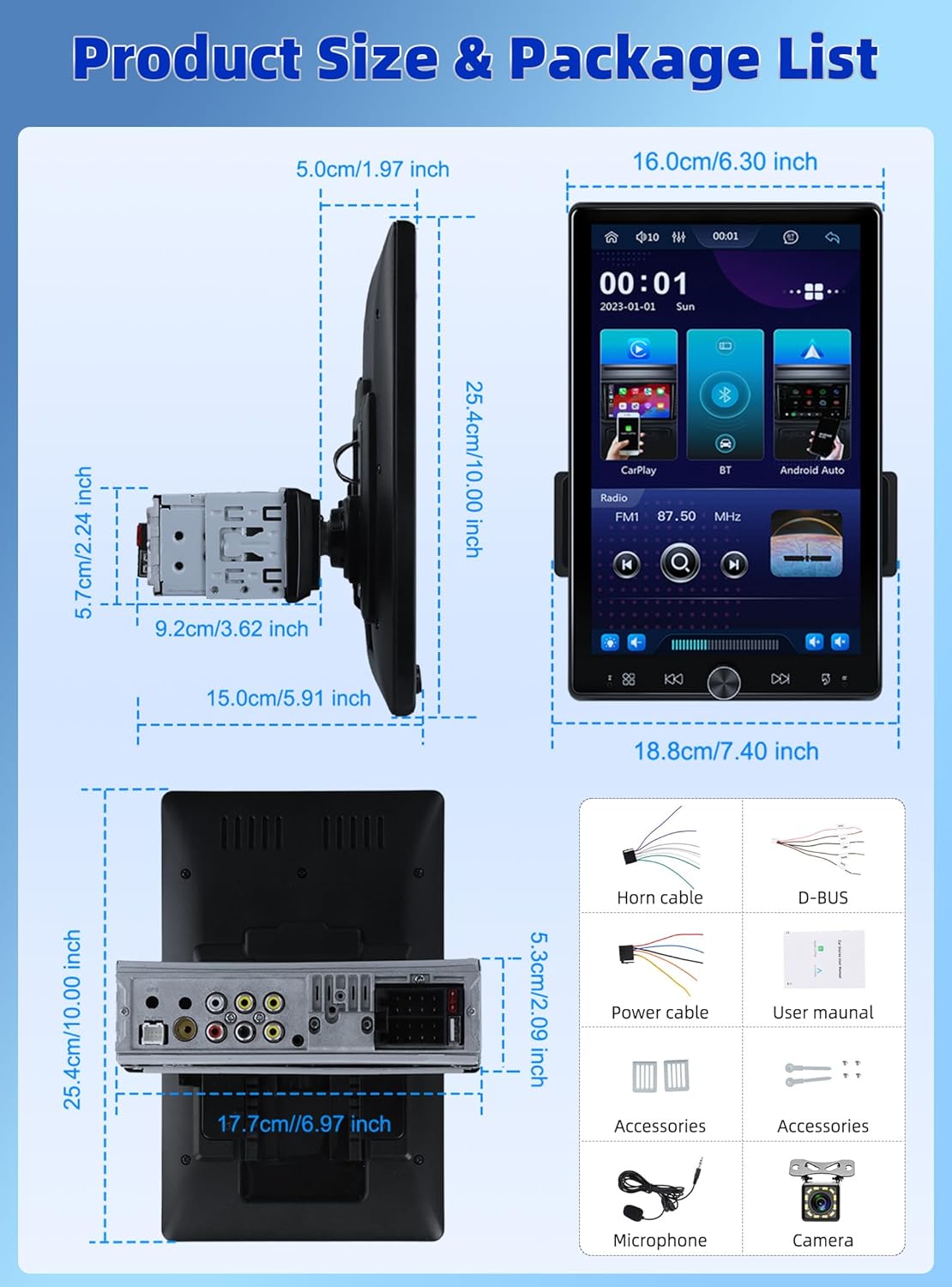
Figure 2.1: Diagram showing the dimensions of the car stereo and a visual representation of the included package contents.
3. Opsætning og installation
Proper installation is crucial for optimal performance. It is recommended to have this unit installed by a professional.
3.1 Skærmjustering
The 10.4-inch floating touchscreen is designed for adjustability to provide the best viewing angle. It can be adjusted in three directions:
- Approximately 30° front/rear tilt
- Approximately 30° left/right tilt
- Approximately 5cm vertical movement

Figure 3.1: Illustration of the adjustable and floating design of the 10.4-inch touchscreen, highlighting tilt and vertical movement capabilities.
3.2 bag View Kamera ledninger
To enable the automatic display of the reversing video, connect the included rear view camera according to the diagram below. Ensure the trigger wire (labeled "back" or "reverse" on the power cable) is connected to the reversing light positive.
- The rear camera features 12 LED lights for clear images in various conditions.
- A 170° horizontal wide angle provides a comprehensive view.

Figure 3.2: Detailed wiring diagram for connecting the rear view camera to the car stereo system.
4. Betjeningsvejledning
4.1 Trådløs CarPlay og Android Auto
Connect your smartphone wirelessly or via USB to access CarPlay or Android Auto. This allows seamless integration of your phone's contacts, GPS navigation, music, and other applications directly on the car stereo screen.

Figure 4.1: Display showing the Wireless CarPlay and Android Auto interfaces, including voice assistant prompts.
4.2 Bluetooth 5.2-forbindelse
The unit features advanced Bluetooth 5.2 technology for faster and more stable connections. Use Bluetooth for hands-free calling and streaming music with lossless sound quality.

Figure 4.2: Screenshots illustrating the Bluetooth 5.2 interface for hands-free calls and music playback.
4.3 FM/RDS Radio and EQ
Enjoy digital stereo FM radio with 18 preset stations. The RDS function provides real-time road conditions, news, and weather. Customize your audio experience using the multi-band EQ mode.

Figure 4.3: Visuals of the FM/RDS radio interface and the adjustable equalizer settings.
4.4 USB & TF Card Functionality
The unit supports USB for media playback and phone charging. The TF card slot allows for playing various audio formats.
4.5 Knob Control and Backlight
A physical knob provides easy adjustment for volume, mute, and power on/off. The unit also features seven customizable backlight colors to match your car's interior.

Figure 4.4: Depiction of the various interfaces, USB charging capability, the adjustable knob, and the seven-color backlight feature.
4.6 Ratbetjening (SWC)
If your vehicle supports it, connect the SWC wires to control various functions (e.g., switch songs, adjust volume) directly from your steering wheel for convenience and safety.
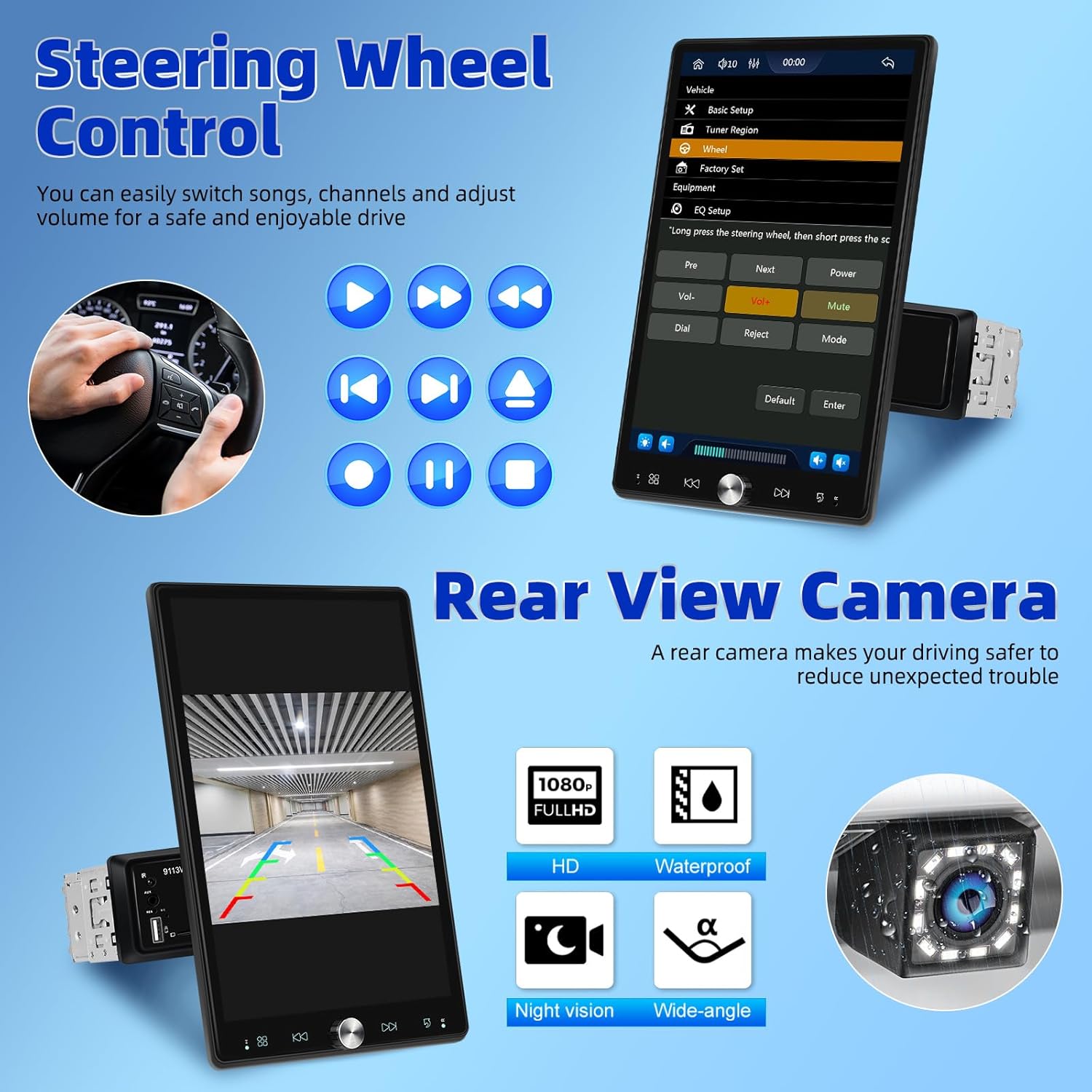
Figure 4.5: Illustration of steering wheel control functionality and the display of the rear view kamera-feed.
4.7 Spejllink
The mirror link function allows you to display your smartphone's screen directly onto the car stereo's display.
5. Vedligeholdelse
For at sikre din bilstereos levetid og optimale ydeevne skal du følge disse vedligeholdelsesretningslinjer:
- Rensning: Brug en blød, tør klud til at rengøre skærmen og ydersiden. Ved genstridige pletter, tør letampRengør kluden med vand. Undgå slibende rengøringsmidler eller opløsningsmidler.
- Temperatur: Udsæt ikke enheden for ekstreme temperaturer, direkte sollys i længere perioder eller høj luftfugtighed.
- Ventilation: Sørg for, at ventilationsåbningerne ikke er blokeret for at forhindre overophedning.
- Magt: Disconnect power before performing any cleaning or maintenance.
6. Fejlfinding
Hvis du støder på problemer med din bilstereo, kan du se følgende almindelige problemer og løsninger:
| Problem | Mulig årsag | Løsning |
|---|---|---|
| Ingen strøm | Løs strømforbindelse; Sprunget sikring | Check power cables and connections; Inspect and replace fuse if necessary. |
| Ingen lyd | Lydstyrken er for lav; Mute aktiveret; Problem med højttalerledningerne | Øg lydstyrken; Deaktiver mute; Kontroller højttalerforbindelserne. |
| Bluetooth forbinder ikke | Bluetooth off on device/stereo; Pairing mode not active | Ensure Bluetooth is enabled on both devices; Put stereo into pairing mode; Delete previous pairings and re-pair. |
| CarPlay/Android Auto virker ikke | Forkert USB-kabel; Softwarefejl; Telefonkompatibilitet | Use original or certified USB cable; Restart phone and stereo; Check phone's compatibility with CarPlay/Android Auto. |
| Bakkamera viser ikke | Incorrect wiring; Camera malfunction | Verify all camera wiring, especially the trigger wire; Test camera with another display if possible. |
Hvis problemet fortsætter efter at have prøvet disse løsninger, bedes du kontakte UNITOPSCIs kundesupport.
7. Specifikationer
| Feature | Specifikation |
|---|---|
| Produktdimensioner | 5.91 x 7.4 x 10 tommer (15.0 x 18.8 x 25.4 cm) |
| Varens vægt | 2.2 pund (1 kilo) |
| Modelnummer | A4034A3 |
| Forbindelsesteknologi | Auxiliary, Bluetooth, USB |
| Controller type | Håndkontrol |
| Kompatible enheder | Smartphone, højttaler |
| Connector Type | USB Type A |
| Lydudgangstilstand | Mono |
| Udgangseffekt | 180 watt |
| Skærmstørrelse | 10.4 tommer |
| Skærmopløsning | 1280*480P |
8. Garanti og support
UNITOPSCI is committed to providing high-quality products and satisfactory services. Your product comes with the following support:
- Replacement Available: Within 24 Months of purchase.
- Hurtigt svar: Kundesupport bestræber sig på at svare inden for 16 timer.
- Lifetime After-Sales: Consult and Technical Support.
- Returpolitik: 60-days No Worry to Return.
For online support, please contact us at: UNITOPSCI@126.com


Figure 8.1: Information regarding UNITOPSCI's customer support, warranty, and contact details.


