1. Produktet er slutview
The ANRAN Wireless Security Camera System (Model AR-W692) is a comprehensive surveillance solution designed for both indoor and outdoor use. This system includes a 10.5-inch LCD monitor NVR (Network Video Recorder) with a built-in 2TB HDD and four 5-megapixel (5MP) wireless cameras. It features advanced functionalities such as 360° auto-tracking, AI-powered motion detection, full-color night vision, and two-way audio communication.
The system is designed for easy installation, requiring no complex wiring, and supports 24/7 continuous recording. Its H.265+ video compression technology ensures efficient storage, and the NVR is expandable to support up to 8 cameras and a maximum of 10TB HDD storage.

Figure 1.1: ANRAN Wireless Security Camera System components.
2. Opsætningsvejledning
2.1 Pakkens indhold
Før du fortsætter med opsætningen, skal du sørge for, at alle komponenter er til stede:
- 1 x 10.5-inch LCD Monitor NVR (with 2TB HDD pre-installed)
- 4 x 5MP Wireless Security Cameras
- Strømadaptere til NVR og kameraer
- Monteringsskruer og ankre
- Brugervejledning (dette dokument)
2.2 Første opsætning (Plug and Play)
The ANRAN system is designed for quick and easy setup. The cameras and NVR are pre-paired at the factory, eliminating the need for complex configuration.
- Power On the NVR: Connect the NVR to a power outlet using its dedicated power adapter.
- Power On the Cameras: Connect each camera to a power outlet using their respective power adapters.
- Automatisk forbindelse: The cameras will automatically connect to the NVR within a few moments. You should see the live video feeds appear on the NVR's LCD monitor.

Figure 2.1: Connect NVR and cameras to power for immediate use.
Note: An internet connection is not required for local viewing and recording. However, an internet connection is necessary for remote viewvia mobilapplikationen.
2.3 Kamerainstallation
Select suitable locations for your cameras, ensuring they have a clear field of view and are within range of a power outlet. The cameras are IP66 waterproof, making them suitable for outdoor installation.
- Marker borepunkterne ved hjælp af kameraets base som skabelon.
- Bor huller og isæt vægankre om nødvendigt.
- Fastgør kameraet til monteringsfladen med de medfølgende skruer.
- Juster kameravinklen for at dække det ønskede område.
3. Betjeningsvejledning
3.1 Videooptagelse og -lagring
The NVR comes with a 2TB HDD pre-installed, supporting 24/7 continuous recording. The system utilizes H.265+ video compression technology, which significantly reduces file size while maintaining video quality, effectively doubling the storage capacity compared to H.264.

Figure 3.1: H.265+ compression offers improved storage efficiency.
When the HDD is full, the system automatically overwrites the oldest recordings to ensure continuous operation without manual deletion.

Figure 3.2: The system automatically overwrites old data when the HDD is full.
3.2 Motion Detection and Auto-Tracking
The cameras are equipped with AI-powered motion detection, capable of distinguishing between humans, vehicles, pets, and packages. When motion is detected, the system can automatically track the moving object within the camera's field of view.

Figure 3.3: Auto-tracking feature follows detected movement.
The dome-type cameras feature a horizontal pan of 355° and a vertical tilt of 90°, allowing for 360° coverage. After tracking, the camera will return to its original monitoring position once the detected object leaves the area.

Figure 3.4: Pan-Tilt-Zoom (PTZ) functionality for wide area coverage.
3.3 Nattesynstilstande
The cameras offer enhanced night vision capabilities with four LED lights, providing clear images even in low-light conditions. There are three primary night vision modes:
- Nattesyn i fuld farve: When human motion is detected in the dark, the camera's LED lights activate, providing a vivid, full-color image.
- Infrarødt nattesyn: Provides clear black-and-white images in complete darkness using infrared illumination.
- Smart nattesyn: The camera operates in infrared mode by default and switches to full-color mode upon detection of human movement.

Figure 3.5: Different night vision modes for optimal surveillance.
3.4 Tovejs lydkommunikation
Each camera is equipped with a built-in speaker and microphone, enabling two-way audio communication through the ANRAN mobile application. This allows you to speak with visitors, delivery personnel, or deter intruders remotely.

Figure 3.6: Communicate directly through the camera using the app.
3.5 Remote Monitoring via Mobile App
Download the official ANRAN app to your smartphone (iOS or Android) for remote monitoring, playback, and system control. The app provides real-time alerts and allows you to manage camera settings from anywhere with an internet connection.

Figure 3.7: Scan QR codes to download the ANRAN app for iOS or Android.
Download links:
The system also supports remote viewing on multiple devices, including tablets and PCs, when the NVR is connected to the network.

Figure 3.8: Remote monitoring supported on smartphones, tablets, and PCs.
3.6 Systemudvidelse
The NVR supports up to 8 channels, allowing you to expand your surveillance system by adding up to four additional cameras (sold separately). The NVR is compatible with 8MP cameras for future upgrades.
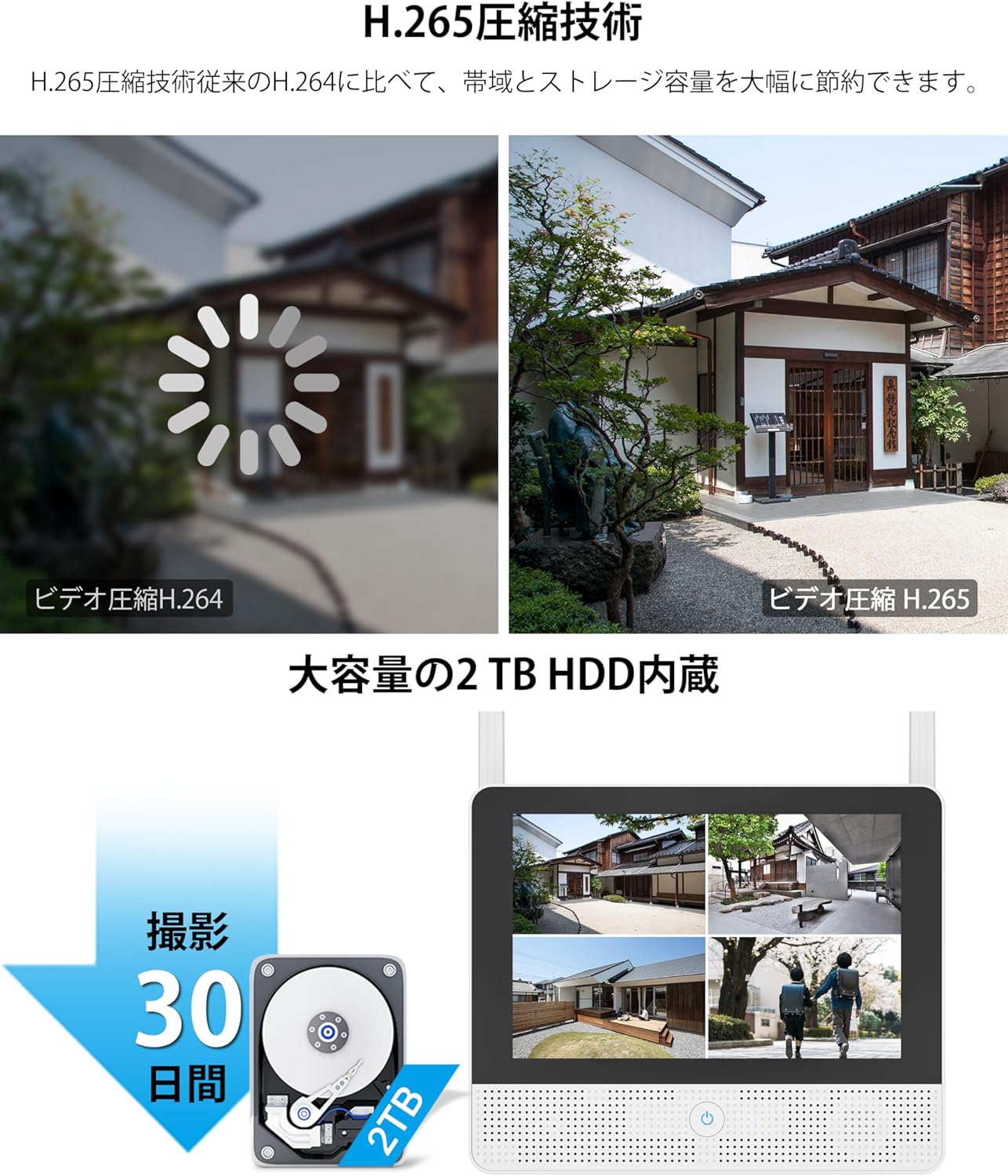
Figure 3.9: The NVR can support up to 8 cameras.
The built-in 2TB HDD can be upgraded to a maximum of 10TB for extended recording duration.

Figure 3.10: The NVR's HDD storage can be expanded to 10TB.
4. Vedligeholdelse
4.1 Rengøring
To ensure optimal performance and clear image quality, regularly clean the camera lenses and the NVR screen. Use a soft, dry cloth. For stubborn dirt, a slightly damp en tør klud kan bruges. Undgå at bruge skrappe kemikalier eller slibende materialer.
4.2 firmwareopdateringer
Periodically check for firmware updates through the ANRAN mobile application or the official ANRAN website. Keeping your system's firmware updated ensures access to the latest features, security enhancements, and bug fixes.
4.3 HDD Management
The 2TB HDD is designed for continuous recording with an automatic overwrite function. No manual intervention is typically required for deleting old footage. If you wish to manually manage recordings or backup specific footage, refer to the NVR's on-screen menu or the mobile app's playback section.
5. Fejlfinding
If you encounter any issues with your ANRAN Wireless Security Camera System, please refer to the following common troubleshooting steps:
- Ingen videovisning: Ensure both the NVR and cameras are properly connected to power outlets and are powered on. Check that the cameras are within wireless range of the NVR.
- Dårlig billedkvalitet: Rengør kameralinsen. Sørg for, at der ikke er nogen forhindringer i kameraets synsfelt. view. Check for strong interference sources near the cameras or NVR.
- Ingen fjernadgang: Verify that your NVR is connected to the internet via an Ethernet cable. Ensure your smartphone has a stable internet connection. Confirm that the ANRAN app is updated to the latest version.
- Ingen optagelse: Check the HDD status in the NVR settings to ensure it is recognized and functioning correctly.
- Bevægelsesdetektion virker ikke: Verify that motion detection is enabled in the camera settings via the NVR or app. Adjust sensitivity settings if necessary.
For further assistance, please contact ANRAN customer support using the details provided in the Warranty & Support section.
6. Specifikationer
| Feature | Specifikation |
|---|---|
| Mærke | ANRAN |
| Modelnummer | AR-W692 |
| Produktdimensioner | 17 x 41 x 37 cm |
| Varens vægt | 5 kilo |
| Farve | Hvid |
| Strømkilde | Elektrisk med ledning |
| Inkluderede komponenter | Cameras, NVR |
| Forbindelsesteknologi | Trådløs |
| Videooptagelsesopløsning | 5 megapixel (5 MP) |
| Hukommelseslagringskapacitet | 2 TB (kan udvides op til 10 TB) |
| NVR-kanaler | 8 Channels (supports up to 8 cameras) |
| Vandtæt vurdering | IP66 |
| Videokomprimering | H.265 + |
| Certificeringer | PSE, Technical Conformity Certification |
7. Garanti og support
7.1 Garantioplysninger
This ANRAN Wireless Security Camera System comes with a 12 måneders garanti fra købsdatoen. Denne garanti dækker fabrikationsfejl og funktionsfejl ved normal brug. Gem venligst din købsbevis til garantikrav.
7.2 Kundesupport
For any questions, technical assistance, or warranty inquiries, please contact ANRAN customer support through the following channels:
- Via ordrehistorik: You can contact the seller directly through your purchase history on the platform where you bought the product.
- Official Contact Information: Refer to the last page of the physical instruction manual included with your product for the official email address and phone number.
Support Hours (Phone): Monday - Friday, 10:00 - 13:00 and 14:30 - 19:30 (Japan Standard Time)
Support Hours (Email): 24 timer i døgnet


