Indledning
The My Arcade Atari Pixel Pocket Pro is a portable, officially licensed Atari video game system designed for on-the-go entertainment. This compact device includes 25 classic Atari games, offering a nostalgic gaming experience in a convenient keychain format. This manual provides essential information for setting up, operating, and maintaining your device.
Pakkens indhold
- My Arcade Atari Pixel Pocket Pro device
- Brugervejledning (dette dokument)

Image: The My Arcade Atari Pixel Pocket Pro device shown within its retail packaging, highlighting the product's branding and key features.
Produkt overview
The Pixel Pocket Pro features a 2-inch full-color screen and intuitive button controls for an authentic arcade experience. Its compact design includes a keychain for easy portability.

Billede: Forside view of the My Arcade Atari Pixel Pocket Pro, displaying the screen, directional pad, SELECT, START, VOLUME, and 'A' buttons.
Image: The My Arcade Atari Pixel Pocket Pro with visual callouts indicating 25 officially licensed Atari titles, a 2-inch full-color screen, and power via 3 AAA batteries.
Opsætning
Installation af batteri
- Find batterirummet på bagsiden af enheden.
- Using a small Phillips head screwdriver (not included), carefully remove the screw securing the battery compartment cover.
- Fjern dækslet.
- Insert three (3) AAA batteries (not included) into the compartment, ensuring correct polarity (+/-) as indicated inside the compartment.
- Sæt batterirummets dæksel på igen og fastgør det med skruen.
Bemærk: Brug altid nye batterier, og bortskaf gamle batterier ansvarligt. Bland ikke gamle og nye batterier eller forskellige typer batterier.

Billede: Bagside view of the My Arcade Atari Pixel Pocket Pro, showing the location of the battery compartment cover.
Betjeningsvejledning
Tænd/sluk
- For at tænde enheden skal du trykke på STARTE knap.
- For at slukke for enheden skal du trykke på og holde nede STARTE button for approximately 3 seconds until the screen turns off.
Spilvalg
- After powering on, use the directional pad to navigate through the list of available games.
- Tryk på A knappen for at vælge et spil og begynde at spille.
Lydstyrkekontrol
- Brug BIND button to adjust the sound level. Pressing it cycles through different volume settings.
Gameplay
- The directional pad controls movement within the game.
- De A button typically serves as the action or fire button.
- De VÆLGE button may be used for in-game options or pausing, depending on the specific game.
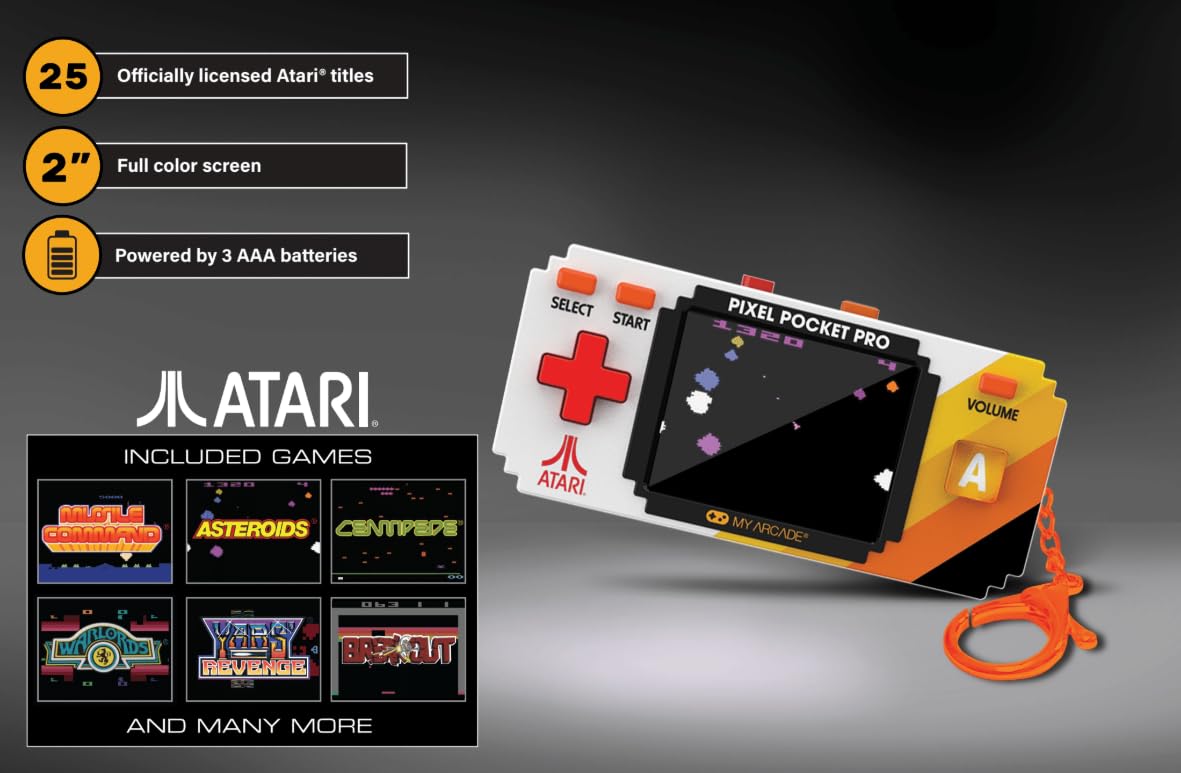
Image: A hand holding the My Arcade Atari Pixel Pocket Pro, demonstrating its portable size and how it is used for gameplay.
Opretholdelse
Rensning
- Tør enheden af med en blød, tør klud.
- Do not use liquid cleaners or abrasive materials, as these can damage the screen or casing.
Batteripleje
- Fjern batterierne, hvis enheden ikke skal bruges i længere tid, for at forhindre lækage.
- Opbevar enheden på et køligt, tørt sted væk fra direkte sollys.
Fejlfinding
Enheden tændes ikke
- Sørg for, at batterierne er isat korrekt med den korrekte polaritet.
- Udskift med friske AAA-batterier.
- Kontroller, at batteridækslet er lukket ordentligt.
Ingen lyd eller lav lyd
- Tryk på BIND button to increase the sound level.
- Sørg for, at højttaleren ikke er blokeret.
Screen Issues (e.g., Blurry, Flickering)
- Sørg for, at skærmen er ren og fri for pletter.
- Replace batteries, as low power can sometimes affect screen performance.
- Kontakt kundesupport, hvis problemet fortsætter.
Specifikationer
| Modelnummer | DGUNL-7134 |
| Mærke | Min Arcade |
| Skærmstørrelse | 2 inches (full color) |
| Controller type | Knap kontrol |
| Strømkilde | Batteridrevet |
| Batterier påkrævet | 3 x AAA (medfølger ikke) |
| Dimensioner (B x H x D) | 1.75 x 3.8 x 1 cm (omtrent) |
| Vægt | 4.5 ounce (cirka) |
| Materiale | Plast |
| Antal spil | 25 Officially Licensed Atari Titles |
Garanti og support
For warranty information or technical support, please refer to the contact details provided on the product packaging or visit the official My Arcade webwebstedet. Behold din købskvittering som købsbevis.
Image: A QR code for collecting more My Arcade products. Scan this code to explore other available items.
Explore more My Arcade products: https://qrco.de/collectthem


