1. Introduktion
This manual provides essential information for the proper installation, operation, and maintenance of your Sophos XGS 108 (Gen2) Network Security Appliance. The Sophos XGS 108 is designed to deliver robust firewall performance, integrating advanced security features such as Deep Packet Inspection (DPI), Intrusion Prevention System (IPS), and TLS 1.3 decryption to protect network traffic. It supports SD-WAN optimization and VPN for secure and resilient connectivity, with centralized management facilitated by Sophos Central.
2. Sikkerhedsoplysninger
Please read all safety instructions before operating the device. Failure to follow these instructions may result in injury or damage to the device. Keep this manual for future reference.
- Sørg for, at enheden er placeret på en stabil, plan overflade.
- Udsæt ikke enheden for fugt, ekstreme temperaturer eller direkte sollys.
- Brug kun den strømadapter, der fulgte med enheden.
- Åbn ikke enheden casing. Overlad al service til kvalificeret personale.
- Sørg for tilstrækkelig ventilation omkring enheden for at forhindre overophedning.
3. Pakkens indhold
Bekræft at alle varer er til stede i pakken:
- Sophos XGS 108 (Gen2) Network Security Appliance
- Strømadapter
- Ethernet kabel
- Hurtig startvejledning
- Sikkerheds- og overensstemmelsesoplysninger
4. Produktet er slutview
Frontpanel
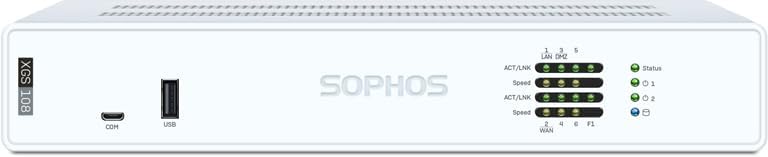
Billede: Forside view of the Sophos XGS 108 appliance, showing the Sophos logo, status LEDs, a COM port, and a USB port.
The front panel features status indicators for network activity and device health, along with a console port (COM) and a USB port for management and connectivity.
Bagpanel

Billede: Bagside view of the Sophos XGS 108 appliance, displaying power inputs, a console port, USB ports, multiple 2.5 GE copper ports, and an SFP fiber port.
The rear panel provides the primary connectivity options, including dual DC power inputs, a console port, USB ports, six 2.5 Gigabit Ethernet (GE) copper ports, and one Small Form-Factor Pluggable (SFP) fiber port. A reset button is also located on the rear panel.
5. Opsætning
Follow these steps for initial setup of your Sophos XGS 108 appliance:
- Fysisk placering: Position the appliance in a well-ventilated area, away from direct heat sources or moisture.
- Tilslut netværkskabler: Connect your WAN (Internet) cable to the designated WAN port. Connect your internal network devices (switches, computers) to the LAN ports. The XGS 108 features 6 x 2.5 GE copper ports and 1 SFP fiber port.
- Tilslut strøm: Connect the power adapter to the appliance and then to a power outlet. The device will power on automatically.
- Indledende konfiguration: Access the Sophos Firewall OS web interface from a connected computer using the default IP address (refer to the Quick Start Guide for details). Follow the on-screen prompts to complete the initial setup, including network settings, administrator password, and basic security policies.
- Sophos Central Registration: Register your appliance with Sophos Central for centralized management, unified policies, and advanced reporting capabilities.
6. Betjeningsvejledning
The Sophos XGS 108 operates on Sophos Firewall OS, providing a comprehensive suite of security features. Management is primarily performed through the web-based interface or Sophos Central.
Key Features and Protection
The XGS 108 offers advanced protection technologies and threat intelligence:
- Xstream Protection: Includes zero-day defense, cloud sandboxing, email filtering, intrusion prevention, and advanced reporting.
- TLS Inspection: Blocks hidden threats within encrypted traffic.
- Next-Gen Intrusion Prevention: Stops sophisticated attacks.
- SD-WAN Optimization: Ensures resilient and efficient network connectivity.
- Secure VPN: Provides secure remote access and site-to-site connections.

Image: Diagram illustrating Sophos Firewall's powerful protection and performance, showing integration with cloud services, remote workers, and various network components.
Sophos Central Management
Sophos Central provides a unified platform for managing your XGS 108 appliance, offering:
- Group firewall management
- Backup styring
- Firmware update scheduling
- Centralized reporting

Image: Screenshot of the Sophos Central dashboard displayed on a laptop, showing various network security metrics and management options, with a Sophos appliance visible below.
Licensmuligheder
The XGS 108 supports various licensing bundles, including Xstream Protection, which provides comprehensive security features. Custom protection bundles and individual modules are also available to tailor security to specific organizational needs.

Image: Table detailing various licensing options for Sophos XGS Firewalls, including Xstream Protection Bundle, Standard Protection Bundle, and additional protection modules like Email Protection and Web Server Protection.

Image: Detailed diagram outlining the features included in the Xstream Protection bundle, categorized into Base Firewall Features, Network Protection, Web Protection, Zero-Day Protection, DNS Protection, Sophos Central Management, Sophos Central Orchestration, and Enhanced Support.
7. Vedligeholdelse
Regular maintenance ensures optimal performance and longevity of your Sophos XGS 108 appliance:
- Firmwareopdateringer: Regularly check for and apply firmware updates through Sophos Central or the device's web interface to ensure the latest security patches and features.
- Konfigurationssikkerhedskopier: Perform regular backups of your device configuration.
- Miljøtjek: Ensure the operating environment remains within specified temperature and humidity ranges. Keep ventilation clear.
- Overvågning: Utilize Sophos Central's monitoring tools to observe device health, network traffic, and security alerts.
8. Fejlfinding
If you encounter issues with your Sophos XGS 108, consider the following troubleshooting steps:
- Ingen strøm: Verify the power adapter is securely connected to both the appliance and a working power outlet. Check the power LED on the front panel.
- Ingen netværksforbindelse: Check all Ethernet and SFP cable connections. Verify link/activity LEDs on the ports. Ensure correct network configuration in the Sophos Firewall OS.
- Web Interface Inaccessible: Confirm your computer is on the same network segment as the appliance and that its IP address is correctly configured. Try accessing the interface using the default IP address.
- Ydelsesproblemer: Review system logs and resource utilization in the Sophos Firewall OS or Sophos Central. Ensure the appliance is not overloaded and that security policies are optimized.
- Sikkerhedsadvarsler: Investigate alerts through Sophos Central or the device's logs. Adjust security policies as needed.
- Gendan fabriksindstillinger: As a last resort, a factory reset can restore the device to its default settings. Refer to the Quick Start Guide for instructions. Note that this will erase all configurations.
9. Specifikationer
The following table provides detailed technical specifications for the Sophos XGS 108 appliance:

Image: A table detailing the technical specifications of the Sophos XGS 108 and XGS 108w models, including performance metrics, physical specifications, environmental conditions, and product certifications.
| Feature | Detalje |
|---|---|
| Modelnavn | XGS 108 |
| Fabrikant | Sophos |
| Havne | 6 x 2.5 GE Copper Ports, 1 x SFP Fiber Port (Total 7 ports) |
| Firewall-gennemstrømning | Op til 12.5 Gbps |
| Operativsystem | Sophos Firewall OS |
| Særlige funktioner | Internet Security, Remote Access |
| Forbindelsesteknologi | Ethernet, Wi-Fi (for XGS 108w variant), 5G (via external modem) |
| Wireless Standard (XGS 108w only) | 802.11ax (Wi-Fi 6) |
| Sikkerhedsprotokoller | WPA3, WPA2-PSK, WPA-PSK |
| Kompatible enheder | Bærbar computer, personlig computer, smartphone, tablet |
Product Matrix for XGS Series

Image: A table comparing various Sophos XGS Series appliance models, detailing their form factor, ports, technical specifications, and throughput capabilities for Firewall, IPsec VPN, and Xstream SSL/TLS.
10. Garanti og support
For warranty information, please refer to the documentation included with your product or visit the official Sophos website. Sophos provides comprehensive support resources, including knowledge bases, forums, and direct technical assistance.
Your Sophos XGS 108 appliance, especially with an Xstream Protection subscription, includes access to advanced support and threat intelligence updates. For immediate assistance, log in to your Sophos Central account or contact Sophos support.
11. Produktvideo
Se denne video for en overview of the Sophos XGS Series 2nd Gen Desktop Appliances:
Video: An informational video from BlueAlly showcasing the features and benefits of the Sophos XGS Series 2nd Generation Desktop Appliances, highlighting performance, energy efficiency, and flexible connectivity options including 2.5 GE ports and Wi-Fi 6.


