Indledning
Welcome to the imoo Watch Phone Z7 user manual. This guide provides essential information for setting up, operating, maintaining, and troubleshooting your new imoo Watch Phone Z7. Designed for children, this 4G smartwatch offers advanced communication, safety, and health monitoring features to keep children connected and parents informed.
Hvad er der i æsken
- imoo Watch Phone Z7 (Blue)
- Batteri (forudinstalleret)
- Oplader
- Brugervejledning (dette dokument)
Opsætningsvejledning
- Oplad uret: Before first use, fully charge the imoo Watch Phone Z7 using the provided charger. Connect the charger to a standard USB power adapter (not included) and the magnetic charging pins to the back of the watch. A full charge typically takes approximately 90 minutes.
- Insert Nano SIM Card: The imoo Z7 requires a standard Nano-SIM card for cellular connectivity. Ensure the watch is powered off before inserting the SIM card. Locate the SIM card slot, typically on the side of the watch, and carefully insert the Nano-SIM card with the gold contacts facing down, following the diagram on the watch or in the quick start guide. Compatible operators include Airtel in India.
- Download the imoo App: On a parent's smartphone, download the official imoo app from your device's app store (Google Play Store for Android or Apple App Store for iOS).
- Pair the Watch with the App:
- Open the imoo app and create an account or log in.
- Follow the on-screen instructions to add a new device. This usually involves scanning a QR code displayed on the watch screen using the app.
- Når de er parret, kan du konfigurere kontakter, sikkerhedszoner og andre indstillinger via appen.
Betjeningsvejledning

Image: A child wearing the imoo Watch Phone Z7, with an illustration of a video call on the watch and a smartphone. This image demonstrates the 2-way HD video and voice calling feature.
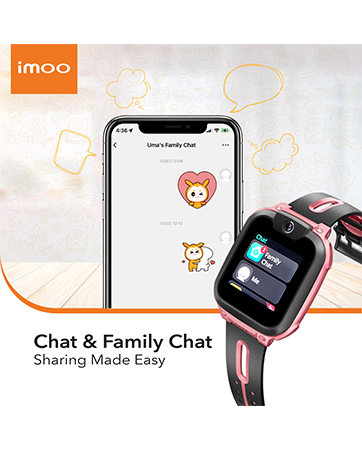
Image: The imoo Watch Phone Z7 screen showing a chat message, alongside a smartphone displaying a family chat interface. This illustrates the chat and family chat capabilities.
Kommunikationsfunktioner
- 2-way HD Video & Voice Call: The imoo Z7 allows for real-time high-definition video and voice calls between the watch and pre-approved contacts. It features flip-up dual cameras for an enhanced calling experience.
- Chat & Family Chat: Children can send and receive messages, including voice messages and emojis, with family members and approved friends through the watch. Parents can manage and participate in family chat groups via the imoo app.

Image: The imoo Watch Phone Z7 displaying a GPS tracking icon, with a smartphone showing a detailed map and the child's real-time location. This highlights the advanced safety and security features.

Image: An animated graphic depicting a city skyline with multiple satellites orbiting above, pointing to a location pin. This visualizes the multi-satellite positioning system for accurate location tracking.
Placeringssporing
- Real-time Locating & 14 Days of Historical Tracking: The imoo Z7 utilizes a 5-satellite positioning system (GPS, GLONASS, BeiDou, QZSS, and Galileo) for precise real-time location tracking with up to 10-meter accuracy. Parents can view the child's current location and access 14 days of historical movement data through the imoo app.

Image: Multiple imoo Watch Phone Z7 units (blue and pink) surrounding a smartphone displaying health monitoring data, including body temperature, heart rate, and blood oxygen. This illustrates the comprehensive health tracking capabilities.

Image: A smartphone screen displaying detailed workout data, including total steps, calories burned, and exercise time, along with achievement badges. This demonstrates the multi-sport and workout tracking features of the imoo Z7.
Sundhed & Fitness
- Multi-sport & Workout Data: The imoo Z7 includes 4 built-in sports modes: swimming, running, jumping rope, and sit-ups. It provides insights into professional workout data such as calories burned, cadence, and stride. Rewards are integrated to encourage children to stay active.
- IPX8 Swimming Water-resistant: The watch is designed with IPX8 water resistance, allowing it to be submerged up to 20 meters deep. A drainage mode can be activated to expel water after swimming.
- Sundhedsovervågning: The watch offers PPG-based health monitoring, including heart rate, body temperature, blood oxygen (SpO2), and mood recognition, providing parents with peace of mind regarding their child's well-being.

Image: A child using the imoo Watch Phone Z7 to scan a common daisy, with the watch screen displaying "Common Daisy." This illustrates the AI Scanner feature for interactive learning.

Image: A child reading a book with the imoo Watch Phone Z7 on their wrist, surrounded by icons representing Class Mode, No Stranger Calls, GDPR-Compliant, SOS, and Screen Time Control. This highlights the ultimate privacy and security features.
Smarte funktioner
- AI Scanner for Interactive Learning: The integrated AI scanner allows children to interact with their environment, identifying objects and providing information, fostering smart learning.
Sikkerhed og privatliv
- Klassetilstand: Parents can set specific times during which the watch functions are limited to prevent distractions during school hours.
- No Stranger Calls: Only pre-approved contacts can call the watch, ensuring the child is protected from unknown callers.
- GDPR-Compliant: The watch adheres to General Data Protection Regulation standards, ensuring user data privacy and security.
- SOS funktion: In an emergency, the child can press and hold the SOS button to alert pre-set emergency contacts with their location.
- Screen Time Control: Parents can manage and limit the child's screen time directly from the imoo app.
Opretholdelse
- Rensning: Tør regelmæssigt urets skærm og rem af med en blød, tør klud. Ved genstridigt snavs kan du bruge en let tør klud.amp cloth can be used, ensuring no moisture enters the charging port or speaker.
- Vandtæthed: While the imoo Z7 is IPX8 water-resistant, it is not recommended for hot water, saunas, or steam rooms. After exposure to water, especially saltwater, rinse with fresh water and dry thoroughly. Activate the drainage mode as needed.
- Batteripleje: To prolong battery life, avoid extreme temperatures. Do not leave the watch fully discharged for extended periods. Charge the watch regularly, even if not in use.
- Softwareopdateringer: Keep the watch's software updated through the imoo app to ensure optimal performance and access to new features.
Fejlfinding
| Spørgsmål | Mulig årsag/løsning |
|---|---|
| Uret tænder ikke | Sørg for, at uret er fuldt opladet. Tryk på tænd/sluk-knappen og hold den nede i flere sekunder. |
| Intet netværkssignal / Kan ikke foretage opkald | Check if the Nano-SIM card is correctly inserted and activated. Ensure the SIM card has an active plan and sufficient balance. Verify network coverage in your area. |
| Upræcis GPS-placering | Location accuracy relies on SIM signal strength and network compatibility. Ensure the watch is in an open area with clear sky view. Using recommended carrier SIM cards ensures optimal performance. |
| Dårlig opkaldskvalitet | Check network signal strength. Ensure the microphone and speaker are not obstructed. |
| Batteriet aflades hurtigt | Frequent video calls, high screen brightness, and continuous GPS tracking can consume more battery. Adjust settings in the app to optimize battery life. |
| Uret reagerer ikke | Prøv at genstarte uret ved at holde tænd/sluk-knappen nede. Hvis det ikke reagerer, så lad batteriet aflades helt og genoplad det derefter. |
If you encounter issues not listed here or require further assistance, please contact imoo customer support.
Specifikationer
| Feature | Detalje |
|---|---|
| Mærke | imoo |
| Modelnavn | IMOO Z7 |
| Produktdimensioner | 5.64 x 4.24 x 1.65 cm |
| Varens vægt | 10.2 g |
| Batterier | 1 A Lithium Ion battery (included) |
| Batterikapacitet | 760 mioamp Timer |
| Hukommelseslagringskapacitet | 4 GB |
| Digital lagerkapacitet | 128 MB |
| Operativsystem | Mocor OS |
| Kompatible enheder | Smartphone |
| Særlige funktioner | Camera, GPS, Phone Call |
| Display Type | LCD |
| Trådløs type | Bluetooth |
| Cellulær teknologi | 4G |
| Oprindelsesland | Kina |
Garanti og support
imoo offers a 30-day unconditional return policy for the Watch Phone Z7. For any questions, technical support, or warranty claims, please contact imoo customer service.
Hjælpline nummer: +91 7353108999
Importør: INM COMMUNICATION PRIVATE LIMITED, A-191, OKHLA INDUSTRIAL AREA, SOUTH EAST DELHI, New Delhi, South East Delhi, Delhi, 110020.


