1. Introduktion
The Yeedi S14 Plus is an advanced robot vacuum and mop designed to provide a comprehensive and effortless cleaning experience for your home. Equipped with powerful suction, innovative mopping technology, and smart navigation, it ensures thorough cleaning of various floor types. This manual will guide you through the setup, operation, and maintenance of your Yeedi S14 Plus to ensure optimal performance and longevity.
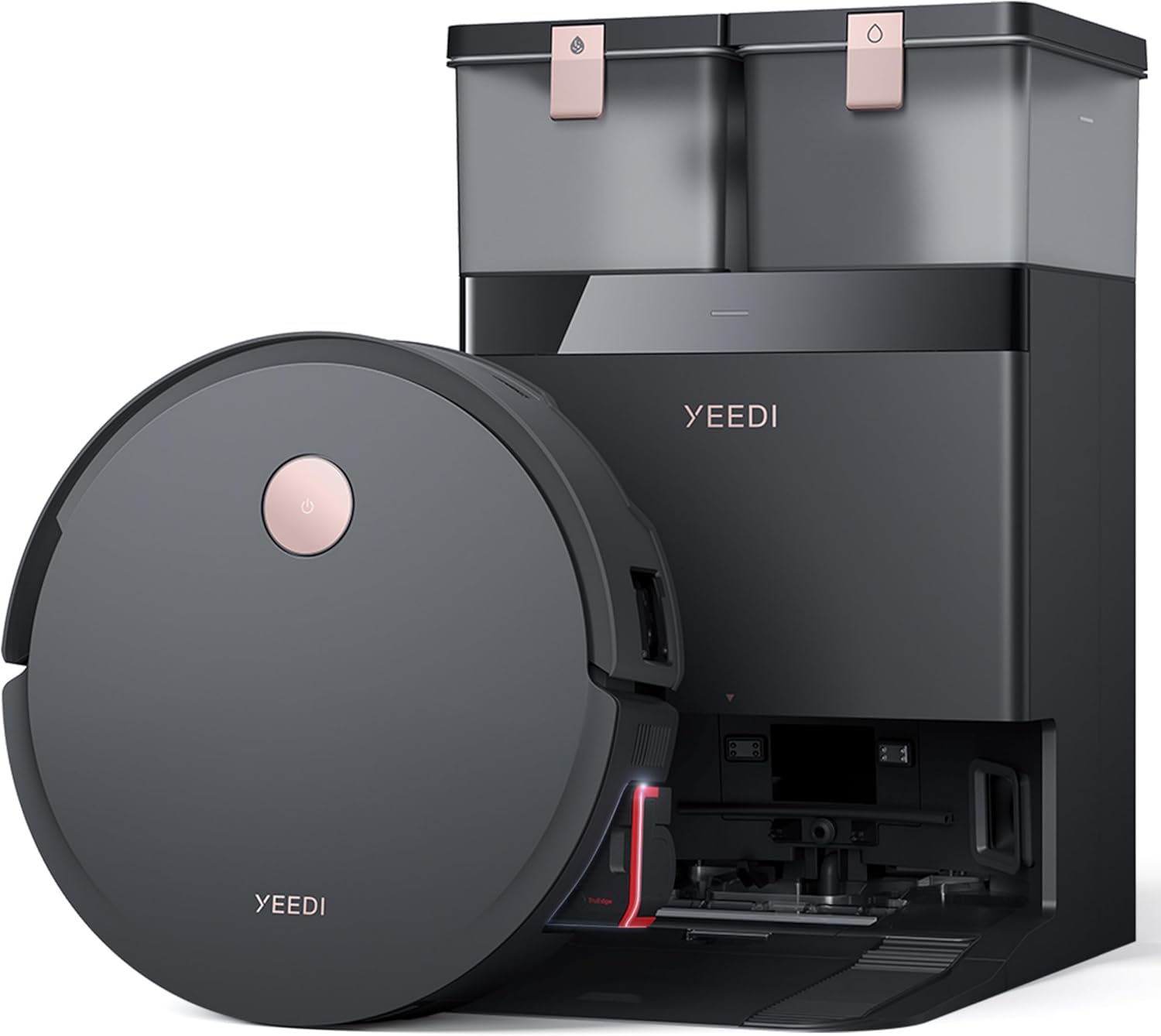
Image: The Yeedi S14 Plus robot vacuum positioned next to its all-in-one OMNI Station.
2. Hvad er der i æsken
Pak forsigtigt alle komponenter ud, og sørg for, at du har modtaget følgende:
- All-in-one Station (1)
- Robotstøvsuger (1)
- Strømledning (1)
- Brugervejledning (1)
- Hurtig vejledning (1)
- Rulle (1)
- Sidebørste (1)
- Main Brush & Cover (1)
- Clean Water Tank (1)
- Waste Water Tank (1)
Note: Roller Mop, Dust Bag, Main brush & Main Brush Cover are pre-installed on the Robot.

Image: A visual representation of all components included in the Yeedi S14 Plus package.
3. Opsætning
3.1 Station Placement
Place the OMNI Station against a wall on a level, hard ground. Ensure there are no objects within 0.164ft (5cm) on either side and 2.62ft (80cm) in front of it to allow the robot to dock properly. Connect the power cord to the station and plug it into a wall outlet.
3.2 Initial Robot Setup
- Remove all protective films and packaging materials from the robot and station.
- Place the robot onto the charging pins of the OMNI Station. Ensure it is properly aligned.
- Download YEEDI App from your mobile app store.
- Følg instruktionerne i appen for at forbinde din robot til dit Wi-Fi-hjemmenetværk. Note: Only 2.4GHz Wi-Fi is supported. 5GHz Wi-Fi is not supported.
- Once connected, the robot will perform an initial mapping of your home. Clear any obstacles to ensure accurate mapping.
4. Operating Your Yeedi S14 Plus
4.1 Rengøringstilstande
The Yeedi S14 Plus offers versatile cleaning modes to suit your needs:
- Kun støvsuger: Ideal for dry debris and carpets. Features 18,000Pa Hurricane Suction for powerful dirt removal and ZeroTangle 2.0 technology to prevent hair tangles.
- Kun moppe: For hard floors requiring wet cleaning. The OZMO Roller Mopping System provides a continuous, self-washing mop for deep cleaning without spreading dirt.
- Støvsuger og mopper: Combines both functions for a comprehensive clean on hard floors.

Image: The Yeedi S14 Plus demonstrating its powerful 18,000Pa suction and ZeroTangle 2.0 technology, effectively cleaning debris.
4.2 Smart navigation og forhindringsundgåelse
The robot utilizes TruEdge 2.0 and AIVI 3D 3.0 sensors for precise navigation and obstacle avoidance. It can clean along edges and corners with up to 100% coverage, recognize and avoid cables, chair legs, and other household items. Its agile movement allows it to navigate tight spaces and climb over obstacles up to 0.79 inches (20mm).

Image: The Yeedi S14 Plus demonstrating its TruEdge 2.0 technology for 100% edge and corner cleaning coverage.
4.3 Carpet Cleaning Management
The Yeedi S14 Plus features an auto-lift roller mop that automatically lifts by 0.39 inches when a carpet is detected, ensuring carpets stay dry during mopping. You can customize carpet cleaning modes via the YEEDI App, setting specific strategies for different carpet types (e.g., pass-through only for foam mats, auto mop lifting for short-fiber carpets, or no entry for extra-long fiber carpets).

Image: The Yeedi S14 Plus illustrating its ability to switch carpet cleaning modes, including auto mop lifting for carpets.
4.4 YEEDI App Control
The intuitive YEEDI App allows for personalized smart cleaning. You can:
- Customize cleaning modes and parameters (suction power, water flow).
- Schedule cleaning routines.
- Define specific cleaning zones or no-go zones.
- View and manage 2D/3D maps of your home.
- Control OMNI Station settings (hot water wash, hot air drying, dust collection).
5. Vedligeholdelse
Regular maintenance ensures your Yeedi S14 Plus operates efficiently and effectively.
5.1 OMNI Smart Station Maintenance
The OMNI Station automates much of the maintenance:
- Auto Hot Water Mop Washing: The station washes the mop with 167°F (75°C) hot water to dissolve grime and grease.
- Auto Hot Air Drying: Mop pads are dried at 145°F (63°C) to prevent odors and mildew.
- Automatisk tømning: The robot automatically empties its dustbin into the 3L dust bag in the station, which can hold up to 90 days of debris.
- Vandpåfyldning: The station automatically refills the robot's water tank for continuous mopping.
- Station Self-cleaning: The station performs self-cleaning of its base plate.

Billede: En overview of the 11 key features of the OMNI Smart Station, including hot air drying and hot water mop washing.
5.2 Rengøring af robotkomponenter
- OZMO Roller: Periodically check and clean the roller to remove any accumulated debris. The self-washing feature minimizes manual cleaning.
- Side Brush & Main Brush: While ZeroTangle 2.0 reduces tangles, inspect and clean the side brush and main brush regularly for hair and debris.
- Filtre: Clean or replace the filter as recommended by the app or every 1-2 months, depending on usage.
- Sensorer: Wipe the sensors on the robot and station with a clean, dry cloth to ensure accurate navigation.
5.3 Maintenance-Free Tray
The OMNI Station features a 150-day maintenance-free tray, requiring cleaning only 2-3 times a year, significantly reducing manual effort.
6. Fejlfinding
If you encounter issues with your Yeedi S14 Plus, refer to the following common solutions:
| Problem | Mulig årsag | Løsning |
|---|---|---|
| Robotten opretter ikke forbindelse til Wi-Fi | Incorrect Wi-Fi band (5GHz) or weak signal. | Ensure your router is broadcasting a 2.4GHz network. Move the robot closer to the router. Restart the robot and try connecting again. |
| Robotten sidder ofte fast | Too many obstacles, tangled cables, or dirty sensors. | Clear the cleaning area of small objects and cables. Clean the robot's sensors with a dry cloth. Check for debris in wheels or brushes. |
| Dårlig rengøringsydelse | Full dustbin, dirty mop pads, clogged filter, or worn brushes. | Empty the dustbin. Ensure mop pads are clean (station should handle this). Clean or replace the filter. Inspect and clean the main and side brushes. |
| Station not performing auto-empty/wash | Dust bag full, water tanks empty/full, or station components blocked. | Replace the dust bag. Fill the clean water tank and empty the waste water tank. Check for any blockages in the station's ports or tray. |
For more detailed troubleshooting or persistent issues, please refer to the comprehensive user manual provided with your product or contact Yeedi customer support.
7. Specifikationer
| Feature | Detalje |
|---|---|
| Mærke | Yeedi |
| Modelnavn | S14 PLUS |
| Særlige funktioner | ZeroTangle 2.0, AIVI 3D 3.0, TruEdge 2.0 |
| Farve | Sort og rosaguld |
| Produktdimensioner | 13.8"L x 18.8"W x 21"H (Station) |
| Sugekraft | 18,000 Pa |
| Moppeteknologi | OZMO Roller Mopping System |
| Batterilevetid | 270 minutter |
| Støvposekapacitet | 3 liter (op til 90 dage) |
| Kontrolmetode | App, Touch, Voice (Amazon Echo, Google Home) |
| Wi-Fi support | Kun 2.4 GHz |
| Varens vægt | 37 pund |
8. Garanti og support
Yeedi is committed to providing excellent customer service and product support.
- Garanti: Enjoy up to 12 months of worry-free warranty coverage.
- Returnering og ombytning: Benefit from 30-day free returns and exchanges.
- Kundeservice: Access a 24/7 rapid responding service team for any inquiries or assistance.
- Hurtig levering: Products are shipped from local warehouses for quick delivery.

Image: A graphic detailing Yeedi's service policy, including warranty, returns, and customer support availability.
For further assistance, please visit the official Yeedi webwebstedet eller kontakt deres kundesupportteam direkte.


